Our Short List of 3
All 5 Picks at a Glance
| Product | Specs | Action |
|---|---|---|
 Epson Pro EX7280 | Check price on Amazon | |
 Epson Pro EX11000 | Check price on Amazon | |
 ViewSonic PA503W | Check price on Amazon | |
 ViewSonic PA503HD | Check price on Amazon | |
 Epson EX3280 | Check price on Amazon |
Key takeaways
- Find the best affordable conference room projectors for bright meeting rooms, with strong brightness, simple setup, and clear slides for every team.
The best affordable conference room projectors keep slides readable with the lights on, connect to almost any laptop without fuss, and stay within a sensible budget for a small office or a growing team. A conference room is a demanding place for a projector: fluorescent lights, daylight from windows, people sitting at wide angles, and presenters who need to switch between a laptop, a video call, and a spreadsheet in seconds. The models below are built for that kind of room, with brightness levels that hold up in lit spaces, the ports a meeting room actually uses, and speakers loud enough for a small group to hear without extra equipment.
Affordable does not have to mean dim or flimsy. Every pick in this guide delivers at least 3,600 lumens of brightness, a resolution suited to text-heavy slides, and a straightforward setup that does not require an AV specialist. Some are compact enough to carry between rooms, while others are better suited to a permanent ceiling or shelf mount. Use the guide below to match brightness, resolution, and connectivity to the size of your room and the way your team meets.
How to Choose
Brightness for lit rooms
Brightness is the first number to check, and it matters more in a conference room than in a dark home theater. A projector rated at 3,600 lumens or higher can hold a readable image in a room with the lights on, while anything below that range tends to wash out when daylight enters the room. For small rooms with good light control, 3,600 lumens is a solid floor. For larger rooms, rooms with big windows, or spaces where the lights stay on during every meeting, look toward 4,000 lumens and above. Note that color brightness and white brightness can differ; models that rate both equally tend to keep charts and colored text looking accurate.
Resolution for text and spreadsheets
Resolution decides how sharp small text looks. XGA (1024 x 768) is serviceable for basic slides in a small room, WXGA (1280 x 800) is a better fit for widescreen laptops and modern slide decks, and Full HD (1920 x 1080) is the clearest choice when the room regularly shows spreadsheets, dashboards, or detailed diagrams. If your team spends meetings reading fine print on a shared screen, Full HD is worth the step up. For rooms where the projector mainly shows bullet points and large charts, WXGA keeps things readable at a lower cost.
Throw distance and room size
Throw distance is how far the projector sits from the screen to fill it. Standard-throw models suit most conference rooms, where the projector sits on a table or mounts on the ceiling several feet back from the wall. Before buying, measure the distance from the mounting spot to the screen and check the throw ratio in the specifications. A projector with a zoom lens gives you more flexibility if the room layout changes, while keystone correction helps square up the image when the projector cannot sit perfectly centered.
Connectivity that matches your laptops
A conference room projector should connect to whatever laptop walks in the door. HDMI is the essential port, and a second HDMI input is useful when a room has both a permanent video-conferencing setup and a guest laptop. VGA still appears in older rooms and on some corporate laptops, and a USB port that powers a streaming stick or a wireless dongle adds flexibility. Wireless screen sharing, such as Miracast, lets presenters connect without hunting for a cable, which is a real advantage in rooms that host visitors.
Built-in audio
Built-in speakers will not replace a dedicated conference audio system, but they matter in small and medium rooms. A 10-watt speaker is enough for a room of six to ten people to hear a video clip or a remote participant. Larger rooms benefit from a 16-watt speaker or an audio-out port that feeds the room’s existing speakers. Check the audio output options if your room already has ceiling speakers or a soundbar.
Lamp life and running costs
Projectors use either a lamp or a laser light source. Lamps are rated in hours, and a rating of 10,000 hours or more in eco mode means years of normal meeting use before a replacement is needed. Laser models last far longer, often rated up to 20,000 hours, and they hold their brightness more evenly over time. Laser projectors cost more up front but can be the lower-maintenance choice for a room that runs all day.
Portability versus permanent mounting
Some teams need a projector that travels between rooms, while others mount one unit and leave it in place. Portable models weigh under 10 pounds, start quickly, and pack away in a carry bag. Heavier models with lens shift and a full set of mounting points are better suited to a ceiling install, where image alignment controls matter more than weight. Decide which pattern your team follows before choosing, because a portable projector rarely offers the same placement flexibility as a fixed-install model.
Top Picks
Epson Pro EX7280
View the Epson Pro EX7280 on Amazon
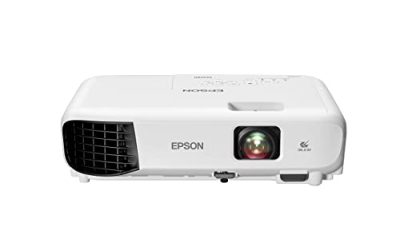
The Epson Pro EX7280 is a strong all-round choice for a small to medium conference room, pairing 4,000 lumens of color brightness and 4,000 lumens of white brightness with a WXGA resolution that suits widescreen laptops. Its 3LCD technology produces color and white brightness at the same level, which keeps colored charts, logos, and highlighted text looking vivid rather than washed out under office lighting. The 16,000:1 contrast ratio helps black text stay crisp against a white slide background.
Connectivity covers the essentials: HDMI, VGA, and USB, plus a built-in speaker for small rooms. The lamp is rated for up to 12,000 hours in eco mode, so a room that meets a few hours a day will go years before a lamp change. Setup is straightforward, with automatic keystone correction and a simple on-screen menu. At around 5.7 pounds, it is light enough to move between rooms, and it mounts easily on a ceiling or a shelf for a permanent install.
Who it is for: small and medium teams that want a bright, reliable projector for daily meetings without paying for features they will not use.
Caveats: WXGA resolution is not as sharp as Full HD for dense spreadsheets viewed from the back of a large room. It has no built-in wireless screen sharing, so add a wireless dongle or a streaming stick if presenters need to connect without a cable.
Epson Pro EX11000
View the Epson Pro EX11000 on Amazon
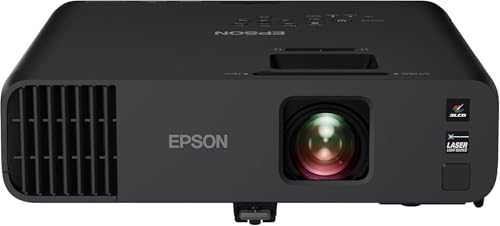
The Epson Pro EX11000 is the premium pick in this guide, built around a laser light source that delivers 4,600 lumens of brightness and a Full HD 1080p image. The laser is rated for up to 20,000 hours, which removes lamp replacements from the maintenance list for a room that runs meetings all day. The 3LCD engine keeps color brightness equal to white brightness, and the high contrast helps fine text and detailed diagrams stay legible even with the lights on.
Wireless connectivity is a highlight: Miracast is built in, so presenters can share a Windows laptop screen without a cable, and two HDMI ports let a room keep a video-conferencing system connected alongside a guest laptop. A USB port supplies power to a streaming stick, and the built-in 16-watt speaker is louder than most in this class, covering medium rooms without external audio. Manual zoom, focus, and lens shift give the installer room to align the image precisely.
Who it is for: busy meeting rooms, larger conference spaces, and teams that present all day and want a laser projector with wireless sharing and a long service life.
Caveats: at around 9.5 pounds it is heavier than the lamp-based models here, so it suits a fixed install more than frequent carrying between rooms. It is also the most expensive model in this guide, so confirm the room size and usage justify the step up before choosing it.
ViewSonic PA503W
View the ViewSonic PA503W on Amazon
The ViewSonic PA503W is a straightforward WXGA business projector with 4,000 lumens of brightness, aimed squarely at presentations in lit rooms. Its DLP engine and SuperColor technology keep slides bright and colors balanced, and the WXGA resolution matches the widescreen output of most modern laptops, so slides fill the screen without black bars or stretched images. A 10-watt built-in speaker handles audio for small groups, and the lamp is rated for up to 15,000 hours in SuperEco mode.
Ports include HDMI and VGA, plus a USB port and audio in and out, which covers both new laptops and older machines that still use VGA. Vertical keystone correction squares up the image when the projector sits above or below the center of the screen, and the 3D-ready capability is a bonus for rooms that occasionally show 3D content. The chassis is compact and light enough to carry from room to room in a bag.
Who it is for: offices and classrooms that need a bright, no-frills projector for slides and video in a lit room, with support for both HDMI and VGA laptops.
Caveats: WXGA resolution limits how sharp very small text looks at the back of a large room. The single HDMI input means a room with a permanent video system and frequent guest laptops will need an HDMI switch or a cable swap.
ViewSonic PA503HD
View the ViewSonic PA503HD on Amazon
The ViewSonic PA503HD steps up to Full HD 1080p resolution while keeping the 4,000-lumen brightness that lit conference rooms need. That combination makes it the best fit in this guide for rooms that regularly display spreadsheets, dashboards, and detailed diagrams, where small numbers and fine lines need to stay readable from every seat. The DLP engine delivers a 22,000:1 contrast ratio, and a 1.1x optical zoom lets the installer fine-tune the image size without moving the projector.
Connectivity includes HDMI and USB, and the projector supports 3D content for occasional use. The built-in speaker covers small meetings, and the lamp life is rated for long service in eco modes. The design is a standard business-projector chassis that mounts on a ceiling or sits on a table, and the remote control keeps the most-used functions within reach during a presentation.
Who it is for: teams that show detailed documents, financial models, or engineering drawings in meetings and need Full HD sharpness at a modest cost.
Caveats: the 1080p panel is a step up in sharpness but the brightness matches the WXGA models here, so very large rooms with strong daylight may still need light control. Confirm the exact input layout matches your room’s cabling before mounting, since the port selection is slimmer than on some business models.
Epson EX3280
View the Epson EX3280 on Amazon
The Epson EX3280 is the most budget-friendly pick in this guide, an XGA projector with 3,600 lumens of color and white brightness from its 3LCD engine. XGA resolution suits basic slide decks, training videos, and video calls in a small room, and the 15,000:1 contrast ratio keeps text readable. HDMI, VGA, and USB ports cover the common laptop connections, and the built-in speaker is adequate for a small group around a table.
Its compact size and light weight make it easy to carry between rooms or store in a cupboard between meetings, and the simple menu and automatic keystone correction mean anyone on the team can set it up without help. For a small office, a huddle room, or a team that only projects a few times a week, it covers the basics at the lowest cost in this guide.
Who it is for: small rooms, huddle spaces, and teams on a tight budget that mainly show simple slides and video.
Caveats: XGA resolution is the lowest here, so dense spreadsheets and small text will look softer than on the WXGA and Full HD models. Epson lists this model as discontinued on its own site, so confirm the listing is still active and the exact model is in stock before ordering; if it is no longer available, the EX7280 above is the closest current alternative.
Comparison Table
| Projector | Resolution | Brightness | Light Source | Wireless Sharing | Built-in Speaker |
|---|---|---|---|---|---|
| Epson Pro EX7280 | WXGA 1280 x 800 | 4,000 lumens | Lamp, up to 12,000 hours eco | No | Yes |
| Epson Pro EX11000 | Full HD 1920 x 1080 | 4,600 lumens | Laser, up to 20,000 hours | Miracast | 16W |
| ViewSonic PA503W | WXGA 1280 x 800 | 4,000 lumens | Lamp, up to 15,000 hours SuperEco | No | 10W |
| ViewSonic PA503HD | Full HD 1920 x 1080 | 4,000 lumens | Lamp | No | Yes |
| Epson EX3280 | XGA 1024 x 768 | 3,600 lumens | Lamp | No | Yes |
Which One Is Right for You?
For most small and medium conference rooms, the Epson Pro EX7280 is the safest starting point: bright enough for lit rooms, sharp enough for widescreen slides, and simple to set up and maintain. If your room runs meetings all day and you want to stop thinking about lamp replacements, the Epson Pro EX11000 is the upgrade, with its laser light source, wireless sharing, and louder speaker.
Rooms that show spreadsheets and detailed documents should lean toward the Full HD models. The ViewSonic PA503HD is the lower-cost way to get 1080p sharpness, while the EX11000 adds laser longevity and wireless connectivity on top of the same resolution. The ViewSonic PA503W is the right call when the room still has older VGA laptops in rotation alongside new HDMI machines, and the Epson EX3280 fits huddle rooms and occasional use where the budget is the deciding factor.
Measure your room before ordering: check the distance from the projector spot to the screen, count the seats that need a clear view, and note which ports your laptops use. A projector that matches the room on those three points will serve the team far better than a brighter model that does not fit the space.
Frequently Asked Questions
How many lumens does a conference room projector need?
For a small room with some light control, 3,600 lumens is a workable floor. For a medium room, or a room with large windows and the lights on during meetings, 4,000 lumens or more keeps slides readable. Larger rooms and spaces with strong daylight benefit from the 4,600 lumens of a model like the EX11000, plus blinds or light control on the brightest windows.
Is Full HD worth it for meeting slides?
It depends on what the room displays. For bullet-point slides and large charts, WXGA is fine and keeps costs down. For spreadsheets, dashboards, code, and detailed diagrams, Full HD makes small text noticeably sharper, especially for people sitting at the back of the room. If your team lives in spreadsheets, choose one of the 1080p models in this guide.
Can a projector replace a large TV in a conference room?
In many rooms, yes. A projector gives you a much larger image than a TV at a lower cost, and it works well when the room is used for presentations to a group. A TV can be the better choice in a very bright room with no light control, or a small huddle room where a 55-inch screen is already large enough. For groups of eight or more, a projector’s larger image usually wins.
Do conference room projectors need external speakers?
Not always. The built-in speakers in this guide cover small and medium rooms for video clips and remote participants. In a large room, or a room with acoustic treatment and ceiling speakers, connect the projector’s audio output to the room system, or add a dedicated conference speaker. Check the audio-out port on the projector before planning the room setup.
Disclosure: As an Amazon Associate, we may earn from qualifying purchases.
FAQ
Which One Is Right for You?
How many lumens does a conference room projector need?
Is Full HD worth it for meeting slides?
Can a projector replace a large TV in a conference room?
Do conference room projectors need external speakers?
More from Amazon
Programs that pair well with the guide above. Offers and eligibility are set by Amazon and may change.
Free shipping on eligible items, Prime Video and more. Eligible new members can start with a free trial.
Start a Prime free trialAd-free music streaming. Eligible new subscribers can start with a free trial.
Try Music Unlimited freeA Prime membership for ages 18-24 with a trial period. Eligibility is set by Amazon.
See Prime for Young AdultsAudiobooks and podcasts to listen to on the go. Eligible new members can start with a free trial.
Try Audible freeAs an Amazon Associate we earn from qualifying purchases.