Our Short List of 3

- Ports: 5x Gigabit Ethernet, up to 3 WAN, plus 1x USB WAN
- VPN: IPsec, OpenVPN, L2TP, PPTP
- Management: Omada SDN integrated, centralised cloud management with a compatible controller
- Firewall: SPI firewall with load balancing and failover

- Ports: 1x Gigabit SFP, 5x Gigabit RJ45, up to 4 WAN ports
- VPN: IPsec, OpenVPN, L2TP, PPTP, WireGuard, rated at 341.3 Mbps for WireGuard and 139.1 Mbps for OpenVPN
- Management: Omada SDN integrated, centralised cloud management with a compatible controller
- Firewall: SPI firewall with load balancing and failover
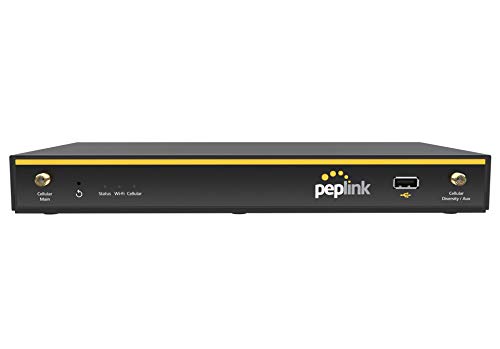
- Ports: 1x Gigabit Ethernet WAN, 4x Gigabit Ethernet LAN, embedded CAT-4 LTE modem, FlexModule Mini slot
- Throughput: 900 Mbps routing throughput
- VPN: site-to-site VPN and remote access VPN
- Management: web interface and cloud management, with 1 year of PrimeCare included
All 3 Picks at a Glance
| Product | Specs | Action |
|---|---|---|
| 1. TP-Link ER605 V2 — Best Commercial Router for a Small Office |
| Check price on Amazon |
| 3. TP-Link ER7206 — Best Commercial Router for a Larger Gigabit Office |
| Check price on Amazon |
| 5. Peplink Balance 20X — Best Commercial Router for Cellular Failover |
| Check price on Amazon |
Key takeaways
- Compare the best commercial routers for small businesses and offices, from multi-WAN VPN gateways to rack-mount network appliances, with specs on ports, VPN support and management.
A commercial router does a different job from the box a home internet plan ships with. It sits between a business and the internet, keeps the connection running when one line drops, separates staff traffic from guest traffic, and gives remote workers a secure way back into the office network. The hardware is built for continuous operation, the firmware is built for administration, and the feature list reads differently: multiple WAN ports, site-to-site VPN, VLAN segmentation, and central management across several sites.
This guide covers commercial and business-grade routers only. Every pick is a wired gateway or network appliance made for a small business, a branch office, or a growing office network. None is a consumer home router, and none includes built-in Wi-Fi, so each pairs with separate access points for wireless coverage. The router handles routing, firewalling, and VPN, while access points handle wireless, and either side can be replaced without touching the other.
The five picks span the range a small business is likely to need: a compact five-port gateway for a small office with two internet links, a rack-mount appliance with 10-gigabit fibre ports and a drive bay for camera recording, and between them a multi-gigabit gateway, a higher-capacity gigabit gateway with a fibre port, and a dual-WAN router with a built-in cellular modem for a site where the wired line cannot be trusted. All five are described from their published specifications.
How to Choose a Commercial Router
Start with the WAN ports
The WAN port is where the internet enters the building, and it is the first specification to check. A commercial router should have at least two WAN-capable ports, because a business that depends on its connection needs a second line to take over when the first one fails. That failover can be automatic: the router watches the primary link, and when it stops responding, traffic moves to the backup without anyone touching the hardware.
Check the speed of those ports against the internet plan. A gigabit WAN port caps a connection at one gigabit, no matter how fast the plan is. If the office has a multi-gigabit plan, the gateway needs a 2.5-gigabit or 10-gigabit WAN port, or a fibre SFP port with a suitable module, to use the full speed.
VPN support decides remote access
Remote access is the second deciding factor. Staff working from home, a second office, or a client site need a secure tunnel back to the office network, and the router is what provides it. The common protocols are IPsec, OpenVPN, L2TP, and WireGuard, and the right choice depends on what the remote devices already support. IPsec suits site-to-site tunnels between two offices. OpenVPN and WireGuard suit individual remote workers connecting from laptops and phones.
Throughput matters here more than the headline routing speed. VPN encryption costs processing power, so a router that moves a gigabit of plain traffic may move far less through an encrypted tunnel. Match the published VPN throughput figures in this guide to the number of remote workers and the work they do over the tunnel: file access and internal applications need far less than video editing over a remote share, but a tunnel that is too slow will be felt by everyone on it.
VLANs and segmentation
A commercial network is rarely one flat network. Staff devices, guest Wi-Fi, payment terminals, printers, and cameras each belong on their own segment, so a problem in one segment cannot reach the others. VLAN support is what makes that possible: the router defines the segments, sets the rules for traffic between them, and gives each segment its own address range and access policy. Every pick in this guide supports VLANs, but the number of VLANs and the ease of configuring inter-VLAN rules vary, so confirm the limit against the size of the planned network before ordering.
Central management saves time across sites
A single office can be managed through a web interface on the router itself. Two or more sites, or a network with a router, switches, and access points from the same maker, benefit from a central controller. TP-Link’s Omada platform and Ubiquiti’s UniFi OS both manage the gateway alongside switches and access points from one dashboard, which means one place to push firmware, view connected clients, and change settings across every site. Some controllers are hardware appliances, some are software, and some are cloud services, and the requirements differ by model, so check which controller a given gateway needs before assuming the app on a phone will manage it alone.
Form factor and placement
Commercial routers come in two shapes: desktop boxes and rack-mount units. A desktop gateway sits on a shelf or a desk and suits a small office with a modem, a switch, and a few access points. A rack-mount unit bolts into a standard rack alongside switches and servers, and it suits an office that already has a rack or plans to build one. Rack-mount models often add fibre ports or a drive bay, but they also need rack space, airflow, and a power feed inside the rack. Measure the rack before ordering a 1U appliance, and confirm the depth as well as the width.
What is not in this guide
None of the picks below has built-in Wi-Fi, and that is normal for this class. Wireless coverage comes from access points connected to the router, which gives better placement options and lets the wireless side grow independently. None of them is a modem either: the internet connection still needs a modem or an optical network terminal from the provider, connected to the WAN port.
1. TP-Link ER605 V2 — Best Commercial Router for a Small Office
- Ports: 5x Gigabit Ethernet, up to 3 WAN, plus 1x USB WAN
- VPN: IPsec, OpenVPN, L2TP, PPTP
- Management: Omada SDN integrated, centralised cloud management with a compatible controller
- Firewall: SPI firewall with load balancing and failover
The TP-Link ER605 V2 is the entry point into commercial routing in this guide, and it suits a small office that wants two internet links and a managed network without rack hardware. Its five Gigabit ports include up to three WAN Ethernet ports plus a USB WAN port, so a second connection can take over automatically if the first fails, and load balancing spreads traffic across both links. The SPI firewall and Omada SDN integration let the router join a centrally managed network with compatible switches and access points, which suits an office that is growing into a proper managed setup.
The ER605 V2 has no Wi-Fi of its own and needs separate access points, which keeps the wireless side independent of the router. VPN support covers the standard protocols for remote workers and branch offices, and the Omada controller manages the gateway alongside the rest of the network. The metal case and fanless design suit a shelf or a small cabinet, and the five-year manufacturer warranty matches the longer service life a business expects from network hardware.
Choose the ER605 V2 when the office has a gigabit internet plan, when two WAN links are enough, and when the network will stay at a modest size. It is the pick for a small office, a clinic, a retail back office, or a home office that has outgrown a consumer gateway. Check the hardware version on the unit label before assigning port roles, because the port map differs between hardware revisions.
2. TP-Link ER707-M2 — Best Commercial Router for a Multi-Gigabit Connection
The TP-Link ER707-M2 is the pick when the internet plan is faster than gigabit and the gateway must keep up. It has one fixed 2.5-gigabit WAN port, one 2.5-gigabit WAN/LAN port, one Gigabit SFP WAN/LAN port, four Gigabit RJ45 WAN/LAN ports, and one USB 2.0 port that supports USB storage and LTE backup with a compatible dongle. That port set covers a multi-gigabit primary link, a second WAN link for failover, and a fibre uplink, all in a desktop box.
The published performance figures show where the extra speed goes. WireGuard VPN throughput is rated at 343 Mbps, deep packet inspection throughput at 1,823 Mbps over TCP, and the device supports 500,000 concurrent sessions, so a busy office with many connected devices will not run out of session capacity. The hardware underneath is 1 GB of DDR4 memory with 128 MB of flash, and the unit measures 8.9 by 5.2 by 1.4 inches, so it fits on a shelf beside a modem and a switch.
Management follows the Omada pattern: a web interface for standalone use, and Omada App and cloud access through a compatible controller such as the OC200, OC300, or the Omada Software Controller. VPN support covers IPsec, OpenVPN, L2TP, PPTP, and WireGuard, which covers both site-to-site tunnels and remote workers. Like the ER605, it has no built-in Wi-Fi, so access points handle wireless coverage separately.
Choose the ER707-M2 when the office has a 2.5-gigabit internet plan, when the WAN side needs a fibre SFP path, or when VPN throughput matters more than it does on a gigabit-only gateway. It is the step up from the ER605 for a business whose connection has already outgrown gigabit.
- Ports: 1x 2.5G WAN, 1x 2.5G WAN/LAN, 1x Gigabit SFP WAN/LAN, 4x Gigabit RJ45 WAN/LAN, 1x USB 2.0
- VPN: IPsec, OpenVPN, L2TP, PPTP, WireGuard, rated at 343 Mbps for WireGuard
- Management: Omada SDN, web interface plus Omada App and cloud access with a compatible controller
- Firewall: SPI firewall with load balancing and failover
- Model number: ER707-M2
- ASIN: B0C238XMVV — https://www.amazon.com/dp/B0C238XMVV
3. TP-Link ER7206 — Best Commercial Router for a Larger Gigabit Office
- Ports: 1x Gigabit SFP, 5x Gigabit RJ45, up to 4 WAN ports
- VPN: IPsec, OpenVPN, L2TP, PPTP, WireGuard, rated at 341.3 Mbps for WireGuard and 139.1 Mbps for OpenVPN
- Management: Omada SDN integrated, centralised cloud management with a compatible controller
- Firewall: SPI firewall with load balancing and failover
The TP-Link ER7206 is the higher-capacity gigabit gateway in the Omada range, and it suits an office that needs more WAN flexibility than the ER605 without moving to multi-gigabit ports. It has one Gigabit SFP port and five Gigabit RJ45 ports, with up to four WAN ports available, so the office can run a primary link, a backup link, and still have room for a third connection or a dedicated fibre uplink. The SPI firewall, load balancing, and Omada SDN integration carry over from the smaller models, and the five-year manufacturer warranty matches the rest of the Omada business range.
The ER7206 is built for a larger network than the ER605. Its VPN throughput is higher, with the maker rating WireGuard at 341.3 Mbps and OpenVPN at 139.1 Mbps, so more remote workers can use the tunnel at once without the gateway becoming the limit. The extra ports also matter for segmentation: with more WAN and LAN ports to assign, the router can feed separate switches or separate network segments without adding hardware. Rack-mount brackets are included in the box, so the unit can go into a rack or sit on a shelf depending on the office.
Management is through the Omada platform, with a web interface for standalone setup and centralised management through a hardware or software controller. That makes the ER7206 a natural fit for an office that already runs Omada switches and access points, since the whole network can be managed from one place.
Choose the ER7206 when the office has a gigabit plan but needs more WAN ports, more VPN capacity, or more room to grow than the ER605 provides. It is the pick for a mid-size office, a branch site with several WAN links, or a business that wants the Omada platform with headroom to spare.
4. Ubiquiti UniFi Dream Machine Pro — Best Commercial Router for a Rack and Cameras
The Ubiquiti UniFi Dream Machine Pro, model UDM-Pro, is a 1U rack-mount network appliance that combines a wired router, an 8-port Gigabit switch, and the UniFi Network controller in one chassis. It has a Gigabit WAN port, a 10-gigabit SFP+ WAN port, a 10-gigabit SFP+ LAN port, and eight Gigabit LAN ports, so it can take a multi-gigabit fibre connection and hand it to the local network without a separate switch for a small rack. Ubiquiti rates routing throughput at 10 Gbps and intrusion detection and prevention throughput at 3.5 Gbps.
The UDM-Pro is more than a router. It runs UniFi OS and hosts the UniFi Network controller, so it manages UniFi switches and access points directly, and it hosts UniFi Protect for camera recording. A 3.5-inch drive bay in the chassis takes a hard drive for those recordings, which keeps camera storage on hardware the business owns. The processor is a quad-core 1.7 GHz ARM chip with 4 GB of DDR4 memory and 16 GB of eMMC storage.
Two limits to plan around: the UDM-Pro has no Wi-Fi and no PoE on its ports, so wireless coverage needs separate access points and powered devices need a PoE switch or injectors, and it needs a rack with airflow rather than a desk. Confirm the model number on the listing before ordering, because the Dream Machine range includes several similar models.
Choose the UDM-Pro when the office has a rack, when the network is built on UniFi switches and access points, or when camera recording should live on the same appliance as the router. It is the pick for a business that wants one box to run the network and the cameras.
- Ports: 1x Gigabit WAN, 1x 10G SFP+ WAN, 1x 10G SFP+ LAN, 8x Gigabit LAN
- Throughput: 10 Gbps routing, 3.5 Gbps with intrusion detection and prevention enabled
- Storage: 3.5-inch drive bay for UniFi Protect camera recordings
- Management: UniFi OS with built-in UniFi Network controller
- Model number: UDM-Pro
- ASIN: B086967C9X — https://www.amazon.com/dp/B086967C9X
5. Peplink Balance 20X — Best Commercial Router for Cellular Failover
- Ports: 1x Gigabit Ethernet WAN, 4x Gigabit Ethernet LAN, embedded CAT-4 LTE modem, FlexModule Mini slot
- Throughput: 900 Mbps routing throughput
- VPN: site-to-site VPN and remote access VPN
- Management: web interface and cloud management, with 1 year of PrimeCare included
The Peplink Balance 20X is the pick for a site where the wired internet line cannot be trusted to stay up. It is a dual-WAN gigabit router with an embedded cellular modem, so when the primary wired connection drops, the cellular link takes over and the office stays online. The modem is a CAT-4 LTE unit in the standard configuration, and the FlexModule Mini slot accepts an upgrade module for a faster cellular connection later, which means the router can grow with the site instead of being replaced.
Choose the Balance 20X when the business cannot afford an internet outage: a retail site that takes card payments, a clinic, a remote office on a single wired line, or any location where the wired connection has failed before. The cellular modem is the feature that sets it apart from every other pick in this guide.
Management is through the Peplink web interface and the cloud management service, which suits a business with several sites that need the same failover behaviour. The router supports site-to-site VPN and remote access VPN, so a branch office can hold a tunnel back to headquarters over whichever WAN link is currently active. It has no built-in Wi-Fi, so access points handle wireless coverage, and it is a desktop unit rather than a rack-mount one.
Which Commercial Router Fits Your Office
The right pick depends on the connection, the size of the office, and what happens when the internet drops. A small office with a gigabit plan and two WAN links should start with the TP-Link ER605 V2, which covers failover, VPN, and Omada management in a compact box. An office whose plan is faster than gigabit should step up to the TP-Link ER707-M2, whose 2.5-gigabit ports and SFP slot match the faster connection. An office that needs more WAN ports and more VPN capacity on a gigabit plan should look at the TP-Link ER7206.
An office with a rack and a UniFi network should look at the Ubiquiti UniFi Dream Machine Pro, which combines the gateway, a switch, the network controller, and camera recording in one 1U chassis. An office that cannot afford downtime should look at the Peplink Balance 20X, whose built-in cellular modem keeps the network online when the wired line fails. Measure the internet plan, count the WAN links, count the remote workers, and then match the pick to those numbers.
Before ordering, confirm the model number, the hardware version where it affects the port map, and the condition stated on the listing, since commercial routers often appear under several listings for the same model. Confirm that the listing matches the model in this guide, and that any included subscription or warranty term is the one expected.
Disclosure: As an Amazon Associate, we earn from qualifying purchases.
More from Amazon
Programs that pair well with the guide above. Offers and eligibility are set by Amazon and may change.
Free shipping on eligible items, Prime Video and more. Eligible new members can start with a free trial.
Start a Prime free trialAd-free music streaming. Eligible new subscribers can start with a free trial.
Try Music Unlimited freeA Prime membership for ages 18-24 with a trial period. Eligibility is set by Amazon.
See Prime for Young AdultsAudiobooks and podcasts to listen to on the go. Eligible new members can start with a free trial.
Try Audible freeAs an Amazon Associate we earn from qualifying purchases.