Our Short List of 3
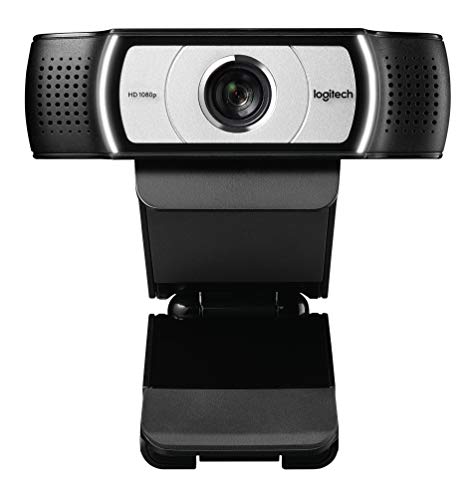
- Best for: Certified Skype for Business calls at a desk or small table.
- 1080p video at 30 frames per second
- 90-degree angle of view
- Pan, tilt, and 4x digital zoom
- Carl Zeiss glass lens

- Best for: Everyday desk meetings across a whole office.
- 1080p video at 30 frames per second
- 78-degree angle of view
- Autofocus with a glass lens
- Dual stereo microphones

- Best for: Staff who present and move during meetings.
- 1080p video at 30 frames per second
- 90-degree angle of view
- Auto-framing keeps the presenter centered
- Dual microphones with noise reduction
All 4 Picks at a Glance
| Product | Specs | Action |
|---|---|---|
| Logitech C930e |
| Check price on Amazon |
| Logitech C920s HD Pro |
| Check price on Amazon |
| Logitech Brio 500 |
| Check price on Amazon |
 Logitech MeetUp |
| Check price on Amazon |
Key takeaways
- Compare the best webcams for skype for business, from certified Logitech models to a 4K huddle-room system, and pick the right camera for your meetings.
Business meetings punish weak webcams. A camera that looks fine on a personal call can fall apart in a conference room, where the lighting is harsh, the participants sit far from the lens, and the audio has to cross a table. Skype for Business adds its own demands: certified compatibility, reliable drivers, and microphones that keep voices intelligible through long calls. The cameras in this guide are built for that environment.
This guide compares four webcams that work with Skype for Business, from a certified desktop camera to a 4K huddle-room system. Every camera below was selected from the name and specifications shown on its Amazon page. The right camera depends on whether you meet at a desk, around a small table, or in a room full of colleagues.
Quick Picks
As an Amazon Associate we earn from qualifying purchases
| Product | Best for | Key spec from title |
|---|---|---|
| Logitech C930e | Certified business calls | 1080p, 90-degree view, Skype certified |
| Logitech C920s HD Pro | Everyday desk meetings | 1080p, 78-degree view |
| Logitech Brio 500 | Presenters on camera | 1080p, auto-framing |
| Logitech MeetUp | Small meeting rooms | 4K, 120-degree view |
How to Choose
Certification Removes the Guesswork
A webcam certified for Skype for Business has passed compatibility checks with the platform, so it connects, focuses, and handles audio without driver wrestling. Look for the certification in the listing rather than assuming any 1080p camera will do, since uncertified models can produce echo, fail to switch microphones, or drop frames during long calls. Certification also matters for IT teams, who can deploy a known model across an office without testing every desk. Certified cameras also behave the same way on every computer, which matters when a company deploys dozens of them. When the listing names the certification, the camera is a safer business purchase.
Angle of View Should Match the Room
A desk camera only needs to frame one person, so a 78-degree angle is plenty. A meeting room camera has to cover a table full of colleagues, so a 90-degree or wider angle becomes essential, and a motorized pan-and-tilt model can sweep the whole room. Choose the angle for the room you actually meet in, not the room you wish you had. A camera that is too narrow crops people out of the frame, while one that is too wide makes everyone look small, so match the angle to the seating layout. For a boardroom, a camera with motorized pan and tilt covers the whole table without moving the mount.
Microphones Must Reach Across the Table
A single microphone works at a desk, but a meeting room needs more. Beamforming microphones pick up voices from several meters away and focus on the person speaking, while noise reduction cuts the hum of air conditioning and projectors. Check the listing for the microphone count and the pickup range, and test the audio from the far end of the table before the first important call. If remote participants keep asking speakers to repeat themselves, the microphones are the problem, not the network. Ask remote participants how the audio sounds during a test call, since the far end hears problems the room never notices.
Plan for IT Deployment and Privacy
Business cameras live on managed computers, so driver-free plug-and-play setup saves the IT team hours. A camera that works over standard USB without extra software deploys in minutes, while one that needs a companion app creates support tickets. Privacy matters too: a built-in shutter or lens cover lets staff block the camera between meetings, which is essential in shared offices and hot-desking setups. Check both the connection type and the privacy features before ordering a fleet of cameras. Keep a spare camera in the office, since a failed camera on the morning of an important call is a problem no one wants.
The 4 Best Options
Logitech C930e
- Best for: Certified Skype for Business calls at a desk or small table.
- 1080p video at 30 frames per second
- 90-degree angle of view
- Pan, tilt, and 4x digital zoom
- Carl Zeiss glass lens
Certified Skype for Business calls at a desk or small table.
The USB 2.0 connection is older, so confirm the office computers still have a free USB-A port.
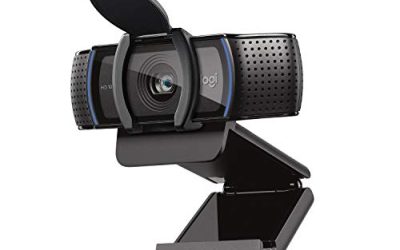
The Logitech C930e is the classic business webcam, and it remains the reference point for Skype for Business setups. It records in 1080p at 30 frames per second through a Carl Zeiss glass lens, and its 90-degree angle of view covers a presenter and a whiteboard without distortion. Pan, tilt, and 4x digital zoom let remote participants focus on the speaker or the board, and the dual microphones keep voices clear across a small meeting table. The listing states Microsoft Lync 2013 and Skype certification, which is exactly the assurance an IT buyer wants. It has served offices for years, and its drivers are stable on managed machines.
Watch out for: The USB 2.0 connection is older, so confirm the office computers still have a free USB-A port.
Logitech C920s HD Pro
- Best for: Everyday desk meetings across a whole office.
- 1080p video at 30 frames per second
- 78-degree angle of view
- Autofocus with a glass lens
- Dual stereo microphones
Everyday desk meetings across a whole office.
The 78-degree angle suits one person, not a meeting table, so do not use it as a room camera.
The Logitech C920s is the everyday workhorse for desk meetings, and its long track record is the reason it appears in so many offices. It captures 1080p video at 30 frames per second with autofocus that keeps the speaker sharp, and its dual stereo microphones handle normal desk distances without fuss. The 78-degree angle of view frames one person neatly, and the privacy shutter slides closed between calls. It connects over USB-A and works with Skype for Business and every other major meeting app, which makes it the safe default when a company needs to equip many desks.
Watch out for: The 78-degree angle suits one person, not a meeting table, so do not use it as a room camera.
Logitech Brio 500
- Best for: Staff who present and move during meetings.
- 1080p video at 30 frames per second
- 90-degree angle of view
- Auto-framing keeps the presenter centered
- Dual microphones with noise reduction
Staff who present and move during meetings.
Older office desktops may need a USB-C adapter, which is not included in the box.
The Logitech Brio 500 suits staff who present on camera and move while they talk. Its 90-degree angle of view covers more of the room than the C920s, and the auto-framing feature keeps the presenter centered as they step between the desk and the whiteboard. Dual microphones with noise reduction cut office hum, and the privacy shutter rotates closed with a twist when the meeting ends. It records in 1080p at 30 frames per second and connects over USB-C, which suits the newer laptops most companies now issue.
Watch out for: Older office desktops may need a USB-C adapter, which is not included in the box.
Logitech MeetUp
- Best for: Small meeting rooms and huddle rooms.
- Ultra HD 4K sensor
- 120-degree angle of view, motorized pan and tilt to 170 degrees
- Three beamforming microphones, pickup up to 4 meters
- 5x zoom
Small meeting rooms and huddle rooms.
The expansion microphone is sold separately, and larger rooms may need it for the far end of the table.
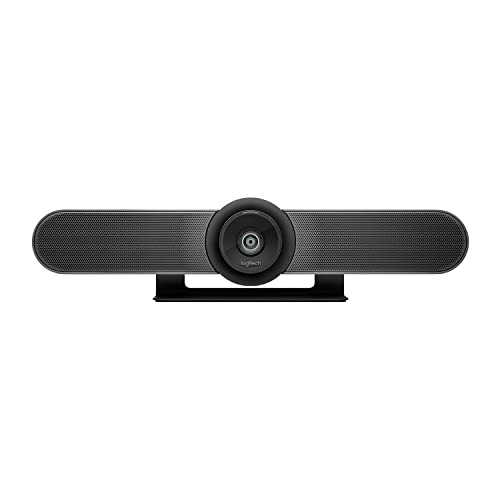
The Logitech MeetUp is the only camera in this guide built for a whole meeting room rather than a single desk. Its Ultra HD 4K sensor and 120-degree angle of view capture everyone around a small table, and the motorized pan and tilt extend the coverage to 170 degrees for whiteboard sessions. Three beamforming microphones pick up voices from up to four meters away, and the 5x zoom lets remote participants focus on the speaker. It connects over USB as a plug-and-play device, so it works with Skype for Business without extra software. Mount it below the display for a natural eye-level view.
Watch out for: The expansion microphone is sold separately, and larger rooms may need it for the far end of the table.
Which One Fits Your Situation
Desk Meetings, One Person
The Logitech C920s fits a desk meeting. It frames one person cleanly, its microphones handle normal desk distances, and the privacy shutter gives a quick way to block the lens between calls. Deploy the same model on every desk and the IT team only has to learn one camera.
Certified Calls With Clients
The Logitech C930e is the right choice when certification matters. Its Skype certification and 90-degree angle suit client calls where the camera must simply work, and the pan, tilt, and zoom let the presenter show a whiteboard or a product sample without moving the camera. Keep one in the meeting room for important calls.
Presenters Who Move
The Logitech Brio 500 suits presenters who walk while they talk. Auto-framing keeps them centered as they move, and the 90-degree angle covers the desk and the board in one frame. It is the best pick for training sessions and internal presentations. The USB-C connection suits newer laptops, and the privacy shutter closes with a twist when the session ends.
Small Meeting Room, Whole Table
The Logitech MeetUp owns the small meeting room. Its 120-degree angle and beamforming microphones cover a whole table, and the motorized pan and tilt let remote participants look around the room. Mount it under the display and it becomes the room’s permanent camera. Add the expansion microphone if the table seats more than six, so voices at the far end stay clear.
Common Mistakes
- Buying an uncertified webcam for business calls and fighting driver problems every week.
- Using a desk camera to cover a meeting table and cropping half the participants out.
- Forgetting the privacy shutter in a shared office, where a live camera is a real concern.
- Ignoring microphone range and leaving remote participants asking for repeats.
- Ordering a USB-C camera for desktops that only have USB-A ports.
Frequently Asked Questions
What does Skype for Business certification actually mean?
Certification means the manufacturer tested the webcam against Skype for Business for video quality, audio handling, and driver stability. A certified camera connects and works without extra configuration, while an uncertified model may produce echo, drop frames, or fail to switch microphones during a call. Look for the certification badge on the listing before you buy.
Can I use a normal consumer webcam for business meetings?
You can, and many offices do, but business-certified models remove risk. A consumer camera may work perfectly on one computer and misbehave on another, while a certified model behaves the same way everywhere. For a single desk the difference is small, but for a whole office it matters. Across a whole office, certification saves hours of support time.
How many people can one webcam cover in a meeting room?
A 78-degree camera covers one person at a desk, a 90-degree camera covers two or three people around a small table, and a 120-degree camera with pan and tilt covers a whole huddle room. Count the seats, not the room size, and choose the angle that frames every seat. Test the camera in the room before ordering more.
Do I need a separate microphone for Skype for Business calls?
Not for desk calls, where dual microphones in the camera are enough. For a meeting room, the camera’s beamforming microphones usually suffice up to four meters, and an expansion microphone helps only when the table is longer than that or the room is very noisy. Most huddle rooms manage without one.
FAQ
What does Skype for Business certification actually mean?
Can I use a normal consumer webcam for business meetings?
How many people can one webcam cover in a meeting room?
Do I need a separate microphone for Skype for Business calls?
More from Amazon
Programs that pair well with the guide above. Offers and eligibility are set by Amazon and may change.
Free shipping on eligible items, Prime Video and more. Eligible new members can start with a free trial.
Start a Prime free trialAd-free music streaming. Eligible new subscribers can start with a free trial.
Try Music Unlimited freeA Prime membership for ages 18-24 with a trial period. Eligibility is set by Amazon.
See Prime for Young AdultsAudiobooks and podcasts to listen to on the go. Eligible new members can start with a free trial.
Try Audible freeAs an Amazon Associate we earn from qualifying purchases.