Key takeaways
- Hook a DisplayPort gaming PC up to an HDMI monitor with the right adapter. We compare 8K, active 4K, and passive DP to HDMI adapters for every setup.
Most gaming graphics cards ship with DisplayPort outputs, while plenty of good monitors, televisions, and projectors still take HDMI only. A DisplayPort to HDMI adapter bridges that gap, letting a DisplayPort-equipped desktop or laptop drive an HDMI display without swapping hardware. The catch is that not every adapter handles the same resolution and refresh, and every adapter in this guide works in one direction only: DisplayPort source to HDMI display, never the reverse.

This guide covers five adapters spanning the whole class, from a compact passive dongle for a second 1080p screen to active 8K adapters built for high-refresh gaming monitors. Each pick has its own job, and the How to Choose section explains the active-versus-passive split, each design’s resolution ceiling, and the limits around variable refresh and HDR.
Disclosure: As an Amazon Associate, we earn from qualifying purchases made through links in this article, at no extra cost to you.
Quick Picks
| Product | Best for | ASIN |
|---|---|---|
| UGREEN 8K DisplayPort to HDMI Adapter (Model 85996) | High-refresh 8K and 4K gaming monitors | B0FQCGSWW3 |
| Cable Matters 8K DisplayPort to HDMI Adapter (Model 102101) | A second 8K adapter with a roomier housing | B08XFSLWQF |
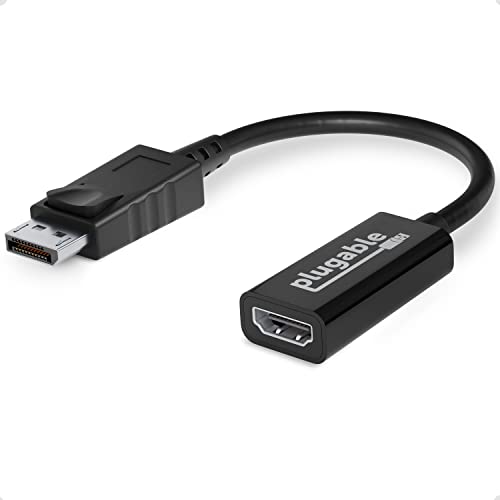
| Plugable Active DisplayPort to HDMI Adapter (Model DP-HDMI) | A long-running active 4K adapter | B00S0C7QO8 |
| Cable Matters Active DisplayPort to HDMI Adapter (Model 102021) | Multi-monitor Eyefinity setups | B00EDT0072 |
| BENFEI 4K DisplayPort to HDMI Adapter (Passive) | Simple passive hookups from DP++ ports | B017Q8ZVWK |
How to Choose
Direction comes first. Every adapter here converts DisplayPort to HDMI in one direction only; none carries a signal from an HDMI source to a DisplayPort monitor. Check the listing for the word unidirectional and confirm that DisplayPort is named as the input and HDMI as the output before you order.
Active versus passive is the second decision. A passive adapter relies on the graphics card’s Dual-Mode DisplayPort (DP++) output to produce an HDMI signal, so it works only when the source port supports DP++. An active adapter carries its own conversion chip, so it works from any full-size DisplayPort output and is the right call for multi-monitor setups.
Resolution and refresh come next, and the listing’s headline figure is only half the story. A passive adapter in this class tops out at 4K at 30Hz, fine for a secondary screen or a television but too slow for a fast gaming monitor. An active 4K adapter reaches 4K at 60Hz on standard dynamic range displays, while the 8K adapters here reach 4K at 240Hz and 8K at 60Hz when the graphics card and the monitor both support those modes.
Variable refresh and HDR deserve a careful look. One 8K adapter in this guide supports variable refresh while the other states openly that it does not, and the older active adapters handle HDR only at reduced refresh or not at all. If your monitor leans on variable refresh for smooth play, pick an adapter whose listing names that support.
Form factor matters more than it looks. A rigid dongle plugs straight into the graphics card and holds the HDMI cable close to the case, which keeps the desk tidy but puts leverage on the port. A short pigtail adapter with a flexible lead relieves that strain and lets the HDMI socket rest on the desk, which suits tight monitor arms and cramped cases. Audio passes through DisplayPort, so all five picks carry sound to monitors with built-in speakers.
UGREEN 8K DisplayPort to HDMI Adapter (Model 85996)
Specs
- 8K at 60Hz, 4K at 240Hz, 2K at 240Hz, and 1080p at 480Hz
- DisplayPort 1.4 input to HDMI 2.1 output, unidirectional
- 32.4 Gbps bandwidth with DSC 1.2a compression
- Aluminum housing with tinned copper conductors
- Variable refresh support and HDCP 2.2
- 24-bit/192kHz audio sampling
- Model 85996, first available November 24, 2025
The UGREEN 8K adapter is the high-refresh pick in this guide. Its active chip turns a DisplayPort 1.4 signal into HDMI 2.1, reaching 8K at 60Hz and 4K at 240Hz when the graphics card and the monitor both support those modes. The 32.4 Gbps pipeline, DSC 1.2a compression, and variable refresh support separate it from the 4K adapters below.
The listing is explicit about direction: this adapter converts DisplayPort to HDMI only and will not work from an HDMI source such as a console or a docking station. It also advises connecting the source to the display directly rather than through a dock, since a hub in the middle can make the picture unstable. One note: the crawled copy showed no featured offers alongside heavy recent buying, a pattern seen across many adapter listings, so glance at the live listing before ordering.
Best for: high-refresh 8K and 4K gaming monitors
Cable Matters 8K DisplayPort to HDMI Adapter (Model 102101)
Specs
- 8K at 60Hz and 4K at 240Hz with HDR
- DisplayPort 1.4 input to HDMI 2.1 output, unidirectional
- Model 102101-BLK, UPC 818707029954
- 4.17 x 2.76 x 0.59 inches
- 3-amp current figure and 720-watt nominal power figure
- Supports RTX 4080 and RX 7900 graphics cards
- No variable refresh support
The Cable Matters 8K adapter is the second 8K pick in this guide, and it earns its place on its own merits rather than as a duplicate. It shares the same headline figures as the UGREEN — 8K at 60Hz and 4K at 240Hz with HDR — but it arrives in a larger housing and its listing is frank about a limit the UGREEN does not share: this adapter does not support variable refresh. A monitor that leans on variable refresh belongs with the UGREEN; a fixed-refresh screen is well served here.
The listing names RTX 4080 and RX 7900 graphics cards among the supported hardware, and it states plainly that the adapter does not work with a PS5 or Xbox. The adapter is unidirectional, converting a DisplayPort port on a gaming PC or multimedia system to an HDMI connector for a television or monitor. As with the UGREEN, the crawled copy showed no featured offers alongside heavy recent buying, so glance at the live listing before ordering.
Best for: a second 8K adapter with a roomier housing
Plugable Active DisplayPort to HDMI Adapter (Model DP-HDMI)
Specs
- 4K at 60Hz on standard dynamic range displays
- 4K at 30Hz on HDR-capable displays
- DisplayPort 1.2 to HDMI 2.0 conversion, active
- Model DP-HDMI, first available February 3, 2015
- Driverless and unidirectional
- Works from full-size DisplayPort on laptops, desktops, tablets, and docks
- Not compatible with the HDR specification
The Plugable adapter is the long-running active 4K pick in this guide. Its active chip converts a DisplayPort 1.2 output to HDMI 2.0, delivering 4K at 60Hz on standard dynamic range displays. The listing is unusually honest about its limits: the adapter is designed for SDR displays, it is not compatible with the HDR specification, and refresh drops to 30Hz on 4K HDR televisions. That tells you exactly where this adapter belongs: a 4K SDR monitor, television, or projector.
The adapter is driverless and unidirectional, and it works from any full-size DisplayPort output, including laptops, desktops, tablets, and DisplayPort docking stations. An HDMI cable is not included, so one is needed to complete the hookup. The crawled copy is the oldest in the guide at around 329 days, so a stock glance at the live listing is prudent before ordering.
Best for: a long-running active 4K adapter
Cable Matters Active DisplayPort to HDMI Adapter (Model 102021)

Specs
- 4K at 60Hz video and audio streaming
- Active DisplayPort to HDMI conversion
- Model 102021
- Supports AMD Eyefinity multi-display technology
- Connects a DisplayPort computer to a UHD television or 4K monitor
- Portable adapter, HDMI cable sold separately
The Cable Matters Active adapter is the multi-monitor pick in this guide. Its headline figure matches the Plugable — 4K at 60Hz — but its listing leads with a feature the Plugable does not name: support for AMD Eyefinity multi-display technology. That makes it the pick for a desk where one graphics card drives several HDMI displays from its DisplayPort outputs, with one adapter per monitor.
The adapter connects a laptop or desktop equipped with DisplayPort to a UHD television for ultra-high-definition video and audio streaming, or to a 4K monitor or a projector for a presentation. It is a portable dongle, and an HDMI cable is sold separately. The listing’s comparison chart shows the maker’s other DisplayPort to HDMI products alongside it. The crawled copy is around 216 days old, so a stock glance at the live listing is prudent before ordering.
Best for: multi-monitor Eyefinity setups
BENFEI 4K DisplayPort to HDMI Adapter (Passive)

Specs
- 4K at 30Hz and 1080p at 60Hz
- DisplayPort 1.2 to HDMI 1.4 conversion, passive
- Gold-plated DisplayPort connector with latching design
- Built-in IC chip for signal conversion
- 0.96 ounces, first available July 31, 2015
- 18-month warranty
- Unidirectional, DisplayPort computer to HDMI display only
The BENFEI adapter is the simple passive pick in this guide, and its limits are the point. It converts DisplayPort to HDMI at up to 4K at 30Hz or 1080p at 60Hz, which suits a secondary monitor, a television, or a projector where 60Hz at 4K is not needed. As a passive adapter it relies on a Dual-Mode DisplayPort (DP++) source, so confirm that your graphics card’s port supports DP++ before ordering.
What it lacks in speed it makes up for in build and convenience. The gold-plated DisplayPort connector resists corrosion, the latching design holds the adapter firmly in the port until the release button is pressed, and the compact body tucks into a pocket for presentations. The listing backs it with an 18-month warranty. One caution: the listing’s comparison chart mixes in figures from sibling models, so follow the description’s own 4K at 30Hz figure. The crawled copy showed no featured offers alongside heavy recent buying, so glance at the live listing before ordering.
Best for: simple passive hookups from DP++ ports
FAQ
Does a DisplayPort to HDMI adapter work in reverse?
No. Every adapter in this guide converts DisplayPort to HDMI in one direction only. A signal from an HDMI source, such as a console or a media player, will not pass through these adapters to a DisplayPort monitor. The reverse direction needs a different product built for HDMI input and DisplayPort output.
Do I need an active or a passive adapter?
It depends on your graphics card’s DisplayPort output. A passive adapter needs a Dual-Mode DisplayPort (DP++) port, which many desktop graphics cards provide, and it tops out at 4K at 30Hz in this class. An active adapter carries its own conversion chip, works from any full-size DisplayPort output, and reaches 4K at 60Hz or higher. Pick active when DP++ support is unconfirmed, when you drive several displays at once, or when you need 4K at 60Hz.
Will the adapter carry audio to my monitor?
Yes. DisplayPort carries audio alongside video, and all five adapters in this guide pass audio through to the HDMI display. That covers monitors with built-in speakers, televisions, and projectors. If sound does not appear, check the computer’s sound output setting.
Can I get 144Hz or 240Hz through a DisplayPort to HDMI adapter?
It depends on the adapter, the graphics card, and the monitor together. The two 8K adapters in this guide support 4K at 240Hz when every link in the chain supports it, while the active 4K adapters top out at 4K at 60Hz and the passive BENFEI tops out at 4K at 30Hz. Confirm both the refresh ceiling and the variable refresh behavior in the listing before ordering.
Conclusion
A DisplayPort to HDMI adapter is a small purchase that solves a common mismatch between gaming graphics cards and HDMI displays, but the right pick depends on direction, active versus passive conversion, and the resolution and refresh your monitor actually runs. The UGREEN 8K adapter leads for high-refresh 8K and 4K gaming monitors, the Cable Matters 8K adapter covers the same ceiling without variable refresh, the Plugable and Cable Matters active adapters serve 4K at 60Hz with the latter aimed at multi-monitor Eyefinity desks, and the BENFEI passive adapter handles simple hookups from DP++ ports. Match the adapter to your monitor’s native resolution and refresh and confirm the direction in the listing.
FAQ
Does a DisplayPort to HDMI adapter work in reverse?
Do I need an active or a passive adapter?
Will the adapter carry audio to my monitor?
Can I get 144Hz or 240Hz through a DisplayPort to HDMI adapter?
More from Amazon
Programs that pair well with the guide above. Offers and eligibility are set by Amazon and may change.
Free shipping on eligible items, Prime Video and more. Eligible new members can start with a free trial.
Start a Prime free trialAd-free music streaming. Eligible new subscribers can start with a free trial.
Try Music Unlimited freeA Prime membership for ages 18-24 with a trial period. Eligibility is set by Amazon.
See Prime for Young AdultsAudiobooks and podcasts to listen to on the go. Eligible new members can start with a free trial.
Try Audible freeAs an Amazon Associate we earn from qualifying purchases.