Our Short List of 3

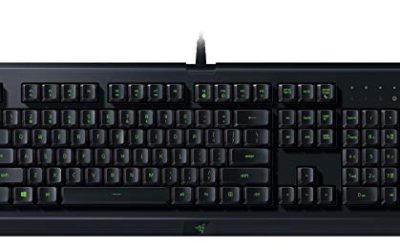
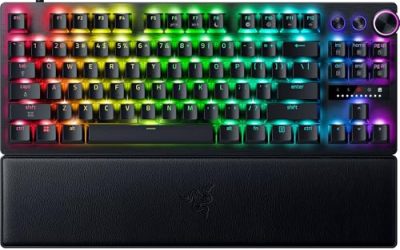
- Best for: Players who want a full-size board with a palm rest, media dial and pre-lubed linear switches.
- Pre-lubed MLX Red linear switches
- Full-size 104-key layout
- SOCD handling for opposing directional inputs
- ABS double-shot keycaps

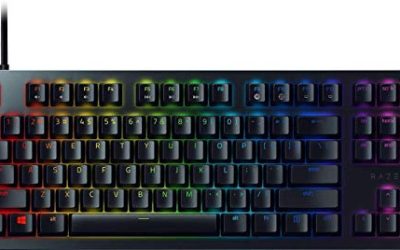
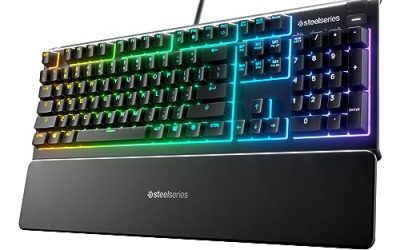
- Best for: Players who want a durable full-size mechanical board without RGB lighting or extra software.
- Tactile mechanical switches
- Full-size layout
- PBT keycaps
- Brushed aluminium-magnesium alloy top case
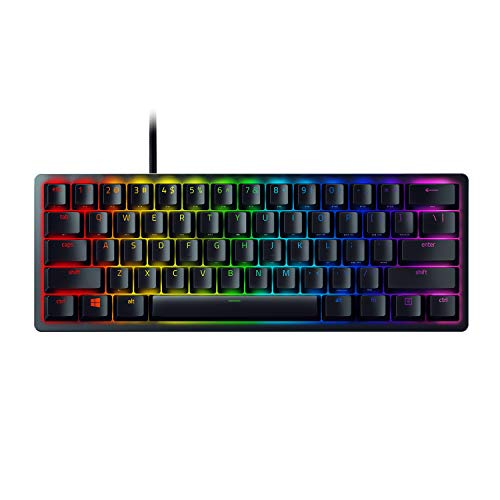
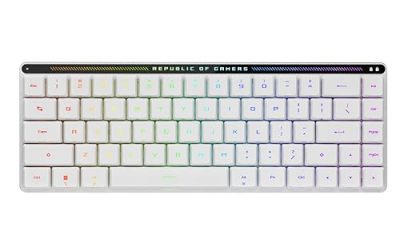
- Best for: FPS players who want the smallest possible board with fast optical switches.
- Linear optical switches with 1.0 mm actuation
- 60 percent layout
- Snap Tap for opposing directional inputs
- Aluminium top frame
All 3 Picks at a Glance
| Product | Specs | Action |
|---|---|---|
| Corsair K70 CORE |
| Check price on Amazon |
| Logitech G413 SE |
| Check price on Amazon |
| Razer Huntsman Mini |
| Check price on Amazon |
Our Top Picks
- Razer Huntsman Mini 60% Gaming Keyboard11.56x 4.07 x 1.45 inches11.56 x 4.07 x 1.45 inches1.1 poundsCheck on Amazon
A gaming keyboard under 150 is not really about finding the cheapest board that lights up. The real decision is which trade-off you can live with every day: the feel of the switches under your fingers, the amount of desk space the layout takes, and whether the frame and keycaps will still feel solid a year from now. Get those three right and the rest — lighting modes, extra keys, software tricks — becomes a bonus rather than the reason you bought it.
This guide is for PC players who want a proper mechanical or optical board without stepping into flagship territory, from competitive shooter players who need fast, consistent keys to people who type all day and game at night. Every board below was picked from the switch type, layout and build details stated on its Amazon listing, so you can compare them on what the listing actually promises rather than on marketing slogans.
Quick Picks
As an Amazon Associate we earn from qualifying purchases
| Product | Best for | Key spec from title |
|---|---|---|
| Razer BlackWidow V3 TKL | A classic tenkeyless board for everyday competitive play | Yellow mechanical switches, linear and silent |
| HyperX Alloy Origins Core | A sturdy tenkeyless board with a tactile switch feel | HyperX Aqua tactile switches, aluminum body |
| Corsair K70 CORE | A full-size board with a palm rest and media dial | Pre-lubed MLX Red linear switches, SOCD |
| Logitech G413 SE | A plain, durable full-size board for work and play | Tactile mechanical switches, PBT keycaps |
| Razer Huntsman Mini | A tiny 60 percent board for fast FPS games | Linear optical switches, Snap Tap |
How to Choose
Switch Feel Comes First
Switches decide how every keypress feels, and they matter more than lighting or branding. Linear switches travel straight down with no bump, which suits fast repeated presses in shooters, while tactile switches give a small bump that confirms each press, which many typists prefer. Clicky switches add a sharp sound on top of the bump, so think about who shares your room before choosing them. Optical switches register with a beam of light instead of a metal contact, and their actuation point is often shorter than a standard mechanical switch. If you can, match the switch to your main game first: linear or optical for fast-paced shooters, tactile for a mix of typing and slower games.
Layout Size Shapes Your Desk
Full-size boards keep the number pad and a full set of navigation keys, which suits players who use macros, spreadsheets or number-heavy work alongside games. Tenkeyless boards drop the number pad and free up room for wide mouse sweeps, which is why they are the default shape for competitive play. A 60 percent board goes further and drops the function row, navigation cluster and arrows, leaving only the core keys, so it fits tiny desks and travel bags but asks you to learn layered shortcuts for missing keys. Before you buy, measure your desk and think about how much room your mouse actually needs at your sensitivity.
Build and Keycaps Decide Longevity
A keyboard that feels solid on day one can still wear badly if its frame flexes or its key legends fade. Aluminum top plates add stiffness and a planted feel, while plastic frames keep weight down and cost lower. Double-shot keycaps have legends moulded through a second layer of plastic, so the lettering cannot wear off the way printed legends can, and PBT keycaps resist shine from finger oils better than ABS. Detachable cables are worth having because a cable is the part most likely to fail, and a board with a standard USB-C cable is easier to fix than one with a cable moulded into the case.
Software and Extras Worth Checking
Most gaming keyboards ship with companion software for remapping keys, building macros and tuning lighting, and the depth of that software varies a lot. Some boards store profiles in onboard memory, so your lighting and macros travel with the keyboard to another PC, while others forget everything the moment the software closes. Media controls, a volume dial and a palm rest sound minor until you use them daily, and a USB passthrough port can save a cable run for a mouse or headset. Check whether the extras need the software running, whether the board works without it, and whether the features you care about are in the listing at all.
The 5 Best Options
Razer BlackWidow V3 TKL
The BlackWidow V3 TKL is the straightforward pick for players who want a proven tenkeyless layout without learning a new shape. Its Yellow switches are linear and silent, so keys travel smoothly without a click, and per-key Chroma RGB lighting lets each key carry its own colour through Razer Synapse. Programmable macros cover the keys you actually use, and a USB passthrough port keeps a mouse or headset cable close at hand. The aluminium top plate keeps the board planted during heated matches, and the compact form factor leaves real room for low-sensitivity mouse movement.
Specs
- Yellow mechanical switches, linear and silent
- Tenkeyless compact form factor
- Per-key Chroma RGB lighting
- Programmable macros through Razer Synapse
- USB passthrough port
- Aluminium top plate
Best for: Competitive players who want a familiar tenkeyless board with silent linear switches.
Watch out for: Confirm it is still sold before buying, and confirm the Yellow switch variant on the listing, since Green clicky and Yellow linear versions share the same model name.
HyperX Alloy Origins Core
The Alloy Origins Core is a tenkeyless board built around a full aluminium body, which gives it a dense, planted feel that cheaper plastic boards rarely match. Its HyperX Aqua switches are tactile, so each press gives a small bump without a loud click, a middle ground that works for both typing and play. RGB lighting and macros are controlled through HyperX software, and the detachable USB-C cable makes the board easy to pack or replace a worn cable. With 87 keys it keeps the function row and navigation cluster while dropping only the number pad.
Specs
- HyperX Aqua tactile mechanical switches
- Tenkeyless layout with 87 keys
- Full aircraft-grade aluminium body
- RGB LED backlighting with software-controlled lighting and macros
- Detachable USB-C to USB-A cable
- Switches listed for 80 million keystrokes
Best for: Players who want a solid aluminium tenkeyless board with a tactile switch feel.
Watch out for: Confirm it is still sold before buying, and confirm the Aqua switch variant on the listing, since Red linear versions are sold under the same model name.
Corsair K70 CORE
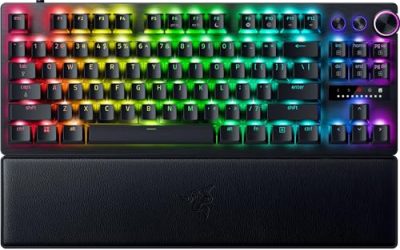
- Best for: Players who want a full-size board with a palm rest, media dial and pre-lubed linear switches.
- Pre-lubed MLX Red linear switches
- Full-size 104-key layout
- SOCD handling for opposing directional inputs
- ABS double-shot keycaps
Players who want a full-size board with a palm rest, media dial and pre-lubed linear switches.
Confirm it is still sold before buying, and note that the full-size frame and palm rest need more desk depth than a tenkeyless board.
The K70 CORE is the full-size option for players who want everything on the desk at once: number pad, media controls and a palm rest included. Its pre-lubed MLX Red linear switches are factory lubricated for a smoother keystroke, and the board lists SOCD handling for opposing directional inputs, a detail competitive players will recognise. ABS double-shot keycaps keep legends durable, sound dampening quiets the typing sound, and a multi-function dial handles volume, zoom and scrolling. The magnetic palm rest attaches when you want it and comes off when you do not.
Watch out for: Confirm it is still sold before buying, and note that the full-size frame and palm rest need more desk depth than a tenkeyless board.
Logitech G413 SE
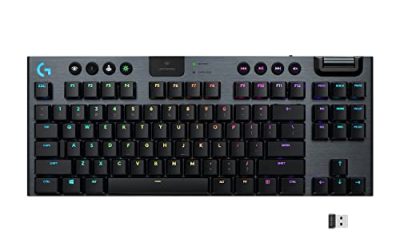
- Best for: Players who want a durable full-size mechanical board without RGB lighting or extra software.
- Tactile mechanical switches
- Full-size layout
- PBT keycaps
- Brushed aluminium-magnesium alloy top case
Players who want a durable full-size mechanical board without RGB lighting or extra software.
Confirm it is still sold before buying, and note the backlighting is white only, so check the listing if you expect colour lighting.
The G413 SE is the plainest board in this guide, and that is its appeal. It is a full-size mechanical keyboard with tactile switches, PBT keycaps and a brushed aluminium-magnesium alloy top case, built for players who would rather have durable materials than a long list of extras. White LED backlighting keeps the look clean instead of rainbow, and twelve function keys cover media and shortcuts without extra software layers. There is no wrist rest and no RGB show, just a sturdy wired board that suits a desk shared between work and games.
Watch out for: Confirm it is still sold before buying, and note the backlighting is white only, so check the listing if you expect colour lighting.
Razer Huntsman Mini
- Best for: FPS players who want the smallest possible board with fast optical switches.
- Linear optical switches with 1.0 mm actuation
- 60 percent layout
- Snap Tap for opposing directional inputs
- Aluminium top frame
FPS players who want the smallest possible board with fast optical switches.
Confirm it is still sold before buying, and note the 60 percent layout has no dedicated arrow keys or number pad, so layered shortcuts take practice.
The Huntsman Mini shrinks the keyboard to 60 percent, keeping only the keys competitive FPS players use most and freeing the rest of the desk for the mouse. Its linear optical switches register with a light beam and list a 1.0 mm actuation point, which suits fast repeated presses, and Snap Tap prioritises the most recent directional input when two opposing keys are held. Doubleshot PBT keycaps, an aluminium top frame and Chroma RGB lighting round out a board that feels far more substantial than its size suggests. Onboard memory stores up to five profiles, so settings travel with the keyboard.
Watch out for: Confirm it is still sold before buying, and note the 60 percent layout has no dedicated arrow keys or number pad, so layered shortcuts take practice.
Which One Fits Your Situation
Competitive FPS on a Small Desk
Pick the Razer Huntsman Mini if your mouse needs the most room possible, since its 60 percent frame leaves the widest sweep area and its optical switches suit fast repeated presses. If the missing arrow keys worry you, the Razer BlackWidow V3 TKL keeps a standard function row and navigation cluster while still freeing the space a number pad would take.
A Full-Size Board for Work and Play
Pick the Corsair K70 CORE when you want the number pad, media dial and palm rest in one package, with pre-lubed linear switches and SOCD handling for competitive play. Pick the Logitech G413 SE instead when you prefer a simpler full-size board with tactile switches and PBT keycaps, and you would rather skip RGB lighting and extra software entirely.
A Quiet, No-Fuss First Mechanical Board
Pick the HyperX Alloy Origins Core if this is your first mechanical board and you want a tactile switch that confirms each press without a loud click. Its aluminium body and detachable cable cover the durability basics, and the tenkeyless layout is easy to adjust to if you are coming from a laptop keyboard or a full-size office board.
Maximum Desk Space With a Tiny Board
Pick the Razer Huntsman Mini when desk space matters more than having every key visible, and you are willing to learn layered shortcuts for arrows and function keys. If you share the desk with a laptop or a second monitor arm, the small footprint also makes it the easiest board here to slide aside when you need the space.
Common Mistakes
- Choosing clicky switches without thinking about who shares the room, then regretting the noise during late-night sessions.
- Buying a 60 percent board for the size and discovering too late that the missing arrow keys slow down everyday work.
- Judging a keyboard by its lighting alone while ignoring switch type, keycap material and frame stiffness.
- Ordering the wrong switch variant, since several boards here sell linear and tactile or clicky versions under one model name.
- Assuming every board stores profiles onboard, when some forget lighting and macros the moment their software closes.
Frequently Asked Questions
Are tenkeyless keyboards better for gaming?
Tenkeyless boards suit many players because dropping the number pad moves the mouse closer to the centre of the body, which helps wide, low-sensitivity sweeps. They keep the function row and navigation keys, so most shortcuts still work as expected. Full-size boards remain better when you use the number pad for work, macros or games that bind many keys.
Do optical switches last longer than mechanical switches?
Optical switches register with a light beam instead of a metal contact, so they avoid the contact wear that mechanical switches eventually face. That design difference is real, but a well-built mechanical board can still serve for years of daily play. Switch feel, build quality and keycap material usually matter more in practice than the switch technology alone.
Is a palm rest necessary for a gaming keyboard?
A palm rest is not necessary, but it helps during long sessions by supporting the wrists at a neutral angle, especially on taller boards. The Corsair K70 CORE includes a magnetic palm rest, while the other boards here expect you to add one separately if you want it. Try the board at your desk height first before deciding.
Can I use a gaming keyboard for office work?
Yes, most gaming keyboards work well for office tasks, and tactile or silent linear switches are usually the best fit for shared spaces. Boards with loud clicky switches can disturb colleagues, so check the switch type before ordering. A full-size board with a number pad also suits spreadsheet work, while a tenkeyless board fits smaller office desks.
FAQ
Are tenkeyless keyboards better for gaming?
Do optical switches last longer than mechanical switches?
Is a palm rest necessary for a gaming keyboard?
Can I use a gaming keyboard for office work?
More from Amazon
Programs that pair well with the guide above. Offers and eligibility are set by Amazon and may change.
Free shipping on eligible items, Prime Video and more. Eligible new members can start with a free trial.
Start a Prime free trialAd-free music streaming. Eligible new subscribers can start with a free trial.
Try Music Unlimited freeA Prime membership for ages 18-24 with a trial period. Eligibility is set by Amazon.
See Prime for Young AdultsAudiobooks and podcasts to listen to on the go. Eligible new members can start with a free trial.
Try Audible freeAs an Amazon Associate we earn from qualifying purchases.