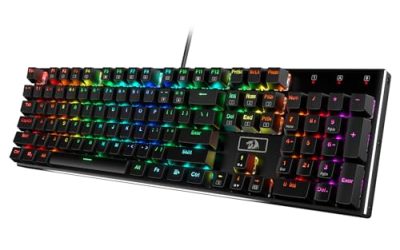
Our Short List of 3

- Best for: Competitive players who want analog optical control in a tenkeyless frame.
- Switches: Razer Analog Optical Switches
- Features: Snap Tap, Rapid Trigger, adjustable actuation
- Layout: Tenkeyless
- Keycaps: Doubleshot PBT

- Best for: Players who want magnetic switches with presets and an OLED display.
- Switches: OmniPoint 3.0 HyperMagnetic Switches
- Features: Adjustable actuation, Rapid Trigger, Protection Mode, Rapid Tap
- Display: OLED
- Layout: Tenkeyless

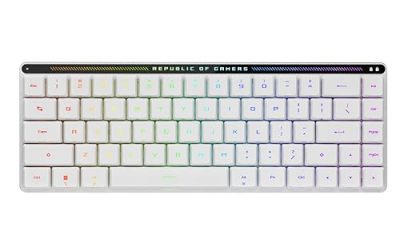
- Best for: Enthusiasts who want a dampened, hot-swappable wireless board for play and typing.
- Switches: Pre-lubed ROG NX Red, hot-swappable
- Layout: 75 percent
- Mounting: Gasket mount with three-layer dampening
- Display: OLED
All 5 Picks at a Glance
| Product | Specs | Action |
|---|---|---|
| Razer Huntsman V3 Pro TKL |
| Check price on Amazon |
| SteelSeries Apex Pro TKL Gen 3 |
| Check price on Amazon |
| ASUS ROG Azoth |
| Check price on Amazon |
 Corsair K70 MAX RGB |
| Check price on Amazon |
 Logitech G915 X Lightspeed TKL |
| Check price on Amazon |
Key takeaways
- Compare five premium gaming keyboards by switch system, layout, connection and keycaps, from analog optical flagships to a slim low-profile wireless board.
A generous keyboard budget changes the question from what you can afford to what you should actually prioritise, because this tier holds analog optical boards with adjustable actuation, magnetic switches with rapid trigger, gasket-mounted custom-style boards and slim low-profile wireless models, all competing on feel and speed rather than basic features.
That spread suits competitive players chasing faster inputs, enthusiasts who want hot-swappable switches and dampened typing, and desk minimalists who prefer a thin wireless board, so the five picks below are chosen from the named switch systems, layouts and connections on their Amazon listings rather than from headline lighting effects. Each pick also had to earn its place on everyday details such as PBT keycaps, stated connection modes and controls you can reach without leaving a match.
Quick Picks
As an Amazon Associate we earn from qualifying purchases.
| Product | Best for | Key spec from title |
|---|---|---|
| Razer Huntsman V3 Pro TKL | Analog optical speed | Razer Analog Optical Switches with Snap Tap |
| SteelSeries Apex Pro TKL Gen 3 | Magnetic adjustment | OmniPoint 3.0 HyperMagnetic Switches |
| ASUS ROG Azoth | Custom-style wireless typing | Hot-swappable pre-lubed ROG NX Red switches |
| Corsair K70 MAX RGB | Full-size magnetic control | CORSAIR MGX adjustable magnetic switches |
| Logitech G915 X Lightspeed TKL | Low-profile wireless play | LIGHTSPEED wireless with GL Tactile switches |
How to Choose
Switch System and Actuation Control
The biggest split in this tier is between conventional mechanical switches and analog or magnetic systems that let you set the actuation point per key. Adjustable actuation suits players who want movement keys to fire early while keeping ability keys deeper and less prone to accidental presses, and rapid trigger shortens reset behaviour during fast strafing. Traditional mechanical switches feel more familiar and need no tuning time, but they give you one fixed behaviour for every key, so decide whether per-key control is a feature you will genuinely configure or simply admire in the listing.
Layout and Desk Space
Full-size boards keep a number pad and a complete function row, which helps players who also work with spreadsheets, editing timelines or chat macros on the same desk. Tenkeyless layouts drop the number pad to bring the mouse hand closer, a real comfort gain during long sessions, while a 75 percent board goes further by packing arrows and function keys into a tighter frame. Measure your desk before choosing, because a premium board with a wrist rest can occupy far more depth than its headline layout suggests, and mouse room matters as much as key count.
Wired, Wireless and Polling Behaviour
Wired boards in this group remove battery management entirely and several publish very high polling rates aimed at competitive play, while wireless models trade a cable for receiver storage, charging routines and connection switching between machines. Check which modes a listing actually states, because some boards offer Bluetooth and a fast wireless receiver while others are wired only despite looking similar. If you move between a gaming PC and a laptop, tri-mode connection is worth prioritising; if the board never leaves one desk, a stable wired flagship usually makes the simpler and faster choice.
Keycaps, Build and Sound
Double-shot PBT keycaps resist shine and keep legends readable, which matters at this level where the board should feel fresh after years of daily play. Case construction and internal dampening shape the sound as much as the switches do: gasket mounts and foam layers soften the typing note, while aluminium tops feel firmer and colder. Listings do not always state weight, stabiliser treatment or included accessories, so treat an unstated detail as unknown rather than assuming a flagship automatically includes a wrist rest, spare switches or a carry case in the box.
The 5 Best Options
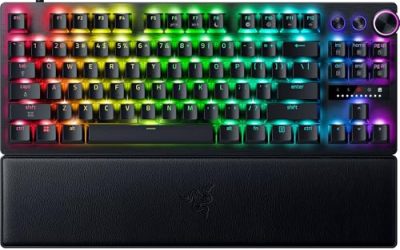
Razer Huntsman V3 Pro TKL
- Best for: Competitive players who want analog optical control in a tenkeyless frame.
- Switches: Razer Analog Optical Switches
- Features: Snap Tap, Rapid Trigger, adjustable actuation
- Layout: Tenkeyless
- Keycaps: Doubleshot PBT
Competitive players who want analog optical control in a tenkeyless frame.
The tenkeyless layout drops the number pad, so heavy spreadsheet users should look at the full-size Corsair instead.
This tenkeyless Razer board is built around analog optical switches with adjustable actuation, rapid trigger and Snap Tap, which prioritises the last opposing directional input for cleaner counter-strafing. A media key set and dial sit above the main cluster, the keycaps are doubleshot PBT, and a wrist rest is named in the listing, making it the most esports-focused pick here for players who tune movement keys carefully and want a compact wired flagship with dedicated controls within easy reach during matches.
SteelSeries Apex Pro TKL Gen 3
- Best for: Players who want magnetic switches with presets and an OLED display.
- Switches: OmniPoint 3.0 HyperMagnetic Switches
- Features: Adjustable actuation, Rapid Trigger, Protection Mode, Rapid Tap
- Display: OLED
- Layout: Tenkeyless
Players who want magnetic switches with presets and an OLED display.
It is a wired board, so buyers wanting a cable-free desk should compare the wireless ASUS and Logitech picks.
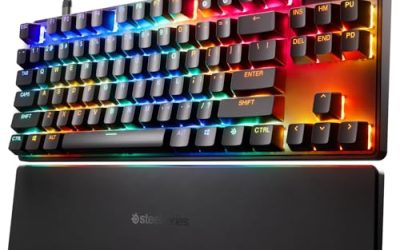
SteelSeries uses OmniPoint 3.0 HyperMagnetic switches with adjustable actuation, rapid trigger and game-ready presets, plus a Protection Mode and Rapid Tap behaviour aimed at reducing accidental inputs during frantic movement. An OLED display handles on-board information, the keycaps are PBT, and the connection is USB-C, so this is a wired tenkeyless board for players who like magnetic tuning but also want presets and a small screen instead of opening software for every adjustment they make between games.
ASUS ROG Azoth
- Best for: Enthusiasts who want a dampened, hot-swappable wireless board for play and typing.
- Switches: Pre-lubed ROG NX Red, hot-swappable
- Layout: 75 percent
- Mounting: Gasket mount with three-layer dampening
- Display: OLED
Enthusiasts who want a dampened, hot-swappable wireless board for play and typing.
The compact 75 percent layout compresses the function row, which takes adjustment if you rely on spaced F-keys.
The Azoth takes a different route from the esports boards: a 75 percent gasket-mounted frame with three-layer dampening, hot-swappable pre-lubed ROG NX Red switches and an OLED display, paired with tri-mode connectivity for wired, receiver and Bluetooth use. That combination suits enthusiasts who care about typing sound and switch swapping as much as gaming speed, and who move one board between a gaming PC, a work laptop and a second machine without wanting three separate keyboards cluttering the desk at home.
Corsair K70 MAX RGB
- Best for: Players who want magnetic adjustment in a full-size wired board.
- Switches: CORSAIR MGX adjustable magnetic switches
- Features: Rapid Trigger and simultaneous SOCD handling
- Polling: 8000Hz stated in the listing
- Keycaps: PBT double-shot
Players who want magnetic adjustment in a full-size wired board.
The wired-only connection and larger footprint need desk depth, especially once a separate wrist rest is added.
Corsair’s K70 MAX RGB is the full-size magnetic option, using MGX adjustable switches with rapid trigger and simultaneous SOCD handling, sound dampening and a polling rate the listing states at 8000Hz. Double-shot PBT keycaps and a wired connection keep the focus on a fixed tournament-style desk, and the larger frame suits players who refuse to give up a number pad. It is the natural pick here for someone who wants magnetic tuning without shrinking the keyboard or losing the extra keys used outside games.
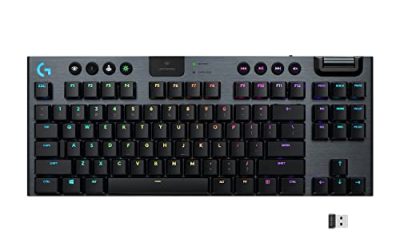
Logitech G915 X Lightspeed TKL
- Best for: Wireless players who prefer a slim, low-profile board for mixed gaming and typing.
- Switches: GL Tactile switches
- Layout: Tenkeyless, low-profile
- Keycaps: Double-shot PBT
- Connection: LIGHTSPEED wireless
Wireless players who prefer a slim, low-profile board for mixed gaming and typing.
Low-profile GL switches feel very different from tall mechanical switches, so committed mechanical fans should compare the ASUS first.
Logitech’s G915 X Lightspeed TKL goes low-profile instead of tall and mechanical in the traditional sense, pairing LIGHTSPEED wireless with GL Tactile switches, double-shot PBT keycaps and an aluminium finish. Fully programmable keys and RGB backlighting are stated, and the tenkeyless frame keeps the slim board easy to slide aside or carry between rooms. It suits players who type all day on the same board and prefer a shorter key travel and a cleaner desk, accepting tactile low-profile switches rather than adjustable analog or magnetic behaviour.
Which One Fits Your Situation
You Play Ranked Shooters Every Night
Choose between the Razer and the SteelSeries first, because both centre on fast, adjustable inputs for movement keys. The Razer leans on analog optical switches, Snap Tap and a wrist rest, while the SteelSeries adds an OLED display, presets and Protection Mode. Either way, spend your first session setting actuation for movement and ability keys separately instead of leaving one behaviour across the whole board.
You Want One Board for Gaming and Serious Typing
The ASUS ROG Azoth fits this brief best, with its gasket mount, dampening layers, pre-lubed switches and hot-swappable sockets making it the easiest board here to tune for sound and feel. Its tri-mode connection also helps when the same desk hosts a work laptop during the day, and the OLED display keeps basic status visible without opening companion software every time.
You Refuse to Give Up the Number Pad
The Corsair K70 MAX RGB is the pick built around a larger frame and magnetic switches, so data entry, editing shortcuts and game keybinds can share one board. Its wired connection and stated high polling suit a fixed desk that never moves. Just measure the available depth first, because a full-size board plus a mouse and monitor stand can crowd smaller desks quickly.
Your Desk Must Stay Cable-Free and Slim
The Logitech G915 X Lightspeed TKL keeps the profile low and the desk clear, with wireless connection, an aluminium finish and tenkeyless width that leaves generous mouse room. It is also the easiest pick here to move between a PC and a Mac, since both are named in its listing. Charge it on a routine rather than waiting for a low-battery warning before a session.
Common Mistakes
- Buying adjustable actuation and never configuring it, which leaves the main reason for choosing an analog or magnetic flagship unused.
- Choosing a tenkeyless or 75 percent layout without checking whether your games, work or streaming tools rely on a number pad or spaced function keys.
- Assuming every premium board is wireless, when several flagships here are wired only by design.
- Ignoring keycap material and switch travel, then disliking the feel of a board whose speed specifications looked perfect on paper.
- Treating an unstated specification as included, instead of checking the listing for weight, wrist rests, spare switches and carry cases before ordering.
Frequently Asked Questions
Are analog and magnetic keyboards better than mechanical ones?
They are more adjustable rather than automatically better, because analog optical and magnetic switches let you change actuation and reset behaviour per key, which helps movement-heavy games. A good mechanical board still feels excellent and needs no tuning. Choose the adjustable systems when you will actually configure them, and choose conventional switches when a familiar, consistent feel matters more.
Is a tenkeyless keyboard enough for gaming?
For most games, yes, because the keys used for movement, abilities and communication all remain, and the smaller frame leaves more mouse room. The loss is the number pad, which matters for some simulation games, editing work and data entry. If your non-gaming tasks use that pad daily, a full-size board such as the Corsair is the safer long-term choice.
Does a higher polling rate change how a keyboard feels?
A higher stated polling rate means the board reports inputs more often, which can reduce the delay between a press and the PC receiving it. The difference is subtle next to switch actuation, key travel and your own reaction time, so treat polling as one factor among several rather than the single number that decides a purchase in this tier.
Should a premium keyboard be hot-swappable?
Hot-swappable sockets matter if you enjoy changing switch feel, replacing a single faulty switch or experimenting without soldering, as the ASUS board allows. Players who pick a switch type and never change it gain less from the feature. Esports-focused analog and magnetic boards usually prioritise their tuned switch systems instead, so decide whether customisation or outright input adjustment matters more to you.
FAQ
Are analog and magnetic keyboards better than mechanical ones?
Is a tenkeyless keyboard enough for gaming?
Does a higher polling rate change how a keyboard feels?
Should a premium keyboard be hot-swappable?
More from Amazon
Programs that pair well with the guide above. Offers and eligibility are set by Amazon and may change.
Free shipping on eligible items, Prime Video and more. Eligible new members can start with a free trial.
Start a Prime free trialAd-free music streaming. Eligible new subscribers can start with a free trial.
Try Music Unlimited freeA Prime membership for ages 18-24 with a trial period. Eligibility is set by Amazon.
See Prime for Young AdultsAudiobooks and podcasts to listen to on the go. Eligible new members can start with a free trial.
Try Audible freeAs an Amazon Associate we earn from qualifying purchases.