Key takeaways
- Compare the best low profile gaming keyboards with genuine low-profile switches, from full-size wireless flagships to a compact 65 percent board, plus a clear guide to layouts, switch types and connections.
As an Amazon Associate we earn from qualifying purchases.
A standard gaming keyboard asks your fingers to climb. Tall switches, tall keycaps and a thick case mean longer travel, more finger lift and wrists that often need a raised rest. A low profile gaming keyboard removes that height at the source: shorter switches, flatter keycaps and a thinner case keep your hands closer to the desk and let actuation happen sooner in the press.
That only works if the board is genuinely low profile. Many keyboards look slim in photos while using full-height switches under shallow keycaps, which changes the appearance without changing the travel. Every keyboard here was chosen because its listing or manufacturer specifications name a low-profile switch or ultra-low-profile housing: Logitech GL, Razer low-profile optical, CHERRY MX Ultra Low Profile and ROG RX low-profile optical switches. Boards without that evidence were left out. The five picks cover full-size, tenkeyless, wired and compact 65 percent layouts.
Disclosure: This article contains affiliate links to products on Amazon. If you buy through those links, we may earn a commission at no extra cost to you.
Quick Picks
- Best full-size wireless overall: Logitech G915 X LIGHTSPEED — Full-size layout with number pad, low-profile GL switches, tri-mode connection and double-shot PBT keycaps in a slim aluminium build.
- Best tenkeyless for fast optical input: Razer DeathStalker V2 Pro TKL — Low-profile optical switches, HyperSpeed wireless plus Bluetooth and a compact frame that leaves more room for mouse movement.
- Best ultra-thin full-size board: Corsair K100 AIR Wireless — CHERRY MX Ultra Low Profile switches in a case that is only 11 mm at the front, with SLIPSTREAM wireless, Bluetooth and wired modes.
- Best compact board: ASUS ROG Falchion RX Low Profile — A 65 percent layout with ROG RX low-profile optical switches, tri-mode connection, a touch panel and a protective cover for travel.
- Best wired full-size option: Razer DeathStalker V2 — The same low-profile optical switch family in a simpler wired design with a detachable cable, media roller and aluminium top plate.
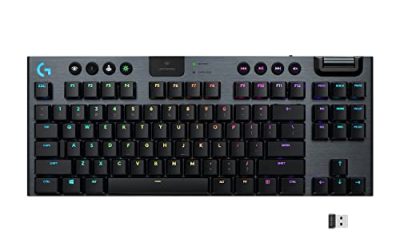
1. Logitech G915 X LIGHTSPEED — Best Full-Size Wireless Overall
The G915 X LIGHTSPEED suits players who want a slim board without giving up the full layout. It keeps the number pad, function row, media controls and volume roller, while low-profile GL mechanical switches keep it far thinner than a conventional flagship. The listing names this version with GL Linear switches; tactile and clicky GL variants exist in the same family, so check the switch named before you order.
Logitech lists a 1.3 mm actuation point for its low-profile GL switches, so the press registers early. That suits rapid repeated inputs and quick direction changes, and your fingers do not need to lift as high between keys. The trade-off is a smaller margin for error: a light brush is more likely to register than on a tall, long-travel board.
The G915 X offers LIGHTSPEED wireless, Bluetooth for a second device and wired USB-C, so one board can cover a gaming PC, a laptop and a work machine. Double-shot PBT keycaps keep their legends because they are moulded through the cap. The brushed aluminium top keeps flex low, and per-key RGB and programmable keys are handled through Logitech G HUB, including its KEYCONTROL remapping layer.
Key specs:
- Layout: Full-size with number pad, function row and media controls
- Switches: Logitech GL low-profile mechanical, this listing with GL Linear; 1.3 mm actuation point
- Connection: LIGHTSPEED wireless, Bluetooth and wired USB-C
- Keycaps: Double-shot PBT, low-profile
- Build: Slim aluminium top plate, per-key RGB backlighting
- Extras: Volume roller, dedicated media keys, programmable keys through G HUB
Pros:
- True low-profile switches in a complete full-size layout
- Three connection modes cover gaming and everyday devices cleanly
- PBT keycaps and an aluminium top suit a board used all day
- Early actuation suits fast, repeated in-game inputs
Cons:
- Full-size footprint still takes a lot of desk width
- Low-profile keycaps are not interchangeable with standard-height sets
- Linear feel will not suit players who want a clear tactile bump
View the Logitech G915 X LIGHTSPEED on Amazon
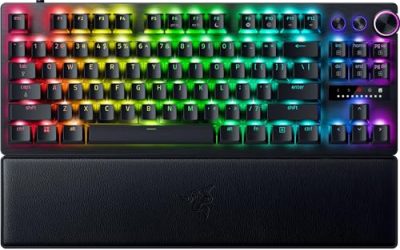
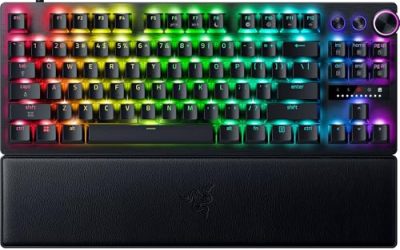
2. Razer DeathStalker V2 Pro TKL — Best Tenkeyless for Fast Optical Input
The DeathStalker V2 Pro TKL takes a different route to speed. It uses Razer low-profile optical switches, which register a press with light rather than a metal contact. The listing names the Linear Red version, with a short actuation point and shorter total travel than a standard switch. For players who value a fast, smooth press with no tactile interruption, that is the main reason to choose this board.
Removing the number pad pulls the mouse hand closer, helps posture and frees a wide strip of desk for low-sensitivity mouse movement. The board still keeps its function row, navigation keys and arrow keys, so it avoids the layer compromises of a smaller layout.
Wireless comes through Razer HyperSpeed, with Bluetooth for additional devices, and the listing states battery life of up to 200 hours under its stated conditions, varying with brightness and mode. Chroma RGB, a slim casing with an aluminium top plate and coated keycaps complete the package. The switches are not hot-swappable, so choose the switch feel you want from the outset.
Key specs:
- Layout: Tenkeyless, with function row and navigation cluster
- Switches: Razer low-profile optical, this listing with Linear Red
- Connection: Razer HyperSpeed wireless, Bluetooth and wired USB-C
- Battery: Up to 200 hours under the conditions stated on the listing
- Build: Ultra-slim casing with aluminium top plate
- Lighting: Razer Chroma per-key RGB backlighting
Pros:
- Optical low-profile switches actuate quickly with a smooth linear press
- Tenkeyless width gives the mouse far more room
- Wireless and Bluetooth modes suit a PC plus a second device
- Slim case keeps wrists low without a tall rest
Cons:
- No number pad for players who use one for binds or data entry
- Switches are not hot-swappable
- Keycaps are coated ABS-style caps rather than double-shot PBT
View the Razer DeathStalker V2 Pro TKL on Amazon
3. Corsair K100 AIR Wireless — Best Ultra-Thin Full-Size Board
The K100 AIR is the thinnest board here. Corsair lists the frame at 11 mm at the front rising to 17 mm at the rear, closer to a laptop deck than a desktop board. Inside sit CHERRY MX Ultra Low Profile switches, a purpose-built short switch with a listed actuation distance of just 0.8 mm on the tactile version in Corsair specifications. Few desktop boards register a press that early.
Despite the thin case, this is a full-size keyboard with a number pad, function row, media keys and four programmable G keys for push-to-talk, recording controls or game macros. Players who strike the left edge by feel may need time to adjust to the added column.
The K100 AIR offers SLIPSTREAM wireless, described by Corsair as sub-1 ms, low-latency Bluetooth and a wired USB mode that also charges the battery. Corsair lists up to 50 hours with RGB on and up to 200 hours with lighting off, so brightness decides how often you charge it. Per-key RGB, onboard profiles and iCUE cover customisation, and wired AXON processing is listed with polling up to 8,000 Hz. Most players will notice the short travel and thin wrist angle sooner than any polling difference.
Key specs:
- Layout: Full-size with number pad and four dedicated G keys
- Switches: CHERRY MX Ultra Low Profile mechanical
- Case height: 11 mm at the front to 17 mm at the rear, as listed by Corsair
- Connection: SLIPSTREAM wireless, Bluetooth and wired USB
- Battery: Up to 50 hours with RGB on and up to 200 hours with RGB off, as listed
- Extras: Per-key RGB, onboard profiles, iCUE software control
Pros:
- Genuinely ultra-thin housing with purpose-built low-profile switches
- Full layout plus dedicated macro keys for games and streaming tools
- Three connection modes, including a fast wireless option
- Very short actuation suits quick, light key presses
Cons:
- The added G-key column takes adjustment for touch typists
- Battery life drops sharply with bright RGB lighting
- Ultra-low-profile switches have very limited replacement options
View the Corsair K100 AIR Wireless on Amazon
4. ASUS ROG Falchion RX Low Profile — Best Compact Board

The Falchion RX Low Profile shrinks the idea to a 65 percent layout. It keeps arrow keys and a small navigation column while removing the number pad and separate function row, leaving most of the desk to the mouse. The protective cover in the box doubles as a tray under the keyboard and makes travel easier.
Its ROG RX low-profile optical switches are the core of the design. ASUS lists the Red version with a 1.0 mm actuation point and 2.8 mm of total travel: inputs register early and the press bottoms out soon after, which suits fast strafing, ability chains and repeated jumps. A Blue clicky version exists in the same family, so confirm which switch the listing names; the white Red-switch version linked here feels smooth and quiet by comparison.
Connection is tri-mode: ROG SpeedNova wireless, Bluetooth and wired USB. The ROG Omni Receiver can handle a compatible ROG mouse through the same receiver. A touch panel handles volume and media, silicone dampening foam softens the bottom-out sound, and per-key Aura Sync RGB covers lighting. The function row lives on a layer, so players who use F keys constantly should consider that first.
Key specs:
- Layout: 65 percent with arrow keys and a compact navigation column
- Switches: ROG RX low-profile optical, this listing with Red switches; 1.0 mm actuation and 2.8 mm travel as listed by ASUS
- Connection: ROG SpeedNova wireless, Bluetooth and wired USB
- Extras: Interactive touch panel, protective cover, silicone dampening foam
- Compatibility: ROG Omni Receiver support, PC and Mac modes
- Lighting: Per-key RGB with Aura Sync
Pros:
- Smallest footprint here, with the most mouse room of any pick
- Fast optical low-profile switches with short total travel
- Cover makes it the easiest board here to carry safely
- One receiver can pair with a compatible ROG mouse
Cons:
- Function row lives on a layer, which slows heavy F-key use
- Compact layout gives fewer dedicated keys for complex binds
- ABS keycaps on this version are less durable in feel than PBT
View the ASUS ROG Falchion RX Low Profile on Amazon
5. Razer DeathStalker V2 — Best Wired Full-Size Option
Not every player wants a battery. The wired DeathStalker V2 keeps the low-profile optical design of its Pro siblings and removes charging entirely. It is full-size, with a number pad, media button and roller, and a detachable USB Type-C cable that is easier to replace or pack than a fixed lead. Wired is also the simplest connection: no receiver, pairing or power state to think about.
Razer low-profile optical switches in the Linear Red version named on this listing actuate with light, with a listed lifespan of up to 70 million keystrokes. The ultra-slim casing uses an aluminium alloy top plate, laser-etched coated keycaps carry the Chroma RGB, and onboard memory stores profiles on the keyboard itself. Choose this version for the full layout and media roller without wireless features; choose the Pro TKL if mouse room matters more than the number pad.
Key specs:
- Layout: Full-size with number pad and media roller
- Switches: Razer low-profile optical, this listing with Linear Red; listed lifespan up to 70 million keystrokes
- Connection: Wired, detachable USB Type-C cable
- Build: Ultra-slim casing with aluminium alloy top plate
- Keycaps: Laser-etched with a durable coating, Chroma RGB backlighting
- Memory: Onboard profile storage for up to five profiles, as listed by Razer
Pros:
- Full-size low-profile optical board with no battery to manage
- Detachable cable is simple to replace or pack
- Media roller and button are quick to reach during play
- Aluminium top plate keeps the slim case feeling solid
Cons:
- Wired only, so it cannot move to a sofa or second machine easily
- Full-size width limits mouse space on smaller desks
- Switches are not hot-swappable
View the Razer DeathStalker V2 on Amazon
How to Choose a Low Profile Gaming Keyboard
Confirm the switch, not the silhouette. Look for wording such as low-profile mechanical, low-profile optical or ultra low profile in the switch name itself. A thin case or flat keycaps on standard switches look similar in a photo but keep standard travel and actuation.
Pick a switch feel you can live with for typing too. Linear switches move smoothly and suit fast repeated presses. Tactile switches add a bump many players prefer for ability keys and typing accuracy. Clicky switches add sound, a poor match for shared rooms or an open microphone. With shorter travel, these differences are compressed, so the choice matters more, not less.
Match the layout to your mouse and your binds. Full-size keeps the number pad for extra binds or spreadsheet work. Tenkeyless is the balanced default for most desks. A 65 percent board maximises mouse room but moves the function row to a layer. If your mouse already has room, you may prefer keeping dedicated keys.
Decide how the board connects. Wired never needs charging. A gaming wireless receiver gives a stable connection for play, while Bluetooth suits a laptop or second PC. Tri-mode boards let one keyboard cover a whole setup. Check what is in the box on the listing, especially the receiver and cable.
Check keycaps and replacements early. Low-profile caps and switches are often not interchangeable between brands, so confirm compatibility before assuming existing sets will fit. Double-shot PBT caps generally keep their legends longer than thin printed caps. Also set expectations for noise: shorter travel bottoms out sooner, and dampening and switch type change the sound more than case thickness alone, so a low profile board is not automatically quiet.
Frequently Asked Questions
Are low profile keyboards actually better for gaming?
They suit players who value a short, fast press and a low wrist position. Shorter travel and earlier actuation can make repeated inputs feel quicker, and the flat deck needs less wrist extension. They are not better for everyone: players who rest heavily on keys may trigger accidental presses, and fans of deep, cushioned travel may not enjoy the feel.
Can a low profile keyboard replace a standard board for work as well?
Yes. The full-size and tenkeyless picks keep standard legends, function rows and, on full-size models, number pads. The main adjustment is typing accuracy in the first days, because keys register earlier. For heavy number entry stay full-size; for heavy function-key use avoid the smallest layouts.
Do low profile switches wear out faster because they are smaller?
Size alone does not decide lifespan. Optical switches remove the physical contact that wears in a mechanical switch, while low-profile mechanical switches are rated like standard switches. Compare the figure stated for the exact switch rather than assuming smaller means weaker.
Will my standard keycaps and switches fit a low profile board?
Usually not. Low-profile keycaps are shorter and often use different stem spacing, and switch families differ between Logitech, Razer, CHERRY and ASUS systems. Some boards accept a limited range of matching low-profile caps, so check the product page before ordering accessories.
Is wireless fast enough on these keyboards?
The dedicated gaming receivers here are designed for play with low-latency wireless systems, and wired mode remains available on all of them. Reserve Bluetooth for convenience rather than competitive play. Switch travel and your own input habits will be noticeable before a modern gaming receiver is.
Do I still need a wrist rest with a low profile keyboard?
Many players do not, because the deck sits low enough for wrists to stay close to neutral. If you use a rest, choose a low, firm pad; a tall soft one raises your wrists above the keys and undoes the benefit.
Conclusion
The best low profile gaming keyboards earn the name at the switch, not in the product photo. Choose the Logitech G915 X LIGHTSPEED if you want one full-size wireless board for gaming and everything else, or the Corsair K100 AIR if the thinnest possible full-size deck is the priority. Take the Razer DeathStalker V2 Pro TKL for optical speed with more mouse room, the ASUS ROG Falchion RX Low Profile for the smallest and most portable setup, and the wired Razer DeathStalker V2 if you want the same low-profile optical feel with no battery to think about. Whichever layout you choose, confirm the exact switch named on the listing before you buy, because on a short-travel board, that single choice shapes every press you make.
FAQ
Are low profile keyboards actually better for gaming?
Can a low profile keyboard replace a standard board for work as well?
Do low profile switches wear out faster because they are smaller?
Will my standard keycaps and switches fit a low profile board?
Is wireless fast enough on these keyboards?
Do I still need a wrist rest with a low profile keyboard?
More from Amazon
Programs that pair well with the guide above. Offers and eligibility are set by Amazon and may change.
Free shipping on eligible items, Prime Video and more. Eligible new members can start with a free trial.
Start a Prime free trialAd-free music streaming. Eligible new subscribers can start with a free trial.
Try Music Unlimited freeA Prime membership for ages 18-24 with a trial period. Eligibility is set by Amazon.
See Prime for Young AdultsAudiobooks and podcasts to listen to on the go. Eligible new members can start with a free trial.
Try Audible freeAs an Amazon Associate we earn from qualifying purchases.