Key takeaways
- Four Z790 gaming motherboards for Intel Core i7 builds, with DDR5 support, PCIe 5.0 slots, strong power delivery and fast wired and wireless networking.
A Core i7 gaming build lives or dies by the motherboard underneath it. The board decides how hard the processor can boost, how fast the memory can run, how many drives and graphics cards the system can hold, and how clean the networking feels during online play. Choosing well means matching the socket, chipset and power delivery to the chip you actually own, then checking storage and connectivity against the rest of your parts list.

This guide is for builders running an unlocked or high-core-count Core i7 from the 12th, 13th or 14th generation who want a board that supports overclocking headroom, fast DDR5 memory and current-generation expansion. Every pick below is an ATX Z790 board chosen from the chipset, slot layout, power stage count and networking listed on its product page.
Quick Picks
As an Amazon Associate we earn from qualifying purchases
| Product | Best for | Key spec |
|---|---|---|
| ASUS ROG Strix Z790-E Gaming WiFi II | High-end i7 builds with the newest networking | WiFi 7 and 18+1 power stages |
| GIGABYTE Z790 AORUS Elite AX | Balanced builds that still want strong power delivery | 16+1+2 power phase design |
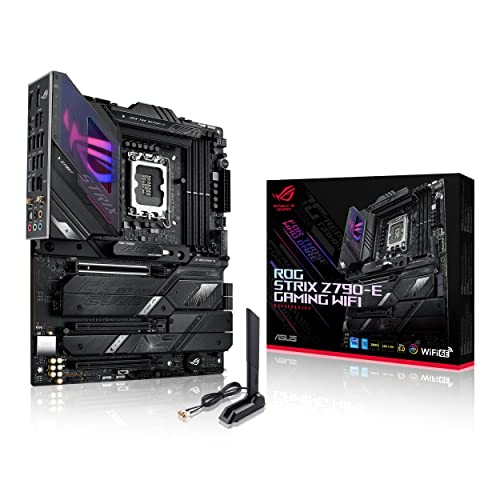
| ASUS ROG Strix Z790-E Gaming WiFi | Builders who want Thunderbolt 4 on the rear panel | Thunderbolt 4 and 5 M.2 slots |
| MSI PRO Z790-P WiFi | Value-focused builds that keep the Z790 chipset | DDR5 support up to 7000+ MHz (OC) |
How to Choose
Match the socket and chipset to your processor
Every board in this guide uses the LGA 1700 socket and the Intel Z790 chipset, which together support 12th, 13th and 14th generation Core processors. That pairing matters because the Z790 chipset allows processor and memory overclocking, which is exactly what an unlocked Core i7 is built for. Before ordering, confirm your exact processor model appears on the board maker’s CPU support list, and note the BIOS version that support requires. A board that ships with an older BIOS may need an update before a newer-generation chip will boot, so plan for that step if you are pairing a recent processor with an earlier production board.
Check power delivery against your i7 model
Core i7 processors draw serious current under boost, and the board’s power stage design decides how stable that delivery stays during long gaming sessions. Higher stage counts, such as the 18+1 and 16+1+2 layouts in this guide, spread the load across more components and generally run cooler than leaner designs. If you plan to overclock, power delivery should be your first filter after socket compatibility. If you run the chip at stock settings, a mid-range design still delivers stable performance, but headroom shrinks. Either way, pair the board with a quality power supply and a case with real airflow over the voltage regulator area.
Count storage and expansion before you buy
Modern game libraries fill drives quickly, so the number and generation of M.2 slots deserves a close look. Boards here offer four or five M.2 slots, and at least one PCIe 5.0 slot for the graphics card or a future drive. Check how the slots share bandwidth, because populating every slot can sometimes reduce the speed of another connector on some layouts; the manual’s block diagram explains the sharing rules for each board. Also confirm the slot spacing works with a thick graphics card, and count the SATA ports if you still run older drives alongside your solid-state storage.
Compare networking and rear panel connections
A gaming board earns its keep every day through its connections. Wired 2.5 gigabit Ethernet is standard across these picks and suits fast home networks and network-attached storage. On the wireless side, WiFi 7, WiFi 6E and Wi-Fi 6E boards differ in the bands and speeds they support, so match the board to your router rather than paying for a standard your network cannot use. Finally, count the USB ports on the rear panel, note whether USB-C and Thunderbolt 4 appear where you need them, and check the audio codec if you drive headphones or speakers directly from the board.
The 4 Best Options
ASUS ROG Strix Z790-E Gaming WiFi II
This is the flagship-feeling option of the group, built around an 18+1 power stage design that suits an unlocked Core i7 pushed beyond stock settings. Five M.2 slots give a large game library room to grow, and the PCIe 5.0 support covers both current graphics cards and the next wave of storage. WiFi 7 headline networking pairs with 2.5 Gb Ethernet for builders who want the newest wireless standard alongside a fast wired fallback. For a high-end 13th or 14th generation i7 build that will stay in service for years, this board asks the fewest compromises.
Specs
- Chipset: Intel Z790, LGA 1700 socket for 14th, 13th and 12th Gen Intel Core processors
- Form factor: ATX
- Power design: 18+1 power stages
- Memory: DDR5
- Expansion: PCIe 5.0 support
- Storage: 5 M.2 slots
- Networking: WiFi 7 and 2.5 Gb Ethernet LAN
Best for: High-end Core i7 builds that want the newest wireless standard and the strongest power delivery in this group.
Watch out for: The feature set is aimed at enthusiasts, so budget builders pay for headroom they may never use.
ASIN: B0CJMQ2S5M
GIGABYTE Z790 AORUS Elite AX
The AORUS Elite AX hits a middle path: a 16+1+2 power phase design that comfortably feeds a Core i7 at stock or moderately tuned settings, four M.2 slots for storage, and PCIe 5.0 support for the graphics card slot. WiFi 6E wireless and 2.5GbE wired networking cover both connection styles without pushing into the newest, priciest standard. USB-C 3.2 on the panel adds a modern front-facing option for fast peripherals and external drives. Builders who want a well-rounded Z790 board without stepping up to flagship pricing habits will find this the natural center of the lineup.
Specs
- Socket: LGA 1700, supports Intel Core 14th, 13th and 12th Gen processors
- Form factor: ATX
- Power design: 16+1+2 power phase
- Memory: DDR5
- Storage: 4 M.2 slots
- Expansion: PCIe 5.0 support
- Connectivity: USB-C 3.2
- Networking: WiFi 6E and 2.5GbE LAN
Best for: Balanced i7 gaming builds that want strong power delivery and modern networking at a mid-tier position.
Watch out for: A near-identical DDR4 version of this board exists, so confirm the listing says DDR5 before ordering.
ASIN: B0BH9DXY38
ASUS ROG Strix Z790-E Gaming WiFi
The original Strix Z790-E Gaming WiFi remains a serious board: the same 18+1 power stage count and five M.2 slots as its newer sibling, PCIe 5.0 support, and DDR5 memory. The differences sit in connectivity. This version uses WiFi 6E instead of WiFi 7, and its listing names Thunderbolt 4, which the newer board’s summary does not highlight. For builders whose desk setup depends on Thunderbolt docks, displays or fast external storage, that port can matter more than a newer wireless standard. It suits a 12th, 13th or 14th generation i7 build that values wired expansion as much as raw gaming hardware.
Specs
- Chipset: Intel Z790, LGA 1700 socket
- Form factor: ATX
- Power design: 18+1 power stages
- Memory: DDR5
- Expansion: PCIe 5.0 support
- Storage: 5 M.2 slots
- Connectivity: Thunderbolt 4
- Networking: WiFi 6E
Best for: Builders who need Thunderbolt 4 for docks or external drives alongside a top-tier power design.
Watch out for: It is easy to confuse with the WiFi II model, so check the exact name and wireless standard on the listing.
ASIN: B0BG6KQPWD
MSI PRO Z790-P WiFi
MSI’s PRO Z790-P WiFi strips the formula back to the essentials while keeping the parts that matter for an i7 gaming build: the Z790 chipset, DDR5 support rated up to 7000+ MHz with overclocking, a PCIe 5.0 slot, and four M.2 Gen4 slots for storage. Wi-Fi 6E and 2.5G LAN cover networking without exotic extras. The PRO line’s plain styling will not anchor a showcase build, but the money goes toward the platform rather than lighting or covers. For a performance-first 12th, 13th or 14th generation Core i7 system, this is the value anchor of the group.
Specs
- Chipset: Intel Z790, LGA 1700 socket, supports 14th, 13th and 12th Gen Core processors
- Form factor: ATX
- Memory: DDR5, support up to 7000+ MHz (OC)
- Expansion: PCIe 5.0 support
- Storage: 4 M.2 Gen4 slots
- Networking: Wi-Fi 6E and 2.5G LAN
Best for: Value-focused builders who want the full Z790 platform and fast DDR5 support without paying for flagship extras.
Watch out for: A DDR4 variant shares this model name, so verify the listing describes the DDR5 version before buying.
ASIN: B0BHBP8CS2
Which One Fits Your Situation
You are building a flagship rig around an unlocked i7
Choose from the two Strix boards at the top of this list. Their 18+1 power designs, five M.2 slots and PCIe 5.0 support leave room for aggressive memory tuning, several fast drives and a top-end graphics card. Decide between them on connectivity: the WiFi II model brings WiFi 7, while the original names Thunderbolt 4 for dock-heavy desk setups.
You want one balanced board and no second-guessing
The GIGABYTE Z790 AORUS Elite AX is the set-and-forget pick. Its 16+1+2 power design handles a Core i7 comfortably, four M.2 slots cover a growing library, and WiFi 6E plus 2.5GbE Ethernet match most home networks today. It skips the flagship extras and spends its budget on the platform features you will actually use every day.
Your budget matters more than your feature list
The MSI PRO Z790-P WiFi keeps the Z790 chipset, DDR5 speeds up to 7000+ MHz with overclocking, PCIe 5.0 and four Gen4 M.2 slots, which is the core of what makes an i7 build fast. Savings here can move to the graphics card or memory kit, where they show up directly in frame rates and load times.
You are upgrading an existing LGA 1700 system
Any board here accepts 12th, 13th and 14th generation chips, so the upgrade decision turns on what your current board lacks. If storage ran out, prioritize five M.2 slots. If your network changed, match the WiFi standard to your router. Check the CPU support list and BIOS requirement for your exact processor before ordering, and keep your DDR5 kit, since all four boards use it.
Common Mistakes
- Buying a DDR4 variant by accident: several of these model names exist in both memory versions, and DDR4 and DDR5 kits are not interchangeable.
- Ignoring the BIOS version: a board may need a firmware update before a 14th generation processor will boot, so check the support list first.
- Assuming every M.2 slot runs at full speed at once: slot bandwidth sharing rules vary, and the manual’s diagram shows what slows down when all slots are filled.
- Paying for a WiFi standard your router does not broadcast: the board can only use bands and speeds your network actually offers.
- Forgetting case fit and clearance: ATX boards need an ATX case, and thick graphics cards can block slots or headers along the board’s lower edge.
Frequently Asked Questions
Does a Z790 board work with a 12th generation Core i7?
Yes. All four boards in this guide use the LGA 1700 socket and list support for 12th, 13th and 14th generation Intel Core processors. The practical step is checking the maker’s CPU support list for your exact model, because support sometimes depends on a minimum BIOS version that an older board may need to install first.
Can I reuse my DDR4 memory on these motherboards?
No. Every pick in this guide is a DDR5 board, and DDR4 modules physically do not fit DDR5 slots. Several of these model names also exist in DDR4 variants, which is a common source of ordering mistakes. If you are moving from a DDR4 system, budget for a new DDR5 kit as part of the upgrade.
How many M.2 drives do I actually need for gaming?
One fast drive covers the operating system and a working set of games for most players, and two drives add comfortable room for a large library. Boards here offer four or five slots, which is headroom rather than a requirement. Start with one or two drives, confirm the slot generation matches your drives, and leave the remaining slots for later expansion.
Is WiFi 7 worth choosing over WiFi 6E for gaming?
Only if your router and internet setup can use it. WiFi 7 is the newer standard and appears on the Strix WiFi II in this guide, while the other picks use WiFi 6E. For the lowest and most consistent latency, the 2.5 gigabit wired Ethernet port fitted to every board here remains the dependable choice, with wireless as the flexible backup.
FAQ
Does a Z790 board work with a 12th generation Core i7?
Can I reuse my DDR4 memory on these motherboards?
How many M.2 drives do I actually need for gaming?
Is WiFi 7 worth choosing over WiFi 6E for gaming?
More from Amazon
Programs that pair well with the guide above. Offers and eligibility are set by Amazon and may change.
Free shipping on eligible items, Prime Video and more. Eligible new members can start with a free trial.
Start a Prime free trialAd-free music streaming. Eligible new subscribers can start with a free trial.
Try Music Unlimited freeA Prime membership for ages 18-24 with a trial period. Eligibility is set by Amazon.
See Prime for Young AdultsAudiobooks and podcasts to listen to on the go. Eligible new members can start with a free trial.
Try Audible freeAs an Amazon Associate we earn from qualifying purchases.