
Our Short List of 3

- Best for: Desk sessions where comfort matters most.
- 8K DPI sensor
- Quiet Clicks, 90% less click noise
- MagSpeed scroll wheel
- 141 g weight
- Best for: Switching between a MacBook Air and another computer.
- 1000 DPI sensor
- 6 programmable buttons
- Bluetooth and Unifying receiver
- Up to 2-year battery life

- Best for: Travellers who want a full-featured mouse in a pocket frame.
- Razer 5G optical sensor, 12,000 DPI
- Silent mechanical switches
- HyperScroll wheel
- 7 programmable buttons
All 4 Picks at a Glance
| Product | Specs | Action |
|---|---|---|
| Logitech MX Master 3S Bluetooth Edition |
| Check price on Amazon |
| Logitech M720 Triathlon |
| Check price on Amazon |
| Razer Pro Click Mini |
| Check price on Amazon |
 Logitech MX Anywhere 3S |
| Check price on Amazon |
Our Top Picks
- Logitech MX Master 3S Bluetooth Wireless Mouse NoMouse without USB Receiver4.92 x 3.32 x 0.1 inches0.3 poundsCheck on Amazon
A MacBook Air is thin, light and silent, and a gaming mouse for it has to match that character instead of fighting it. The real decision is not raw sensor speed, because every mouse here tracks well beyond what a laptop screen needs, but which shape, weight and connection style fits a machine you carry everywhere. A heavy wired mouse drags against the Air’s portability, while a compact Bluetooth mouse that slips into a sleeve keeps the whole setup light.
This guide is for MacBook Air owners who game on the side, work in coffee shops and libraries, and want one mouse that handles both play and productivity. Every mouse below was chosen from the name and specifications shown on its Amazon page, so the sensors, batteries and connections match what the listings state.
Quick Picks
As an Amazon Associate we earn from qualifying purchases
| Product | Best for | Key spec from title |
|---|---|---|
| Logitech MX Master 3S | Desk work and play | 8K DPI, quiet clicks, 141 g |
| Logitech M720 Triathlon | Multi-device use | 1000 DPI, 6 buttons, 2-year battery |
| Razer Pro Click Mini | Portable productivity | 12,000 DPI, silent switches, 88 g |
| Logitech MX Anywhere 3S | Travel and glass desks | 8K DPI, glass tracking, 70-day battery |
How to Choose
Bluetooth and Connection
The MacBook Air has a small port count, so a mouse that connects over Bluetooth saves a port and a dongle. All four mice here offer Bluetooth, and three also include a wireless receiver for times when Bluetooth feels laggy or a second machine needs it. Check whether the mouse needs a receiver at all: the MX Master 3S Bluetooth Edition is Bluetooth-only, which is clean for a Mac-only setup but means no fallback. Multi-device pairing matters if you switch between a MacBook Air and a desktop, because a single button should move the mouse between machines.
Size, Weight and Grip
A mouse for a MacBook Air should be easy to carry and comfortable for hours, and those two goals pull in opposite directions. Compact mice like the MX Anywhere 3S and the Pro Click Mini slip into a sleeve and weigh under 100 grams, which suits travel and small hands. Larger mice like the MX Master 3S fill the palm and support the hand during long sessions, which suits desk work. Measure your hand against the mouse dimensions before buying, because a mouse that is too small cramps the fingers and a mouse that is too large forces a claw grip.
Sensor and Tracking Surface
Sensor resolution matters less than most buyers think, because even 1000 DPI is enough for a 13-inch or 15-inch laptop screen, and higher settings are there for large external monitors. What matters more is tracking on the surfaces you actually use: glass desks, glossy tables and hotel room surfaces defeat many sensors. The MX Anywhere 3S tracks on glass, which is the standout feature for travellers. If you use a mouse pad at a desk, any sensor here will track cleanly, so pick for shape and battery instead.
Battery and Charging
Battery life decides how often you think about the mouse at all. The M720 Triathlon runs for up to two years on a single battery, which means you can forget about charging entirely. The MX Anywhere 3S runs for up to 70 days and charges over USB-C, which matches the MacBook Air’s own cable. The Pro Click Mini uses AA batteries and runs for up to 725 hours, which suits travellers who can buy batteries anywhere. Pick the power style that matches how you travel, because a dead mouse in a meeting is worse than a slightly heavier one.
The 4 Best Options
Logitech MX Master 3S Bluetooth Edition
- Best for: Desk sessions where comfort matters most.
- 8K DPI sensor
- Quiet Clicks, 90% less click noise
- MagSpeed scroll wheel
- 141 g weight
Desk sessions where comfort matters most.
Bluetooth-only means no receiver fallback, and the full-size shape does not fit small laptop sleeves well.
The Logitech MX Master 3S Bluetooth Edition is the desk pick of this group, a full-size mouse shaped to support the palm during long work and play sessions. An 8K DPI sensor tracks precisely on large monitors, Quiet Clicks cut click noise by 90 percent, and the MagSpeed scroll wheel moves through long documents and timelines quickly. The mouse weighs 141 grams and runs on a 500 mAh rechargeable battery. Note that the dedicated for Mac edition was unavailable on Amazon as of October 2026, so this standard Bluetooth edition is the one to buy, and it works with Mac out of the box.
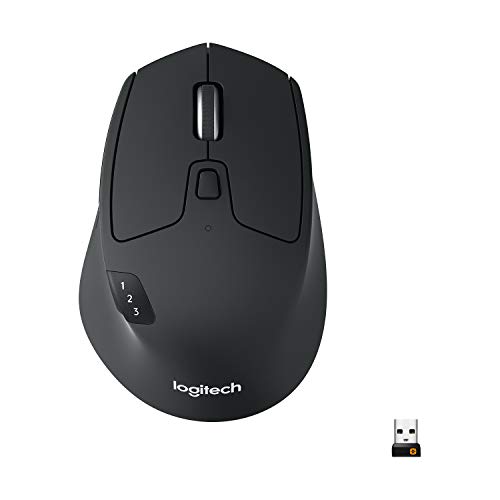
Logitech M720 Triathlon
- Best for: Switching between a MacBook Air and another computer.
- 1000 DPI sensor
- 6 programmable buttons
- Bluetooth and Unifying receiver
- Up to 2-year battery life
Switching between a MacBook Air and another computer.
The 1000 DPI sensor is modest for large external monitors, so check your screen size before buying.
The Logitech M720 Triathlon is the multi-device workhorse, a mouse that pairs with up to three devices and switches between them with a single button. Six programmable buttons cover the shortcuts you use most, and the 1000 DPI sensor is steady for everyday work and casual games on a laptop screen. Bluetooth and the Unifying receiver both work, so you can connect to a MacBook Air over Bluetooth and keep the receiver for a second machine. Battery life runs up to two years, which is the longest in this group by a wide margin.
Razer Pro Click Mini
- Best for: Travellers who want a full-featured mouse in a pocket frame.
- Razer 5G optical sensor, 12,000 DPI
- Silent mechanical switches
- HyperScroll wheel
- 7 programmable buttons
Travellers who want a full-featured mouse in a pocket frame.
The small frame suits fingertip and claw grips better than a full palm grip, so check your hand size.
The Razer Pro Click Mini packs a full productivity mouse into a frame that fits in a jacket pocket. A Razer 5G optical sensor reaches 12,000 DPI, silent mechanical switches keep clicks quiet in libraries and meetings, and the HyperScroll wheel switches between precise steps and free spinning. Seven programmable buttons cover shortcuts, and the mouse connects over 2.4GHz wireless or Bluetooth to up to four devices. It weighs 88 grams with one AA battery and 111 grams with two, and battery life runs up to 725 hours. The model number is RZ01-03990100-R3A1.
Logitech MX Anywhere 3S
- Best for: Working on glass desks and travelling light.
- 8K DPI any-surface tracking, including glass
- Quiet Clicks
- MagSpeed scroll wheel, 1,000 lines per second
- Up to 70 days battery life
Working on glass desks and travelling light.
The compact shape suits small and medium hands better than large ones, so check the dimensions first.
The Logitech MX Anywhere 3S is the travel pick, a compact mouse that tracks on any surface including glass, which is the feature that sets it apart for MacBook Air owners who work on hotel desks and cafe tables. An 8K DPI sensor and Quiet Clicks match the larger Master 3S, and the MagSpeed wheel scrolls 1,000 lines per second. Battery life runs up to 70 days with USB-C quick charging, and Flow lets you move between three computers. Bluetooth and Bolt both work, and the Graphite model is 910-006925.
Which One Fits Your Situation
Desk Work and Long Sessions
The MX Master 3S is the pick for desk work, because its full-size shape supports the palm and the MagSpeed wheel moves through long documents fast. The 141-gram weight keeps it planted during precise work. If you also game at the desk, the 8K sensor handles fast movement cleanly. Keep it at the desk, since the size does not suit a sleeve.
Switching Between Machines
The M720 Triathlon is the pick if you move between a MacBook Air and a desktop or a work laptop, because one button switches the mouse between three paired devices. The two-year battery means you never think about charging it. The Pro Click Mini is the alternative if you want the same multi-device trick in a smaller frame with a stronger sensor.
Travel and Coffee Shop Work
The MX Anywhere 3S is the pick for travel, because it tracks on glass and fits in a sleeve beside the Air. The 70-day battery and USB-C charging match the laptop’s own cable, so you carry one charger. The Pro Click Mini is the fallback if you prefer AA batteries you can buy anywhere instead of recharging.
Quiet Rooms and Libraries
The Pro Click Mini is the pick for quiet rooms, because its silent mechanical switches and compact frame keep both noise and footprint low. The MX Anywhere 3S is the alternative with the same quiet clicks in a slightly larger body. Either mouse keeps you from drawing looks in a library or a meeting.
Common Mistakes
- Buying a heavy gaming mouse for a laptop you carry everywhere, then leaving it at home because it does not fit the sleeve.
- Choosing a mouse that needs a USB receiver when your MacBook Air has no spare port for the dongle.
- Picking a full-size mouse for small hands and ending up with a claw grip that aches after an hour.
- Assuming any sensor tracks on glass, then discovering your mouse skips on a hotel desk or a glass table.
- Forgetting to check battery style, and ending up with a rechargeable mouse when you wanted AA batteries for travel.
Frequently Asked Questions
Do gaming mice work with a MacBook Air?
Yes. All four mice here connect over Bluetooth and work with macOS, and most of their buttons and scroll features work without extra software. Some advanced features, such as custom button mapping, need the maker’s software, which is available for Mac. Check the software page for your mouse before buying if you rely on remapping.
Is Bluetooth fast enough for gaming on a MacBook Air?
Bluetooth is fine for casual and story-driven games, and most players will not notice the difference from a wired connection. For fast competitive games, a 2.4GHz receiver connection has lower latency than Bluetooth. The Pro Click Mini and the M720 both include a receiver option for those sessions.
What size mouse fits a MacBook Air bag?
Compact mice like the MX Anywhere 3S and the Pro Click Mini fit in a sleeve pocket beside the laptop. Full-size mice like the MX Master 3S need a separate pocket or a larger bag. Measure your sleeve before buying, because a mouse that does not fit the bag gets left behind.
How long should a wireless mouse battery last?
It depends on the mouse: the M720 runs for up to two years, the MX Anywhere 3S runs for up to 70 days on a charge, and the Pro Click Mini runs for up to 725 hours on AA batteries. Rechargeable mice charge over USB-C, while battery mice need a spare AA. Pick the style that matches how you travel.
FAQ
Do gaming mice work with a MacBook Air?
Is Bluetooth fast enough for gaming on a MacBook Air?
What size mouse fits a MacBook Air bag?
How long should a wireless mouse battery last?
More from Amazon
Programs that pair well with the guide above. Offers and eligibility are set by Amazon and may change.
Free shipping on eligible items, Prime Video and more. Eligible new members can start with a free trial.
Start a Prime free trialAd-free music streaming. Eligible new subscribers can start with a free trial.
Try Music Unlimited freeA Prime membership for ages 18-24 with a trial period. Eligibility is set by Amazon.
See Prime for Young AdultsAudiobooks and podcasts to listen to on the go. Eligible new members can start with a free trial.
Try Audible freeAs an Amazon Associate we earn from qualifying purchases.









