Key takeaways
- Only one gaming mouse pad still charges your mouse while you play. See how it works, which mice it fits, and what to check before you buy it.
Shopping for a mouse pad that charges your mouse sounds simple until you check what is actually still available. Most pads with the words wireless charging in the name are Qi mats built for phones, with a small charging circle in one corner and a mouse surface that does nothing for the mouse itself. True mouse-charging pads are a much smaller group, and most of the famous names in it have quietly left the market, so the real question is which system still exists, fits your mouse, and keeps working while you play.
This guide is for Logitech G owners who want to stop plugging in a mouse, for buyers weighing a switch into that ecosystem, and for anyone who has seen an old charging pad recommended somewhere and wants to know whether it is still sold. The pick below comes from the name and listed details on its Amazon page, and it explains the compatibility trap, the discontinued rivals, and the checks worth doing before you order.
Quick Picks
As an Amazon Associate we earn from qualifying purchases
| Product | Best for | Key spec from title |
|---|---|---|
| Logitech G POWERPLAY 2 | Logitech G owners who never want to plug in a mouse | Wireless charging mouse pad, 34.5 x 28.4 cm, 3.5 mm height |
How to Choose
Whole-surface charging or a Qi corner
Two very different ideas hide behind the same phrase, and mixing them up is the most common way to buy the wrong pad. A whole-surface system charges the mouse anywhere on the mat while you move it, using a coil or puck fitted to that mouse, so the battery stays topped up through a full session. A Qi-corner pad only charges a device parked on a marked circle, which suits a phone resting beside the keyboard but does nothing for a mouse in motion. Check where charging happens: continuous charging across the surface means the mouse itself is being powered, while a charging zone usually means the pad is a phone charger with a mouse surface attached and nothing more.
Mouse compatibility comes first
A charging pad is useless without a mouse built to receive its power, so compatibility outranks surface feel, size, and lighting in this category. The surviving whole-surface system works only with certain Logitech G wireless mice, and each one needs the small charging coin fitted inside before the pad can do anything. Before you buy, open the listing and check that your exact mouse model appears among the compatible models, and confirm whether the coin comes in the box or needs buying separately. Bundles that pair the pad with a mouse can settle both questions at once, since the pairing itself shows the two were made to work together. A bundle listing is the fastest proof of a real match.
Surface, size, and desk fit
Once compatibility is settled, the pad still has to work as a pad, and here the usual mouse-pad questions apply with one extra twist. A cloth surface gives a controlled glide and suits low-sensitivity aiming, while a hard surface feels faster and wipes clean far more easily, so pick the texture your wrist already likes rather than chasing an unfamiliar new feel. Measure the desk space too: a charging pad cannot be slid under a keyboard the way a plain mat can, because the power cable and the charging base set exactly where it must sit. Check the listed dimensions against the clear space on your desk, and leave room for the cable run to a spare USB port nearby.
Power, cable, and what the box holds
Every charging pad is also a powered device, which adds a cable and a power draw that a plain mat never has. Look closely at how the pad connects: a USB-A cable to the PC is the usual arrangement, and it means one more port occupied and one more cable to route, though plugging into the PC also lets the pad switch off together with the machine. The box contents matter as well, since the charging coin, the cable, and the pad itself may be listed separately in the description. A listing that names each included part leaves no guessing about what else you need to order on day one. A short, tidy cable run keeps the whole desk clean.
The 1 Best Option
Logitech G POWERPLAY 2 Wireless Charging Mouse Pad

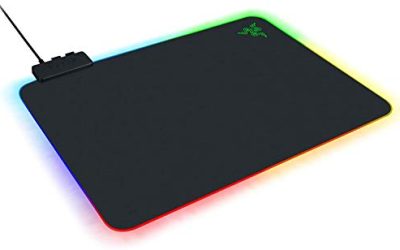
The POWERPLAY 2 is the one whole-surface charging pad in this guide, and it solves the exact problem the keyword describes: a mouse that never needs plugging in. Its listing describes continuous charging that powers a compatible mouse in motion or at rest, so the battery tops up during play instead of during a break. It measures 34.5 by 28.4 cm with a slim 3.5 mm height, connects through a USB-A cable to a PC or power adapter, and works with current and future Logitech G wireless tech, including LIGHTSPEED 4 KHz. Amazon bundles pair it with the G309, the G502 X Plus, and the Pro X Superlight 2 DEX.
Specs
- Wireless charging mouse pad for compatible Logitech G gaming mice
- 34.5 x 28.4 cm (13.5 x 11.2 inches), 3.5 mm height
- For PC/Mac
- Charges the mouse continuously while it is in motion or at rest
- Connects through a USB-A cable to a PC or power adapter
- POWERPLAY 2 Coin fits inside the mouse to receive the charge
- Works with current and future Logitech G wireless tech, including LIGHTSPEED 4 KHz
- Model 947-000001
Best for: Logitech G owners with a compatible wireless mouse who want charging to disappear into the background of every session.
Watch out for: it only charges compatible Logitech G mice, and the coin must be fitted inside the mouse first — confirm it is still sold before buying, since this listing could not be checked live.
Which One Fits Your Situation
You already own a compatible Logitech G mouse
This is the straightforward case, and the POWERPLAY 2 is built for it. Check your mouse model against the compatible list on the listing, fit the coin, then plug the pad into a USB port, and the charging problem goes away without changing anything else about your setup. The cloth surface and the listed dimensions suit a standard desk, and the continuous charging means the mouse is ready whenever you sit down. It simply removes the cable from your setup.
You use a mouse from another brand
A charging pad cannot rescue a mouse that was never built to receive its power, so the POWERPLAY 2 acts as an ordinary pad for a non-Logitech mouse. Your honest options are to switch to a compatible Logitech G mouse, which turns the pad into the system it was designed to be, or to skip this category and buy a plain pad plus a short charging cable. Buying the pad first and hoping for compatibility is the wrong order entirely.
You mainly want to charge a phone on the desk
The POWERPLAY 2 charges a mouse, not a phone, so it is simply the wrong tool for a phone-charging desk. A Qi-corner pad or a small standalone Qi stand handles a phone far better and costs less than a full whole-surface mouse system, though neither one will ever charge your mouse while you play. Decide which device actually needs the wireless power first, then buy the pad that serves that device rather than one that merely mentions charging in passing.
Your desk is small or made of metal
Measure the desk carefully before you order, because the pad needs its full listed footprint plus a cable route to a USB port, and it cannot share space with a keyboard the way a thin plain mat can. A metal desk always needs an extra check as well: this kind of charging system is known to struggle on ferrous metal surfaces, so always confirm the listing’s own guidance on desk materials before buying if your desk has a steel top.
Common Mistakes
- Assuming any pad with wireless charging in the name charges a mouse — most Qi pads charge a phone parked on a corner circle and do nothing for the mouse.
- Buying the pad before checking the mouse — the POWERPLAY 2 only works with compatible Logitech G mice, and an incompatible mouse gets no benefit at all from the charging hardware underneath.
- Forgetting the coin — the POWERPLAY 2 Coin must be fitted inside the mouse, so a pad without the coin in the box is an unfinished system.
- Trusting old recommendations without a fresh check — several well-known charging pads, including the Corsair MM1000 and the ASUS ROG Balteus Qi, are discontinued or out of stock, and a stale guide will not tell you that.
- Ignoring the desk itself — a steel-top desk can interfere with this kind of charging, and a cramped desk may leave no room for the pad, its control module, and the cable run.
Frequently Asked Questions
Does the POWERPLAY 2 charge any wireless mouse?
No. It charges only fully compatible Logitech G wireless mice, and each one needs the POWERPLAY 2 Coin fitted inside before charging starts. A mouse from another brand, or a Logitech model outside the compatible list, will still glide on the pad like any ordinary mat and receive no power at all. Check the compatible list on the listing before you buy, since similar model names are easy to confuse.
Does the mouse charge while I am moving it?
Yes, that is the whole point of a whole-surface system. The listing describes continuous charging while the mouse is in motion or at rest, so the battery tops up during play rather than only when the mouse sits still. You never need to park the mouse or pause a session just to top it up. A Qi-corner pad cannot do this, since its charging only works on the marked circle.
Can I use the POWERPLAY 2 to charge my phone?
No, it is built to charge a compatible mouse through the coin fitted inside it, not a phone. The coin-based system has no Qi coil for phones, so a phone placed on the pad simply sits there. If phone charging is what your desk needs, a Qi pad with a charging zone or a standalone Qi stand is the right purchase, and it will cost less than a mouse-charging system.
Why does this guide list only one pad?
Because the pool of pads that truly charge a gaming mouse while you play is genuinely that small right now. The other well-known names in this category are discontinued or out of stock, and padding the list with phone-charging mats or plain pads would mislead readers more than it would help them. The whole category is genuinely thin, and an honest short list serves readers better than a padded one.
FAQ
Does the POWERPLAY 2 charge any wireless mouse?
Does the mouse charge while I am moving it?
Can I use the POWERPLAY 2 to charge my phone?
Why does this guide list only one pad?
More from Amazon
Programs that pair well with the guide above. Offers and eligibility are set by Amazon and may change.
Free shipping on eligible items, Prime Video and more. Eligible new members can start with a free trial.
Start a Prime free trialAd-free music streaming. Eligible new subscribers can start with a free trial.
Try Music Unlimited freeA Prime membership for ages 18-24 with a trial period. Eligibility is set by Amazon.
See Prime for Young AdultsAudiobooks and podcasts to listen to on the go. Eligible new members can start with a free trial.
Try Audible freeAs an Amazon Associate we earn from qualifying purchases.