1440p gaming hits the sweet spot between visual fidelity and smooth performance, but finding the right graphics card to push those 2560×1440 pixels without compromise can be a real headache. Buyers face a confusing landscape of competing GPU architectures, memory configurations that look similar on paper but perform wildly differently, and prices that swing from budget-friendly to eye-watering with little apparent logic. Throw in ray tracing demands, feature sets like FSR and XeSS, and the ever-present question of whether a given card will bottleneck your current CPU, and it’s easy to feel paralyzed by choice.
Our top picks
 ASRock Radeon RX 9060 XT Challenger 16GB
RDNA 4 architecture adds AI-enhanced 1440p performance
16GB GDDR6 memory suits modern game textures
0dB silent mode keeps idle operation quiet
Requires a single 8-pin power connector and adequate PSU capacity
128-bit memory bus trails wider high-end buses
 ASUS Dual Radeon RX 9060 XT 16GB
- Axial-tech fans now feature a smaller fan hub…
- 2.5-slot design allows for greater build compatibility while…
- 0dB technology lets you enjoy light gaming in…
 XFX Swift AMD Radeon RX 9060 XT
- Chipset: AMD RX 9060 XT
- Memory: 16 GB GDDR6
- XFX SWFT Triple Fan Cooling Solution
| Product | Key specs | |
|---|---|---|
| ASRock Radeon RX 9060 XT Challenger 16GB | Check price | |
| ASUS Dual Radeon RX 9060 XT 16GB | Axial-tech fans now feature a smaller fan hub… 2.5-slot design allows for greater build compatibility while… 0dB technology lets you enjoy light gaming in… | Check price |
| XFX Swift AMD Radeon RX 9060 XT | Chipset: AMD RX 9060 XT Memory: 16 GB GDDR6 XFX SWFT Triple Fan Cooling Solution | Check price |
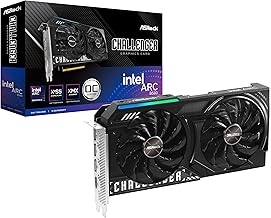 ASRock Intel Arc B580 Challenger 12GB OC ASRock Intel Arc B580 Challenger 12GB OC | Check price | |
 GIGABYTE Radeon RX 9070 XT Gaming OC GIGABYTE Radeon RX 9070 XT Gaming OC | Powered by Radeon RX 9070 XT WINDFORCE Cooling System Hawk Fan | Check price |
 ASRock AMD Radeon RX 7700 XT Challenger ASRock AMD Radeon RX 7700 XT Challenger | High-Performance GPU: AMD Radeon RX 7700 XT with… Blazing Fast Clock Speeds: Boost Clock up to… Ample Memory Configuration: 12GB GDDR6 memory on a… | Check price |
 GIGABYTE GeForce RTX 5070 Ti Gaming OC GIGABYTE GeForce RTX 5070 Ti Gaming OC | Powered by the NVIDIA Blackwell architecture and DLSS… Powered by GeForce RTX 5070 Ti Integrated with 16GB GDDR7 256bit memory interface | Check price |
 ASUS Dual NVIDIA GeForce RTX 5060 Ti ASUS Dual NVIDIA GeForce RTX 5060 Ti | AI Performance: 767 AI TOPS OC mode: 2632 MHz (OC mode)/ 2602 MHz… Powered by the NVIDIA Blackwell architecture and DLSS… | Check price |
As an Amazon Associate we earn from qualifying purchases at no extra cost to you.
This guide cuts through the noise by focusing on the graphics cards that genuinely deliver at 1440p, regardless of brand loyalty. We’ve selected options that balance raw rasterization performance, memory capacity for modern texture-heavy titles, thermal management, and overall value. Whether you’re aiming for high-refresh-rate esports dominance or cinematic single-player experiences with settings maxed, the cards below represent the best options available right now.
🛒 Best Price Today on Amazon
Prime members get fast, free shipping on everything above, plus member-only deals. New members get a 30-day free trial — cancel anytime.
Watch: Best Graphics Cards for 1440p Gaming — Video Review
How to Choose a Graphics Card for 1440p Gaming
- VRAM Capacity: Modern 1440p titles routinely demand 12GB or more to run at high texture settings without stuttering. Prioritize cards with 16GB where your budget allows, as future-proofing matters more than ever with newer engines pushing asset quality higher each year.
- Cooling Solution: Dual and triple fan configurations matter at 1440p since sustained loads generate significant heat. Look for designs with 0dB silent modes for light workloads, but ensure the cooler can handle extended gaming sessions without thermal throttling.
- Feature Ecosystem: Consider upscaling and frame generation technologies. AMD’s FSR, Intel’s XeSS, and NVIDIA’s DLSS can meaningfully boost frame rates at 1440p, and newer architectures deliver better implementation quality. Check which features your favorite games actually support.
- PCIe Interface and Bandwidth: PCIe 5.0 cards are becoming standard on newer GPUs, but most 1440p scenarios won’t see meaningful performance differences between PCIe 4.0 and 5.0. Still, matching your motherboard’s slot version ensures you’re not leaving free performance on the table.
- Power and Case Clearance: Verify your power supply has the appropriate connectors and wattage headroom, and measure your case clearance against the card’s physical dimensions. High-performance 1440p cards often exceed 300mm in length and can draw 250W or more under load.
The Best Graphics Cards for 1440p Gaming Reviewed
ASRock Radeon RX 9060 XT Challenger 16GB OC
This RDNA 4 card delivers excellent 1440p performance with a healthy 16GB buffer, dual-fan cooling with silent operation, and modern DisplayPort 2.1a output. The Challenger’s aggressive pricing makes it a standout value pick for gamers wanting strong rasterization without overspending.
ASUS Dual Radeon RX 9060 XT 16GB
ASUS brings its reliable Axial-tech fan design and clean 2.5-slot profile to the RX 9060 XT, offering quiet thermals and straightforward installation. It’s a solid choice for builders who want a no-nonsense 1440p card from a trusted board partner with proven warranty support.
XFX Swift RX 9060 XT OC Triple Fan
XFX’s triple-fan configuration keeps the RX 9060 XT running cool under sustained 1440p loads, making it ideal for cases with decent airflow. The factory overclock and robust shroud design appeal to users who want extra thermal headroom for pushing settings higher.
ASRock Intel Arc B580 Challenger 12GB OC
Intel’s Arc B580 punches above its weight at 1440p thanks to strong compute performance and 12GB of GDDR6, with XeSS upscaling providing a meaningful boost in supported titles. It’s an intriguing budget option for gamers willing to embrace Intel’s rapidly maturing driver ecosystem.
GIGABYTE Radeon RX 9070 XT Gaming OC 16G
Stepping up to the RX 9070 XT brings class-leading 1440p performance with 16GB of GDDR6 and PCIe 5.0 support, handling demanding titles with ray tracing better than its siblings. Gigabyte’s Gaming OC cooler is well-regarded for keeping noise levels low under heavy load.
Frequently Asked Questions
Is 12GB of VRAM enough for 1440p gaming?
Twelve gigabytes handles most current 1440p titles at high settings, but some recent games with ultra texture packs can exceed this. If you plan to keep the card for several years and max out settings, 16GB provides meaningful headroom.
Do I need PCIe 5.0 for a 1440p graphics card?
Not necessarily. While newer cards support PCIe 5.0, performance differences at 1440p compared to PCIe 4.0 are minimal in most games. Ensure your motherboard has at least a PCIe 4.0 x16 slot for optimal bandwidth.
What power supply do I need for these cards?
Most cards in this roundup pair well with a quality 650W to 750W power supply. Check each card’s specific TDP and recommended PSU rating, and ensure you have the correct PCIe power connectors.
Are reference cooler designs worse than custom partner cards?
Partner cards like those from ASRock, ASUS, GIGABYTE, and XFX generally offer better cooling, quieter operation, and sometimes factory overclocks compared to reference designs. They’re worth the small premium for most buyers.
Final Thoughts
For pure 1440p value, the ASRock RX 9060 XT Challenger 16GB OC and ASUS Dual RX 9060 XT deliver excellent performance per dollar with ample VRAM for modern titles. If you want more headroom for ray tracing and higher settings, the GIGABYTE RX 9070 XT Gaming OC is the clear step-up choice. Budget-conscious builders should seriously consider the Arc B580 Challenger, which offers surprising capability at its price point.