Our Short List of 3

- Best for: streamers and remote workers with a fixed desk setup who want strong, even light.
- 2800 lumens maximum brightness
- Color temperature range of 2900 to 7000K
- Wi-Fi app control on Mac, PC, iOS, and Android
- Desk clamp mount included

- Best for: small desks and laptop setups where a monitor-top light is the only practical mount.
- 250 lumens maximum brightness
- Color temperature range of 2700 to 6500K
- 93 CRI with TrueSoft full-spectrum LED light
- Three-way monitor mount with adjustable height, tilt, and rotation

- Best for: creators who record phone video or stream from one fixed spot and want a wide, flattering wash.
- 18-inch outer ring diameter
- 55W output at 5600K daylight
- CRI 95 with 240 LEDs
- 5,500 lux at 0.5 meters
All 5 Picks at a Glance
| Product | Specs | Action |
|---|---|---|
| Elgato Key Light |
| Check price on Amazon |
| Logitech Litra Glow |
| Check price on Amazon |
| Neewer RL-18 Ring Light Kit |
| Check price on Amazon |
 UBeesize 10-Inch Ring Light |
| Check price on Amazon |
 Neewer 660 LED Video Light Kit |
| Check price on Amazon |
Key takeaways
- Five lights that fix dim, grainy webcam video: LED panels, ring lights and a two-light kit with adjustable brightness and color temperature for desks.
A webcam can only record the light that reaches it, so a dim room turns even a good camera into a grainy, washed-out mess. The real buying decision is not which camera to upgrade first, but which light puts soft, even illumination on your face without harsh shadows or glare on your glasses. A well-chosen light makes video calls, streams, and recordings look clearer the moment you switch it on.
This guide is for streamers, remote workers, online teachers, and podcasters who want to look natural on camera from a home desk. Every pick below was chosen from the name and specifications on its Amazon listing, with attention to brightness, color temperature, mounting style, and controls, so you can match a light to your room and desk instead of guessing.
Quick Picks
As an Amazon Associate we earn from qualifying purchases
| Product | Best for | Key spec from title |
|---|---|---|
| Elgato Key Light | A dedicated streaming desk | 2800 lumens studio light with desk clamp |
| Logitech Litra Glow | A small desk with no spare space | Premium LED streaming light with TrueSoft |
| Neewer RL-18 Ring Light Kit | Fixed face-to-camera recording | 55W 5600K LED ring light with stand |
| UBeesize 10-Inch Ring Light | A first ring light for phone video | 10-inch LED ring light with 62-inch tripod |
| Neewer 660 LED Video Light Kit | A two-light setup for a small studio corner | Two bi-color 660 LED lights with stands |
How to Choose
Brightness That Matches Your Room
Brightness decides whether your face reads clearly or sinks into noise, and the right amount depends on how dark your room is and how far the light sits from you. A panel near 250 lumens suits a small, already-lit desk, while a 2,500-lumen panel or a large ring light holds up in a dark room or against a bright window behind you. Check whether the listing states lumens or lux, and note the distance that figure was measured at, because a number measured at half a meter looks very different at arm’s length. Dimmable output matters more than a big maximum, since you will usually run the light well below full power once it is aimed correctly.
Color Temperature and Skin Tone
Color temperature shapes how your skin looks on camera, and a mismatch with the lamps already in your room is the most common reason a setup looks off. Daylight near 5600K matches window light and keeps skin tones neutral, warm light near 3200K feels softer in the evening, and an adjustable range lets you blend the two as daylight fades. A high color rendering index, usually shown as CRI 95 or above, means colors stay true instead of drifting green or orange. If your room mixes warm ceiling lamps with cool daylight, pick a light with a wide adjustable range so you can tune it to the room rather than fighting it.
Mounting and Desk Space
A light is only useful if it fits where you sit, so mounting style deserves as much thought as brightness. A monitor-top panel or a desk clamp keeps the light close without eating desk space, which suits a compact setup with one screen. A floor-standing ring light or a pair of panel lights on tall stands needs clear floor space behind or beside the desk, but it gives a wider, softer wash that flatters a fixed recording spot. Measure your desk depth, check the clamp range against your desk thickness, and confirm the stand height reaches above your eye line before you commit to a design.
Controls and Power
How you adjust a light decides whether you actually use it every day or leave it at one setting forever. App control from a phone or computer is handy when the light sits behind a monitor, while physical dials and buttons are faster when the light is within reach. USB-powered lights run from a computer or a powered hub and travel well, but they draw limited power and suit smaller panels. Wall-powered panels are brighter and steadier for long sessions, yet they need a free outlet near the desk. Check what is in the box, including the power adapter, cable length, and mount, so nothing essential is missing on arrival.
The 5 Best Options
Elgato Key Light
- Best for: streamers and remote workers with a fixed desk setup who want strong, even light.
- 2800 lumens maximum brightness
- Color temperature range of 2900 to 7000K
- Wi-Fi app control on Mac, PC, iOS, and Android
- Desk clamp mount included
streamers and remote workers with a fixed desk setup who want strong, even light.
confirm your desk edge fits the clamp and that your Wi-Fi network is supported for app control.
The Elgato Key Light is the strongest choice for a permanent streaming desk where the light stays put and gets used for hours at a time. Its edge-lit panel throws a wide, even wash that softens shadows without a harsh hotspot in the middle of your face, and the output is strong enough to hold up in a dark room or against window light. App control lets you change brightness and color temperature from your computer or phone without reaching behind the monitor, which keeps your framing steady during a stream or a long call.
Watch out for: confirm your desk edge fits the clamp and that your Wi-Fi network is supported for app control.
Logitech Litra Glow
- Best for: small desks and laptop setups where a monitor-top light is the only practical mount.
- 250 lumens maximum brightness
- Color temperature range of 2700 to 6500K
- 93 CRI with TrueSoft full-spectrum LED light
- Three-way monitor mount with adjustable height, tilt, and rotation
small desks and laptop setups where a monitor-top light is the only practical mount.
check that the mount grips your monitor thickness, since very thin or curved screens can sit loosely.
The Logitech Litra Glow is built for desks where space is tight and the light has to sit on top of the monitor. Its frameless diffuser spreads soft light across your face instead of throwing a narrow beam, and the compact panel stays out of the way of a second screen or a microphone arm. The three-way monitor mount adjusts height, tilt, and rotation, so you can aim the light at your face rather than at the ceiling, and the desktop app stores presets for different times of day.
Watch out for: check that the mount grips your monitor thickness, since very thin or curved screens can sit loosely.
Neewer RL-18 Ring Light Kit
- Best for: creators who record phone video or stream from one fixed spot and want a wide, flattering wash.
- 18-inch outer ring diameter
- 55W output at 5600K daylight
- CRI 95 with 240 LEDs
- 5,500 lux at 0.5 meters
creators who record phone video or stream from one fixed spot and want a wide, flattering wash.
Neewer sells several RL-18 listings, so confirm the 55W 5600K kit with stand, phone holder, soft tube, and bag.
The Neewer RL-18 is the classic large ring light for a fixed spot where you record talking-head video or stream from a phone. The 18-inch ring wraps light around the lens, which fills in shadows under the chin and gives the eyes a clean circular catchlight. The kit arrives with a floor stand, a phone holder, a soft diffusion tube, and a carry bag, so it works as a complete recording station rather than a single light that needs extra parts. Daylight output keeps skin tones neutral under ordinary room lighting.
Watch out for: Neewer sells several RL-18 listings, so confirm the 55W 5600K kit with stand, phone holder, soft tube, and bag.
UBeesize 10-Inch Ring Light
- Best for: first-time buyers who want an affordable ring light for phone video and casual streams.
- 10-inch LED ring light
- 62-inch tripod stand included
- Phone holder in the center of the ring
- USB-powered design
first-time buyers who want an affordable ring light for phone video and casual streams.
UBeesize sells several 10-inch variants, so confirm the listing shows the 62-inch tripod stand in black.
The UBeesize 10-inch ring light is a simple starting point for phone video, live streams, and video calls from a desk or a small room. The ring is small enough to sit on a desk or pack away, while the tall tripod raises it to face height when you need a proper key light. A phone holder in the center of the ring keeps the camera in the middle of the light, which is the position that gives the most even illumination on your face. It runs from USB power, so it works from a laptop, a powered hub, or a wall adapter you already own.
Watch out for: UBeesize sells several 10-inch variants, so confirm the listing shows the 62-inch tripod stand in black.
Neewer 660 LED Video Light Kit
- Best for: a dedicated recording corner where two lights can stay set up on stands.
- Two 660 LED panels in one kit
- Bi-color range of 3200 to 5600K
- CRI 96 or above
- Dimmable output on each panel
a dedicated recording corner where two lights can stay set up on stands.
measure the floor space for two stands, and confirm both panels, both stands, and both barn door sets are in the box.
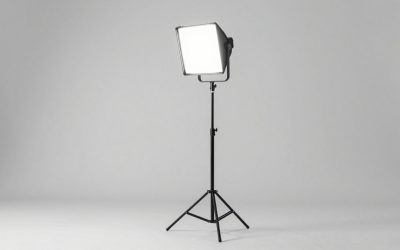
The Neewer 660 kit is the pick for anyone who wants a real two-light setup instead of a single source. Two bi-color panels let you place one light as the key on your face and the second as a fill from the other side, which evens out shadows far better than turning one light up brighter. Each panel dims across a warm-to-daylight range, and the included stands, U brackets, and barn doors give you control over where the light falls. It takes more floor space than a monitor light, but it is the closest thing here to a small studio corner.
Watch out for: measure the floor space for two stands, and confirm both panels, both stands, and both barn door sets are in the box.
Which One Fits Your Situation
A Dark Room With a Window Behind You
A window behind you turns your face into a silhouette, so you need a strong light in front of you that can compete with daylight. Pick the Elgato Key Light for its 2800-lumen output and wide panel, and place it just behind your monitor at face height. Close the blinds partway if you can, then dim the panel until your face matches the room instead of glowing against it.
A Small Desk With No Floor Space
When the desk barely holds a monitor and a keyboard, a floor stand or a big ring light is not an option. Pick the Logitech Litra Glow, which mounts on top of the monitor and leaves the desk clear. Its soft diffuser keeps the light gentle at close range, and the app presets let you switch between a bright daytime setting and a warmer evening one.
Phone-First Recording and Live Streams
If your phone is the camera, the light should hold the phone in the middle of the glow. Pick the UBeesize 10-inch ring light for a compact, portable setup, or the Neewer RL-18 when you record from one fixed spot and want a larger, softer ring. Both put the phone at the center of the light, which is what keeps your face evenly lit.
A Two-Person or Wide Recording Setup
One small light cannot cover two people or a wide shot without leaving one side dark. Pick the Neewer 660 two-light kit and place one panel on each side of the desk, angled inward at about 45 degrees. The two sources balance each other, so neither person sits in shadow, and the barn doors keep stray light off the background.
Common Mistakes
- Putting the light behind you, which turns your face into a dark silhouette on camera.
- Mixing a cool-white panel with warm room lamps and never adjusting the color temperature to match.
- Buying a light that is too dim for the room, then running it at full power and getting harsh glare.
- Choosing a floor stand or a desk clamp without measuring the desk, the floor space, or the mount range first.
- Forgetting to check the power source, so a USB light ends up on a weak port or a wall-powered panel ends up far from an outlet.
Frequently Asked Questions
Do I need a light if my room has a window?
A window helps during the day, but it changes with the weather and the time, and it often sits to one side or behind you. A dedicated light gives you steady, even illumination that does not shift when a cloud passes or the sun moves. Use window light as a bonus and let the panel or ring light do the consistent work.
Ring light or LED panel: which is better for video calls?
A ring light suits phone recording and fixed talking-head shots because it wraps light around the lens and gives a flattering catchlight in the eyes. An LED panel suits a desk setup because it mounts on a monitor or a clamp, throws a wider wash, and adjusts more precisely. Pick the ring for a fixed camera spot and the panel for a daily desk.
What color temperature looks best on camera?
Daylight near 5600K looks most natural for most people, because it matches window light and keeps skin tones neutral. Warmer light near 3200K feels softer in the evening but can look yellow against a cool room. An adjustable light is the safest choice, since you can tune it to your room and the time of day.
Can I use these lights with any webcam?
Yes, these lights work with any webcam, because they only change the light in the room and never connect to the camera itself. Mount the light near the webcam, aim it at your face, and let the camera adjust to the brighter scene. A built-in laptop camera benefits just as much as a separate webcam on a monitor.
FAQ
Do I need a light if my room has a window?
Ring light or LED panel: which is better for video calls?
What color temperature looks best on camera?
Can I use these lights with any webcam?
More from Amazon
Programs that pair well with the guide above. Offers and eligibility are set by Amazon and may change.
Free shipping on eligible items, Prime Video and more. Eligible new members can start with a free trial.
Start a Prime free trialAd-free music streaming. Eligible new subscribers can start with a free trial.
Try Music Unlimited freeA Prime membership for ages 18-24 with a trial period. Eligibility is set by Amazon.
See Prime for Young AdultsAudiobooks and podcasts to listen to on the go. Eligible new members can start with a free trial.
Try Audible freeAs an Amazon Associate we earn from qualifying purchases.