Our Top Picks
 TONOR Gaming Microphone Set with Boom Arm518.4 cubic inches16 x 6 x 5.4 inches1 poundsCheck on Amazon


The best streaming microphones under $50 are the FIFINE AmpliGame A6V for a full desk kit with stand and pop filter, the MAONO DGM20S for headphone monitoring and a boom arm, and the TONOR TC310+ set for an arm-mounted bundle. All three are USB condenser mics that plug straight into a PC.
A streaming microphone needs to do three things well: capture a clear voice, mute quickly when you cough or take a call, and stay out of the way of your screen and keyboard. At this ceiling almost every option is a USB condenser with RGB lighting, a tap-to-mute control and either a tripod stand or a boom arm.
Every model below is compared from listing specifications. Gaming, home office and small-space use are covered in the buying section and the FAQ, so you can pick the kit that fits the way you stream.
Quick Comparison
| Model | Key specs per listing | Best for |
|---|---|---|
| FIFINE AmpliGame A6V USB Gaming Microphone | USB condenser, quick mute, RGB, gain control, tripod stand, pop filter, shock mount | A complete starter kit |
| MAONO DGM20S USB Gaming Microphone | USB condenser, noise reduction, RGB, tap-to-mute, gain control, headphone monitoring, boom arm | Streamers who want monitoring |
| TONOR TC310+ Gaming Microphone Set with Boom Arm | USB vocal condenser, boom arm, stand, RGB, tap mute, gain control | Arm-mounted bundle for content creators |
| ONIKUMA Gaming USB Microphone with Boom Arm | USB condenser, noise cancellation, mute, boom arm, reverb adjustment, monitoring | Gamers who want reverb and monitoring |
| MAONO DGM20 USB Gaming Microphone | USB, noise reduction, RGB, tap-to-mute, gain control, plug and play | Plug-and-play desk use |
| Gaming Microphone for PC (COCONISE) | USB condenser, quick mute, pop filter, RGB, PS4 and PS5 compatible | Entry streaming on a tight spend |
The table uses only the features each listing names: mounting hardware, mute control, gain control, monitoring and console compatibility. Listings rarely state sample rates or frequency range at this price tier, so those are marked as not listed in the picks below. Phrases such as clear voice and noise reduction are seller wording, not a measurement.
FIFINE AmpliGame A6V USB Gaming Microphone
As an Amazon Associate we earn from qualifying purchases at no extra cost to you.

Spec line: USB condenser gaming microphone with quick mute, RGB, gain control, tripod stand, pop filter and shock mount, for PC and PS5, Discord, Twitch, podcasts and YouTube.
FIFINE’s A6V is the most complete bundle in the list, because the listing names the tripod stand, pop filter and shock mount alongside the mic. That means you can unbox it and start streaming without extra accessories. Quick mute and gain control sit on the mic, so you can reduce the level or silence it without opening software. PC and PS5 use are named, so it works on a console too. The tripod stand takes desk space, so a small desk may prefer an arm. Sample rate and frequency details are not in the listing text.
- Pro: Stand, pop filter and shock mount named
- Pro: Quick mute and gain control
- Pro: PC and PS5 compatible
- Con: Tripod stand uses desk space
- Con: Sample rate not listed
MAONO DGM20S USB Gaming Microphone

Spec line: USB gaming microphone, noise reduction condenser, RGB lighting, tap-to-mute, gain control, headphone monitoring and boom arm, for Discord, gaming, streaming and content creation.
The DGM20S is the top-priced pick in this group, and the listing justifies it by naming a boom arm and headphone monitoring. A boom arm lifts the mic off the desk, so it keeps keyboard thumps lower than a tripod, and monitoring lets you hear your own voice without lag, which helps you avoid shouting. Tap-to-mute and gain control are listed too. It is the most streaming-focused model here, but the noise-reduction wording is seller language and does not replace a quiet room. The boom arm needs a clamp point on the desk edge.
- Pro: Boom arm named in the listing
- Pro: Headphone monitoring listed
- Pro: Tap-to-mute and gain control
- Con: Highest price in the group
- Con: Needs desk edge for the clamp
TONOR TC310+ Gaming Microphone Set with Boom Arm

Spec line: Gaming microphone set with boom arm, vocal condenser USB microphone for PC with stand, RGB, tap mute and gain control.
TONOR packages the TC310+ as a content creator set. The listing names a boom arm, a stand, RGB, tap mute and gain control, which covers the main controls you want on a streaming mic. It is the lowest-priced option here with a boom arm in the box, so it is a sensible pick for someone who wants the arm benefit without paying the top tier. The listing calls it a vocal condenser microphone, which suggests a voice-focused tuning, but no frequency range or sample rate is given. The set is aimed at PC use, and console compatibility is not stated.
- Pro: Boom arm and stand in the set
- Pro: Tap mute and gain control
- Pro: Lower price than the MAONO
- Con: Console support not stated
- Con: Sample rate not listed
ONIKUMA Gaming USB Microphone with Boom Arm

Spec line: USB gaming microphone, noise-cancellation condenser with mute, boom arm, reverb adjustment and monitoring, for streaming, podcasting, Discord, YouTube, PC, PS4, PS5 and Mac.
ONIKUMA’s listing is the broadest in terms of platforms: PC, PS4, PS5 and Mac are all named, which helps if one microphone has to serve a console and a computer. It also lists a boom arm, monitoring and a reverb adjustment, the last of which is unusual at this price. A reverb control adds an effect to your voice, which some streamers like and others avoid, so check whether you can turn it fully off. The brand has a gaming focus rather than an audio heritage, and the listing gives no sample rate. It is a solid all-rounder for a casual stream.
- Pro: PC, PS4, PS5 and Mac named
- Pro: Boom arm and monitoring listed
- Pro: Reverb adjustment included
- Con: Brand has little audio heritage
- Con: Reverb is not for everyone
MAONO DGM20 USB Gaming Microphone

Spec line: USB gaming microphone with clear voice, RGB lighting, noise reduction, tap-to-mute, gain control and plug-and-play setup, for Discord, streaming, podcasting, chat and PS5 or PS4 gaming.
The DGM20 is the simpler sibling of the DGM20S. The listing leaves out the boom arm and monitoring wording of the S, but keeps the RGB, tap-to-mute and gain control, and it names PS5 and PS4 use alongside PC. That makes it a good choice if you already own an arm or prefer a stand-mounted mic and want to save money. The listing calls it plug and play, so no driver should be needed on a PC. Because two MAONO models appear here, choose the DGM20S only if you want monitoring, otherwise this one covers the basics.
- Pro: Plug and play
- Pro: Tap-to-mute and gain control
- Pro: PS5 and PS4 named
- Con: No arm or monitoring named
- Con: Stand not described
Gaming Microphone for PC (COCONISE)
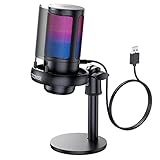
Spec line: USB condenser gaming microphone with quick mute, pop filter and RGB, compatible with PS4, PS5, computer and laptop.
This COCONISE model is the entry point of the group. The listing names a condenser capsule, a quick mute button, a pop filter and RGB lighting, plus compatibility with PS4, PS5, computers and laptops. It is the lowest-priced pick here, so it suits a first stream or a spare mic for a second room. The trade-offs are visible in the listing: no boom arm, no monitoring and no gain control are named, so you get the basics only. The title leans on gift wording rather than technical detail, which makes it hard to judge the capsule. Use it as a starter and upgrade later.
- Pro: Pop filter named
- Pro: Quick mute
- Pro: PC and console compatible
- Con: No gain control or monitoring named
- Con: Few technical details
What Matters on a Streaming Mic at This Price
A USB mic under $50 will not match a studio XLR setup, but it can sound clear and consistent if you place it correctly. Distance, angle and room echo matter more than the capsule, so a boom arm that brings the mic close to your mouth is worth more than extra lighting effects.
Controls are the second factor. Tap-to-mute lets you silence the mic with a touch, a gain knob sets the level without opening software, and a monitor jack lets you hear your voice live. Not every listing names all three, which is why the picks above call out what is and is not listed.
Finally, remember that lighting modes can be turned off, but they add cost. If you prefer a quiet desk, a model with fewer lights and a pop filter can be a better value than one built around RGB.
How to Choose Streaming Microphones Under $50
Mounting hardware
Decide between a tripod stand and a boom arm. A tripod is easy and portable but takes desk room and carries keyboard thumps, while a boom arm lifts the mic and frees the desk. The TONOR, MAONO DGM20S and ONIKUMA name arms, the FIFINE names a tripod.
Controls you will use
Prefer a mic with tap-to-mute and a gain control, since a hardware mute is faster than software mid-stream. Headphone monitoring, listed on the DGM20S and ONIKUMA, is useful if you want to hear yourself and avoid speaking too loudly.
Home office and small-space use
For a home office, a streaming mic for home office use should have a clear mute button and a compact stand for calls. For small desks, a boom arm clears surface space, and a low-profile tripod such as the FIFINE works if you cannot clamp anything.
Gaming and console use
For gaming, a streaming mic for gaming should name your platform. The FIFINE, MAONO DGM20, ONIKUMA and COCONISE listings mention PS4 or PS5, while the TONOR does not. Under $50, check platform support before you buy, because USB mic compatibility on consoles varies.
FAQ
Is a USB microphone good enough for streaming?
Yes, for most streamers. A USB condenser with a mute control and correct placement gives clear speech without an interface.
Do I need a boom arm for streaming?
It is not required, but it keeps the mic close to your mouth and reduces desk noise. Tripod stands work if you cannot clamp an arm.
Will these mics work on a PS5?
Several listings name PS4 or PS5 compatibility, including the FIFINE A6V, ONIKUMA and MAONO DGM20. Check the listing for your console.
Are streaming microphones for small spaces different?
No, but compact stands and arms matter more. Choose a mount that fits your desk and keep the mic away from walls to reduce echo.
Does noise reduction remove keyboard sound?
Not completely. Seller noise-reduction claims help with steady background hum, but placement and a quiet room matter more for keyboard noise.
Last updated: November 2026
FAQ
Is a USB microphone good enough for streaming?
Do I need a boom arm for streaming?
Will these mics work on a PS5?
Are streaming microphones for small spaces different?
Does noise reduction remove keyboard sound?
More from Amazon
Programs that pair well with the guide above. Offers and eligibility are set by Amazon and may change.
Free shipping on eligible items, Prime Video and more. Eligible new members can start with a free trial.
Start a Prime free trialAd-free music streaming. Eligible new subscribers can start with a free trial.
Try Music Unlimited freeA Prime membership for ages 18-24 with a trial period. Eligibility is set by Amazon.
See Prime for Young AdultsAudiobooks and podcasts to listen to on the go. Eligible new members can start with a free trial.
Try Audible freeAs an Amazon Associate we earn from qualifying purchases.