Key takeaways
- Initial Hardware Costs: Software recording costs $0 in upfront hardware fees. Hardware capture cards range from budget dongles around $25 to premium pass-through cards costing $150 to $220.
- Electricity Consumption: Software recording places an additional 10% to 15% system load on your graphics processing unit and power supply during recording sessions. On a standard 650W gaming system running 15 hours a week, this extra thermal and computational load adds roughly $12 to $20 annually in electrical grid power, totaling approximately $60 to $100 over 5 years. A dedicated low-power capture card drawing 2.5W to 5W off USB consumes negligible power (under $2 total over 5 years).
- Hardware Wear and Tear: Running your primary graphics card at elevated temperatures (+5°C to +10°C) over a 5-year lifecycle can accelerate fan bearing wear, requiring earlier component replacement or thermal paste re-application. Conversely, physical capture cards have fixed physical connectors that can wear out if repeatedly plugged and unplugged on a daily basis.
Designing a high-performance gaming or content creation setup inside a living space requires balancing technical power with home aesthetics. When evaluating capture card pass through vs software game recording, the real decision a home gaming enthusiast faces isn’t just about video frame rates or resolution numbers—it is about managing desk space, controlling fan noise in shared living areas, minimizing power draw, and organizing cable management across your furniture.
Hardware pass-through capture cards sit physically between your console or gaming rig and your primary display, sending a zero-latency signal directly to your television or gaming monitor while transmitting encoded footage over USB to a secondary machine or recording drive. Conversely, pure software game recording relies entirely on your computer’s existing graphics card and processor to record gameplay in the background. Choosing the right path impacts your physical room layout, thermal comfort, desk clutter, and overall system longevity.
Our top picks
 Capture Card
- 【1080P HD High Quality】Capture resolution up to 1080p…
- 【Plug and Play】No driver or external power supply…
- 【Compatible with Multiple Systems】suitable for Windows and Mac…
 UGREEN 4K@30Hz Loop Out HDMI Capture Card
- Ultimate HD 2K@30Hz Capture Card: UGREEN capture card…
- 4K Input and HDMI loop-out: UGREEN video capture…
- Versatile USB-A/C Dual Interface: Our HDMI capture card…
![MixPad Free Multitrack Recording Studio and Music Mixing Software [Download]](https://m.media-amazon.com/images/I/71ltIxIuz1L._SL500_.jpg) MixPad Free Multitrack Recording Studio and Music
MixPad Free Multitrack Recording Studio and Music- Create a mix using audio, music and voice…
- Customize your tracks with amazing effects and helpful…
- Use tools like the Beat Maker and Midi…
| Product | Key specs | |
|---|---|---|
| Capture Card | 【1080P HD High Quality】Capture resolution up to 1080p… 【Plug and Play】No driver or external power supply… 【Compatible with Multiple Systems】suitable for Windows and Mac… | Check price |
| UGREEN 4K@30Hz Loop Out HDMI Capture Card | Ultimate HD 2K@30Hz Capture Card: UGREEN capture card… 4K Input and HDMI loop-out: UGREEN video capture… Versatile USB-A/C Dual Interface: Our HDMI capture card… | Check price |
| MixPad Free Multitrack Recording Studio and Music | Create a mix using audio, music and voice… Customize your tracks with amazing effects and helpful… Use tools like the Beat Maker and Midi… | Check price |
 MixPad Multitrack Recording Software for Sound Mixing MixPad Multitrack Recording Software for Sound Mixing | Mix an audio, music and voice tracks Record single or multiple tracks simultaneously Intuitive tools to split, trim, join, and many… | Check price |
As an Amazon Associate we earn from qualifying purchases at no extra cost to you.
Quick Verdict
If you play multi-platform games on consoles like an Xbox Series X or PlayStation 5 from your desk or living room media console, or if you want to keep your PC’s internal temperatures and fan noise to an absolute minimum, a hardware pass-through capture card is the superior choice. It keeps cable routing neat, prevents frame drops on your primary screen, and isolates recording overhead.
If you play exclusively on a single PC, prefer a ultra-minimalist minimalist desk free of dongles and extra HDMI wires, and already possess a modern mid-to-high-end graphics card, software game recording provides a zero-cost, invisible solution that keeps your furniture layout completely uncluttered.
Side by Side
| Feature / Dimension | Capture Card Pass Through | Software Game Recording |
|---|---|---|
| Ease of Use & Comfort | Plug-and-play hardware; requires connecting extra HDMI cables and USB bridges. | Purely digital setup; launch software and map hotkeys without touching a cable. |
| Hardware Durability | Physical aluminum or plastic housing (approx. 2 to 6 oz); susceptible to cable strain over time. | Zero physical wear and tear; entirely virtual software implementation. |
| Price Range | $25 to $200+ depending on pass-through bandwidth and resolution support. | Free (built into GPU drivers or open-source software like OBS). |
| Maintenance & Cable Management | Requires cable ties, desk grommets, or under-desk trays to hide 2-3 extra cords. | Zero physical maintenance; updates handled automatically via desktop software. |
| Desk Space Needed | Requires 2 to 5 inches of flat surface area or a hanging dongle behind the monitor. | 0 sq inches; completely invisible footprint on your workstation surface. |
| Visual Aesthetic | Adds visible hardware blocks, HDMI, and USB cables to your desk ecosystem. | Completely sleek; preserves minimalist, ultra-clean desktop aesthetics. |
| System Thermal & Fan Impact | Minimal thermal impact on primary gaming PC; keeps room fan noise low. | Increases GPU/CPU load, generating +5°C to +10°C higher system heat and louder fan RPMs. |
| Resale & Utility Value | Retains physical trade-in or resale value; usable across multiple devices and consoles. | No physical resale value; tied exclusively to your computer’s operational life. |
| Best For | Multi-device setups, console gaming desks, living room media centers, dual-PC streaming. | Single-PC gamers, ultra-minimalist home offices, compact apartment workspaces. |
Where Capture Card Pass Through Wins
Capture card pass-through technology excels at decoupling your gaming display from the recording pipeline. By routing your display signal physically into an input port on the capture card and out through an HDMI pass-through jack directly to your monitor, the display signal experiences zero delay or signal processing degradation. This allows you to play high-speed competitive games at native 4K or high-refresh rates while sending a separate, compressed video feed via USB 3.0 to a secondary laptop or storage machine.
From an interior and lifestyle perspective, pass-through hardware significantly reduces internal computer thermals. When a computer handles both rendering a game at high settings and encoding video simultaneously via software, internal case temperatures rise. This triggers higher cooling fan speeds, adding up to 45 to 52 decibels of persistent background fan noise to your room. Utilizing external hardware keeps your PC running cooler and quieter, creating a more peaceful home office or bedroom environment.
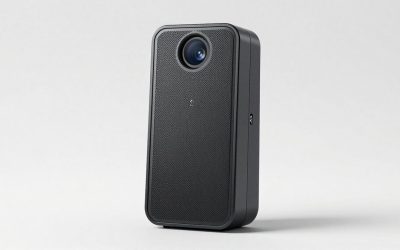
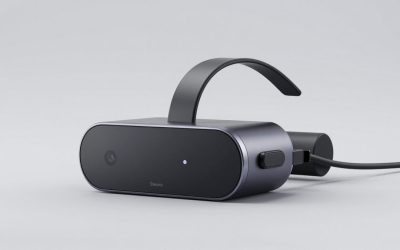
Hardware devices also offer broad compatibility across non-PC devices. If your home setup includes a Nintendo Switch, PlayStation 5, or DSLR camera mounted on a monitor arm, software recording on a single PC cannot natively capture these hardware feeds without an ingest point. Compact entry-level units, such as a compact Capture Card, 4K HDMI Video Capture Card, Game Capture Card, 1080P 60FPS Video Capture Device, HDMI to USB 3.0 Capture Card for Streaming, Work with Camera/Xbox/PS4/PS5/PC/OBS priced around $25.89, give you an instant hardware bridge. Mid-range units like the UGREEN 4K@30Hz Loop Out HDMI Capture Card for 2K 30FPS 1080P 60FPS USB 3.0 at $39.99 add dedicated zero-latency HDMI loop-out ports, making them ideal for living room TV setups where lag-free gaming on the main screen is mandatory.
Where Software Game Recording Wins
Software game recording wins decisively on physical footprint, spatial minimalism, and initial cost. Programs like OBS Studio, Nvidia ShadowPlay, or AMD Software operate entirely inside your computer’s operating system. There are no additional boxes cluttering your custom oak desk, no rigid HDMI cables spilling out from behind your monitor, and no wall-wart power adapters taking up outlets on your surge protector.
For modern interior design trends that prioritize sleek floating desks, hidden cable runs, and zero desktop distraction, software recording is completely invisible. You simply press a keyboard shortcut to begin recording or save a replay buffer directly to your internal solid-state drive.
Software solutions also offer superior flexibility for multi-channel audio capture and software routing. When you record gameplay purely through software, you can isolate microphone audio, game sound, and voice chat onto separate digital tracks without buying hardware mixers. If you need to edit audio afterwards, importing those separate tracks into software like MixPad Free Multitrack Recording Studio and Music Mixing Software [Download] or MixPad Multitrack Recording Software for Sound Mixing and Music Production Free [Mac Download] allows you to adjust volume levels, apply equalization, and remove background room hum cleanly on your desktop.
Cost Over 5 Years
Understanding the full financial impact of capture card pass through vs software game recording over a 5-year period involves evaluating initial hardware costs, potential component upgrades, and electrical power consumption in your home in 2026.
- Initial Hardware Costs: Software recording costs $0 in upfront hardware fees. Hardware capture cards range from budget dongles around $25 to premium pass-through cards costing $150 to $220.
- Electricity Consumption: Software recording places an additional 10% to 15% system load on your graphics processing unit and power supply during recording sessions. On a standard 650W gaming system running 15 hours a week, this extra thermal and computational load adds roughly $12 to $20 annually in electrical grid power, totaling approximately $60 to $100 over 5 years. A dedicated low-power capture card drawing 2.5W to 5W off USB consumes negligible power (under $2 total over 5 years).
- Hardware Wear and Tear: Running your primary graphics card at elevated temperatures (+5°C to +10°C) over a 5-year lifecycle can accelerate fan bearing wear, requiring earlier component replacement or thermal paste re-application. Conversely, physical capture cards have fixed physical connectors that can wear out if repeatedly plugged and unplugged on a daily basis.
Which One for Your Home
Small Apartment / Studio
In a small studio apartment where your desk doubles as a workspace and living area, visual clutter and noise pollution must be controlled. If you play on a single PC, software game recording is ideal because it keeps your desk surface entirely clear and eliminates unnecessary hardware boxes. However, if your studio setup involves a console connected to a desktop monitor, a small USB capture card mounted flush against the monitor arm keeps your footprint tiny while letting you record without purchasing a second display.
Family Home with Kids or Pets
In shared family rooms or high-traffic homes, loose cables dangling off the back of desks or TV credenzas pose a tipping hazard for pets and toddlers. Software recording eliminates physical cables altogether, keeping your media console safe. If you must use a hardware capture card for family console setups, select a low-profile loop-out capture card and secure all HDMI lines inside under-desk cable management trays or wall raceways.
Rental Property
Renters often face constraints with cable routing because they cannot drill mounting holes into walls or modify built-in furniture to hide dense cable bundles. Software recording requires zero physical installation and leaves no trace on your living space. If a capture card is required, choose a lightweight dongle-style capture card that sits neatly behind the PC case out of sight without requiring permanent mounting brackets.
Long-Term Dedicated Home Office / Game Room
If you have a dedicated room with a custom standing desk, cable management channels, and a dual-monitor or multi-console setup, hardware capture card pass-through is the premier solution. It provides ultimate flexibility for streaming console hardware, offloads processing tasks to keep fan noise virtually silent during late-night sessions, and integrates permanently into your cable tray routing for a clean, professional aesthetic.
FAQ
Does a capture card pass-through reduce lag on my gaming monitor?
Yes. Capture card pass-through uses a dedicated hardware passthrough channel to pass the HDMI video signal directly to your monitor without digital processing delay. This guarantees zero input lag on your primary playing screen, whereas monitoring a pure software capture preview on your desktop often introduces 30 to 100 milliseconds of display delay.
Can software recording affect my game’s frame rate?
Software recording uses your graphics card’s hardware encoder (such as Nvidia NVENC or AMD VCE). While modern graphics cards are efficient, software recording still incurs a 3% to 10% penalty on total frame rates and increases overall GPU temperatures compared to using an offloaded external capture system.
How do I hide capture card cables on a minimalist desk setup?
To keep a capture card setup looking clean, mount the capture device underneath your desk using double-sided acrylic foam tape or tuck it inside an under-desk cable management tray. Run short 1.5-foot or 3-foot slim HDMI 2.1 cables along your monitor arm tubing using hook-and-loop sleeves.
Do I need a dual-PC setup to benefit from a capture card?
Not necessarily. While capture cards shine in dual-PC configurations by taking 100% of the encoding load off the primary gaming rig, they are also essential for capturing single-PC console feeds (PlayStation, Xbox, Nintendo Switch) or connecting external DSLR cameras for high-definition webcams.