Key takeaways
- The best live beach webcams bring the shoreline to your screen in sharp detail. Compare five webcams for watching beach streams with family and friends.
The best live beach webcams bring the shoreline to your screen, live and unscripted. Beaches around the world point cameras at their sand and surf, and anyone with a browser can watch waves roll in, surfers catch the morning swell, and the sun drop into the ocean without leaving home. This guide explains how beach live streams work, where to find the most reliable ones, and which webcam to use on your own desk so watching becomes a shared experience for family, friends, or a classroom.
Watching a beach cam is simple, but watching it well takes a little setup. A beach stream is a live video feed hosted by the beach itself, a surf shop, a hotel, or a local tourism board, usually free to watch in a browser, and the quality of what you see depends on the beach camera and your connection. The webcam on your own desk covers the other half of the experience: when you watch with family or a class over a video call, it lets everyone see each other react and share the moment. The five webcams below were chosen for exactly that job: sharp images, wide fields of view, clear microphones, and designs that suit a living room PC, a classroom desk, or a family computer.
How to Choose
Match the webcam to how you watch
Think about who watches with you before you buy. A solo viewer on a laptop needs little more than a sharp 1080p image and a decent microphone. A family gathered on a couch needs a wide field of view so everyone fits in frame when you join a video call about the beach you are watching. A classroom needs a camera that can sit on top of a large display and capture the whole front row. The right webcam is the one that fits your viewing group, not the one with the longest spec sheet.
Image sharpness for bright ocean scenes
Beach streams are at their best when the picture is crisp enough to pick out whitecaps, surfers, and the line where the sand meets the water, and your own webcam should be just as clear when you share reactions with others. Look for 1080p as a minimum and 4K if you watch on a large television or projector, where a soft image becomes obvious quickly. A large sensor matters more than a big resolution number: it gathers more light and keeps the picture clean in a dim living room during evening viewing. Autofocus helps too, since people shift seats and lean toward the screen while watching.
Field of view for groups
Field of view decides how many people fit in frame. A narrow view near 65 degrees suits one person at a desk. A medium view near 78 degrees fits two or three people on a couch. A wide view of 90 degrees or more covers a classroom row or a full family group without anyone sitting out of frame. Some cameras switch between preset angles, handy when you watch alone one day and with a group the next.
Low-light handling for sunrise and sunset streams
Some of the best beach moments happen at the edges of the day: the sun rising over the water, or the long golden light before sunset. Indoor viewing often means a dim room with the lights down, too. A webcam with good low-light handling keeps faces visible without harsh grain or washed-out color. Look for a large sensor, light correction features, and a lens with a wide aperture. A camera that handles high dynamic range also helps, since a bright window behind you can otherwise turn faces into silhouettes.
Microphones for group reactions
Half the fun of a beach cam is reacting out loud — calling out a big wave or a pelican gliding past — and a good microphone makes those reactions easy to share. Dual microphones with noise reduction pick up voices from across a room while ignoring keyboard clicks and background hum. If you watch with a group, a mic that captures sound from a distance matters more than one tuned for a single person at a desk.
Mounting on any screen
Beach cam viewing happens on laptops, desktop monitors, and living room televisions, so the mount needs to adapt. A clip mount that grips both thin laptop lids and thick television bezels is the most flexible option, and a tripod thread lets you place the camera on a shelf or stand at the right height for a couch. Check cable length too: a camera on a television may need a longer cable to reach the computer. USB-A and USB-C both work fine, so match the plug to the ports you have.
Ease of use for all ages
A webcam for beach watching is often used by kids, grandparents, and teachers, so setup should be simple. Plug-and-play cameras that work without installing software are the easiest to live with, especially on a shared family computer. A physical privacy shutter is also worth having, since it gives everyone a clear visual signal that the camera is off. Software controls are a bonus, not a requirement: the best camera for a family is the one everyone can use without a manual.
Top Picks
Logitech C920s HD Pro

The Logitech C920s HD Pro is the simplest way to set up a beach cam viewing station, and its straightforward design is exactly what a family computer needs. The compact black body clips onto a laptop lid or monitor in seconds, with a built-in privacy shutter that flips closed when viewing time is over. Dual built-in microphones and a USB-A connection keep things uncomplicated, and the camera works with common video call apps without any software to install.
Image quality covers the basics well: Full HD 1080p video at 30 frames per second, with HD light correction that brightens faces in a dim room. The 78 degree field of view frames two or three people comfortably, which suits a parent and child sharing a laptop or a small group on a couch. Autofocus keeps the picture sharp as people lean in toward the screen to point at a wave or a passing boat.
This camera suits families and casual viewers who want a dependable, easy webcam for shared beach cam sessions on a laptop or small monitor. Its main caveats are the 30 frames per second limit, which is fine for calls but less smooth than 60 frames per second cameras for fast movement, and the fixed field of view, which will not fit a large group. If you want the simplest possible setup for watching beach streams together, the C920s is a sensible starting point.
Logitech C922x Pro Stream

The Logitech C922x Pro Stream steps up from the C920s with a faster frame rate and a tripod in the box, and it is the pick for viewers who want their shared beach sessions to look smoother. It records Full HD 1080p video at 30 frames per second, or switches to 720p at 60 frames per second for fluid motion — handy when the group is animated and moving around during a call. Autofocus keeps faces sharp as people shift seats, and HD light correction handles the dim living room where most evening viewing happens.
The included tripod is a genuine advantage for beach watching: it lets you place the camera on a shelf or table at couch height instead of perched on a monitor, which frames a group far more naturally. Dual stereo microphones pick up voices from across the room, and the camera supports background replacement through Logitech software, which can hide a messy living room behind a beach scene of your own. The 78 degree field of view fits two or three people on a couch without crowding.
This camera suits families and small groups who watch beach streams together and want smoother motion and flexible placement. Its main caveats are the older design, which lacks the 4K resolution of newer cameras, and the 720p limit when running at 60 frames per second. If you want a tripod, smoother motion, and a proven design for group viewing, the C922x is a strong choice.
Logitech StreamCam

The Logitech StreamCam is the smoothest 1080p camera in this guide, recording Full HD video at 60 frames per second through a modern USB-C connection. Its premium glass lens and smart autofocus keep the picture crisp as people move, and the 78 degree field of view frames a small group well. The square, compact body looks tidy on top of a monitor, and the mount works on laptops, desktop screens, and tripods.
What sets the StreamCam apart is how it handles movement and framing. The 60 frames per second output makes group calls feel fluid rather than choppy, and the camera can record in vertical orientation, which suits phone viewing and short clips shared with friends. Facial tracking keeps the speaker centered when someone leans in to point at something on the beach stream, and the dual front-facing microphones capture clear voices from a desk or couch.
This camera suits viewers who want the smoothest possible picture for shared beach watching, especially on a modern laptop with USB-C ports. Its main caveats are the USB-C connection, which needs an adapter on older computers with only USB-A ports, and the lack of a built-in privacy shutter. If smooth 60 frames per second video and a clean, modern design matter most to you, the StreamCam delivers.
OBSBOT Meet 4K

The OBSBOT Meet 4K is the sharpest camera in this guide, and the one to choose if you watch beach streams on a large television or projector. It records Ultra HD 4K video at 30 frames per second through a large 1/2.8-inch sensor, which gathers more light and keeps the picture clean in a dim room. AI auto-framing follows the speaker and keeps them centered, and 4x digital zoom lets you crop in on the group without moving the camera.
HDR support helps the camera handle the tricky lighting of a living room with a bright window, keeping faces visible instead of silhouetted. Dual omnidirectional microphones pick up voices from across the room, and the compact body clips onto a monitor or sits on a tripod thread. The camera works with common video call apps and needs no software to get started, though its companion app unlocks the auto-framing and image controls.
This camera suits viewers with a large screen who want the sharpest picture for shared beach watching, and classrooms where the camera sits far from the group. Its main caveats are the 4K resolution, which needs a strong computer and a fast connection to run at its best, and the digital zoom, which softens the picture at full reach. If you watch on a big screen and want every detail sharp, the Meet 4K is the pick.
Anker PowerConf C300
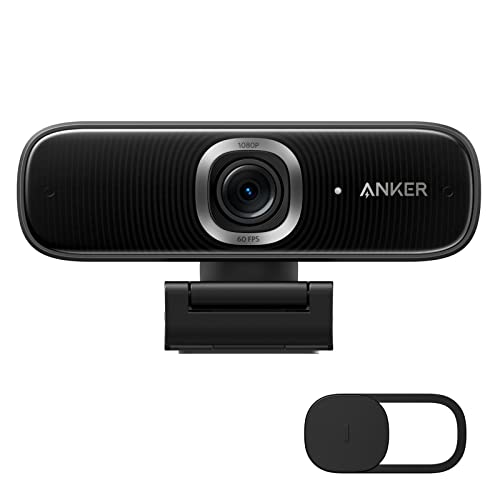
The Anker PowerConf C300 is the wide-angle pick in this guide, built for groups that need everyone in frame at once. Its 115 degree field of view is the widest here, covering a full couch or a classroom row without anyone sitting out of frame, and the camera can switch to narrower angles for solo viewing. It records Full HD 1080p video at 60 frames per second, with AI-powered framing that adjusts the shot to fit the people in view and AI autofocus that locks on quickly.
Low-light correction and HDR keep faces visible in a dim room and in front of a bright window, which are the two hardest lighting situations for a shared viewing setup. Dual noise-cancelling microphones pick up voices clearly while reducing background hum, and the camera is certified for common video call apps, so it works smoothly in classrooms and meeting rooms. The clip mount grips laptop lids, monitors, and television bezels alike.
This camera suits large families, classrooms, and group viewing sessions where a wide field of view is the priority. Its main caveats are the wide-angle distortion at the edges of the frame when everyone sits close, and the 1080p resolution, which is less sharp than the 4K OBSBOT on a very large screen. If your group is big and fitting everyone in frame is the hardest part, the C300 solves it.
Comparison Table
| Webcam | Resolution | Frame Rate | Field of View | Microphones | Privacy Shutter | Connection |
|---|---|---|---|---|---|---|
| Logitech C920s HD Pro | 1080p | 30 fps | 78 degrees | Dual stereo | Yes | USB-A |
| Logitech C922x Pro Stream | 1080p | 30 fps, 720p at 60 fps | 78 degrees | Dual stereo | No | USB-A |
| Logitech StreamCam | 1080p | 60 fps | 78 degrees | Dual | No | USB-C |
| OBSBOT Meet 4K | 4K | 30 fps | 86 degrees | Dual omnidirectional | No | USB-C |
| Anker PowerConf C300 | 1080p | 60 fps | 115 degrees | Dual noise-cancelling | No | USB-A |
Which One Is Right for You?
Start with your viewing group, because it decides the field of view. If you watch beach streams alone or with one other person, the Logitech C920s HD Pro is the simplest choice: a sharp 1080p picture, a privacy shutter, and a setup that takes seconds. If you want smoother motion and a tripod for couch-height placement, step up to the Logitech C922x Pro Stream. For the smoothest 1080p picture on a modern laptop, the Logitech StreamCam records at 60 frames per second through USB-C and keeps the picture fluid.
If you watch on a large television or projector, the OBSBOT Meet 4K is the pick: its 4K resolution stays sharp on a big screen, and its AI framing keeps the speaker centered. If your group is large — a full family on a couch or a classroom row — the Anker PowerConf C300 is the answer, with a 115 degree field of view that fits everyone in frame. Whichever you choose, place the camera at eye level, face the light rather than sitting in front of a bright window, and join the call before the sun sets over the beach you are watching.
Frequently Asked Questions
What exactly is a live beach webcam?
A live beach webcam is a camera installed at a beach that streams video of the shoreline in real time, usually hosted by the beach itself, a surf shop, a hotel, or a local tourism board. Most streams are free to watch in a browser and show the sand, the surf, and the weather as it happens. The webcams in this guide are the cameras on your own desk, which let you watch those streams with family or a class over a video call.
Do I need a webcam to watch beach live streams?
No. Watching a beach stream only needs a browser and a connection — the beach camera does the filming. A webcam on your desk is for the other half of the experience: it lets everyone see each other react while you watch together over a video call. If you always watch alone, your screen and speakers are all you need.
When is the best time to watch beach cams?
Daylight hours give the clearest picture, with sunrise and sunset offering the most striking light. Early morning is the best time to catch surfers and quiet sand, while the middle of the day shows the beach at its busiest. Check the local time at the beach you are watching, since a cam in another time zone may be dark when your evening begins.
Can I watch beach cams on a television?
Yes. Most beach streams play in a browser, so you can open the stream on a smart television, a streaming stick, or a laptop connected to the television with an HDMI cable. A webcam with a clip mount that grips a thick television bezel, such as the Anker PowerConf C300, lets the whole room join the call while the stream fills the big screen.
Disclosure: As an Amazon Associate, we may earn from qualifying purchases.
FAQ
Which One Is Right for You?
What exactly is a live beach webcam?
Do I need a webcam to watch beach live streams?
When is the best time to watch beach cams?
Can I watch beach cams on a television?
More from Amazon
Programs that pair well with the guide above. Offers and eligibility are set by Amazon and may change.
Free shipping on eligible items, Prime Video and more. Eligible new members can start with a free trial.
Start a Prime free trialAd-free music streaming. Eligible new subscribers can start with a free trial.
Try Music Unlimited freeA Prime membership for ages 18-24 with a trial period. Eligibility is set by Amazon.
See Prime for Young AdultsAudiobooks and podcasts to listen to on the go. Eligible new members can start with a free trial.
Try Audible freeAs an Amazon Associate we earn from qualifying purchases.