Our Top Picks
 NETGEAR Nighthawk DOCSIS 3.1 Modem Router Combo CAX30Pack of 111.93 x 5.39 x 9.92 inchesCheck on Amazon
 NETGEAR Nighthawk Pro Gaming 6-Stream WiFi 6 RouterExtra Large11.61 x 7.87 x 2.51 inches1.32 poundsCheck on Amazon

If you rent Spectrum’s router, the fastest fix is a DOCSIS 3.1 modem-router combo from Spectrum’s approved list — the ARRIS SURFboard G36 covers most 1 Gig homes in one box. If you already have Spectrum’s free modem, buy a standalone gaming router instead — the ASUS RT-AX86U Pro pairs with it and removes the monthly Advanced WiFi charge. Either way, buy DOCSIS 3.1 only, because Spectrum stopped supporting DOCSIS 3.0 modems on October 28, 2026, and an older modem can no longer be activated on faster tiers.
This guide is for three kinds of Spectrum subscribers: renters who want the Advanced WiFi charge off the bill, households on the 1 Gig plan that need one box to feed every screen, and competitive players who want steadier lobbies without swapping providers. Every pick below comes from Amazon listing titles and manufacturer specs, and every combo sits on Spectrum’s published approved list.
Quick Picks
As an Amazon Associate we earn from qualifying purchases
| Product | Best for | Key spec from title |
|---|---|---|
| NETGEAR Nighthawk CAX30 | One-box Spectrum setup on plans up to 1 Gig | DOCSIS 3.1, WiFi 6 AX2700, 4x 1GbE ports |
| ARRIS SURFboard G36 | Most 1 Gig homes that want a 2.5GbE wired port | DOCSIS 3.1, WiFi 6 AX3000, 1x 2.5GbE + 4x 1GbE |
| NETGEAR Nighthawk CAX80 | Large device households on 1 Gig | DOCSIS 3.1, WiFi 6 AX6000, 1x 2.5GbE + 4x 1GbE |
| ASUS RT-AX86U Pro | Gamers who keep Spectrum’s free modem | WiFi 6 AX5700, 2.5G port, gaming port, AiMesh |
| NETGEAR Nighthawk XR1000 | Competitive players who want DumaOS server control | WiFi 6 AX5400, DumaOS 3.0, Geo-Filter, 4x 1GbE |
How to Choose
Combo or standalone router first
Decide this before you compare models, because it splits the whole list in two. If Spectrum’s free modem already sits on your shelf, a standalone gaming router is the cheaper move: you keep the free modem and only replace the part that makes WiFi. If you rent Spectrum’s router, a combo replaces both boxes in one step and removes the Advanced WiFi charge at the same time. A combo also means one device to reboot, one app, and one power plug. The trade-off is flexibility: if the modem side ages out, you replace the whole box, while a separate router lets you upgrade either half alone.
DOCSIS 3.1 and the approved list
Spectrum stopped supporting DOCSIS 3.0 modems on October 28, 2026, so buy DOCSIS 3.1 only and never let a bargain on an older modem tempt you. Then check Spectrum’s published approved list, support article 111746, which authorizes 26 models for non-symmetrical tiers up to 1 Gig and 7 models for tiers up to 500 Mbps. All three combos in this guide are on the 1 Gig list. A modem that is not on the list can fail activation even if it worked fine on another provider. Two limits to know: the 2 Gig plan requires Spectrum-provided equipment, and High-Split symmetrical speeds need Spectrum’s own 2251 modem.
Ports decide your wired speed
WiFi numbers like AX2700 or AX6000 are theoretical combined maxima across bands, not the speed one device will ever see, so look at the Ethernet ports instead. The CAX30 has four 1GbE ports only, which means a single wired device tops out near 940 Mbps no matter what your plan promises. The G36 and the CAX80 each add a 2.5GbE port, giving a PC or console headroom above gigabit. Count the LAN ports you need for a console, a PC, and a TV box before you buy. On the standalone side, the RT-AX86U Pro has a 2.5G port plus a dedicated gaming port, while the XR1000 has four 1GbE ports only.
Coverage, device count, and gaming features
Match coverage to the size of your home rather than chasing the biggest WiFi number. The CAX30 covers up to 2,000 sq ft and about 25 devices, while the G36 and CAX80 reach up to 2,500 sq ft and 30 or more devices. A large or multi-story home needs mesh or access points, not a stronger single router. For gaming extras, the ASUS offers Adaptive QoS and Mobile Game Mode to prioritize game traffic, and the XR1000 runs DumaOS with a Geo-Filter that lets you pick nearby servers and watch ping on a heatmap. None of these lowers ping by itself; they steady the connection and keep other traffic from crowding games out.
The 5 Best Options
NETGEAR Nighthawk CAX30
The CAX30 is the simplest one-box answer for a Spectrum home on plans up to 1 Gig. It pairs a DOCSIS 3.1 modem with WiFi 6 in a single unit, so it replaces both Spectrum’s free modem and a rented router, and it sits on Spectrum’s approved list for tiers up to 1 Gig. Setup runs through the Nighthawk app, and the quad-core processor keeps the connection moving when several people stream and play at once. For a smaller home that wants one device doing everything, this is the least complicated way to stop renting Spectrum’s router.
- Specs: DOCSIS 3.1, 32×8 channel bonding
- Specs: Dual-band WiFi 6 AX2700, up to 2.7 Gbps combined
- Specs: Coverage up to 2,000 sq ft, rated for about 25 devices
- Specs: Four Gigabit Ethernet ports, 1 USB 3.0 port
- Specs: NETGEAR Armor security with 30-day free trial, quad-core 1.5 GHz processor, Nighthawk app setup
- Best for: A smaller Spectrum home that wants one box for modem and router on plans up to 1 Gig.
- Watch out for: No 2.5GbE port, so a single wired device tops out near 940 Mbps; no telephone port, so Spectrum Voice customers cannot use it as their only box.
ARRIS SURFboard G36

The G36 is the pick for most 1 Gig homes because it covers the two things the cheaper combo misses: a 2.5GbE wired port and wider coverage. Its DOCSIS 3.1 modem is on Spectrum’s approved list for tiers up to 1 Gig, and the AX3000 WiFi 6 radio reaches up to 2,500 sq ft. The 2.5GbE port is headroom for a wired PC or console rather than a promise of a faster plan, and the SURFboard Central app handles setup and remote management. With WPA3, parental controls, a guest network, and a two-year limited warranty, it is the most complete single box in this guide.
- Specs: DOCSIS 3.1, 32×8 SC-QAM plus 2×2 OFDM/OFDMA
- Specs: Dual-band WiFi 6 AX3000, up to 3 Gbps combined
- Specs: One 2.5 Gbps Ethernet port plus four 1 Gbps Ethernet ports
- Specs: Coverage up to 2,500 sq ft, WPA/WPA2/WPA3, CableLabs certified
- Specs: SURFboard Central mobile app, parental controls, guest network, 2-year limited warranty
- Best for: Most 1 Gig homes that want a 2.5GbE wired port in a single Spectrum-approved box.
- Watch out for: No telephone port, so Spectrum Voice customers need separate provider equipment; some 2026 guides flag the Intel Puma chipset for possible latency spikes, a reported concern rather than a proven defect.
NETGEAR Nighthawk CAX80
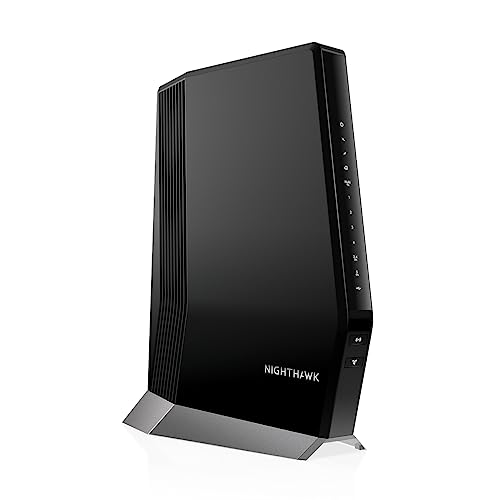
The CAX80 is the heavy lifter of the three combos, built for a household where thirty or more devices fight for the connection at once. Its DOCSIS 3.1 modem is on Spectrum’s approved list up to 1 Gig, and the AX6000 WiFi 6 radio runs eight streams across two bands. A 2.5GbE port sits beside four Gigabit Ethernet ports for a wired PC or console, and the quad-core 1.8 GHz processor is a step up from the CAX30. If your evenings mean a console, two streams, and a house full of phones and smart devices, this is the combo that keeps up.
- Specs: DOCSIS 3.1, 32×8 channel bonding
- Specs: Dual-band WiFi 6 AX6000, 1,200 Mbps on 2.4 GHz plus 4,800 Mbps on 5 GHz, 8 streams
- Specs: One 2.5 Gigabit Ethernet port plus four Gigabit Ethernet ports
- Specs: Coverage up to 2,500 sq ft, rated for 30 or more connected devices
- Specs: Quad-core 1.8 GHz processor, NETGEAR Armor with 30-day free trial, USB 3.0 port, Nighthawk app
- Best for: A large device household on the 1 Gig plan that needs one powerful combo box.
- Watch out for: The “up to 6 Gbps” figure in the title is combined WiFi, not a plan speed — Spectrum authorizes it up to 1 Gig; no telephone port, so Spectrum Voice customers cannot use it as their only box.
ASUS RT-AX86U Pro
The RT-AX86U Pro is the best standalone pick if you keep Spectrum’s free modem, because it turns that plain bridge into a gaming network without touching the modem side. Its AX5700 WiFi 6 radio pairs with a 2.5G port and a dedicated gaming port, while Adaptive QoS and Mobile Game Mode push game traffic to the front of the queue. AiProtection Pro network security runs without a subscription, Instant Guard adds a VPN, and AiMesh lets you extend coverage with other ASUS routers later. It is the strongest fresh signal in this guide, with November 2026 sources linking this exact ASIN.
- Specs: Dual-band WiFi 6 AX5700
- Specs: 2.5G port plus a dedicated gaming port
- Specs: Mobile Game Mode, Adaptive QoS game acceleration, port forwarding
- Specs: AiProtection Pro network security, subscription-free, powered by Trend Micro; Instant Guard VPN
- Specs: AiMesh compatible, 3 external antennas
- Best for: Gamers who keep Spectrum’s free modem and want gaming features without replacing the modem.
- Watch out for: It has no modem and no DOCSIS, so buying it alone does not connect you to Spectrum — it must sit behind a modem, and you should power-cycle the modem for 60 seconds when swapping routers.
NETGEAR Nighthawk XR1000
The XR1000 is for competitive players who care less about raw WiFi numbers and more about which server they land on. Its DumaOS 3.0 software brings a Geo-Filter for picking nearby servers, a ping heatmap, and bandwidth allocation that keeps a download from crowding a match out. The AX5400 WiFi 6 radio and four Gigabit Ethernet ports cover a typical gaming setup, and four detachable antennas let you aim coverage where the rig sits. It is the oldest model in this guide, first sold in 2020, so check the live listing before you commit to it.
- Specs: Dual-band WiFi 6 AX5400, up to 5.4 Gbps combined
- Specs: DumaOS 3.0 with Geo-Filter, ping heatmap, and bandwidth allocation
- Specs: 4 x 1 Gigabit Ethernet ports, 1 x USB 3.0 port
- Specs: 4 detachable antennas, dimensions 11.61 x 7.87 x 2.51 in, weight 1.32 lb
- Best for: Competitive players who want DumaOS server control behind Spectrum’s free modem.
- Watch out for: It is the oldest model in the pool, so live-check the listing first; all four LAN ports are 1GbE with no 2.5G port, so wired tops out at gigabit; it has no modem.
Which One Fits Your Situation
You rent Spectrum’s router and want the charge gone
Pick a combo, because it replaces the rented router in one step and the modem was already free, so there is no modem fee to chase. The CAX30 suits a smaller home on plans up to 1 Gig, while the G36 adds a 2.5GbE port and wider coverage for most households. Return the rented router to Spectrum rather than just unplugging it, because returning it is what takes the Advanced WiFi charge off the bill.
You are on the 1 Gig plan with a house full of devices
Pick the CAX80, which is built for 30 or more connected devices and covers up to 2,500 sq ft. The G36 is the fallback if you want the same 2.5GbE port and coverage in a simpler box. Remember that the 2.5GbE port is headroom for one wired device, not a faster plan, and that Spectrum authorizes these combos up to 1 Gig.
You play competitively and want steadier lobbies
Keep Spectrum’s free modem and add the XR1000, whose DumaOS Geo-Filter lets you pick nearby servers and whose bandwidth allocation keeps other traffic out of your match. The RT-AX86U Pro is the alternative if you prefer Adaptive QoS and a dedicated gaming port over server filtering. Either way, wire the console or PC in, because no router feature beats a cable for stability.
You have Spectrum Voice or the 2 Gig plan
Do not buy any combo in this guide as your only box. None of the three combos has a telephone port, so Spectrum Voice customers must keep provider equipment with voice support. The 2 Gig plan requires Spectrum-provided equipment too, and no retail modem covers it. If you are on a standard tier and only want better WiFi, keep Spectrum’s free modem and add a standalone router like the RT-AX86U Pro.
Common Mistakes
- Buying a DOCSIS 3.0 modem for Spectrum: Spectrum stopped supporting DOCSIS 3.0 on October 28, 2026, and an older modem can no longer be activated on faster tiers.
- Buying a standalone gaming router and expecting it to replace the modem: the RT-AX86U Pro and the XR1000 have no modem, so they only work behind Spectrum’s free modem or an approved modem.
- Reading AX numbers as the speed one device will see: AX2700, AX5400, and AX6000 are theoretical combined maxima across bands, not real-world speed on a single console or PC.
- Unplugging the rented router and assuming the charge stops: returning the rented router to Spectrum is what removes the Advanced WiFi charge from the bill.
- Picking a combo when you need Spectrum Voice: none of the three combos in this guide has a telephone port, so voice customers need separate provider equipment.
Frequently Asked Questions
Do I need a modem and a router for Spectrum?
Yes. Spectrum cable internet needs a DOCSIS modem to talk to the cable line and a router to make WiFi. A combo does both jobs in one box, which is why the three combos here work as single-device setups. A standalone gaming router like the RT-AX86U Pro or the XR1000 has no modem, so it needs a modem in front of it, and Spectrum’s free modem works fine for that.
Will a DOCSIS 3.0 modem still work on Spectrum?
No. Spectrum stopped supporting DOCSIS 3.0 modems on October 28, 2026. A DOCSIS 3.0 modem caps out on faster tiers and can no longer be activated, so buying one in 2026 is a dead end. Buy DOCSIS 3.1 only, and check that the model sits on Spectrum’s published approved list before you order, because an unlisted modem can fail activation.
Can I use my own router with Spectrum’s free modem?
Yes. Spectrum’s modem, models such as the ET2251 and EU2251, is a pure bridge with no WiFi, so you plug your router’s WAN port into it and you are set. Power-cycle the modem for 60 seconds when you swap routers, because Spectrum’s modem binds to a single device address and will not hand internet to the new router until it restarts. Spectrum uses DHCP, so no extra settings are needed.
Does owning my equipment remove the monthly fee?
It removes the Advanced WiFi charge for Spectrum’s rented router. The modem itself is already free with every internet plan, so there is no modem fee to remove, and owning a combo removes the WiFi charge too. Returning the rented router to Spectrum, rather than just unplugging it, is what takes the charge off the bill. Check your bill after the return to confirm the charge is gone.
FAQ
Do I need a modem and a router for Spectrum?
Will a DOCSIS 3.0 modem still work on Spectrum?
Can I use my own router with Spectrum’s free modem?
Does owning my equipment remove the monthly fee?
More from Amazon
Programs that pair well with the guide above. Offers and eligibility are set by Amazon and may change.
Free shipping on eligible items, Prime Video and more. Eligible new members can start with a free trial.
Start a Prime free trialAd-free music streaming. Eligible new subscribers can start with a free trial.
Try Music Unlimited freeA Prime membership for ages 18-24 with a trial period. Eligibility is set by Amazon.
See Prime for Young AdultsAudiobooks and podcasts to listen to on the go. Eligible new members can start with a free trial.
Try Audible freeAs an Amazon Associate we earn from qualifying purchases.