Key takeaways
- Our guide to the best membrane keyboards compares four quiet, spill-resistant boards, with layout and feel to match, plus how to choose the right one.
Membrane keyboards are the quiet workhorses of the desk: soft keys, low cost, and no click to carry through a thin wall. They suit typing far more than their reputation suggests, because the rubber dome under each key gives a cushioned press that stays comfortable through long documents. The differences between models are real but easy to miss: key feel, layout, spill protection, and the extras that make a board pleasant to live with day after day. A board that suits your hands disappears into the work.

This guide is for writers and office workers who type for hours, students setting up a first desk, and gamers who want a quiet board for late sessions. It also suits anyone replacing a noisy keyboard that disturbs the household. Every keyboard below was picked from the name and specifications shown on its Amazon page. The four picks below span plain office boards and gaming boards, so every typist finds a fit.
Quick Picks
As an Amazon Associate we earn from qualifying purchases
| Product | Best for | Key spec from title |
|---|---|---|
| Logitech K120 | Simple everyday typing | Full-size, spill resistant, USB |
| Logitech K350 | Comfortable wave layout | Wave design, Unifying receiver, 3-year battery |
| Razer Cynosa V2 | Gaming with soft keys | Chroma RGB, spill resistant, media keys |
| SteelSeries Apex 3 | Quiet gaming board | 10-zone RGB, IP32 water resistant, wrist rest |
How to Choose
Key feel and travel
Membrane keys press down on a rubber dome, so the feel is soft and cushioned rather than sharp and clicky. Look for keys that bottom out gently without wobbling, and for a layout that matches your fingers rather than fighting them. Low-profile keys suit fast typists who skim across the board, while deeper keys suit writers who like a clear press. The feel is personal, so a board that suits a colleague may not suit you, and the return policy matters more than any spec sheet claim. Give a new board a week before judging its feel.
Layout and size
A full-size board with a number pad suits spreadsheets and data entry, while a tenkeyless board frees desk space for a mouse and suits smaller desks. Check that the function keys, arrow keys, and media controls sit where your hands expect them, because a moved key causes mistakes for weeks. A standard layout is the safest choice for shared computers, since anyone can sit down and type. Measure the desk before ordering, and leave room for the mouse beside the board. A tenkeyless board suits smaller desks, while a full-size board suits data entry.
Noise level
Membrane boards are quiet by design, but some are quieter than others. A board with soft domes and a solid base makes less sound than one with loose keys that rattle in their housing. Whisper-quiet switches suit shared rooms, libraries, and late-night work, while a firmer board suits a private office where sound does not matter. A board with loose keys rattles more than one with a solid base. If the household sleeps near the desk, noise level deserves as much weight as key feel in the decision.
Durability and spill resistance
A keyboard survives coffee, dust, and years of daily use only if it is built for them. Spill-resistant designs channel liquid away from the electronics, and a rated design gives more confidence than a vague claim. Keys rated for ten million presses last through years of typing, and a solid base keeps the board from flexing under hard typing. Check the warranty too, because a three-year warranty signals a maker that expects the board to last. Dust and spills end more boards than worn keys do, so a clean desk matters.
The 4 Best Options
Logitech K120
The Logitech K120 is the simplest board in this group: a full-size wired keyboard that plugs in and works. Its low-profile keys are quiet and comfortable for long typing sessions, and the standard layout with full-size function keys and a number pad needs no learning. A spill-resistant design lets liquid drain away from the keys, and sturdy tilt legs set the typing angle. The keys are rated for up to ten million keystrokes, and the three-year warranty backs a board that is built to outlast the computer it serves. It needs no software and no learning curve.
Specs
- Full-size layout with number pad
- Low-profile quiet keys
- Spill-resistant design, tested with up to 60 ml of liquid
- Keys rated for up to 10 million keystrokes
- Wired USB connection, plug and play
- 3-year limited warranty
- 450 x 155 x 23.5 mm, 550 g
- Curved space bar for comfortable typing
Best for: Simple, reliable everyday typing on any desk.
Watch out for: No backlight, media keys, or wrist rest, so the board stays basic and suits plain desks.
ASIN: B003NREDC0
Logitech K350
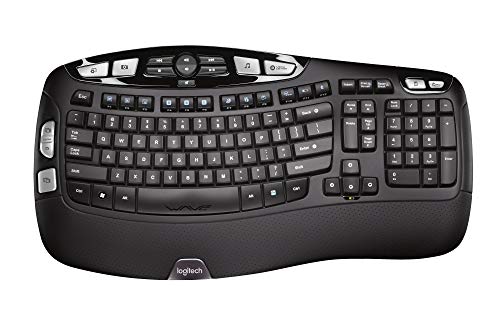
The Logitech K350 is a wireless wave keyboard for typists whose wrists ache by the afternoon. Its Comfort Wave design curves the keyframe to match the natural shape of the hands, and the cushioned palm rest supports the wrists through long documents. The tiny Unifying receiver stays in the laptop, and the battery lasts up to three years on two AA batteries that come pre-installed. Programmable function keys and dedicated media controls round out a board that is built for comfort first and speed second. The receiver stays in the laptop.
Specs
- Wave-shaped keyframe with Constant Curve layout
- Cushioned palm rest
- Wireless connection via Logitech Unifying receiver
- Up to 3 years of battery life
- 2 AA batteries pre-installed
- Programmable function keys
- Dedicated media controls
- 120 keys
Best for: Comfortable long typing sessions with a curved, wrist-friendly layout.
Watch out for: The wave shape takes a few days to learn, and the board is wide, so small desks may feel crowded.
ASIN: B002MMY4WY
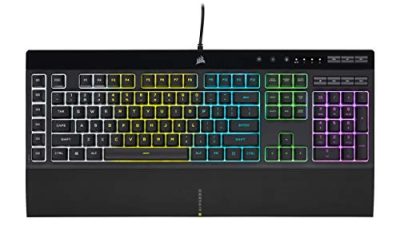
Razer Cynosa V2
The Razer Cynosa V2 is a membrane gaming keyboard that brings soft keys and bright lighting to the desk. Its individually backlit keys use customizable Chroma RGB lighting, and the spill-resistant design protects the board from drinks during long sessions. Programmable macro functionality lets each key carry a second job, and dedicated media keys control volume and playback without leaving the game. The quiet, cushioned keys suit late-night play, and the wired USB connection keeps input steady through fast games. The board suits late-night play in a shared home.
Specs
- Membrane key switches
- Individually backlit keys with customizable Chroma RGB lighting
- Spill-resistant design
- Programmable macro functionality
- Dedicated media keys
- Quiet and cushioned keys
- Wired USB connection
- Full-size layout with number pad
Best for: Gaming with soft keys, bright lighting, and macro control.
Watch out for: The lighting software needs installing before the RGB controls appear, so set it up first.
ASIN: B081JFM4T3
SteelSeries Apex 3
The SteelSeries Apex 3 is a quiet gaming keyboard that treats water resistance as a feature, not an afterthought. Its IP32 rating guards against spills and dust, and the ten-zone RGB illumination lights the board without the noise of mechanical switches. Whisper-quiet gaming switches stay nearly silent for up to twenty million low-friction keypresses, and the premium magnetic wrist rest supports the hands through long sessions. Gaming-grade anti-ghosting keeps every press registered, and the full-size layout holds a number pad for everyday work. The magnetic wrist rest lifts off for cleaning.
Specs
- Whisper-quiet gaming switches
- 10-zone RGB illumination
- IP32 water and dust resistant
- Premium magnetic wrist rest
- Gaming-grade anti-ghosting
- Keys rated for up to 20 million presses
- 5.94 x 17.52 x 1.57 inches, 2.79 pounds
- Compatible with Windows, Mac OS X, Xbox, and PS4
Best for: Quiet gaming with spill protection and a comfortable wrist rest.
Watch out for: The board is wide, so small desks may feel crowded without room for the mouse.
ASIN: B07ZGDPT4M
Which One Fits Your Situation
A first keyboard for a home desk
Start with the K120 when the desk needs a board that simply works. It plugs in over USB, needs no software, and its quiet keys suit a shared home. The spill-resistant design forgives a knocked-over drink, and the low cost leaves room in the budget for a better mouse. Keep it as the household spare even after upgrading, because a plain reliable board always finds a use. Keep it as a spare.
Typing all day for work
The K350 suits writers and office workers whose hands tire by mid-afternoon. Its wave layout and cushioned palm rest guide the hands into a natural position, and the wireless connection keeps the desk free of cables. The three-year battery life means the board is forgotten between changes, and the programmable keys carry the shortcuts that speed up repetitive work. Give the curve a few days before judging it. Wireless keeps the desk tidy.
Gaming late without waking anyone
Pick the Apex 3 when the household sleeps near the desk. Its whisper-quiet switches keep key noise down, and the wrist rest supports long sessions. The spill resistance forgives a drink at the desk, and the ten-zone lighting looks good without a separate lamp. The board is wide, so clear a full space for it before it arrives. The wrist rest supports long sessions, and the spill resistance forgives a drink.
A board that does both work and play
The Cynosa V2 fits a desk that switches between documents and games. Its soft keys type quietly through the day, and the RGB lighting and macro keys come alive in the evening. Dedicated media keys control music without switching windows, and the spill-resistant design suits a desk that holds a drink. One board covers both jobs without a compromise that shows. It handles documents by day and games by night.
Common Mistakes
- Buying a gaming board for office work and discovering the lighting software distracts more than it helps.
- Ignoring the layout and finding the number pad or arrow keys in the wrong place for weeks. A standard layout avoids this.
- Choosing a board by looks alone and ending up with keys that tire your fingers by lunch.
- Forgetting spill protection on a desk that always holds a drink. Spill resistance is cheap insurance.
- Picking a wide board for a small desk and losing the space the mouse needs.
Frequently Asked Questions
Are membrane keyboards good for typing?
Yes, membrane keyboards are good for typing because their soft keys stay comfortable through long documents and keep noise down. The rubber dome under each key gives a cushioned press that suits writers who type for hours. They lack the sharp feedback of mechanical switches, but for everyday typing that softness is a feature rather than a flaw. Try one before judging.
How long do membrane keyboards last?
A well-made membrane keyboard lasts for years of daily typing, with keys often rated for ten million presses or more. Dust and spills end more boards than worn keys do, so a spill-resistant design and a clean desk matter. Replace the board when keys start sticking or missing presses, not on a fixed schedule. Clean the board often.
Can a membrane keyboard work for gaming?
Yes, a membrane keyboard works well for gaming when it has anti-ghosting and responsive keys. Many gaming membrane boards add macro keys, lighting, and media controls that suit play. The soft keys are quieter than mechanical switches, which helps in shared rooms and late sessions. That softness is easy on the fingers too.
What is the difference between a membrane and a mechanical keyboard?
A membrane keyboard presses a rubber dome under each key, while a mechanical keyboard uses an individual switch per key. Membrane boards are quieter, lighter, and cheaper, while mechanical boards give sharper feedback and last longer per key. The right choice depends on whether you value quiet comfort or tactile precision more. Both have their place.
FAQ
Are membrane keyboards good for typing?
How long do membrane keyboards last?
Can a membrane keyboard work for gaming?
What is the difference between a membrane and a mechanical keyboard?
More from Amazon
Programs that pair well with the guide above. Offers and eligibility are set by Amazon and may change.
Free shipping on eligible items, Prime Video and more. Eligible new members can start with a free trial.
Start a Prime free trialAd-free music streaming. Eligible new subscribers can start with a free trial.
Try Music Unlimited freeA Prime membership for ages 18-24 with a trial period. Eligibility is set by Amazon.
See Prime for Young AdultsAudiobooks and podcasts to listen to on the go. Eligible new members can start with a free trial.
Try Audible freeAs an Amazon Associate we earn from qualifying purchases.