
Key takeaways
- Choosing an OLED laptop is a different decision from choosing any other thin-and-light notebook.
Choosing an OLED laptop is a different decision from choosing any other thin-and-light notebook. The panel is the reason you are shopping: every pixel lights itself, so black is actually black, and a screen rated at 100% DCI-P3 or 500 nits for HDR can make photos, video and even a spreadsheet look sharper than a typical IPS display. The catch is that the panel quality only matters if the rest of the machine can keep up, and the rest of the machine varies enormously across the seven laptops below.
This guide is for buyers who already know they want OLED and need to sort the field by what they will do with it. Some of these models are light travel machines with a big battery story, some are 16-inch workhorses with 32GB of memory, one is a Snapdragon-based creator laptop, and one is a gaming machine that happens to carry an OLED screen. As 2026 brings more AI-branded processors into the mix, the spec sheet is the fastest way to tell them apart.
Quick Picks
Our top picks





As an Amazon Associate we earn from qualifying purchases at no extra cost to you.
| Product | Best for | Key spec from the title |
|---|---|---|
| ASUS Zenbook 14 OLED | Light carry and battery focus | Ryzen AI 9 465, 16GB RAM, 1TB SSD, 2K 500 nits HDR |
| ASUS Vivobook S16 (Ryzen) | Big-screen multitasking | 16-inch 16:10 WUXGA OLED, Ryzen AI 7 445, 32GB RAM |
| HP OmniBook 3 | Color-focused creators on a lean setup | 14-inch WUXGA OLED, 100% DCI-P3, Snapdragon X |
| Acer Swift Go 16 | High-resolution display at a moderate tier | 3200×2000, 120Hz, Core Ultra 5 125H |
| Dell XPS 14 | Premium all-rounder | 14.5-inch 3.2K OLED, 48-120Hz, Core Ultra 7 255H, 32GB |
| ASUS Vivobook S16 (Snapdragon) | Arm-based Copilot+ buyers | Snapdragon X2 Elite, 16GB RAM, 1TB SSD |
| Lenovo Legion 5a | Gaming plus OLED | RTX 5060, 15.3-inch 2560×1600 165Hz OLED, 32GB DDR5 |
How to Choose
Match the panel numbers to your work
For photo and video editing, look for a stated color gamut such as 100% DCI-P3. For general use, a refresh rate of 60Hz is acceptable, but 90 to 120Hz makes scrolling and pen input feel smoother. Peak brightness figures such as 500 nits for HDR matter most if you work near a window. Resolution should scale with screen size: a 14-inch panel at WUXGA is already sharp, while 3K-class panels on 14 to 16-inch screens add detail at a battery cost. Also look at the aspect ratio, because 16:10 shows more lines of a document than 16:9 at the same width.
Decide on the processor family before the brand
Intel Core Ultra and AMD Ryzen AI chips run the widest range of Windows software. Snapdragon X and X2 Elite laptops use an Arm architecture, which suits long unplugged days and AI features but can trip over niche legacy apps or drivers. If you rely on specialized plugins, older printers or particular VPN clients, confirm compatibility before choosing an Arm model. For Copilot+ features, the NPU rating in the listing is the number to read, and the HP title states up to 45 TOPS.
Set memory and storage floors
Sixteen gigabytes of RAM is a sensible floor for an OLED machine bought for editing or heavy browsing, and 32GB is worth paying for if you keep many apps open. Storage is where budget models cut corners: 256GB fills up quickly with a few projects and updates, while 512GB to 1TB leaves room to breathe. Remember that soldered memory cannot be upgraded later, so the configuration you pick on day one is the one you live with. Check whether the listing names DDR5 and the Wi-Fi standard, since those hint at how current the platform is.
Plan for OLED-specific care
Burn-in is rare in normal use but possible with static elements left at high brightness for long periods. Use dark mode, an automatic screen timeout and a moving wallpaper or slideshow screensaver. Ignore marketing terms that do not come with numbers, and be cautious of very thin chassis paired with a high-power GPU, since cooling and noise become the compromise. Ports and keyboard layout rarely make the headline of a listing, yet they decide daily comfort more than most spec lines do.
The 7 Best Options
ASUS Zenbook 14 OLED
The Zenbook 14 is the pick for someone who wants OLED in the lightest possible package. The listing pairs a Ryzen AI 9 465 with 16GB of RAM and a 1TB SSD, and it calls out a 2K panel with 500 nits HDR and a backlit keyboard. The title also describes it as ultra light with long battery life, which is exactly the pairing buyers hope for when they carry a laptop from class to cafe to airport. The listing does not publish battery hours, so treat that line as a design goal rather than a measured figure.
- Strength: 1TB of storage is generous for a thin laptop.
- Strength: the 500 nits HDR rating suits bright rooms and video.
- Trade-off: 16GB of memory leaves less headroom than the 32GB models here.
Skip it if you need a screen larger than 14 inches or plan to run demanding creative suites all day.
ASUS Vivobook S16 (Ryzen AI 7)
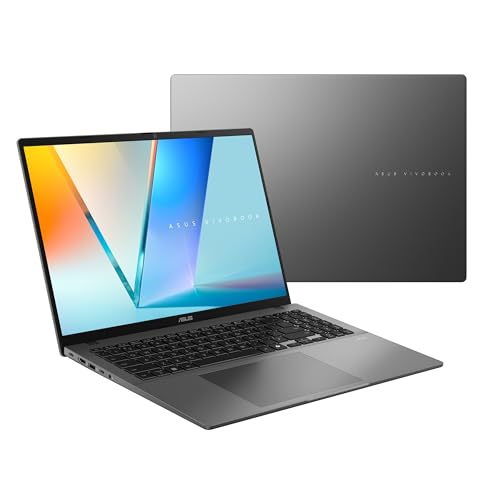
This version of the Vivobook S16 gives you a 16-inch, 16:10 WUXGA OLED display, a Ryzen AI 7 445 processor, Radeon graphics and a full 32GB of RAM with a 1TB SSD. It is also a Copilot+ PC, so it targets buyers who want the AI feature set on a large canvas. The Radeon graphics listed are integrated, which is fine for photo editing and streaming but not a replacement for a dedicated card.
- Strength: 32GB of RAM is the largest memory pool among the AMD options here.
- Strength: the 16:10 shape gives extra vertical room for documents and timelines.
- Trade-off: a 16-inch body is less pocketable than the 14-inch machines.
Skip it if you commute on crowded trains and want the smallest footprint possible.
HP OmniBook 3
The OmniBook 3 pairs a 14-inch WUXGA OLED claiming 100% DCI-P3 with an 8-core Snapdragon X chip rated up to 45 NPU TOPS, 16GB of DDR5 and Wi-Fi 6E. The title aims it at creators and designers who care about color accuracy. Wi-Fi 6E also gives it access to the less crowded 6GHz band on a compatible router, which helps in busy apartment buildings.
- Strength: full DCI-P3 coverage is a clear advantage for photo work.
- Strength: DDR5 memory and Wi-Fi 6E modernize the platform.
- Trade-off: only a 256GB SSD, so external storage or cloud sync will be needed soon.
Skip it if you depend on Windows software that does not run well on Arm.
Acer Swift Go 16
The Swift Go 16 uses a 16-inch OLED running 3200×2000 at 120Hz, with a Core Ultra 5 125H, 512GB SSD and Intel Evo certification. Few laptops in this group list both a high resolution and a fast refresh rate in the title. The Evo badge points to a certified bundle of responsiveness and wake features that Intel defines for thin laptops.
- Strength: the 3200×2000 panel is detailed for its size.
- Strength: 120Hz makes motion feel smooth for a productivity machine.
- Trade-off: only 8GB of RAM, which is thin for heavy multitasking on a screen this good.
Skip it if you plan to keep dozens of browser tabs and creative apps open together.
Dell XPS 14
The XPS 14 is the premium option, with a 14.5-inch touch 3.2K OLED that varies between 48Hz and 120Hz, a Core Ultra 7 255H, Intel Arc graphics, 32GB of memory and a 1TB SSD. The variable refresh range helps conserve battery during static work, and the touch layer adds flexibility for quick annotations. The model number listed is DA14250.
- Strength: the top-tier combination of 32GB RAM and 1TB storage.
- Strength: 3.2K touch panel with adaptive refresh.
- Trade-off: it sits in the premium tier, so it is the hardest to justify for light use.
Skip it if you only browse and write documents and do not need this much hardware.
ASUS Vivobook S16 (Snapdragon X2 Elite)
The second Vivobook S16 swaps the AMD chip for a Snapdragon X2 Elite with Adreno graphics, 16GB of RAM and a 1TB SSD, while keeping the 16-inch 16:10 WUXGA OLED and Copilot+ support. It is the choice for buyers who want a large OLED with an Arm platform and a roomy 1TB drive, and who are happy to rely on the Copilot+ feature set that the listing highlights.
- Strength: Copilot+ features with a big 16-inch screen.
- Strength: 1TB of storage, matching the larger-capacity models.
- Trade-off: Arm software compatibility must be checked for your essential apps.
Skip it if you use legacy engineering or driver-heavy software.
Lenovo Legion 5a
The Legion 5a is the outlier: a gaming laptop with a Ryzen 7 250, GeForce RTX 5060 and a 15.3-inch 2560×1600 OLED running at 165Hz. It also lists 32GB of DDR5, a 1TB SSD, Wi-Fi 7 and an RGB keyboard. A 165Hz OLED means fast response for shooters and racing games, and the 16:10 shape suits editing timelines too.
- Strength: 165Hz OLED paired with a dedicated RTX graphics card.
- Strength: 32GB of DDR5 and Wi-Fi 7 are future-friendly.
- Trade-off: a gaming chassis is heavier and louder than the ultraportables here.
Skip it if you want a quiet, light machine for the classroom or office.
Which One Fits Your Situation
You edit photos on a train
The HP OmniBook 3 puts 100% DCI-P3 into a 14-inch body, which is useful for color work on the move. Add an external drive for the small SSD.
You want one machine for work and play
The Lenovo Legion 5a is the only model listed with a dedicated RTX 5060, so it handles both OLED video and games at 165Hz.
You live in documents and spreadsheets
The ASUS Vivobook S16 with the Ryzen AI 7 gives you 32GB of RAM and a tall 16:10 screen, which fits long documents and side-by-side windows.
You want the most polished premium build
The Dell XPS 14 combines a 3.2K touch OLED, 32GB of memory and 1TB of storage, which covers nearly every scenario without compromise.
Common Mistakes
- Choosing on panel resolution alone and ignoring RAM, so a gorgeous screen ends up paired with 8GB of memory.
- Assuming every Copilot+ laptop runs all Windows software equally well, when Arm models need app-by-app checks.
- Leaving a bright static desktop on screen for hours instead of using dark mode and screen timeouts.
- Paying for 120Hz or 165Hz when the work is mostly reading and writing.
- Skipping storage planning and buying a 256GB model for a video or photo library.
Related guides
- Gaming Headsets For Competitive Fps Directional Audio
- Compact Mini Itx Gaming Pcs For Small Desks
- Threadripper Vs Xeon Vs Core I9 For Workstations
Frequently Asked Questions
Is burn-in a real concern on an OLED laptop?
It is uncommon with ordinary mixed use. You lower the risk by using dark mode, shorter screen timeouts and varied content rather than leaving one static image at maximum brightness.
Do I need 32GB of RAM with an OLED screen?
No, but it helps if you edit video, keep many apps open or plan to keep the laptop for several years. For lighter work, 16GB is a reasonable floor.
Is a Snapdragon OLED laptop a good idea?
It can be, especially for battery life and AI features, as long as the software you use runs natively or well under emulation. Check your key apps before committing.
Is 120Hz worth it on OLED?
For scrolling, pen use and games it looks smoother, and OLED response times make motion crisp. If your work is static text, 60Hz will serve you fine.









