Key takeaways
- Four verified projectors for PS5 gaming compared: true 4K, 4K PRO-UHD and 1080p picks with listed lag, brightness and throw specs to check first.
A PS5 makes unusual demands of a projector. The console outputs a 4K signal, supports high-refresh play in the games that offer it, and punishes slow displays in fast titles, so the real decision is which trade-off you accept: genuine 4K detail, the lowest listed response figures, raw brightness for a living room, or a lower-cost 1080p image that still feels responsive.
This shortlist suits four kinds of PS5 owners: players building a dedicated dark room around 4K, living-room gamers who fight ambient light, short-throw setups in smaller spaces, and buyers who want smart streaming built in. Every model below was picked from the names and specifications on its own Amazon product page, with console gaming support stated by the maker rather than assumed.
Quick Picks
As an Amazon Associate we earn from qualifying purchases.
| Product | Best for | Key spec from title |
|---|---|---|
| BenQ X500i | Short-throw 4K in a smaller gaming room | True 4K UHD, 4ms response time |
| Optoma UHD35 | Bright 4K play in a lit living room | True 4K UHD, 240Hz refresh rate |
| BenQ TH575 | Big-screen 1080p on a tighter budget | 1080p, 3800 lumens |
| Epson Home Cinema 2350 | Streaming plus gaming in one unit | 4K PRO-UHD, 2,800 lumens |
How to Choose
Response Time and Refresh Rate for PS5 Games
Input lag is the delay between pressing a controller button and seeing the result on screen, and projector listings express it either as a response time in milliseconds or as a named low-latency mode. The PS5 tops out at 120Hz output, and only in games that support it, so treat any higher refresh figure as headroom rather than something the console will feed. Match the number to its resolution: several projectors quote their fastest figure at 1080p, not at 4K. For shooters, fighters and rhythm games, prioritise the lowest listed latency; for story-driven titles, a higher figure rarely spoils the experience.
True 4K, 4K PRO-UHD and 1080p Are Different Promises
Projector resolution labels are not interchangeable. A listing that says True 4K UHD means a native 3840×2160 image. Epson’s 4K PRO-UHD uses pixel-shifting on a 3LCD engine, which produces a sharper picture than 1080p but is described differently on the page for a reason. A plain 1080p model accepts the PS5’s 4K signal and scales it down, losing fine detail in menus, maps and distant scenery. Decide what your seating distance justifies: on a very large screen viewed up close, true 4K earns its keep; from a sofa across the room, the gap narrows considerably.
Brightness and the Light in Your Room
Brightness, quoted in lumens on the listing, decides whether the image survives your room. A dedicated space with curtains drawn and lights off flatters almost any projector, including dimmer models with better contrast. A living room with lamps, windows and other people in it needs substantially more output, or colours wash out and shadow detail disappears exactly when a dark PS5 game gets atmospheric. Be honest about when you actually play. If most sessions happen in daylight or under ceiling lights, put lumens near the top of your checklist instead of chasing resolution you will never see at full strength.
Throw Distance, Placement and Sound
Throw distance is how far the projector sits from the screen for a given image size, and it is fixed by the lens design. Short-throw models like the BenQ X500i sit close to the wall, which suits rented rooms and coffee-table setups. Standard-throw models need a shelf or mount behind the seating, plus a clear path for the light beam. Also plan the audio route before buying: some listings include built-in speakers of modest power, while eARC support lets the projector pass sound to a soundbar or receiver. A great picture with an impossible placement is still the wrong purchase.
The 4 Best Options
BenQ X500i

The X500i is the most complete PS5 package in this group because it combines a true 4K UHD image with a short-throw lens, so the projector can sit near the screen instead of behind your sofa. BenQ’s listing leads with a 4ms response time and names PS5, Xbox and Switch support directly, which makes its gaming intent unambiguous. The 4LED light source avoids lamp replacements, 2200 ANSI lumens suit a dimmed room better than a bright one, and eARC gives you a clean route to external sound beyond the built-in 10W audio.
Specs
- Resolution: True 4K UHD (3840×2160)
- Brightness: 2200 ANSI lumens
- Light source: 4LED
- Throw: Short throw
- Response time: 4ms
- Console support: PS5, Xbox and Switch named in the listing
- Audio: 10W built-in audio, eARC support
Best for: PS5 players in smaller rooms who want true 4K without mounting a projector behind them.
Watch out for: Sibling versions of this model circulate under different listings, so confirm the product page you order from matches ASIN B0CK4B8DVW before checkout.
Optoma UHD35
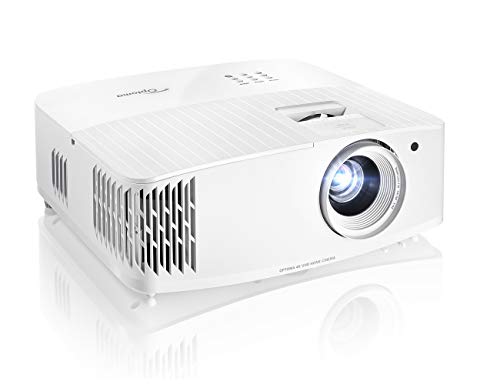
If your PS5 lives in a bright family room, the UHD35’s 3,600 lumens are its headline act, pushing a watchable true 4K UHD picture through ambient light that would flatten dimmer models. Optoma lists a 4.2ms response time at 1080p with Enhanced Gaming Mode engaged, plus a 240Hz refresh rate, which gives competitive players a high-speed mode to drop into when resolution matters less than reaction time. HDR10 and HLG support round out the listing. It is a standard-throw design, so budget space behind your seating and a clear line to the screen.
Specs
- Resolution: True 4K UHD
- Brightness: 3,600 lumens
- Response time: 4.2ms at 1080p with Enhanced Gaming Mode
- Refresh rate: 240Hz
- HDR: HDR10 and HLG
Best for: Living-room PS5 gaming where lights stay on and brightness matters more than the last word in contrast.
Watch out for: The fastest figures apply at 1080p with Enhanced Gaming Mode on, and the PS5 cannot output 240Hz, so check which mode you are actually running before judging the picture.
BenQ TH575
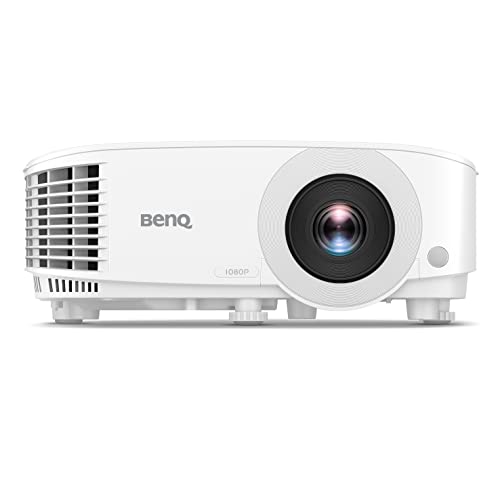
The TH575 accepts a simpler bargain: give up native 4K, and in return get a very bright 1080p image with a listed 16.7ms low-latency figure and an Enhanced Game Mode. Its 3800 lumens are the highest in this roundup, which helps in rooms that never get properly dark, and dual HDMI inputs leave room for a second console or a streaming stick. Auto vertical keystone and a 1.1x zoom make setup forgiving if the projector cannot sit perfectly square to the screen. For players who sit far back or play mostly fast, colourful games, the trade is sensible.
Specs
- Resolution: 1080p
- Brightness: 3800 lumens
- Latency: 16.7ms low latency
- Gaming: Enhanced Game Mode
- Inputs: Dual HDMI
- Extras: 3D Ready, auto vertical keystone, 1.1x zoom
Best for: Budget-conscious PS5 owners who prioritise brightness and a big, lively picture over 4K detail.
Watch out for: The PS5’s 4K output is scaled down to 1080p here, so fine detail in sprawling open-world games will look softer than on the true 4K models above.
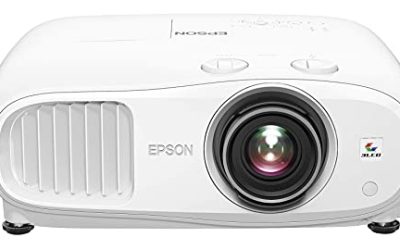
Epson Home Cinema 2350

The Home Cinema 2350 is the all-rounder of the four: a 3-chip 3LCD design producing a 4K PRO-UHD image, 2,800 lumens of output, and Android TV built in, so the same unit handles PS5 sessions and everyday streaming without extra hardware. Epson describes the projector as low latency in its listing, and HDR10 plus HLG support, a 10 W speaker and Bluetooth connectivity are all stated on the page. Because it uses three separate LCD chips, it also avoids the rainbow artefacts some viewers notice on single-chip designs during fast camera pans.
Specs
- Resolution: 4K PRO-UHD
- Engine: 3-chip 3LCD
- Brightness: 2,800 lumens
- HDR: HDR10 and HLG
- Smart features: Android TV built in
- Audio: 10 W speaker, Bluetooth
Best for: Households wanting one projector that covers PS5 gaming and film or sports streaming equally well.
Watch out for: Epson’s listing states low latency without a numeric figure, so do not rely on lag numbers quoted by review or deal sites; also make sure you are ordering the new unit, not the separate Renewed listing.
Which One Fits Your Situation
You Play in a Small Room With the Projector on a Coffee Table
The BenQ X500i fits this setup best. Its short-throw lens throws a large image from close to the screen, so nobody walks through the beam mid-game, and its true 4K output keeps HUD text and menus crisp at the shorter viewing distances small rooms impose. The listed 4ms response time and named PS5 support mean no compromises on the gaming side either.
Your Living Room Never Really Gets Dark
Choose between the Optoma UHD35 and the BenQ TH575. The UHD35 pairs 3,600 lumens with a true 4K image, suiting film-like PS5 titles even with lamps on. The TH575 pushes slightly more brightness at 1080p and costs you resolution instead. If your screen is huge and your sofa close, take the Optoma; if you sit far back, the BenQ’s simpler picture is easier to live with.
You Want One Screen for Gaming and Streaming
The Epson Home Cinema 2350 is built for double duty. Android TV is integrated, so streaming apps live on the projector itself, while the 4K PRO-UHD image and 2,800 lumens keep PS5 games looking strong in a dimmed room. The built-in 10 W speaker and Bluetooth cover casual viewing without wiring up separate audio for every session.
You Play Competitive Games Where Reactions Decide
Prioritise the listed latency figures. The BenQ X500i quotes 4ms alongside its 4K image, and the Optoma UHD35 quotes 4.2ms at 1080p in Enhanced Gaming Mode, which is the mode to use for ranked play. The TH575’s listed 16.7ms remains fine for casual competition, but the two faster options give you more headroom when a fighting game or shooter turns on single frames.
Common Mistakes
- Assuming every 4K-labelled projector is native 4K, when 4K PRO-UHD pixel-shifting and true 3840×2160 output are different technologies described differently on the listing.
- Quoting a projector’s fastest response figure without checking the resolution it applies at, since the lowest lag numbers are often measured at 1080p rather than 4K.
- Buying a standard-throw projector for a room that only has space near the screen, then discovering the image is far smaller than expected from that distance.
- Judging brightness from a dark-room demo mindset when the projector will mostly run in a lit living room, where insufficient lumens wash out dark game scenes.
- Ordering a lookalike or Renewed variant of the intended model because the listing names are nearly identical, instead of confirming the exact ASIN on the product page.
Frequently Asked Questions
Can a projector really keep up with fast PS5 games?
Yes, provided the listed latency is low enough for the genres you play. Models here quote figures such as 4ms and 4.2ms in their gaming modes, which suit shooters and fighters. Slower-paced adventures, RPGs and sports titles remain enjoyable at higher listed figures, so match the projector to your library rather than chasing the smallest number on its own.
Does the PS5 need a true 4K projector to look good?
No. A 1080p projector like the BenQ TH575 still produces a large, bright, enjoyable image, and the PS5 scales its output down cleanly. True 4K shows its advantage in fine detail, text and distant scenery, especially on bigger screens viewed from closer seats. Your room size and seating distance matter more than the badge alone.
What does 4K PRO-UHD mean on the Epson Home Cinema 2350?
It is Epson’s name for a pixel-shifting system on its 3-chip 3LCD engine, which renders an image sharper than standard 1080p without being a native 3840×2160 panel. The listing uses this exact term, so expect a picture between the two in perceived detail. It also brings the benefit of three separate chips, which some viewers find more comfortable during fast motion.
How bright does a PS5 projector need to be?
It depends entirely on your room. In a darkened, dedicated space, the 2200 ANSI lumens listed for the BenQ X500i can look rich and contrasty. In a living room with daylight or lamps, the 3,600 to 3800 lumens of the Optoma UHD35 and BenQ TH575 hold up far better. Decide based on the lighting during your typical session, not the best-case evening.
FAQ
Can a projector really keep up with fast PS5 games?
Does the PS5 need a true 4K projector to look good?
What does 4K PRO-UHD mean on the Epson Home Cinema 2350?
How bright does a PS5 projector need to be?
More from Amazon
Programs that pair well with the guide above. Offers and eligibility are set by Amazon and may change.
Free shipping on eligible items, Prime Video and more. Eligible new members can start with a free trial.
Start a Prime free trialAd-free music streaming. Eligible new subscribers can start with a free trial.
Try Music Unlimited freeA Prime membership for ages 18-24 with a trial period. Eligibility is set by Amazon.
See Prime for Young AdultsAudiobooks and podcasts to listen to on the go. Eligible new members can start with a free trial.
Try Audible freeAs an Amazon Associate we earn from qualifying purchases.