Key takeaways
- Compare the best work from home monitors for sharp 4K text, video calls and single-cable laptop charging, with three picks for every home desk setup today.
A work from home monitor decides how your whole day feels. The wrong one leaves you squinting at cramped spreadsheets, leaning in to read small text and shifting windows around a screen that never quite fits your work. The right one gives every document room to breathe, keeps video calls sharp and lets you finish the day without tired eyes or a stiff neck. Size, resolution, USB-C charging and the stand all shape that difference, and getting them right matters more than chasing the brightest panel on the shelf, and the difference shows up in the first hour, not the first month.
This guide is written for remote workers, hybrid office staff and anyone setting up a home desk for the first time. The three monitors below were chosen from the names and specifications on their Amazon product pages, with a focus on sharp text, comfortable ergonomics and the connections a laptop-first desk actually needs.
Quick Picks
As an Amazon Associate we earn from qualifying purchases.
| Product | Best for | Key spec from title |
|---|---|---|
| LG 27UP850-W 27″ UHD IPS Monitor | Single-cable laptop docking | 4K UHD, USB-C 96W Power Delivery |
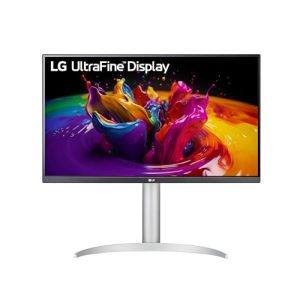
| LG 27UP850K-W 27″ UltraFine 4K Monitor | A bright, tidy desk with built-in sound | 4K UHD, USB-C 90W Power Delivery |
| Samsung M8 M80D 32″ Smart Monitor | Video calls and streaming without a PC | 32″ 4K UHD, HDR10+, SlimFit Camera |
How to Choose
Resolution and text sharpness
Text is what a work monitor shows all day, so resolution decides how comfortable long sessions feel. A 27-inch 4K panel packs roughly 163 pixels into every inch, which keeps letters crisp at normal viewing distances and leaves room for two documents side by side without constant zooming. A 32-inch 4K screen spreads the same pixels wider, so text looks slightly softer but windows feel roomier. A 1080p panel at 27 inches shows visibly rough edges by comparison, and eye strain creeps in faster. If your day is mostly documents, email and browser tabs, treat sharp text as the first filter and let everything else follow. System scaling can enlarge text, but it cannot add detail the panel never captured.
USB-C and single-cable docking
Laptop-first desks benefit most from a monitor that carries video, data and charging over one USB-C cable. Plug the laptop in once and the screen lights up while the battery tops up, which removes the daily tangle of chargers and adapters from the desk. Look at the wattage the listing states: 90W or 96W covers most 13-inch and 15-inch laptops, while thinner ultrabooks get by with less. A monitor with only HDMI forces a separate charger and often a hub as well. Count the downstream USB ports too, because a keyboard, mouse and webcam all need somewhere to live. A monitor that also offers a small USB hub saves a separate dock for most desks.
Size, ergonomics and the stand
A monitor should sit at eye level with the top of the screen roughly level with your gaze, and the stand decides whether that is easy or a daily compromise. Height, tilt and pivot adjustment let you line the screen up without stacking books underneath it, and a pivot mode turns the panel upright for long documents or code. A 27-inch screen suits most desks and keeps the whole display inside a comfortable glance. A 32-inch panel gives more room for timelines and dashboards but needs a deeper desk, or the corners sit too close to your eyes. Measure the desk depth before ordering, since a deep stand base can eat into keyboard space.
Built-in extras for video calls
Remote work runs on video calls, so the extras around the panel carry real weight. Built-in speakers spare you a pair of desk speakers and keep call audio simple, though they rarely match a dedicated speaker for music. A monitor with a bundled camera goes further, removing the clip-on webcam and its cable entirely, which matters on a small desk. Smart features such as built-in streaming apps let the screen double as a television after hours, but they add menus and accounts to manage. Weigh each extra against desk space: the best extra is the one that removes a device, not the one that adds a setting to configure. A KVM switch lets one keyboard and mouse serve two computers.
The 3 Best Options
1. LG 27UP850-W 27″ UHD IPS Monitor

The LG 27UP850-W is the straightforward pick for a laptop-first home office. Its 27-inch 4K IPS panel keeps text crisp across long documents, while the wide color coverage suits photo editing and design work that a plain office screen would wash out. A single USB-C connection carries the picture and charges the laptop at the same time, so the desk stays down to one cable. The height, pivot and tilt stand adjusts easily to eye level, and the virtually borderless frame keeps a two-screen setup looking tidy. The matte screen cuts reflections from windows behind the desk, which helps in bright rooms.
Specs
- 27-inch UHD (3840 x 2160) IPS display
- VESA DisplayHDR 400, 95 percent DCI-P3 color gamut
- USB-C with 96W Power Delivery
- 60Hz refresh rate, 5ms response time
- AMD FreeSync
- Height, pivot and tilt adjustable stand
- 2 HDMI ports, DisplayPort, USB-C
Best for: Laptop-first home offices that want one cable for video and charging.
Watch out for: Check your laptop charges over USB-C before relying on the single-cable setup.
2. LG 27UP850K-W 27″ UltraFine 4K Monitor

The LG 27UP850K-W is the newer refresh of LG’s 27-inch 4K formula, and it adds the one thing the earlier model left out: a built-in speaker. That makes it a tidy choice for video calls and casual listening without extra boxes on the desk. The panel itself is the same sharp 4K IPS class, with DisplayHDR 400 support for brighter highlights in video. USB-C carries the picture and delivers charging to the laptop, and the white finish suits bright home offices better than the usual black slab. The comparison is simple: same sharp panel, plus sound built in.
Specs
- 27-inch UltraFine 4K UHD (3840 x 2160) IPS display
- VESA DisplayHDR 400
- Built-in speaker
- USB-C with 90W Power Delivery
- 60Hz refresh rate, 5ms response time
- Tilt, height and pivot adjustable stand
- 2 HDMI ports, DisplayPort, 2 USB 3.0 ports
Best for: Bright home offices where built-in sound keeps the desk clear.
Watch out for: The built-in speaker suits calls and background listening, not critical audio work.
3. Samsung M8 M80D 32″ Smart Monitor

The Samsung M8 M80D is the pick for a home office that pulls double duty after hours. Its 32-inch 4K screen gives documents, timelines and dashboards generous room, while the built-in streaming apps turn it into a television once work ends. The included SlimFit Camera sits on top for video calls without a separate webcam, and the 10W speakers handle call audio on their own. USB-C connects a laptop with a single cable, and the height-adjustable stand keeps the large panel at a comfortable eye level. The Tizen smart system runs streaming apps without a connected computer.
Specs
- 32-inch 4K UHD (3840 x 2160) VA display
- HDR10+ with AI upscaling
- 60Hz refresh rate, 4ms response time
- SlimFit Camera included
- Built-in 10W speakers
- USB-C and HDMI connectivity, 2 USB 3.0 ports
- Height-adjustable stand, VESA 100 x 100 mm mount
Best for: Home offices that double as a streaming screen after work.
Watch out for: A 32-inch panel needs a deeper desk, or the screen sits too close.
Which One Fits Your Situation
You work from a laptop all day
Pick the LG 27UP850-W. Its USB-C connection carries video and charging over one cable, so you dock the laptop with a single plug each morning and the desk stays clear. The 27-inch 4K panel keeps documents sharp, and the adjustable stand lines the screen up at eye level without extra risers. A second monitor can join later through the laptop’s other port if one screen stops feeling like enough.
You spend all day on video calls
Pick the Samsung M8 M80D. The included SlimFit Camera and built-in speakers cover calls with no extra hardware to buy or cable up, and the 32-inch screen keeps notes and faces visible at the same time. Streaming apps built into the monitor mean it stays useful long after the last meeting ends.
You want the tidiest possible desk
Pick the LG 27UP850K-W. Its white finish and slim frame suit a small, bright room, the built-in speaker removes a pair of desk speakers, and USB-C keeps charging and video on a single cable. The height, tilt and pivot stand adjusts to your posture without extra accessories cluttering the workspace.
You juggle documents, dashboards and calls
Pick the Samsung M8 M80D for the extra space, or pair the LG 27UP850-W with a second screen later. A 32-inch 4K panel holds a dashboard, a document and a call window without constant switching, which suits analysts and project managers. If the desk is shallow, the 27-inch LG keeps the same sharp text in a smaller footprint. Ultrawide screens are another route to the same space, though they cost more per inch.
Common Mistakes
- Buying a 27-inch 1080p panel and wondering why text looks rough after a week of full workdays, when a higher resolution would have kept letters crisp.
- Ignoring USB-C wattage, then discovering the monitor cannot keep a larger laptop charged through a full day.
- Choosing a 32-inch screen for a shallow desk, where the corners sit too close to read comfortably.
- Forgetting the stand: a fixed tilt-only stand forces books or risers under the monitor to reach eye level, and the setup wobbles every time the desk is bumped.
- Picking a monitor for its smart apps alone, when the panel resolution and connections matter far more for daily work.
Frequently Asked Questions
What size monitor is best for working from home?
A 27-inch 4K monitor suits most home desks, keeping text sharp and the whole screen inside a comfortable glance. A 32-inch 4K panel adds room for dashboards and timelines but needs a deeper desk. Smaller desks and tighter rooms are better served by the 27-inch size, while a large desk can take the extra width. Arm’s length suits 27 inches, while 32 inches wants a little more room.
Is 4K worth it for a work monitor?
Yes, for most remote workers. A 4K panel renders text with crisper edges than a 1080p screen of the same size, which reduces eye strain across long days of reading. It also fits two documents side by side without constant zooming. The benefit is clearest at 27 inches and above, where lower resolutions show rough edges. Designers gain the most, since fine detail shows up clearly on a dense panel.
Do I need USB-C on a work from home monitor?
Not always, but it simplifies a laptop-first desk considerably. USB-C carries video, data and charging over one cable, so docking takes a single plug. Check the wattage the listing states against your laptop, since a monitor that delivers too little charging leaves the battery draining. HDMI-only monitors work fine with a separate charger. Desktop PCs do not need it, since they have their own power supply and video outputs.
Should a work monitor have built-in speakers?
Built-in speakers suit video calls and background listening, and they keep the desk free of extra boxes. They rarely match a dedicated speaker or headphones for music, so treat them as a convenience rather than a reason to choose a monitor. If calls dominate your day, a monitor with speakers and a camera covers the basics well. Headphones remain better for music and for calls in a noisy household.
FAQ
What size monitor is best for working from home?
Is 4K worth it for a work monitor?
Do I need USB-C on a work from home monitor?
Should a work monitor have built-in speakers?
More from Amazon
Programs that pair well with the guide above. Offers and eligibility are set by Amazon and may change.
Free shipping on eligible items, Prime Video and more. Eligible new members can start with a free trial.
Start a Prime free trialAd-free music streaming. Eligible new subscribers can start with a free trial.
Try Music Unlimited freeA Prime membership for ages 18-24 with a trial period. Eligibility is set by Amazon.
See Prime for Young AdultsAudiobooks and podcasts to listen to on the go. Eligible new members can start with a free trial.
Try Audible freeAs an Amazon Associate we earn from qualifying purchases.