Our Top Picks
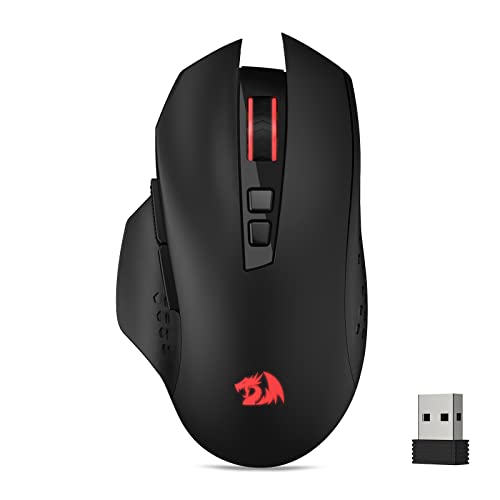 Redragon M656 Wireless Optical Gaming Mouse 4000 DPI8.07 x 5.91 x 0.1 inches0.18 poundsCheck on Amazon


A red gaming mouse does more than match a desk theme. The color usually signals red LED lighting, a red shell, or RGB lighting set to a deep red glow. Some players want the whole setup to read as one coordinated build, while others want a mouse that stands out on a dark desk. Either way, color should never come at the cost of the sensor, the switches, or the shape in your hand.
The honest catch is that very few mainstream gaming mice ship in a red shell. Most get their red look from lighting, and only a handful are red from the factory. This guide covers both kinds: one true red-shell wireless mouse, two red-LED picks, and two RGB mice whose red lighting fits a red setup. Every pick below is sold on Amazon US, with specs taken from the listing.
As an Amazon Associate, we earn from qualifying purchases.
Quick answer
If you want a genuinely red mouse, the ATTACK SHARK X11 in red is the pick, with a 22,000 DPI sensor, a 62g shell, and a charging dock. For a red glow on a budget, the Redragon M656 Gainer and M711 Cobra cover wireless and wired play. MMO players should look at the UtechSmart Venus and the Redragon M908 Impact for their thumb-button grids.
1. ATTACK SHARK X11 Wireless Gaming Mouse, Red
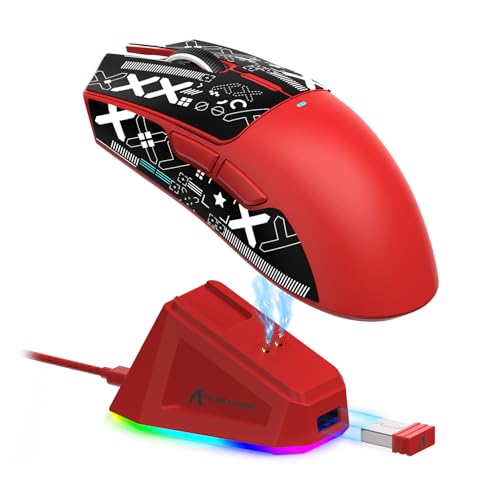
The ATTACK SHARK X11 is the only mouse in this guide with a factory red shell, and the most modern pick here. The matte red finish covers the whole body, and the included charging dock and braided USB-C cable are red as well, so the theme holds together on the desk instead of stopping at the mouse. At around 62g it is light enough for fast flicks in shooters, and the ergonomic right-handed shape suits palm and claw grips.
The sensor is a PixArt PAW3311 optical sensor with a ceiling of 22,000 DPI across six adjustable levels, from 800 up to 22,000. Tracking is rated at 300 IPS with 35G acceleration and a 1000 Hz polling rate, which puts it in the same performance class as mice that cost far more. Connection is tri-mode: 2.4GHz wireless through a receiver stored in the dock, Bluetooth 5.2, and USB-C wired. The RGB charging dock recharges the mouse between sessions and stores the receiver, so nothing small gets lost.
Five programmable buttons cover DPI steps, polling rate, lift-off distance, shortcuts, and macros through the driver software. HUYU switches with a TTC encoder are rated for up to 20 million clicks, and the box includes anti-slip grip tape for extra hold during long sessions. PTFE feet keep the glide smooth on cloth and hard pads alike.
The trade-off is the button count. Five buttons is enough for shooters and general play, but it will feel thin if your games live on thumb buttons. The brand is also newer than the established names here, so long-term support is less proven. For a red setup with serious sensor specs, the X11 is still the most convincing option.
Key specs
| Spec | Detail |
|---|---|
| Sensor | PixArt PAW3311 optical |
| Max DPI | 22,000, six levels from 800 |
| Polling rate | 1000 Hz |
| Weight | Around 62g |
| Connection | 2.4GHz wireless, Bluetooth 5.2, USB-C wired |
| Buttons | 5 programmable |
| Color | Red shell with RGB charging dock |
| ASIN | B0D3KVS4Q1 |
2. Redragon M656 Gainer Wireless Gaming Mouse
The Redragon M656 Gainer is the red-glow pick for players who want wireless freedom without a high price. The shell is black, but the red LED backlight is the defining visual feature, glowing through the scroll wheel and logo area with a steady red that matches a red-themed desk without needing any software setup. It is a simple, honest wireless mouse: a 2.4GHz nano receiver, no cable to manage, and a shape that sits naturally under a palm grip.
The sensor is a PAW3104 optical sensor with a ceiling of 4000 DPI across five adjustable levels. That ceiling is lower than the other mice here, but 4000 DPI is more than enough for most players, since many competitive players run far below the maximum their sensor allows. Seven programmable macro buttons, including two side buttons, handle key remapping and macros through the companion software.
A smart ECO sleep mode with an on, off, and ECO toggle on the underside keeps the mouse from draining between sessions. The switches are rated for 8 million clicks, and the mouse works across PC, Mac, and laptops through the same receiver.
The limits are clear. The 4000 DPI ceiling and 2.4GHz-only connection mean it cannot match the X11 on raw specs or flexibility, and there is no Bluetooth fallback. It is a right-handed ergonomic shape, so left-handed players should look elsewhere. As a red-lit wireless mouse for everyday gaming and work, it does the job.
Key specs
| Spec | Detail |
|---|---|
| Sensor | PAW3104 optical |
| Max DPI | 4000, five levels |
| Polling rate | 1000 Hz |
| Connection | 2.4GHz wireless |
| Buttons | 7 programmable macro buttons |
| Lighting | Red LED backlit |
| Switch life | 8 million clicks |
| ASIN | B09VPBF8NY |
3. Redragon M711 Cobra RGB Gaming Mouse

The Redragon M711 Cobra is the long-running budget classic in this guide. It is a wired ergonomic mouse with a black shell and RGB lighting that can be set to red, including the scroll wheel, side strips, and the dragon logo on the palm rest. The software offers 16.8 million color options, so red is one choice among many, but the red dragon branding and red-lit look are why it fits a red setup.
The optical sensor reaches 10,000 DPI across five adjustable levels, covering slow, precise aiming and fast desktop movement. Seven programmable buttons include side buttons and dedicated DPI controls behind the scroll wheel, and the software supports macros and five onboard profiles. The polling rate is 1000 Hz, and the braided cable is built to survive being dragged across a desk edge.
Grip is a strong point. Textured side grips and a contoured right-handed shape keep the mouse planted during long sessions, and the weight sits around 120g, giving it a planted, deliberate feel rather than a floaty one. Flick-heavy players may find it slow next to the 62g X11.
The Cobra is wired only, and the sensor is a step behind the newest optical sensors here. It is also a right-handed shape. For a wired red-lit mouse sold and refined for years, it remains a safe and inexpensive pick.
Key specs
| Spec | Detail |
|---|---|
| Sensor | Optical |
| Max DPI | 10,000, five levels |
| Polling rate | 1000 Hz |
| Weight | Around 120g |
| Connection | Wired USB, braided cable |
| Buttons | 7 programmable |
| Lighting | RGB, 16.8 million colors, settable to red |
| ASIN | B0751D11BL |
4. UtechSmart Venus MMO Gaming Mouse
The UtechSmart Venus is the MMO specialist of this group, and its red story is told through RGB lighting across a large, button-covered body. The five saved profiles can each use a different lighting color, so one profile can glow red while the others use different colors for quick identification. That profile lighting is practical, not just decoration, when a dozen thumb buttons need to be told apart by feel and by sight.
The high-precision Avago laser sensor reaches 16,400 DPI, adjustable from 200, with 12,000 FPS tracking, 30G acceleration, and a 1000 Hz polling rate. The headline feature is the button layout: 12 programmable side buttons in a thumb grid, and 18 programmable buttons in total, all remappable through the driver software with macro support. The driver runs on Windows, and saved profiles persist in the mouse memory, so bindings keep working on Mac and Linux as well.
An eight-piece weight tuning set lets the balance and heft be adjusted to taste, which matters on a mouse this large. The wired USB connection keeps latency steady, and the ergonomic right-handed shape with a flared thumb rest supports long sessions in games that demand constant ability use.
The Venus is a big mouse, and that is the main thing to check before buying. Small hands will struggle to reach the far side buttons, and the laser sensor, while precise, is an older design next to the optical sensors in the newer mice here. It is also wired only. For MMO and MOBA players who want a thumb grid and red profile lighting, it is the most capable option in this guide.
Key specs
| Spec | Detail |
|---|---|
| Sensor | Avago laser |
| Max DPI | 16,400, adjustable from 200 |
| Polling rate | 1000 Hz |
| Connection | Wired USB |
| Buttons | 18 programmable, 12 side buttons |
| Lighting | Customizable RGB, five profiles |
| Weight tuning | Eight-piece tuning set |
| ASIN | B00FNKMVUO |
5. Redragon M908 Impact MMO Gaming Mouse
The Redragon M908 Impact is the second MMO mouse in this guide, pairing a thumb grid with a lower price and a simpler setup than the Venus. The black ergonomic shell carries RGB lighting through the scroll wheel, side buttons, and logo, and the lighting can be set to red to match a red desk theme. The 12 numbered side buttons sit in a grid under the thumb, with a shape that suits palm grips and long sessions.
The PixArt P3327 optical sensor reaches 12,400 DPI, and the mouse offers 18 programmable buttons in total, including the 12 side buttons, with macro support through the Redragon software. A weight tuning set with eight weights lets the heft be adjusted, and the braided cable and Teflon feet keep movement smooth at a 1000 Hz polling rate.
Compared with the Venus, the M908 gives up some sensor ceiling and the profile lighting system, but it keeps the core MMO layout and adds a more modern optical sensor. Compared with the Cobra, it trades the simpler FPS shape for a larger body built around the thumb grid. Players who split time between MMO games and shooters may find the grid gets in the way during fast aiming, and the larger body will not suit small hands.
For a red-lit MMO mouse that covers the essentials without the Venus size and complexity, the M908 is the more approachable choice, and its RGB lighting keeps the red theme intact.
Key specs
| Spec | Detail |
|---|---|
| Sensor | PixArt P3327 optical |
| Max DPI | 12,400 |
| Polling rate | 1000 Hz |
| Connection | Wired USB, braided cable |
| Buttons | 18 programmable, 12 side buttons |
| Lighting | RGB backlight, settable to red |
| Weight tuning | Eight-weight tuning set |
| ASIN | B07HC4NBQ8 |
Who it’s for
This guide fits players building a red-themed setup who still want the mouse to perform. The X11 suits shooter players who want a light wireless mouse in a true red shell. The M656 suits players who want red lighting and wireless freedom on a tight budget. The M711 suits wired players who want a proven, inexpensive mouse with red-settable RGB. The Venus and the M908 suit MMO and MOBA players who need a thumb grid and want their profile lighting in red.
It also fits anyone tired of black-on-black peripherals who wants a clear accent color without a full custom build. Red lighting coordinates easily with a red keyboard backlight, a red case fan glow, or a red mousepad, and these five mice cover the main ways to get there.
Who should skip it
Players who need a genuinely red mouse and nothing else should know that only the X11 has a red shell in this guide. The other four are black mice with red or red-settable lighting, so anyone who wants red plastic under the palm will be disappointed by them.
Left-handed players should skip all five, since every pick here is right-handed. Small-handed players should skip the Venus and the M908, whose thumb grids and larger bodies assume a bigger hand. Competitive players chasing the highest polling rates should look elsewhere, since every mouse here tops out at 1000 Hz rather than the faster rates on flagship esports mice.
Comparison
The five mice split cleanly by connection and purpose. The X11 and M656 are the wireless options, and the X11 is stronger on sensor, weight, and connection flexibility, while the M656 is the simpler and cheaper way to get red lighting without a cable. The M711, Venus, and M908 are wired: the M711 for general and FPS play, the Venus and M908 for MMO play.
Sensor ceilings run from 4000 DPI on the M656 up to 22,000 DPI on the X11, with the Venus at 16,400, the M908 at 12,400, and the M711 at 10,000 in between. In practice, most players use far less than the maximum, so the ceiling matters less than shape, weight, and button layout. The X11 is the lightest at around 62g, the M711 is the heaviest at around 120g, and the Venus and M908 sit in between with weight tuning sets.
Button counts tell the same story. The X11 has five buttons for clean shooter play, the M656 and M711 have seven each for general and FPS play, and the Venus and M908 have 18 programmable buttons each for games that live on the thumb. Lighting follows the same split: the X11 is red by shell, the M656 is red by LED, and the M711, Venus, and M908 are RGB mice that can be set to red.
For a wider look at cord-free options beyond the two wireless picks here, see our wireless gaming mouse roundup.
| Mouse | Best for | Max DPI | Connection | Buttons |
|---|---|---|---|---|
| ATTACK SHARK X11, Red | Red shell, light wireless play | 22,000 | Tri-mode wireless | 5 |
| Redragon M656 Gainer | Red LED wireless on a budget | 4000 | 2.4GHz wireless | 7 |
| Redragon M711 Cobra | Wired value with red-settable RGB | 10,000 | Wired USB | 7 |
| UtechSmart Venus | MMO thumb grid, profile lighting | 16,400 | Wired USB | 18 |
| Redragon M908 Impact | MMO grid with optical sensor | 12,400 | Wired USB | 18 |
FAQ
Are red gaming mice as good as black ones?
Yes. Color is a finish or a lighting choice, not a performance tier. A red mouse uses the same sensors, switches, and shapes as its black version, so the decision comes down to the model itself.
Why are so few gaming mice actually red?
Most brands sell black and white shells because those colors suit the widest number of buyers, and they use RGB lighting to cover every other color. Red shells appear as special editions or from newer brands, which is why this guide mixes one red shell with red-lit options.
Can RGB mice be set to a solid red?
Yes. The RGB mice in this guide let the lighting be set to a single color through their software, so red is available as a steady glow rather than a cycling rainbow. The M656 uses a fixed red LED instead, so it is red by default.
Do I need a high DPI ceiling for a red gaming mouse?
No. Most players use a small fraction of the maximum DPI, and the ceiling is a poor way to compare mice. Shape, weight, button layout, and connection type matter more for daily play than the largest DPI number.
Final verdict
The best red gaming mouse depends on what red means to you. If you want a mouse that is red from the factory, the ATTACK SHARK X11 in red is the clear pick, with a 22,000 DPI sensor, a 62g shell, tri-mode wireless, and a charging dock that keeps the theme going. For red lighting on a budget, the Redragon M656 Gainer gives wireless play with a red LED glow, and the Redragon M711 Cobra gives a proven wired mouse with RGB set to red.
MMO players should choose between the two thumb-grid mice. The UtechSmart Venus offers the higher sensor ceiling and profile lighting, while the Redragon M908 Impact offers a modern optical sensor and a more approachable layout. Either one keeps the red theme through RGB lighting and covers the button-heavy games the others cannot. Pick the shape and connection that fit your hand and games first, and let the red finish tie the desk together.
Product and ASIN Reference
| Product | ASIN |
|---|---|
| ATTACK SHARK X11 Wireless Gaming Mouse, Red | B0D3KVS4Q1 |
| Redragon M656 Gainer Wireless Gaming Mouse | B09VPBF8NY |
| Redragon M711 Cobra RGB Gaming Mouse | B0751D11BL |
| UtechSmart Venus MMO Gaming Mouse | B00FNKMVUO |
| Redragon M908 Impact MMO Gaming Mouse | B07HC4NBQ8 |
FAQ
Are red gaming mice as good as black ones?
Why are so few gaming mice actually red?
Can RGB mice be set to a solid red?
Do I need a high DPI ceiling for a red gaming mouse?
More from Amazon
Programs that pair well with the guide above. Offers and eligibility are set by Amazon and may change.
Free shipping on eligible items, Prime Video and more. Eligible new members can start with a free trial.
Start a Prime free trialAd-free music streaming. Eligible new subscribers can start with a free trial.
Try Music Unlimited freeA Prime membership for ages 18-24 with a trial period. Eligibility is set by Amazon.
See Prime for Young AdultsAudiobooks and podcasts to listen to on the go. Eligible new members can start with a free trial.
Try Audible freeAs an Amazon Associate we earn from qualifying purchases.