Key takeaways
- Four real mouse bungees on Amazon, from Razer's weighted Chroma model to a nine-gram adhesive micro bungee, with the mount type that decides each one.
A bungee purchase looks trivial until you notice what actually decides it: how the thing stays on your desk. Every bungee lifts a mouse cable off the surface so the cord stops dragging, snagging on the pad edge, and pulling against your aim. The difference between models is the anchor. Some rely on a heavy base, some stick down with a suction pad or adhesive, and each behaves differently on wood, glass, and textured desktops. Choose the anchor wrong and the bungee becomes an object you chase around the desk.
This guide is for wired-mouse players who feel cable drag in fast games, for low-sensitivity players whose long swipes run out of slack, and for tidy-desk builders who want the cable managed. The four products below are all dedicated mouse bungees sold on Amazon, not mice and not cable clips, and every specification quoted here comes from their Amazon listings, including mount type, weight, and accepted cable styles.
Quick Picks
As an Amazon Associate we earn from qualifying purchases.
| Product | Best for | Key spec from title |
|---|---|---|
| Razer Mouse Bungee V3 Chroma | A weighted base that never needs sticking down | 240 g weighted base with anti-slip feet |
| Cougar Bunker RGB | Desks that also need front USB ports | 2-port USB 2.0 hub, vacuum suction base |
| Cougar Bunker | A plain, proven suction mount without extras | Patented vacuum suction pad base |
| Pulsar Micro Bungee ES | Tiny desks and monitor-edge mounting | 3M adhesive mount, about 9 g |
How to Choose
Pick the Mount Before Anything Else
The mount is the product. A weighted base, like the 240-gram foundation under the Razer V3 Chroma, stays put through friction and mass, and you can lift it away whenever you rearrange the desk. A vacuum suction pad, used by both Cougar Bunkers, locks onto smooth surfaces with surprising strength but lets go on textured or porous desktops. Adhesive mounting, the Pulsar Micro Bungee ES approach, is the most permanent and the smallest, and it commits you to one spot. Walk to your desk, look at its surface, and rule out the mounts that cannot work there before comparing any other feature.
Match the Holder to Your Cable
Bungees grip cables, and cables are not interchangeable. A thin paracord replacement cord behaves differently from a thick rubber stock cable or a stiff braided one. Razer’s listing says its clip-on catch accepts rubber, braided, and paracord cables, which makes it the forgiving option for a mixed collection. Flexible rubber arms, like the Cougar design, bend with the cable and tolerate a range of thicknesses. If your mouse wears an unusually thick or rigid cable, check the listing’s stated cable fit rather than assuming any holder will close around it without pinching or slipping.
Think About Arm Height and Swipe Length
A bungee works by holding the cable in the air and feeding slack as you move. Low-sensitivity players who sweep across the whole pad need the arm to release cable smoothly in every direction, while high-sensitivity players barely move the mouse and need only a short, tidy loop. Spring arms, like Razer’s, hold a set height and push back gently; flexible arms follow the cable instead. Where you place the bungee matters as much as its arm: centred behind the pad gives even slack left and right, while an offset mount favours one direction and starves the other.
Measure the Footprint You Can Spare
Desk space decides more purchases than spec sheets do. The Razer V3 Chroma occupies roughly 3.55 by 4.83 inches of desk, which is small but not nothing on a crowded setup with a monitor stand and speakers. The Pulsar Micro Bungee ES, at about 1.77 inches square, can live on a monitor bezel or the pad’s edge and effectively costs no desk space at all. The Cougar models sit between those extremes. Measure the strip of desk behind your pad before ordering; a bungee that forces your monitor or keyboard to move has failed its only job.
The 4 Best Options
Razer Mouse Bungee V3 Chroma
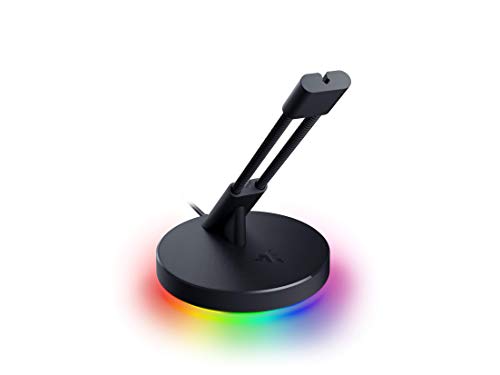
Razer’s bungee is the anchor-by-weight school executed thoroughly. A 240-gram base with anti-slip feet simply refuses to wander, so there is no suction to fail and no adhesive to commit to. The spring arm ends in a clip-on cable catch that the listing says fits rubber, braided, and paracord cables, which covers nearly every gaming mouse cord made. Underneath sits Chroma RGB underglow with the usual wide colour range, controlled through Razer’s software for players who already run that ecosystem. This is the choice for a permanent gaming desk where the bungee goes down once and is forgotten.
Specs
- Base: weighted, 240 g (8.5 oz), with anti-slip feet
- Arm: spring arm with clip-on cable catch
- Cable fit as listed: rubber, braided, and paracord cables
- Lighting: Chroma RGB underglow, 16.8 million colours
- Footprint: 3.55 x 4.83 in
- Model: RC21-01520100-R3M1
Best for: A fixed gaming desk that needs a bungee with zero mounting fuss.
Watch out for: The RGB needs Razer’s software and a USB connection to do anything; without them it is a plain, if excellent, weighted bungee.
ASIN: B08HCF3W5Q
Cougar Bunker RGB
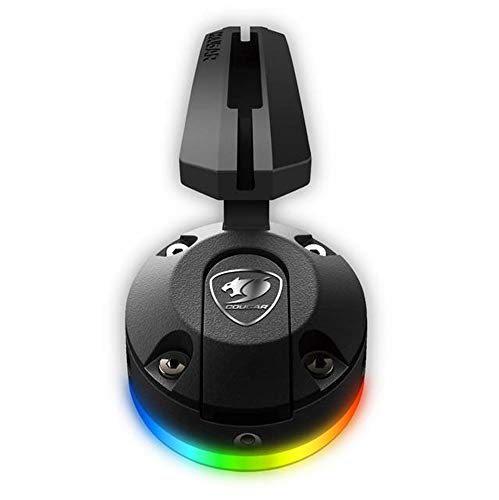
The Bunker RGB answers a different problem: the bungee spot at the back of the desk is also where your front-facing USB ports ought to be. Cougar builds a two-port USB 2.0 hub into the base, so the same footprint that manages your cable also takes a headset dongle or a flash drive. The mount is Cougar’s patented vacuum suction pad, which grips smooth desk surfaces hard enough that the flexible cable arm can move without dragging the base. Fourteen RGB lighting effects run from the base for players who want the desk to glow without adding another lamp-like accessory.
Specs
- Mount: patented vacuum suction pad base
- Hub: 2 x USB 2.0 ports
- Lighting: 14 RGB lighting effects
- Arm: flexible cable mount
- Model: CGR-XXNB-MB1RGB
Best for: Smooth-topped desks that would use a small USB hub at the monitor’s feet.
Watch out for: Suction pads need a smooth, clean surface; on a textured or wood-grain desktop the grip weakens and the base can creep.
ASIN: B07JYX47QN
Cougar Bunker
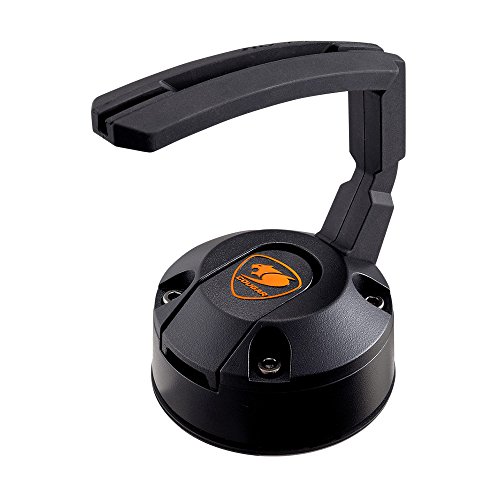
Strip the lights and the hub away and the original Bunker is what remains: a suction-mounted cable holder that has been solving cable drag for years. The vacuum suction pad locks the base to a smooth desk, the flexible rubber arm holds the cable up and feeds it as you move, and the whole thing asks nothing of your PC, not even a USB port. For a player who finds RGB pointless and already has enough hubs, this is the honest version of the product. It also travels well between desks, since the suction pad releases and re-sticks without leaving adhesive behind.
Specs
- Mount: patented vacuum suction pad base
- Arm: flexible cable mount
- Lighting: none
- Model: CGR-XXNB-MB1
Best for: Players who want proven cable control with no software, lights, or ports.
Watch out for: Like its RGB sibling, it depends on a smooth desk surface for the suction pad to hold through a long session.
ASIN: B01HU44Q7G
Pulsar Micro Bungee ES

Pulsar took the opposite path from everyone else here and shrank the bungee until it nearly disappears. The Micro Bungee ES is a small polycarbonate body with a flexible silicone arm, weighing about nine grams, and it mounts with 3M VHB adhesive to the edge of a monitor, a shelf, or the desk itself. Because the arm rotates through a full circle, the cable can approach from almost any angle, which suits cramped setups where a conventional bungee has nowhere sensible to stand. It is the only option in this group that a travelling player can stick inside a laptop bag and forget about until the next LAN.
Specs
- Body: polycarbonate with flexible silicone arm
- Mount: 3M VHB adhesive
- Movement: 360-degree arm rotation
- Size: 1.77 x 1.77 in
- Weight: about 9 g (0.32 oz)
- Model: PMB03
Best for: Minimal desks, monitor-edge mounting, and players who travel with a wired mouse.
Watch out for: Adhesive mounting is a commitment; choose the spot carefully, because moving it means fresh adhesive and a cleaned surface.
ASIN: B0C81FSVCC
Which One Fits Your Situation
You Play Low-Sensitivity FPS and Sweep the Whole Pad
Take the Razer V3 Chroma. Long swipes are exactly what break lesser mounts: the cable pulls sideways for half a metre at a time. A 240-gram base with anti-slip feet absorbs that without skating, and the spring arm meters out slack evenly in both directions. Set it centred behind the pad and the drag simply leaves your aim.
Your Desk Is Glass or High-Gloss and Ports Are Scarce
The Cougar Bunker RGB was made for your surface. Its vacuum suction pad grips glass and gloss finishes better than almost anything else, and the two USB 2.0 ports in the base give a headset receiver a home within reach. Just wipe the surface before mounting; suction strength is only ever as good as the seal.
You Want Cable Control and Nothing Else
Buy the original Cougar Bunker. No lighting to configure, no hub to wire up, no software to install. It sticks down, holds the cable in the air, and gets out of the way, which is the entire job description of a bungee. It is also the easiest of the four to move between a home desk and a second setup.
Your Desk Has No Spare Surface at All
The Pulsar Micro Bungee ES is your option. Stick it to the monitor’s lower bezel or the desk edge and it manages the cable from above the surface entirely, using about as much room as a coin. For a laptop-and-monitor setup on a narrow desk, it is the difference between having cable management and going without.
Common Mistakes
- Buying a bungee for a wireless mouse, where there is no cable for it to manage.
- Mounting a suction bungee on a textured or porous desktop, then blaming the product when the seal fails.
- Placing the bungee far off to one side, so the cable runs short on half of your swipes.
- Forcing a thick braided cable into a small clip until the holder pinches the cord or pops it loose mid-game.
- Leaving too little slack between bungee and mouse, which trades cable drag for a constant spring pull.
Frequently Asked Questions
Does a mouse bungee actually change how aiming feels?
Yes, in a specific way: it removes the variable friction of a cable dragging across the desk and catching on the pad’s edge. Your sensor and settings do not change, but the resistance behind each movement becomes consistent, which is what players notice. The effect is largest for wired mice with stiff rubber cables and for low-sensitivity players who move the mouse the furthest.
Will a bungee work with my paracord or braided cable?
Usually, provided the holder is sized for it. The Razer V3 Chroma’s listing explicitly names rubber, braided, and paracord cables for its catch. Flexible-arm models like the Cougars tolerate a range of thicknesses because the arm bends rather than clamps. Very thick or rigid cables are the exception; check the listing’s stated cable fit before ordering for an unusual cord.
Where on the desk should a bungee sit?
Centred behind the mouse pad is the standard answer, close enough that the cable loop between bungee and mouse stays relaxed through your widest swipe. Too far back and the loop pulls tight at the extremes; too close and the spare cable piles onto the pad. The adhesive Pulsar can also ride on a monitor edge, which works when the strip behind the pad is already occupied.
Can I use a bungee with a charging cable for a wireless mouse?
You can, but it solves a problem most wireless players do not have, since the cable is only attached while charging. A bungee earns its space with a permanently wired mouse. If you play wired while charging often, a small adhesive model like the Pulsar Micro Bungee ES keeps that cable tidy without committing desk space to a full-size base.
FAQ
Does a mouse bungee actually change how aiming feels?
Will a bungee work with my paracord or braided cable?
Where on the desk should a bungee sit?
Can I use a bungee with a charging cable for a wireless mouse?
More from Amazon
Programs that pair well with the guide above. Offers and eligibility are set by Amazon and may change.
Free shipping on eligible items, Prime Video and more. Eligible new members can start with a free trial.
Start a Prime free trialAd-free music streaming. Eligible new subscribers can start with a free trial.
Try Music Unlimited freeA Prime membership for ages 18-24 with a trial period. Eligibility is set by Amazon.
See Prime for Young AdultsAudiobooks and podcasts to listen to on the go. Eligible new members can start with a free trial.
Try Audible freeAs an Amazon Associate we earn from qualifying purchases.