Our Top Picks


A cheap mouse pad fails in predictable ways, and none of them show in a product photo. The surface weave decides whether your mouse glides or grips, the thickness decides whether the desk’s edge presses into your wrist, and the base decides whether the pad creeps forward daily until it hangs off the desk. The decision in this segment is not which pad looks best. It is which combination of size, weave, and thickness matches how you actually move a mouse.
This guide is for players replacing a worn pad, building a first gaming desk, or covering more of the desk so low-sensitivity swipes stop running onto bare wood. Each pad below sat in the under-20 segment on Amazon US when checked on 24 November 2026; pads drift in and out of that segment, so confirm the listing still sits there before ordering. Every dimension and material detail quoted in this guide comes from the pads’ Amazon listings.
Quick Picks
As an Amazon Associate we earn from qualifying purchases.
| Product | Best for | Key spec from title |
|---|---|---|
| SteelSeries QcK Medium | The standard medium cloth pad | 320 x 270 mm micro-woven cloth |
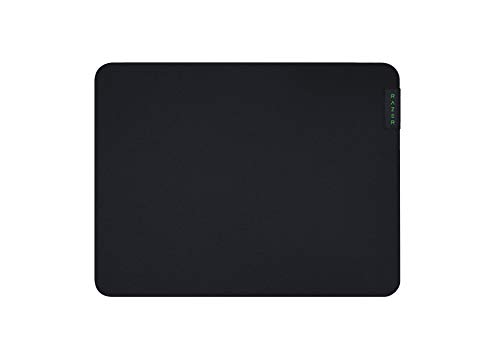
| Razer Gigantus V2 Medium | A slightly larger, thicker medium pad | 360 x 270 mm, 3 mm thick |
| Corsair MM100 Medium | Glide-optimised cloth for optical and laser mice | 320 x 270 x 3 mm textile weave |
| SteelSeries QcK Cloth Large, Lavender | Covering keyboard and mouse space in one pad | 450 x 400 mm, size L |
How to Choose
Size Follows Your Sensitivity, Not Your Desk
Your in-game sensitivity decides how much pad you need. Low-sensitivity players sweep the mouse across tens of centimetres to turn, and a 320 mm pad can run out mid-fight, which is the case for stepping up to the 450 mm QcK Large. Higher-sensitivity players move in small circles and never touch the edges of a medium pad, so the extra cloth buys them nothing but desk coverage. Measure your current swipe: play one match, note how far the mouse actually travels, and buy the smallest pad that contains it with margin to spare.
Weave Decides Glide Versus Control
Cloth pads are not one surface. A fine micro-weave, like the QcK line’s, gives a smooth, consistent glide that suits mixed gaming. A more textured weave, like the Gigantus V2’s, adds a touch of drag that many players feel as control when stopping on a target. Neither is objectively faster in a way that wins games; the difference is what your hand prefers at the moment of stopping. If your current pad feels like ice, choose texture. If it feels like sandpaper by Friday, choose the finer weave and keep it clean.
Thickness Changes Your Wrist Angle
Two millimetres and three millimetres sound identical until your wrist rests on the pad for three hours. The QcK Medium is 2 mm thick, low and firm, so the mouse sits close to desk height. The Gigantus V2 and MM100 are 3 mm, which softens the pad’s edge against your wrist and forgives small bumps or seams in the desk beneath. Players with a hard desk edge digging into the forearm should take the thicker pads; players who like a firm, desk-like feel should take the thinner one.
The Base Is the Feature You Notice Last and Miss Most
Every pad here uses a rubber base meant to grip the desk, and the differences show up over weeks. A good base keeps the pad planted through fast horizontal swipes and lets you peel it up for cleaning without a fight. A poor one lets the pad walk. Because you cannot test grip from a listing, lean on the established pad families in this guide, whose bases are the reason they have stayed in production for years, and plan to wash the pad occasionally, since a dusty base grips worse than a cheap one.
The 4 Best Options
SteelSeries QcK Medium
The QcK Medium is the cloth pad the rest of the segment is measured against. Its exclusive micro-woven cloth surface is built for smooth, consistent tracking, the listing notes it is optimised for gaming sensors, and the non-slip rubber base has kept it planted on desks for well over a decade of production. At 320 by 270 mm and 2 mm thick, it is the classic medium footprint: enough room for mixed-sensitivity play, small enough for almost any desk. If you have never owned a proper gaming pad, this is the safest first one, and if you have, it is the baseline your preferences are defined against.
Specs
- Size: 320 x 270 mm
- Thickness: 2 mm
- Surface: micro-woven cloth
- Base: non-slip rubber
- Sensor fit as listed: optimised for gaming sensors
- Model: 63004
- Colour: black
Best for: A first gaming pad, or a like-for-like replacement for a worn medium cloth pad.
Watch out for: The edges are not stitched, so heavy daily use will eventually fray them; expect to replace it on a cycle rather than own it forever.
ASIN: B000UEZ36W
Razer Gigantus V2 Medium
Razer’s Gigantus V2 Medium gives you a little more pad in every direction than the QcK: 360 by 270 mm of textured micro-weave cloth over a thick, high-density rubber foam base, at 3 mm thick. That extra width suits players whose swipes kept finding the QcK’s side edge, and the denser foam keeps the pad flat and cushioned on less-than-perfect desks. The textured surface leans toward control, with a glide that helps the mouse stop where you put it. For a Razer-ecosystem desk it also matches the rest of the setup, though the pad itself needs no software and works with any mouse.
Specs
- Size: 360 x 270 mm
- Thickness: 3 mm
- Surface: textured micro-weave cloth
- Base: thick, high-density rubber foam, non-slip
- Model: RZ02-03330200-R3M1
- Colour: classic black
Best for: Players who outgrew a standard medium pad’s width and prefer a control-leaning weave.
Watch out for: Confirm you are looking at the classic black medium listing; this pad family has many special editions and sizes under similar names.
ASIN: B088539GLT
Corsair MM100 Medium
The MM100 is Corsair’s entry in the classic medium class, and its listing pitches the surface as glide-optimised: a textile weave tuned for low-friction tracking and pixel-precise targeting, designed for both optical and laser mice. It matches the QcK’s 320 by 270 mm footprint but runs 3 mm thick, so the wrist edge is softer than the SteelSeries pad’s. The base is natural rubber with an anti-slip grip. Players who found the QcK a fraction too draggy, or who simply live in Corsair’s ecosystem, get the same proven format with a slightly quicker surface character.
Specs
- Size: 320 x 270 mm
- Thickness: 3 mm
- Surface: textile-weave cloth, glide-optimised as listed
- Base: natural rubber, anti-slip
- Sensor fit as listed: designed for optical and laser mice
- Model: CH-9100020-WW
- Colour: black
Best for: Players who want the standard medium format with a faster-feeling cloth.
Watch out for: Like the QcK, the edges are unstitched cloth over rubber; treat it as a consumable you replace when the surface wears smooth.
ASIN: B01MS4C5WX
SteelSeries QcK Cloth Large, Lavender
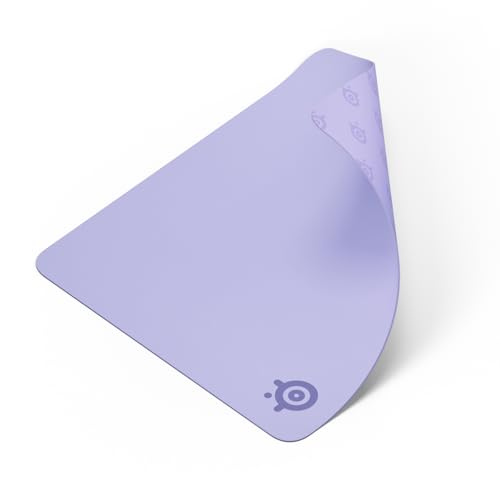
The large QcK answers the other common complaint: the pad ends before the swipe does. At 450 by 400 mm it covers the mouse area and slides under the keyboard’s edge, so a low-sensitivity player gets one continuous surface instead of a pad and a desk. The cloth is the same micro-woven material as the medium QcK, with the same non-slip base behaviour, so the feel stays familiar when you size up. This listing is the lavender colourway, which either suits your desk or does not; the playing surface is the standard QcK cloth. Measure first: 450 mm of width is more desk than some setups can give.
Specs
- Size: 450 x 400 mm, size L
- Surface: micro-woven cloth
- Base: non-slip rubber
- Model: 63463
- Colour: lavender
Best for: Low-sensitivity players who want keyboard and mouse on one continuous pad.
Watch out for: Measure your desk’s depth and width first; a large pad that hangs over the edge or crowds the monitor stand helps no one.
ASIN: B0FJH54VM4
Which One Fits Your Situation
You Keep Running Off the Edge of Your Current Pad
Size up to the QcK Large. Its 450 mm width absorbs the long turns that a medium pad cannot, and because the cloth matches the medium QcK, your aim feel does not change while your space problem disappears. If only your horizontal swipes overflow, the Gigantus V2’s extra width is the smaller step.
Your Desk Is Small and Your Sensitivity Is High
The QcK Medium was designed for you. Its 320 by 270 mm footprint leaves room for everything else on a compact desk, and high-sensitivity play never explores the edges anyway. The MM100 is the same footprint with a softer 3 mm edge, if your wrist rests heavily on the pad.
Your Wrist Hurts Where It Meets the Desk
Take one of the 3 mm pads, the Gigantus V2 or the MM100. The extra millimetre of foam softens the transition between desk and pad and cushions the wrist bone through long sessions at the desk. Between them, choose the Gigantus for a control feel and the MM100 for a quicker glide.
You Are Replacing a Pad That Went Smooth and Shiny
Any of the four restores the surface, but match the weave to what wore out. If the old pad’s glide is what you miss, the MM100’s glide-optimised cloth is the closest replacement. If you want the new one to feel familiar on day one, the QcK Medium is the reference surface most players are calibrated to.
Common Mistakes
- Buying the largest pad on the page without measuring the desk, then folding or overlapping it under the monitor.
- Expecting a cloth pad in this segment to feel like a hard speed pad, when every option here is a control-friendly cloth.
- Treating a pad as permanent; cloth surfaces wear smooth and bases collect dust, so plan on washing or replacing.
- Chasing a special-edition colourway of a pad family without checking that the size and ASIN match the standard model.
- Ignoring thickness, then wondering why the new pad changed how your wrist sits.
Frequently Asked Questions
How long does a cloth pad in this segment last?
With daily play, expect the surface to feel its best for the first year or so, then gradually smooth out where your mouse travels most. Washing the pad gently and letting it dry flat extends its life noticeably. The unstitched edges on pads like the QcK and MM100 usually set the replacement date, fraying after long use rather than failing suddenly.
Will one of these pads work with my mouse’s sensor?
Yes. Modern optical sensors track happily on matte cloth, and the listings here say so directly: the QcK is optimised for gaming sensors, and the MM100 is designed for optical and laser mice. Problems arise on glossy, patterned, or glass surfaces, not on plain cloth like these four. If your mouse skips on a current pad, the pad’s worn surface is the likely cause.
Is a bigger pad always better for FPS games?
Only if your sensitivity needs the room. Low-sensitivity players genuinely use 400 mm or more of width, and for them the QcK Large removes a real limitation. Higher-sensitivity players gain nothing from the extra cloth and lose desk space to it. Buy for the swipe you actually make, which you can measure in one match.
Do these pads stay in this segment all year?
No, and that is worth knowing before you shop. Pads move in and out of the under-20 segment as listings change, which is why this guide names the check date. The four pads here were in the segment on 24 November 2026. If one has drifted out when you look, its medium-sized siblings from the same families are the first alternatives to check.
FAQ
How long does a cloth pad in this segment last?
Will one of these pads work with my mouse’s sensor?
Is a bigger pad always better for FPS games?
Do these pads stay in this segment all year?
More from Amazon
Programs that pair well with the guide above. Offers and eligibility are set by Amazon and may change.
Free shipping on eligible items, Prime Video and more. Eligible new members can start with a free trial.
Start a Prime free trialAd-free music streaming. Eligible new subscribers can start with a free trial.
Try Music Unlimited freeA Prime membership for ages 18-24 with a trial period. Eligibility is set by Amazon.
See Prime for Young AdultsAudiobooks and podcasts to listen to on the go. Eligible new members can start with a free trial.
Try Audible freeAs an Amazon Associate we earn from qualifying purchases.