Our Top Picks
Pros & cons
- 11 programmable buttons add extensive control customization
- Adjustable weights let you fine-tune balance and feel
- LIGHTSYNC RGB syncs lighting with other Logitech gear
- Wired connection limits cable-free desk setups
- Heavier than typical lightweight esports mice at 0.27 pounds
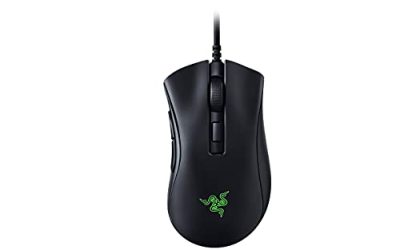
 Razer Basilisk V3 Customizable RGB Wired Ergonomic GamingMouse2.96 x 5.12 x 1.67 inches0.2 poundsCheck on Amazon
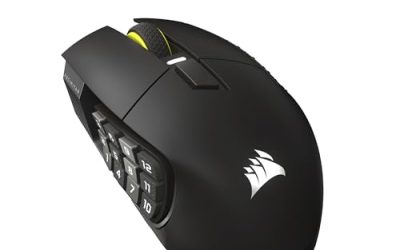
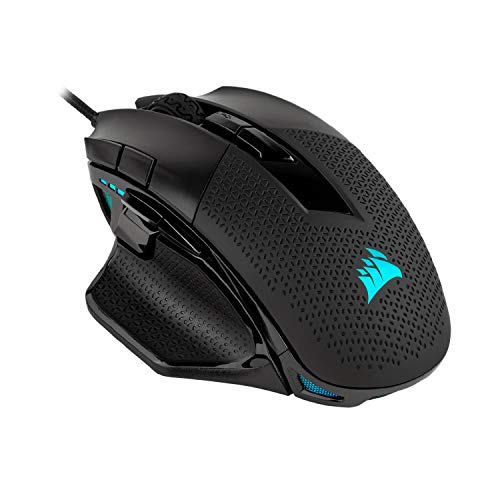 CORSAIR NIGHTSWORD RGB Adjustable Weight FPS MOBA PC5.08 x 3.38 x 1.71 inches0.3 poundsCheck on Amazon
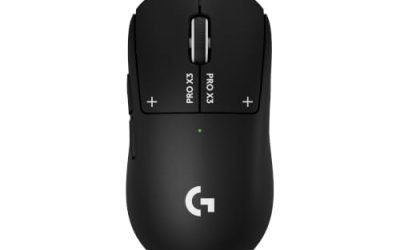
 Logitech G Pro X Superlight 2 Lightspeed WirelessClassic1.57 x 2.5 x 4.92 inches0.1 poundsCheck on Amazon
Pros & cons
- 95-hour battery life reduces how often you need to charge
- 60-gram weight suits fast, low-effort mouse movement
- HERO 2 sensor tracks up to 44,000 DPI with no smoothing
- POWERPLAY wireless charging pad is sold separately
- Premium features add a more complex setup than basic mice

Playing Grand Theft Auto V on PC asks one mouse to do two very different jobs in the same minute. On foot you need steady, precise aim for shootouts and careful camera control in crowded streets. Seconds later you are steering through Los Santos traffic, opening menus, answering the phone and triggering abilities, often without taking your hand off the mouse at all.
This guide is for PC players who split their time between missions, free-roam driving and long open-world sessions, and who want one mouse that handles all of it. Every pick below was chosen from the names and specifications stated on its Amazon product page, focusing on programmable buttons, adjustable sensitivity and shapes suited to extended play rather than headline numbers alone.
Quick Picks
As an Amazon Associate we earn from qualifying purchases
| Product | Best for | Key spec from title |
|---|---|---|
| Logitech G502 HERO | Players who want the most buttons for missions and driving | 11 Programmable Buttons |
| Razer Basilisk V3 | Players who scroll menus and weapon wheels constantly | HyperScroll Tilt Wheel |
| SteelSeries Rival 5 | Players who want quick side buttons for fast-paced action | 9 Programmable Buttons |
| Corsair Nightsword RGB | Players who like a heavier, contoured mouse for long sessions | 10 Programmable Buttons |
| Logitech G Pro X Superlight 2 | Players who want the lightest wireless option for fast aim | 60g Pro-Grade with 5 Programmable Buttons |
How to Choose
Programmable Buttons for Driving, Shooting and Menus
GTA 5 layers a lot of actions onto the mouse hand, from firing and aiming to interacting, covering, switching weapons and working through phone and interaction menus. A mouse with more programmable buttons lets you move the actions you reach for most onto your thumb instead of stretching across the keyboard mid-mission. The Logitech G502 HERO and Razer Basilisk V3 each list 11 programmable buttons, while the Corsair Nightsword RGB lists 10 and the SteelSeries Rival 5 lists 9, including 5 quick action side buttons. Count the actions you actually repeat every session, then choose a button layout that covers them without forcing awkward reaches during a chase or a gunfight.
Adjustable DPI for On-Foot Aim and Vehicle Control
Sensitivity that feels right for aiming on foot rarely feels right for steering, and GTA 5 constantly switches between the two. Adjustable DPI, called CPI on the SteelSeries Rival 5 listing, lets you set a lower, steadier level for precise shots and a higher level for sweeping camera turns and quick vehicle corrections. Every mouse here lists a wide adjustable range, from 18,000 DPI on the Rival 5 and Nightsword RGB up to 44k DPI on the Logitech G Pro X Superlight 2. The headline maximum matters less than being able to store distinct levels and switch between them quickly, so check how each model handles DPI switching before you decide.
Shape and Weight for Long Open-World Sessions
A GTA 5 session can run for hours, moving between relaxed cruising, tense missions and idle browsing of in-game menus, so comfort matters as much as speed. Right-handed ergonomic shapes, like the listings describe for the Razer Basilisk V3 and the SteelSeries Rival 5, support the palm during slower driving stretches. Weight changes the feel just as much: the Logitech G Pro X Superlight 2 lists 60g for fast, low-effort flicks, the Rival 5 lists 85g, and the Corsair Nightsword RGB uses a weight system so you can tune its balance. Match the shape to your grip and session length, not just to the sensor figures.
Wired Reliability Versus Wireless Freedom
Four of the mice in this guide connect by wire, which means no charging breaks during a long Los Santos session and a direct USB connection to your PC. The Logitech G Pro X Superlight 2 is the wireless exception, listing USB-C charging, so its cable can come off your desk entirely while you play. Wireless freedom suits players who hate cable drag during fast on-foot turns, while wired models suit players who never want to think about battery level before starting a heist. Neither connection type changes which buttons or DPI range you get, so decide this point on desk habits and charging tolerance rather than on performance fears.
The 5 Best Options
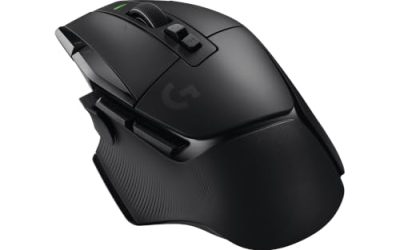
Logitech G502 HERO

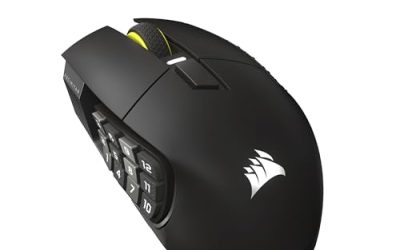
If you remap controls constantly, the G502 HERO is the natural starting point in this list. Its listing states 11 programmable buttons, giving you room to place interaction, weapon switching, cover and vehicle-related actions under your thumb instead of reaching for scattered keyboard keys. The adjustable weights let you add heft for steadier driving inputs or remove it for quicker on-foot aim, and on-board memory means your button layout and sensitivity settings travel with the mouse between PCs. For players who run varied missions back to back, that combination of button count and stored profiles fits GTA 5 particularly well.
Specs
- HERO 25K Sensor
- 25,600 DPI
- RGB lighting
- Adjustable Weights
- 11 Programmable Buttons
- On-Board Memory
- Wired connection for PC and Mac
Best for: Players who want the deepest button layout for mixed driving, shooting and menu work.
Watch out for: Confirm the wired connection suits your desk setup, and plan which of the 11 buttons you will actually assign before buying, since unused extra buttons add no value.
Razer Basilisk V3
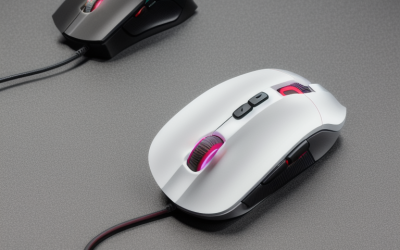
The Basilisk V3 suits players whose GTA 5 time involves constant scrolling, through weapon wheels, phone contacts, settings and long in-game lists. Its listing highlights a HyperScroll Tilt Wheel alongside 11 programmable buttons, so both your thumb and your scroll finger get extra inputs for menus and quick actions. The customizable ergonomic shape is described for extended use, which matters during long free-roam drives between missions, and the 26K DPI optical sensor gives a wide sensitivity range to split between careful on-foot aim and faster camera movement in vehicles. Choose this one if menu navigation speed matters to you as much as raw aiming control.
Specs
- Chroma RGB Lighting
- 26K DPI Optical Sensor
- 11 Programmable Buttons
- HyperScroll Tilt Wheel
- Customizable ergonomic gaming mouse shape
- Classic Black finish
Best for: Players who scroll through weapon wheels and menus constantly and want an ergonomic wired shape.
Watch out for: Check that the ergonomic right-handed shape matches your grip style, and confirm you will use the tilt wheel inputs rather than paying for a feature you ignore.
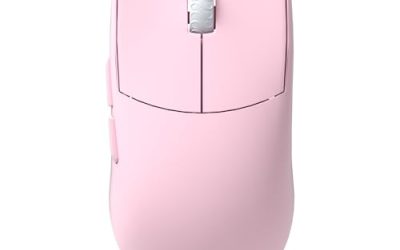
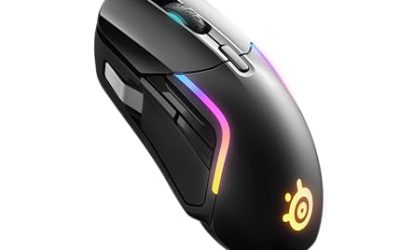
SteelSeries Rival 5

The Rival 5 is built for players who jump between action types without pausing, which describes most GTA 5 sessions well. Its listing states 9 programmable buttons with 5 quick action side buttons, a layout aimed at fast access during Battle Royale, FPS, MOBA and MMO play, and that same quick thumb access maps neatly onto GTA 5 interactions, abilities and weapon changes. The ergonomic right-handed shape and 85g competitive weight sit between the heavy tunable mice and the ultralight wireless option here, while the TrueMove Air sensor gives precise tracking for on-foot gunfights. Pick it if you want many side buttons in a lighter wired body.
Specs
- PrismSync RGB Lighting
- 9 Programmable Buttons
- 5 quick action side buttons
- 18,000 CPI TrueMove Air Optical Sensor
- 85 g Competitive Weight
- USB wired connectivity
- Right-handed ergonomic shape
Best for: Players who want fast side-button access for abilities and interactions in a mid-weight wired mouse.
Watch out for: Verify the claw and fingertip grip styles listed for this mouse match how you hold a mouse, since the shape is described for those grips rather than a full palm rest.
Corsair Nightsword RGB
Choose the Nightsword RGB if you prefer a solid, contoured mouse that stays planted during long, slower-paced GTA 5 sessions of driving, exploring and planning. Its listing describes a comfortable contoured design with 10 programmable buttons, plus a weight system using two sets of weights and six mounting locations to adjust weight and balance to your grip. The custom Pixart PMW3391 optical sensor adjusts in 1 DPI resolution steps up to 18,000 DPI, which allows very fine sensitivity steps between on-foot aim and vehicle control. Onboard profile storage keeps your settings with the mouse, and iCUE compatibility covers macros and lighting control.
Specs
- 18,000 DPI
- Custom Pixart PMW3391 optical sensor with 1 DPI resolution steps
- 10 Programmable Buttons
- Weight System with two sets of weights and six mounting locations
- Contoured shape with rubber grips
- iCUE Compatible
- Onboard profile storage
- Black finish
Best for: Players who like a heavier, contoured mouse and want to tune its weight and balance for long sessions.
Watch out for: Check the listed size and weight range against your hand and desk space before buying, since this is the largest and heaviest option in this guide by design.
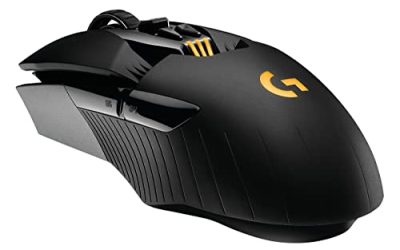
Logitech G Pro X Superlight 2
The Pro X Superlight 2 is the pick for players who prioritise fast, effortless aim movement above button count. Its listing states a 60g pro-grade build with 5 programmable buttons, so you give up the deep thumb panels of the other mice here in exchange for a wireless mouse that moves with little effort during on-foot shootouts and quick camera turns. The 44k DPI sensor and 8kHz report rate headline the listing, and USB-C charging keeps the cable modern when you plug in. For GTA 5 players who spend most time on foot and in combat, that light wireless feel is the main reason to choose it.
Specs
- Wireless gaming mouse
- 60g Pro-Grade weight
- 5 Programmable Buttons
- 44k DPI Sensor
- 8kHz Report Rate
- USB-C Charging
- For PC and Mac
- Black finish
Best for: Players who want the lightest wireless mouse for fast on-foot aim and minimal desk clutter.
Watch out for: Count your essential GTA 5 actions first, because 5 programmable buttons is the smallest layout here, and confirm you are comfortable charging a wireless mouse between sessions.
Which One Fits Your Situation
You Run Heists and Missions With Lots of Keybinds
Pick the Logitech G502 HERO. Coordinated missions stack actions together, from covering and interacting to switching equipment while a teammate drives, and its 11 programmable buttons plus on-board memory give you the most room to build a layout once and keep it. For a bind-heavy mission load, its adjustable weights for switching between driving and shooting stretches make it the most complete fit here.
You Mostly Drive, Cruise and Explore the Map
Pick the Corsair Nightsword RGB for relaxed, long-haul play. Its contoured shape, rubber grips and tunable weight system are described for comfort and calibration rather than flick speed, which suits hours of cruising, deliveries and exploration. For steady vehicle control over a long evening, its balance tuning is the stronger match.
You Split Time Between On-Foot Combat and Driving
Pick the SteelSeries Rival 5. Its 5 quick action side buttons put interaction and ability inputs under your thumb for fast on-foot moments, while the 85g weight and ergonomic shape stay comfortable when play shifts back to driving. Its wide 18,000 CPI range lets you keep separate sensitivity levels for aiming and steering in one mouse.
You Want a Clean Wireless Desk for Fast Aim
Pick the Logitech G Pro X Superlight 2. At a listed 60g with a wireless connection and USB-C charging, it removes cable drag during quick turns and keeps a small desk tidy. You accept the smallest layout here, with 5 programmable buttons, so it fits players whose play centres on aiming and movement rather than deep remapping.
Common Mistakes
- Buying the highest DPI figure without checking whether you can store and switch separate sensitivity levels for aiming and driving.
- Choosing a mouse with many programmable buttons but never assigning the GTA 5 actions you repeat most, such as interaction, cover or weapon switching.
- Ignoring grip and hand size, then finding an ergonomic right-handed shape uncomfortable during a long open-world session.
- Picking a wireless mouse without a charging routine, so it runs low in the middle of a mission or a long drive.
- Overlooking the scroll wheel, even though weapon wheels and menus make wheel design a daily factor in GTA 5.
Frequently Asked Questions
How many programmable buttons do you need for GTA 5?
Most players are well covered by 9 to 11 programmable buttons, which is the range listed for the G502 HERO, Basilisk V3, Rival 5 and Nightsword RGB here. That count lets you move interaction, cover, weapon switching and a vehicle action onto the mouse. Players with simpler layouts can manage with the 5 buttons listed for the Pro X Superlight 2.
Should you use different DPI settings for driving and shooting?
Yes, separate levels usually help because the two activities reward different sensitivity. A lower level steadies on-foot aim, while a higher level makes camera sweeps and quick steering corrections easier. Every mouse in this guide lists a wide adjustable DPI or CPI range, so set at least two levels and practise switching between them until the change feels automatic.
Is a wired or wireless mouse better for GTA 5?
Both connection types appear in this guide and either can work well. Wired models such as the G502 HERO, Basilisk V3, Rival 5 and Nightsword RGB never need charging during a long session. The wireless Pro X Superlight 2 removes cable drag and desk clutter but needs regular USB-C charging. Choose based on your desk habits rather than assuming one type is required.
Does mouse weight really matter for an open-world game?
Weight changes how a mouse feels across a long session, even in a slower-paced game. The listings here span a listed 60g for the Pro X Superlight 2 up to the tunable weight system of the Nightsword RGB, with the Rival 5 at 85g between them. Lighter mice favour quick flicks, heavier or tunable mice favour steady, planted control, so match weight to your play style.
FAQ
How many programmable buttons do you need for GTA 5?
Should you use different DPI settings for driving and shooting?
Is a wired or wireless mouse better for GTA 5?
Does mouse weight really matter for an open-world game?
More from Amazon
Programs that pair well with the guide above. Offers and eligibility are set by Amazon and may change.
Free shipping on eligible items, Prime Video and more. Eligible new members can start with a free trial.
Start a Prime free trialAd-free music streaming. Eligible new subscribers can start with a free trial.
Try Music Unlimited freeA Prime membership for ages 18-24 with a trial period. Eligibility is set by Amazon.
See Prime for Young AdultsAudiobooks and podcasts to listen to on the go. Eligible new members can start with a free trial.
Try Audible freeAs an Amazon Associate we earn from qualifying purchases.