Key takeaways
- Small, light gaming mice that fit smaller hands: mini wired and wireless picks compared by listed size, weight, DPI range and switch ratings.
Buying a gaming mouse for a child is mostly a sizing decision, not a speed decision. A full-size adult mouse forces small fingers to stretch for the side buttons, and a heavy shell tires a young wrist during longer sessions on the family PC. The real question is whether the shell length, width and weight match the hand that will actually hold it, and whether the buttons and cable will survive everyday use at a shared desk.
This guide is for parents equipping a child’s first gaming setup, families sharing one computer between adults and kids, and anyone buying for a younger player who finds standard mice bulky. Every pick below is a compact or mini model, and every figure comes from the product name and specification list on its Amazon page.
Quick Picks
As an Amazon Associate we earn from qualifying purchases
| Product | Best for | Key spec from title |
|---|---|---|
| Razer DeathAdder V2 Mini | A shaped shell for right-handed kids | 62g lightweight design with grip tape included |
| Glorious Model O- (Minus) | The lightest wired option here | 58g superlight honeycomb design |
| Logitech G305 LIGHTSPEED | Wireless freedom at a shared family desk | 250h battery life, 12,000 DPI HERO sensor |
| HyperX Pulsefire Haste 2 Mini | The smallest wireless shell in the list | Compact lightweight build, Bluetooth and 2.4GHz |
How to Choose
Start with shell length, not the DPI number
Adult gaming mice often run past five inches long, which leaves a child’s fingers hovering instead of resting on the buttons. The compact models in this guide sit between roughly four and a half and four and three quarter inches in length, and that shorter body is what lets smaller hands reach the scroll wheel and side buttons without shifting grip. Measure the child’s hand from fingertip to wrist crease, then compare it with the dimensions printed on the listing. If the mouse is longer than the hand is comfortable wrapping around, clicks turn into stretches and aim suffers.
Keep the weight low enough for small arms
Weight is the second filter, because a child moves the mouse with the whole forearm more than an adult does. Three of the four picks here weigh under 62 grams, which keeps swipes across a desk pad easy to start and stop. The wireless Logitech G305 is the exception at 99 grams, still lighter than most full-size gaming mice but noticeably heavier than the mini wired models. For younger kids playing shorter sessions, the lightest shell usually wins. For older kids who play longer and want no cable, the extra grams may be an acceptable trade.
Choose wired simplicity or wireless freedom
A wired mouse never needs charging, never loses a receiver, and works the moment it is plugged in, which suits a fixed family desk and younger children who will not manage battery routines. Wireless models remove cable drag and let the mouse travel between a desktop, a laptop and a homework table, but they add a small USB receiver that is easy to misplace. The G305 stores its receiver inside the body, and the HyperX Haste 2 Mini can fall back to Bluetooth on compatible devices. Decide based on where the mouse will live, not on which connection sounds more advanced.
Check switch ratings and what takes the knocks
Kids drop mice, yank cables and click harder than adults, so the durability figures on the listing matter more than lighting effects. Look for a stated switch rating: the Glorious Model O- lists Omron switches rated for 20 million clicks, while the HyperX Haste 2 Mini lists switches rated for up to 100 million clicks. Flexible paracord-style cables, like the ones on the Razer and Glorious models, tolerate bending better than stiff rubber cords. Grip tape in the box, as with the DeathAdder V2 Mini, also helps small hands hold on without squeezing.
The 4 Best Options
Razer DeathAdder V2 Mini

Most kids grip a mouse with the whole palm, and this shrunken version of Razer’s ergonomic shape is built for exactly that. The listing recommends it for small to medium hands, and at 62 grams it is easy for a child to lift and reposition. The included anti-slip grip tape is a thoughtful extra for smaller fingers, and the flexible Speedflex cable resists the drag that frustrates beginners. Six programmable buttons are plenty for Minecraft, Roblox and a first shooter, without crowding the shell with controls a child will press by accident.
Specs
- Weight: 62 grams
- Dimensions: 4.5 x 2.57 x 1.52 inches
- Sensor: 8,500 DPI optical sensor
- Buttons: 6 programmable buttons
- Connection: wired, Razer Speedflex cable
- Shape: right-handed ergonomic
- Extras: anti-slip grip tape included, Chroma RGB lighting
Best for: right-handed kids who palm-grip and want a shaped, supportive shell.
Watch out for: it is right-handed only, and the programmable buttons need Razer Synapse 3 on a PC to remap.
ASIN: B08B3K9K6P
Glorious Model O- (Minus)
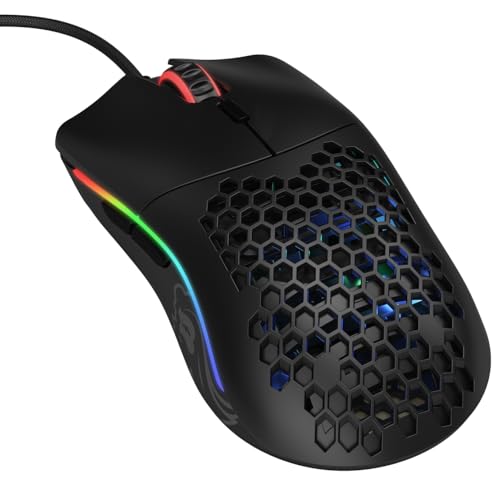
The Model O- is the smallest and lightest wired mouse in this roundup, at 58 grams with a body under five inches long. Its ambidextrous shape works for left-handed children, which is rare in gaming mice, and the honeycomb shell is how it reaches that weight without a battery. The listing pairs a Pixart 3360 sensor with pure PTFE feet, so the glide feels smooth on a basic desk pad. Omron switches rated for 20 million clicks give parents a concrete durability figure, and the soft Ascended cord behaves almost like no cord at all during play.
Specs
- Weight: 58 grams
- Dimensions: 4.72 x 2.48 inches
- Sensor: Pixart 3360, up to 12,000 DPI
- Buttons: 6 buttons with macro support
- Switches: Omron, rated for 20 million clicks
- Connection: wired USB, Ascended paracord cable
- Shape: ambidextrous, honeycomb shell, RGB lighting
Best for: left-handed kids, or any child who needs the lightest wired mouse available here.
Watch out for: the open honeycomb shell lets crumbs and dust inside, so it needs the occasional clean and careful handling around drinks.
ASIN: B07VMM5LKH
Logitech G305 LIGHTSPEED

For a shared family computer, the G305 removes the cable a child would otherwise catch on desk edges and drinks. Its compact 4.6-inch body suits smaller hands, and the LIGHTSPEED wireless connection reports at one millisecond, so there is no noticeable lag in games. The headline figure for parents is battery life: up to 250 hours from a single AA battery means months between changes, and the USB receiver stores inside the mouse for trips to another room or house. At 99 grams it is the heaviest pick here, which older kids may actually prefer for steadier aim.
Specs
- Weight: 99 grams
- Dimensions: 4.6 x 2.4 x 1.5 inches
- Sensor: HERO, 200 to 12,000 DPI
- Buttons: 6 programmable buttons
- Connection: LIGHTSPEED wireless, one millisecond report rate
- Battery: up to 250 hours on one AA battery
- Extras: onboard memory, receiver storage inside the mouse
Best for: families who want one wireless mouse a child can use at any desk in the house.
Watch out for: it runs on a replaceable AA battery rather than recharging, and at 99 grams it may feel heavy for the youngest players.
ASIN: B07CMS5Q6P
HyperX Pulsefire Haste 2 Mini

HyperX shrank its Haste 2 into a mini shell that the listing describes as sixteen percent smaller than the standard wireless model, landing at just 59 grams. That makes it the natural wireless choice for genuinely small hands. It connects two ways, through the 2.4GHz dongle for gaming or Bluetooth for a school laptop, and the battery runs up to 100 hours per charge, with the option to play while plugged in. The switches are rated for up to 100 million clicks, the highest durability figure in this guide, which suits a mouse that will be clicked hard and often.
Specs
- Weight: 59 grams
- Dimensions: 4.61 x 2.44 inches
- Sensor: HyperX 26K, up to 26,000 DPI, up to 650 IPS tracking
- Buttons: HyperX switches rated for up to 100 million clicks
- Connection: 2.4GHz wireless and Bluetooth, wired while charging
- Battery: up to 100 hours per charge
- Model: Haste 2 Mini, 7D389AA
Best for: kids with the smallest hands who still want a wireless mouse for gaming and schoolwork.
Watch out for: the listing dimensions omit a usable height figure, so check the hand-fit in person if possible, and keep track of the small wireless dongle.
ASIN: B0CQ53QFRT
Which One Fits Your Situation
A first gaming mouse for a younger child
Start with the Glorious Model O- or the Razer DeathAdder V2 Mini. Both are wired, so there is nothing to charge and no receiver to lose, and both stay near 60 grams. Pick the Razer if your child is right-handed and holds the mouse with the whole palm; pick the Glorious if they are left-handed or use their fingertips. Either one plugs into a family PC and simply works, which keeps the first setup frustration-free.
One mouse shared by the whole family
The Logitech G305 LIGHTSPEED handles the shared-desk role best. Adults get a proper gaming sensor and six buttons, kids get a compact shell that is not a stretch to hold, and nobody fights over a cable. The 250-hour battery life means it is rarely dead when someone sits down, and the receiver hides inside the body when the mouse moves between rooms. It is the only pick here that genuinely suits a mixed-age household.
Gaming plus homework on a laptop
The HyperX Pulsefire Haste 2 Mini earns its place if the same mouse travels between a gaming PC and a school laptop. Use the 2.4GHz dongle at the desk for games, then switch to Bluetooth for the laptop without carrying a second mouse. Its 59-gram weight disappears into a backpack, and the 100-hour battery easily covers a school week of homework plus weekend play on a single charge.
A child who is rough on gear
Durability figures point to the HyperX Haste 2 Mini, whose switches carry the highest click rating on this page, and to the Glorious Model O-, whose Omron switches and simple wired design leave little to break. Between them, choose wired if cables survive better in your house than small wireless dongles do. Whichever you pick, add a desk pad: it protects both the mouse feet and the desk from hard, enthusiastic swipes.
Common Mistakes
- Buying a full-size adult mouse because the DPI number is higher, when shell length is what actually decides whether a child can reach the buttons.
- Assuming wireless always beats wired for kids, then dealing with flat batteries and a lost receiver at a fixed desk.
- Ignoring the switch rating and cable type, even though drops, yanks and hard clicking are what end most children’s mice.
- Choosing a right-handed ergonomic shape for a left-handed child instead of an ambidextrous shell like the Model O-.
- Setting DPI to the maximum on day one; most children aim better at a lower sensitivity they can control.
Frequently Asked Questions
What size gaming mouse suits a child’s hand?
Look for a shell roughly four and a half to four and three quarter inches long, like the four models in this guide, rather than a full-size mouse over five inches. The listing for the DeathAdder V2 Mini states it suits small to medium hands. Have the child rest their hand on the mouse: fingers should reach both main buttons and the wheel without stretching or lifting the palm.
Is wired or wireless better for kids?
Wired suits a fixed desk and younger children, because there is no battery to manage and no receiver to lose, and the Razer and Glorious picks use flexible cables that barely drag. Wireless suits shared or portable setups. The G305 runs up to 250 hours on one AA battery, so upkeep is minimal, but a parent will still handle battery swaps and receiver storage.
How much DPI does a child actually need?
Far less than the headline numbers. Every mouse here offers at least 8,500 DPI, yet most children play comfortably somewhere in the lower part of that range, where the pointer moves slowly enough to control. High maximum figures simply mean the sensor has headroom. Start low, let the child adjust in small steps through the DPI button, and stop when aiming feels steady rather than twitchy.
Will these mice work with a Chromebook or console?
The wired Razer and Glorious models connect over USB and list PC platforms, so they handle basic pointing on most computers, though their button software needs a Windows or Mac PC. The G305 lists PC and Mac support, and the HyperX Haste 2 Mini adds Bluetooth for compatible laptops and tablets. Console support varies by game and system, so check the specific console before promising it to a child.
FAQ
What size gaming mouse suits a child’s hand?
Is wired or wireless better for kids?
How much DPI does a child actually need?
Will these mice work with a Chromebook or console?
More from Amazon
Programs that pair well with the guide above. Offers and eligibility are set by Amazon and may change.
Free shipping on eligible items, Prime Video and more. Eligible new members can start with a free trial.
Start a Prime free trialAd-free music streaming. Eligible new subscribers can start with a free trial.
Try Music Unlimited freeA Prime membership for ages 18-24 with a trial period. Eligibility is set by Amazon.
See Prime for Young AdultsAudiobooks and podcasts to listen to on the go. Eligible new members can start with a free trial.
Try Audible freeAs an Amazon Associate we earn from qualifying purchases.