Our Top Picks
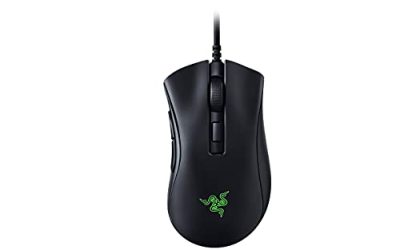
 Razer DeathAdder V3 Pro Wireless Gaming Mouse1000 Hz5.01 x 2.65 x 1.69 inches0.1 poundsCheck on Amazon


Choosing a quiet wireless gaming mouse is a decision about who else hears your game. Loud clicks carry through thin walls and down the hallway to a sleeping child, so the real question is not how fast the sensor runs but how soft each click lands. A mouse can have a top sensor and still be the noisiest thing on your desk, and that matters more at midnight than any polling-rate number.
This guide is for three kinds of buyers: night players who game after the household sleeps, people who share a room, and parents whose desk sits beside a sleeping child. It covers four wireless mice chosen from Amazon listings: one budget mouse whose listing literally calls its buttons silent, one flagship whose quieter clicks reviewers praise, and two premium mice whose optical switches run softer than standard mechanical switches in practice. Honesty matters here, because truly silent gaming mice barely exist, and this guide says plainly which of the four is marketed as silent.
Quick Picks
As an Amazon Associate we earn from qualifying purchases
| Product | Best for | Key spec from title |
|---|---|---|
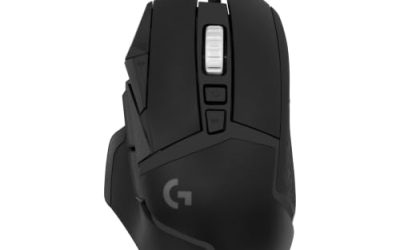
| Logitech G Pro X3 Superstrike | Late-night competitive play | HERO 2 sensor, 48,000 DPI, HITS magnetic switches |
| INPHIC A9 V2 Explorer | A silent mouse on a tight budget | Tri-mode wireless, 12,800 DPI, silent click buttons |
| Logitech G502 X Lightspeed | Many buttons with softer clicks | HERO 25K sensor, LIGHTFORCE switches, 140 hr battery |
| Razer DeathAdder V3 Pro | Lightweight comfort after midnight | Focus Pro 30K sensor, 63 g, Gen-3 optical switches |
How to Choose
What “quiet” actually means on a listing
Only one mouse in this guide has a listing that literally says its buttons are silent, and that fact shapes the whole market. Most gaming mice never mention noise at all, so buyers have to read between the lines: a switch type, a reviewer note, or a single quiet-click claim buried in a review. Treat a “silent” label as a maker claim only when the listing itself uses the word, and treat praise from a review site as a reviewer opinion rather than a specification. When a listing says nothing about noise, assume the mouse clicks like a normal gaming mouse, because it probably does.
Switch type matters more than the brand
The switch under each button decides most of the sound a mouse makes, so start there instead of comparing brands. Optical switches have no metal contact to snap, which makes them softer than traditional mechanical switches in practice, even when the maker never calls them quiet. Magnetic switches, like the HITS switches in the Superstrike, let you adjust click intensity, which can soften the feel further. Avoid loud, crisp tactile switches if your desk sits beside a bed, and remember that a quiet switch in a hollow plastic shell can still sound louder than you expect.
Wireless mode and battery life
A quiet mouse still needs to stay connected and stay charged through long sessions, so check the wireless mode before you buy. A 2.4 GHz receiver gives the lowest latency for competitive play, while Bluetooth works well for casual games and saves a USB port. Battery figures need the same care: flagship “up to” numbers are usually measured at 1,000 Hz polling, and running at 8,000 Hz polling cuts battery life sharply. Check whether the listing states battery life for the polling rate you will actually use, and keep the charging cable within reach.
Weight, shape, and the scroll wheel
Click noise gets all the attention, but the scroll wheel can be just as loud in a quiet room, so test it if you can. A notched wheel that ratchets loudly will announce every weapon switch, while a smoother wheel stays discreet. Weight matters too, because a heavy mouse tires your wrist during long night sessions and makes you grip harder, which makes every click land heavier. Pick a shape that fits your hand and your grip, and remember that a light mouse with a quiet wheel is often a better night companion than a heavy flagship.
The 4 Best Options
Logitech G Pro X3 Superstrike
The Superstrike leads this guide because it pairs a flagship sensor with the quietest clicks reviewers found in a current gaming mouse. Its HITS magnetic switches use ten actuation points with rapid trigger and adjustable click intensity, so each press can feel softer than a standard mechanical click, and the HERO 2 sensor reaches 48,000 DPI with polling up to 8,000 Hz. Reviewers note the quieter clicks as one of its strengths, though that is a review claim rather than a Logitech specification, so treat it as informed opinion rather than a promise.
Specs
- HERO 2 sensor, 100 to 48,000 DPI
- HITS magnetic switches with 10 actuation points and rapid trigger
- Up to 8,000 Hz polling rate
- LIGHTSPEED wireless plus USB-C wired mode
- POWERPLAY wireless charging compatible
- Weight 59 g
Best for: Competitive players who game late and want flagship speed with softer clicks.
Watch out for: Battery life is listed as up to 135 hr on the Logitech spec page, while Logitech’s own box and social posts say 130 hr, so check the live listing for the figure that applies. Check live availability before buying, since all ASINs in this guide were verified from indexed Amazon pages rather than live Amazon page views.
INPHIC A9 V2 Explorer
The INPHIC A9 V2 is the only mouse in this guide whose Amazon listing literally calls its left and right buttons silent, and that makes it the honest budget pick for true silence. Its listing says the whisper-quiet buttons will not wake up family, which is a maker claim rather than a reviewer guess, and it connects through tri-mode wireless with 2.4 GHz, Bluetooth 5.0, and a USB-C wired mode. It is a budget no-name brand rather than an esports-grade mouse, so frame your expectations around silence and everyday play instead of tournament-level tracking.
Specs
- Tri-mode 2.4 GHz, Bluetooth 5.0, and USB-C wired connection
- Silent and whisper-quiet left and right buttons per the Amazon listing
- 12,800 DPI with 6 DPI levels from 800 to 12,800
- RGB lighting
- 500 mAh rechargeable battery, up to 1 month per the listing
Best for: Budget buyers who need a genuinely silent mouse for a shared room.
Watch out for: The same ASIN shows two DPI figures in its listing, with the V2 title saying 12,800 DPI and the base A9 title saying 2,400 DPI, so confirm the V2 figure on the live page. Check live availability before buying, since all ASINs in this guide were verified from indexed Amazon pages rather than live Amazon page views.
Logitech G502 X Lightspeed

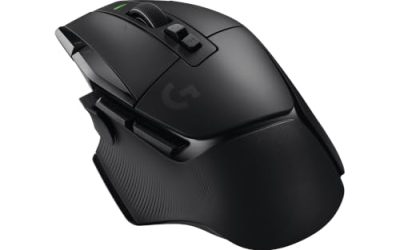
The G502 X Lightspeed earns its place here on a weaker basis than the first two picks, and that caveat belongs in the open. Its LIGHTFORCE hybrid optical-mechanical switches are quieter than standard mechanical switches in practice, because the optical actuation removes the metal contact snap, but Logitech does not market this mouse as silent and its listing never uses the words quiet or silent. What it does offer is a proven shape with 13 buttons, a HERO 25K sensor, and long battery life, which suits players who want many controls without the sharpest click sound.
Specs
- HERO 25K sensor
- LIGHTFORCE hybrid optical-mechanical switches
- 13 buttons
- Up to 140 hr battery life
- LIGHTSPEED wireless plus USB-C wired mode
- PowerPlay wireless charging compatible
- Weight 102 g per Logitech
Best for: Players who want many programmable buttons with switches that run softer than standard mechanical ones.
Watch out for: Do not expect a silent mouse, because this model is not marketed as one and the listing makes no silence claim. Check live availability before buying, since all ASINs in this guide were verified from indexed Amazon pages rather than live Amazon page views.
Razer DeathAdder V3 Pro
The DeathAdder V3 Pro is the lightest comfortable pick in this guide, and its quietness comes from the same practical effect as the G502 X rather than from any silence claim. Its Gen-3 optical switches have no metal contact bounce, which makes them softer than mechanical switches in practice, but Razer does not market this mouse as silent and its listing never says quiet or silent. The ergonomic right-handed shape and 63 g weight suit long sessions, while the Focus Pro 30K sensor keeps tracking sharp for fast games.
Specs
- Focus Pro 30K optical sensor
- Gen-3 optical switches
- 5 programmable buttons per the Amazon.com listing
- Up to 90 hr battery life
- HyperSpeed wireless plus USB-C wired mode
- Weight 63 g
- 1,000 Hz polling rate as standard
Best for: Players with larger hands who want a light ergonomic mouse that clicks softer than a mechanical-switch mouse.
Watch out for: The Amazon.com listing says 5 programmable buttons while the amazon.ca listing says 8, so confirm the button count on the live Amazon.com page. The 8,000 Hz polling rate needs a HyperPolling dongle sold separately. Check live availability before buying, since all ASINs in this guide were verified from indexed Amazon pages rather than live Amazon page views.
Which One Fits Your Situation
You play ranked games after everyone is asleep
Pick the Logitech G Pro X3 Superstrike, because it combines a flagship sensor with the softest clicks reviewers found in a current gaming mouse. Its magnetic switches and 8,000 Hz polling keep competitive play sharp, while the adjustable click intensity lets you soften each press. Confirm the battery figure on the live listing, since Logitech sources disagree between 135 hr and 130 hr.
You need a truly silent mouse on a tight budget
Pick the INPHIC A9 V2 Explorer, because it is the only mouse here whose listing literally calls its buttons silent. Its tri-mode wireless covers a laptop, a desktop, and a couch setup, and the whisper-quiet clicks are the point of the purchase rather than a side benefit. Accept that it is a budget brand, not an esports-grade mouse, and check the V2 DPI figure on the live page.
You want many buttons for MMOs or building games
Pick the Logitech G502 X Lightspeed, because its 13 buttons cover macros, weapon slots, and building binds without forcing you to reach for the keyboard. Its hybrid optical-mechanical switches run softer than standard mechanical switches in practice, even though Logitech never markets it as silent. Keep the 140 hr battery in mind for long sessions, and do not expect true silence.
You want the lightest mouse for long sessions
Pick the Razer DeathAdder V3 Pro, because its 63 g weight and ergonomic right-handed shape reduce wrist strain during hours of play. Its Gen-3 optical switches click softer than mechanical switches in practice, though Razer makes no silence claim for it. Remember that 8,000 Hz polling needs a dongle sold separately, and confirm the button count on the live Amazon.com page.
Common Mistakes
- Assuming every wireless gaming mouse is quiet, when most listings never mention noise at all.
- Treating a reviewer’s quiet-click praise as a maker specification instead of an opinion.
- Expecting 8,000 Hz polling on every flagship, when the DeathAdder V3 Pro runs at 1,000 Hz unless you buy a separate dongle.
- Ignoring the scroll wheel, which can be louder than the clicks in a quiet room.
- Buying a silent productivity mouse for gaming, since models like the Logitech M330 Silent Plus are not gaming mice and lack the sensors and switches competitive play needs.
Frequently Asked Questions
Are there any truly silent gaming mice?
Almost none, and that is the honest answer. Only the INPHIC A9 V2 in this guide has a listing that literally calls its buttons silent, while the Superstrike earns its quiet reputation from reviewers. The other two mice use optical switches that click softer than mechanical switches in practice, but neither maker calls them silent. If silence is your top priority, buy the mouse whose listing says so.
Do optical switches really click quieter?
In practice, yes, because optical switches have no metal contact to snap when the button fires. That removes the sharp click that mechanical switches produce, and most people notice the softer sound immediately. The difference is real but modest, and a hollow shell or a loud scroll wheel can still make the mouse audible. Optical switches are quieter, not silent, and no listing should be read as promising silence.
Does Bluetooth make a mouse quieter?
No, the connection type has nothing to do with click noise. Bluetooth only changes how the mouse talks to your computer, while the switch under each button decides how loud a click sounds. Bluetooth can still help, since it frees a USB port and suits casual games, but it will not soften a loud switch. Choose 2.4 GHz wireless for competitive play and Bluetooth for convenience.
Will a quiet mouse still work for competitive games?
Yes, if you pick the right one. The Superstrike pairs softer clicks with a flagship sensor and 8,000 Hz polling, which competitive play needs. The DeathAdder V3 Pro and G502 X Lightspeed also track well, though their quietness comes from optical switches. The INPHIC is the exception, since it is a budget mouse built for silence rather than esports, so competitive players should choose a flagship instead.
FAQ
Are there any truly silent gaming mice?
Do optical switches really click quieter?
Does Bluetooth make a mouse quieter?
Will a quiet mouse still work for competitive games?
More from Amazon
Programs that pair well with the guide above. Offers and eligibility are set by Amazon and may change.
Free shipping on eligible items, Prime Video and more. Eligible new members can start with a free trial.
Start a Prime free trialAd-free music streaming. Eligible new subscribers can start with a free trial.
Try Music Unlimited freeA Prime membership for ages 18-24 with a trial period. Eligibility is set by Amazon.
See Prime for Young AdultsAudiobooks and podcasts to listen to on the go. Eligible new members can start with a free trial.
Try Audible freeAs an Amazon Associate we earn from qualifying purchases.