Key takeaways
- Find the best gaming mouse for Fortnite building, from button-packed MMO mice to light wireless options, with specs from Amazon listings to compare.
Fortnite building turns a mouse into a control panel. Walls, floors, ramps, and cones each need a bind that your fingers can reach without looking down, and the wrong layout forces your left hand to do work your right hand should handle. A mouse with a crowded side panel or too few spare buttons leaves pieces on keyboard keys that are slower to reach mid-fight, which is why builders shop for button count first and worry about sensor numbers second.
This guide covers players who build constantly in Battle Royale, creators who practise piece control in Creative, and competitive players who want every build piece on a thumb button. Each mouse below was picked from its Amazon listing title and specifications, with button counts and layouts taken from the listing itself, so you can compare the real hardware before choosing.
Quick Picks
As an Amazon Associate we earn from qualifying purchases
| Product | Best for | Key spec from title |
|---|---|---|
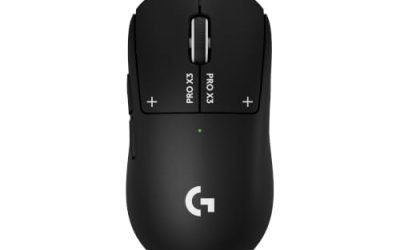
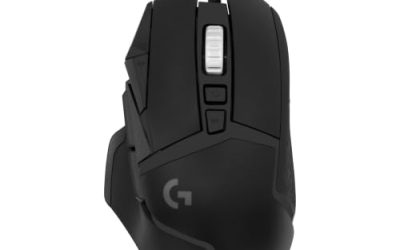
| Logitech G502 X Lightspeed | Builders who want a proven all-rounder with a strong button layout | HERO 25K sensor with LIGHTFORCE switches and 13 buttons |
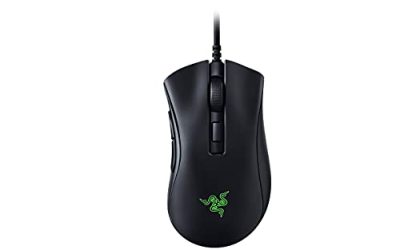
| Razer Basilisk V3 Pro 30K | Players who want a tilt wheel plus thumb buttons for extra binds | Focus Pro 30K sensor with HyperScroll Tilt Wheel and Gen-3 switches |
| Razer Naga V2 Pro | Builders who want the most side buttons and swappable panels | 19 plus 1 programmable buttons with 3 swappable side plates |
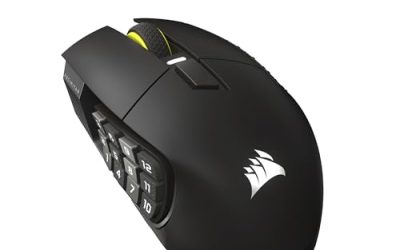
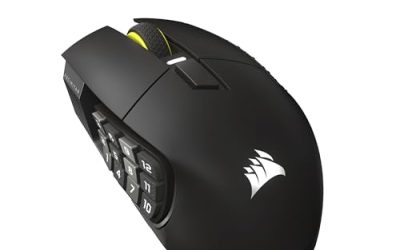
| Corsair Scimitar RGB Elite | Players who want a sliding side panel that fits their thumb reach | 17 programmable buttons with a 12-button side panel and Key Slider |
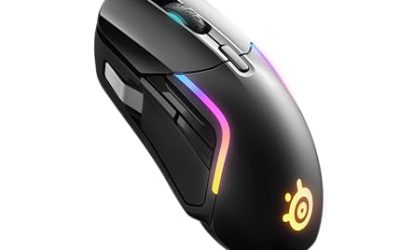
| SteelSeries Aerox 9 Wireless | Builders who want a light wireless mouse with a full side panel | 18 programmable buttons with a 12-button side panel at 89 grams |
How to Choose
Count the Buttons You Can Actually Reach
A high button total means little when half the buttons sit where your thumb cannot press them cleanly during a fast build sequence. Look at the side panel layout in the listing photos and count the buttons your thumb rests on naturally, then map your four main pieces to those positions first. Mice with 12-button side panels suit players who bind every piece plus edits and traps to the thumb, while a mouse with 11 to 13 buttons works better when you keep two pieces on the keyboard. Before buying, write down your current binds and check that the mouse you like has a reachable button for each one.
Pick a Side Panel That Matches Your Thumb
Side panels come in fixed grids, sliding panels, and swappable plates, and each one changes how your thumb moves. A fixed 12-button grid rewards muscle memory because every button stays in the same place, while a sliding panel such as the Key Slider lets you shift the whole grid forward or back to match a shorter or longer thumb. Swappable plates go further by letting you change the panel itself, so a 12-button plate can become a 6-button or 2-button plate when you want fewer, larger targets. Think about your thumb length and how often you mis-press neighbouring buttons before choosing a layout.
Weigh the Mouse Against Long Build Sessions
Building sessions run long, and a heavy mouse tires the wrist faster than a light one when you are flicking between pieces for hours. The mice in this guide range from 89 grams to well above that, so the difference is easy to feel after a few matches. A lighter shell helps players who lift and reposition the mouse constantly, while a heavier mouse can feel steadier for players who plant their palm and make small adjustments. Check the listed weight, then consider whether your grip style and desk space favour a featherweight shell or a planted, stable body.
Check Wireless Battery Life and Connection Options
A wireless mouse removes cable drag during fast flicks, yet it also adds battery management to your routine. Listings in this guide quote battery life from under 140 hours to 300 hours, and that spread decides whether you charge weekly or monthly. Dual connectivity matters too: a mouse that offers both Bluetooth and 2.4 GHz wireless lets you switch between a low-latency gaming link and a portable Bluetooth link without unplugging anything. If you play wired, confirm the listing includes a USB-C cable or charging option so the mouse stays usable while it charges.
The 5 Best Options
Logitech G502 X Lightspeed

The G502 X Lightspeed suits builders who want a familiar shape with enough buttons for a full build loadout and no cable pulling at the wrist. Its 13-button layout gives the thumb a cluster of reachable binds while the main buttons stay dedicated to shooting and editing, and the LIGHTFORCE switches combine optical speed with a mechanical feel. Wireless play removes drag during fast piece placement, and the battery rating below 140 hours means charging stays an occasional task rather than a daily one. Players moving from a wired G502 will find the shape and button positions easy to relearn.
Specs
- HERO 25K sensor
- LIGHTFORCE switches
- 13 buttons
- Battery life rated below 140 hours
- USB-C connection
Best for: Builders who want a proven wireless all-rounder with a practical button count.
Watch out for: Check the listing photos for the exact thumb-button positions, since the cluster layout suits some hand sizes better than others.
Razer Basilisk V3 Pro 30K

The Basilisk V3 Pro 30K fits players who want their build binds spread across thumb buttons and a tilt wheel instead of crammed onto one side panel. Its Focus Pro 30K sensor tracks fine adjustments during edits, while the HyperScroll Tilt Wheel adds extra inputs that can hold a piece or a utility bind. Gen-3 switches give the main clicks a crisp response, and the 11-button, 13-control layout leaves room for a full set of build binds without reaching for the keyboard. This is a strong pick when you want more inputs than a standard gaming mouse without committing to a full MMO grid.
Specs
- Focus Pro 30K sensor
- HyperScroll Tilt Wheel
- Gen-3 switches
- 11 buttons, 13 controls
Best for: Players who want tilt-wheel inputs alongside thumb buttons for their build binds.
Watch out for: Confirm the wheel tilt directions match the binds you plan to assign, since tilt inputs feel different from thumb buttons.
Razer Naga V2 Pro

The Naga V2 Pro is the pick for builders who want every piece, edit, and trap on the mouse itself and never want to touch the keyboard mid-fight. Its 19 plus 1 programmable buttons cover a complete bind set, and the three swappable side plates let you choose a 12-button, 6-button, or 2-button panel depending on how many thumb targets you want. The HyperScroll Pro wheel adds scrolling modes for inventory and building, while the Focus Pro 30K sensor and Gen-3 switches keep tracking and clicks consistent. Battery life rated at 300 hours keeps charging rare even with heavy daily play.
Specs
- 19 plus 1 programmable buttons
- 3 swappable side plates with 12, 6, and 2 buttons
- HyperScroll Pro wheel
- Focus Pro 30K sensor
- Gen-3 switches
- Battery life rated at 300 hours
Best for: Builders who want the maximum number of thumb binds with a panel they can swap.
Watch out for: A 12-button grid takes practice, so expect a learning period before every button feels automatic.
Corsair Scimitar RGB Elite

The Scimitar RGB Elite answers the most common complaint about grid mice: the side panel never sits quite where your thumb rests. Its Key Slider moves the 12-button panel forward or back, so you can align the grid with your thumb instead of stretching for far buttons. Seventeen programmable buttons cover builds, edits, and utility binds, and the 18,000 DPI sensor handles fast flicks between pieces. Omron switches rated at 50 million clicks give the main buttons a long service life, and onboard profile storage keeps your binds on the mouse when you move between machines.
Specs
- 18,000 DPI sensor
- 17 programmable buttons
- 12 side buttons
- Key Slider side panel
- Omron switches rated at 50 million clicks
- Onboard profile storage
Best for: Players whose thumb never quite lined up with a fixed button grid.
Watch out for: Adjust the Key Slider before you start binding keys, since moving the panel changes where each button sits under your thumb.
SteelSeries Aerox 9 Wireless

The Aerox 9 Wireless pairs a full 12-button side panel with a light 89-gram body, which is a rare combination for builders who want both buttons and speed. Its 18 programmable buttons leave room for every build piece plus edits, while the TrueMove Air sensor at 18K DPI tracks quick flicks without a cable holding the mouse back. Dual wireless with Bluetooth and 2.4 GHz gives you a low-latency gaming link at the desk and a portable link on the go, and the 180-hour battery rating covers long stretches between charges. IP54 water resistance adds protection against spills during marathon sessions.
Specs
- 89 grams
- 18 programmable buttons
- 12-button side panel
- 18K DPI TrueMove Air sensor
- Bluetooth and 2.4 GHz wireless
- Battery life rated at 180 hours
- IP54 water resistance
Best for: Builders who want a light wireless mouse without giving up a full side panel.
Watch out for: Check the side-panel button spacing in the listing photos, since the compact shell packs the grid tightly.
Which One Fits Your Situation
You Build in Every Fight and Want Maximum Binds
Choose the Razer Naga V2 Pro when your build loadout needs the most thumb buttons and you like the idea of swapping panels. The 12-button plate holds a full set of pieces and edits, while the 6-button and 2-button plates give you simpler layouts for other games. Its long battery rating means the mouse is ready whenever you sit down to play.
Your Thumb Never Fits a Fixed Grid
Choose the Corsair Scimitar RGB Elite when fixed side panels always leave one row too far away. The Key Slider shifts the whole 12-button grid to meet your thumb, and onboard profile storage carries your binds to another computer. Seventeen programmable buttons leave nothing important on the keyboard. Once the panel sits right, the grid stays put through long sessions.
You Want a Light Mouse With Plenty of Buttons
Choose the SteelSeries Aerox 9 Wireless when weight matters as much as button count. At 89 grams it moves easily during fast build sequences, yet the 12-button side panel still covers every piece. Dual wireless and a 180-hour battery rating make it a flexible pick for desk and travel play.
You Prefer a Familiar Shape With Room to Grow
Choose the Logitech G502 X Lightspeed when you want a trusted shape, wireless freedom, and a button count that covers builds without a full grid. Thirteen buttons handle the pieces you use most, and the HERO 25K sensor keeps tracking steady. It is the easiest mouse here to pick up and play well on day one.
Common Mistakes
- Buying the mouse with the most buttons without checking whether your thumb can reach the far rows cleanly.
- Binding every build piece on day one instead of learning a few binds at a time until they feel automatic.
- Ignoring the side-panel layout and discovering too late that the grid does not fit your hand size.
- Choosing a heavy mouse for long sessions and ending up with a tired wrist before the final circles.
- Forgetting to check battery life and connection options, then finding the mouse dies mid-match or lacks the wireless mode you wanted.
Frequently Asked Questions
How many buttons do I need on a mouse for Fortnite building?
Four build pieces plus an edit bind is the usual starting point, so a mouse with 11 to 13 buttons covers most players comfortably. A 12-button side panel goes further by putting every piece, edits, and a trap or utility bind under your thumb. Count your current binds first, then pick a mouse with a reachable button for each one.
Is a 12-button side panel hard to learn?
It takes practice, since the grid packs many small targets under one thumb. Most players learn the home row first, then add the outer rows one at a time over a week or two of regular play. A sliding panel or swappable plates can help by letting you start with fewer, larger targets.
Should I choose a wired or wireless mouse for building?
Both work, and the choice comes down to cable drag against battery management. Wireless removes the cable from fast flicks, while wired removes charging from your routine entirely. If you go wireless, check the battery rating and whether the mouse charges over USB-C while you keep playing.
Does a higher DPI sensor help with Fortnite building?
Sensor DPI sets how far the cursor moves per inch of mouse movement, so it affects aiming feel rather than building speed directly. Most builders pick a DPI level that feels comfortable for edits and flicks, then leave it alone. Button layout and comfort matter more than chasing the highest DPI number on the box.
FAQ
How many buttons do I need on a mouse for Fortnite building?
Is a 12-button side panel hard to learn?
Should I choose a wired or wireless mouse for building?
Does a higher DPI sensor help with Fortnite building?
More from Amazon
Programs that pair well with the guide above. Offers and eligibility are set by Amazon and may change.
Free shipping on eligible items, Prime Video and more. Eligible new members can start with a free trial.
Start a Prime free trialAd-free music streaming. Eligible new subscribers can start with a free trial.
Try Music Unlimited freeA Prime membership for ages 18-24 with a trial period. Eligibility is set by Amazon.
See Prime for Young AdultsAudiobooks and podcasts to listen to on the go. Eligible new members can start with a free trial.
Try Audible freeAs an Amazon Associate we earn from qualifying purchases.