Our Top Picks
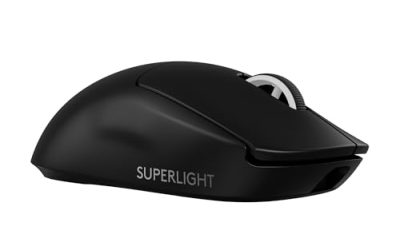
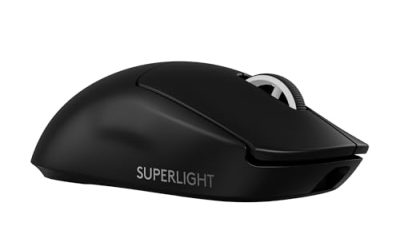
 Logitech G Pro X Superlight 2 Lightspeed WirelessClassic1.57 x 2.5 x 4.92 inches0.1 poundsCheck on Amazon
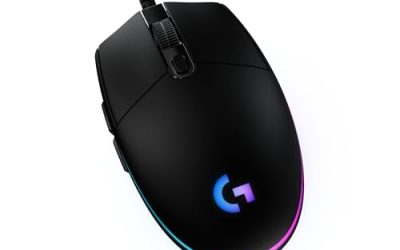
 Logitech G502 X Plus Wireless RGB Gaming Mouse25600 DPI6.89 x 2.74 x 4.61 inches0.2 poundsCheck on Amazon
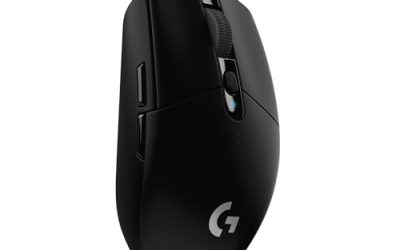
 Logitech G305 LIGHTSPEED Wireless Gaming Mouse4.6" x 2.4" x 1.5"2.45 x 1.5 x 4.6 inches0.21 poundsCheck on Amazon

A white gaming mouse changes more than the look of a desk. The real decision is whether the shape suits your grip, whether the sensor stays steady during fast flicks, and whether the button layout matches the games you play most. A mouse that looks clean in photographs can still feel wrong after an hour of play if the sides are too flat, the clicks are too stiff, or the weight pulls your wrist down during long sessions.
This guide is for PC players building a light-coloured setup, competitive players who want a fast wireless mouse without a dark shell, and everyday players who want one mouse for work and evening games. Every pick below is a white wireless gaming mouse, chosen from its name and specifications on its Amazon listing, with the sensor, buttons, battery life, and connection details that matter most in daily use.
Quick Picks
As an Amazon Associate we earn from qualifying purchases
| Product | Best for | Key spec from title |
|---|---|---|
| Logitech G PRO X Superlight White | Light, simple competitive play | HERO 25K sensor, 25,600 DPI |
| Logitech G PRO X Superlight 2 White | Fast wireless play with high polling | 44K DPI sensor, 8kHz report rate |
| Logitech G502 X Plus White | Button-heavy games and daily use | 13 buttons, LIGHTSYNC RGB |
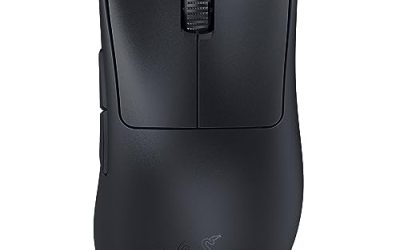
| Razer Viper V3 Pro White | Symmetrical shape and long sessions | 35K DPI sensor, 95-hour battery |
| Logitech G305 LIGHTSPEED White | A compact wireless mouse for smaller hands | HERO 12K sensor, 12,000 DPI |
How to Choose
Match the shape to your grip first
Shape decides comfort long before sensor numbers do. Palm-grip players need a taller shell that fills the hand and supports the fingers, while claw-grip players need a shorter body with a defined hump near the middle. Fingertip players usually prefer a low, narrow mouse that can be lifted and repositioned quickly. A symmetrical mouse suits both hands and works well for claw and fingertip grips, while a right-handed ergonomic shell suits palm players who rest their whole hand on the mouse. Check the length and width in the listing, then compare them with the mouse you already use.
Look at weight and how it is balanced
A lighter mouse changes direction faster and puts less strain on the wrist during repeated flicks, which is why many competitive models sit near 55 to 65 grams. Weight alone does not tell the whole story, because a mouse can feel heavy at the front if the battery sits near the clicks, or awkward if the shell is wide for its weight. Look for the listed weight, then think about where your fingers rest and whether you lift the mouse often. Players who lift frequently should favour the lightest symmetrical option, while players who keep the mouse planted can accept a heavier, feature-rich model.
Check the sensor, DPI range, and polling rate
The sensor controls how accurately the mouse follows fast movement, and the DPI range shows how far sensitivity can be adjusted in software. A 25K or higher sensor gives plenty of headroom for most players, and a higher ceiling matters mainly to players who use very high sensitivity settings. Polling rate controls how often the mouse reports its position to the computer, and an 8kHz option reports far more often than a standard 1kHz mouse. That difference is most useful in fast competitive games on a high-refresh display, while slower or story-driven games rarely need the highest setting.
Count the buttons you will actually use
Extra buttons help only when they sit where your thumb can reach them without shifting your grip. A mouse with five buttons covers left click, right click, scroll click, and two side buttons, which suits shooters and simple setups. A mouse with thirteen buttons suits strategy games, simulation games, and players who bind inventory, voice chat, or abilities to the mouse. Before choosing a button-heavy model, count the commands you want on the mouse and ignore buttons you would never press. A clean five-button layout often feels faster and less confusing than a crowded shell.
The 5 Best Options
Logitech G PRO X Superlight White
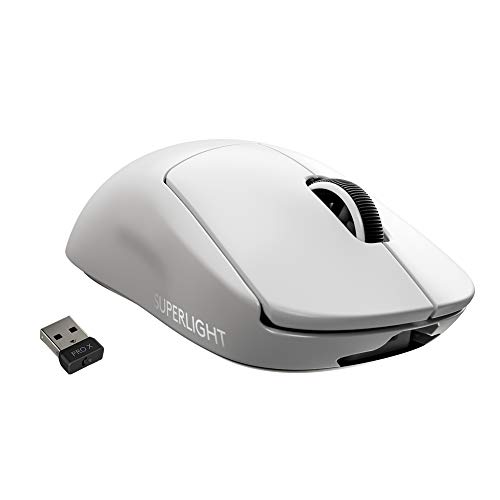
The original Superlight in white suits competitive players who want a clean, simple mouse without extra buttons or lighting. Its symmetrical shape works well for claw and fingertip grips, and the low weight helps during fast aim adjustments and long matches. The five-button layout keeps the sides uncluttered, so the thumb rests naturally and accidental presses are less likely. This is a sensible choice for players who already know their sensitivity, use a consistent grip, and want a mouse that stays out of the way.
Specs
- HERO 25K sensor with 25,600 DPI
- 5 programmable buttons
- Ultra-lightweight wireless design
- Long battery life
- Compatible with PC and Mac
Best for: Competitive players who want a light, simple, symmetrical white mouse.
Watch out for: There is no RGB lighting and no extra side buttons, so players who want more controls should look at the G502 X Plus instead.
Logitech G PRO X Superlight 2 White
The Superlight 2 in white suits players who want the familiar Superlight shape with a newer sensor and faster wireless reporting. Its 44K DPI sensor and 8kHz report rate give it headroom for very fast movement on high-refresh displays, while USB-C charging makes it easier to top up between sessions. At 60 grams, it stays light enough for frequent lifting and quick repositioning. The five-button layout remains simple, so the focus stays on aim, movement, and consistent hand position rather than learning a new button map.
Specs
- 44K DPI sensor
- Up to 8kHz report rate
- 60-gram pro-grade design
- 5 programmable buttons
- USB-C charging
- Compatible with PC and Mac
Best for: Competitive players who want a newer sensor, faster reporting, and USB-C charging in a light white mouse.
Watch out for: The 8kHz mode can shorten battery life and needs a compatible setup to show its full benefit, so check your system before relying on the highest setting.
Logitech G502 X Plus White
The G502 X Plus in white suits players who want many controls, a comfortable right-handed shape, and lighting that matches a white desk setup. Its thirteen buttons give room for abilities, inventory, voice chat, and macros, while the infinite scroll toggle switches between precise steps and free spinning for long documents and web pages. LIGHTSYNC RGB adds a soft glow along the shell, and PowerPlay wireless charging support means the mouse can charge on a compatible pad without a cable. This is the most versatile pick here for players who mix games, browsing, and daily computer work.
Specs
- HERO 25K sensor
- 13 buttons
- LIGHTSYNC RGB lighting
- Infinite scroll toggle
- Up to 130-hour battery life
- USB-C connection
- PowerPlay wireless charging capable
- Compatible with PC and Mac
Best for: Players who want many buttons, RGB lighting, and a full-featured mouse for games and daily use.
Watch out for: The right-handed shape and larger body do not suit small hands or left-handed players, so check the dimensions against your current mouse first.
Razer Viper V3 Pro White
The Viper V3 Pro in white suits players who want a symmetrical esports mouse with a long battery life and a very light body. At 55 grams, it is the lightest mouse in this guide, and its symmetrical shape suits claw and fingertip grips on either side of the hand. The 35K DPI sensor and 8K polling support fast, precise tracking, while eight programmable buttons give more control than a basic five-button mouse without crowding the shell. The 95-hour battery life also means fewer charging interruptions during a busy week of play.
Specs
- 35K DPI optical sensor
- Up to 8K polling
- 55-gram lightweight design
- Gen-3 optical switches
- 8 programmable buttons
- Up to 95-hour battery life
- Symmetrical shape
Best for: Players who want the lightest symmetrical mouse here with long battery life and fast tracking.
Watch out for: The symmetrical shape has a lower profile than an ergonomic mouse, so palm-grip players may find less support under the hand during long sessions.
Logitech G305 LIGHTSPEED White
The G305 in white suits players who want a compact wireless mouse for smaller hands, travel, or a second setup. Its HERO 12K sensor and 12,000 DPI range cover everyday gaming and casual competitive play, while six programmable buttons add two side controls without complicating the layout. The 250-hour battery life is the longest in this guide, so it can run for weeks on a single AA battery with normal use. On-board memory stores settings on the mouse, which helps when moving between computers without reinstalling software each time.
Specs
- HERO 12K sensor with 12,000 DPI
- 6 programmable buttons
- Up to 250-hour battery life
- LIGHTSPEED wireless connection
- On-board memory
- Lightweight design
- Compatible with PC and Mac
Best for: Smaller hands, travel, and players who want a compact wireless mouse with very long battery life.
Watch out for: It uses a single AA battery rather than a rechargeable cell, so keep a spare battery nearby and check the battery indicator before a long session.
Which One Fits Your Situation
You play competitive shooters most nights
Choose the Logitech G PRO X Superlight 2 White or the Razer Viper V3 Pro White. Both are light, symmetrical, and built around fast sensors and high polling rates, which helps during quick flicks and tracking. The Superlight 2 suits players who already like the Logitech shape, while the Viper V3 Pro suits players who want the lightest body here and a longer battery life between charges.
You want one mouse for games and daily work
Choose the Logitech G502 X Plus White. Its thirteen buttons, infinite scroll toggle, and comfortable right-handed shape make it useful for strategy games, browsing, and long documents as well as shooters. The RGB lighting also ties a white desk setup together, and the long battery life means it can handle a full day of mixed use without frequent charging.
You have small hands or travel often
Choose the Logitech G305 LIGHTSPEED White. Its compact body fits smaller hands more naturally than the larger ergonomic models, and the very long battery life means it can travel without a charging cable. On-board memory also helps when switching between a laptop and a desktop, because the saved settings travel with the mouse.
You want the simplest light mouse possible
Choose the Logitech G PRO X Superlight White. Its five-button layout, symmetrical shape, and light body keep the focus on aim and movement without extra controls to learn. It suits players who use the same grip every session and want a clean white mouse that feels consistent from the first game to the last.
Common Mistakes
- Choosing a white mouse for looks alone and ignoring whether the shape fits your grip and hand size.
- Picking the highest DPI setting by default, then finding the cursor too twitchy for precise aiming.
- Buying a button-heavy mouse when you only use two side buttons, then pressing the wrong control in a fast moment.
- Forgetting to check the charging method, and then discovering the mouse needs a cable or a battery you do not have ready.
- Assuming every white mouse stays clean, and then skipping regular cleaning of the shell, sensor area, and scroll wheel.
Frequently Asked Questions
Does a white gaming mouse show dirt more than a dark one?
Yes, a white shell shows dust, hand marks, and discolouration more clearly than a dark shell, especially around the grip areas and scroll wheel. Wipe the shell with a dry or slightly damp cloth often, keep food and drinks away from the desk, and store the mouse out of direct sunlight when it is not in use.
Is a lighter mouse always better for gaming?
Not always. A lighter mouse helps with fast flicks and frequent lifting, but some players aim more steadily with a slightly heavier mouse that stays planted. The best weight depends on your grip, your sensitivity, and how often you lift the mouse. Try a light model first if you play fast shooters, and a heavier model if you prefer slow, deliberate aiming.
What DPI should I use for a white gaming mouse?
Start near 800 DPI for shooters and 1,200 DPI for general use, then adjust in small steps until aiming feels steady. A higher DPI does not make a mouse more accurate on its own, and very high settings can make small hand movements feel jumpy. Match the DPI to your in-game sensitivity and your mousepad space rather than chasing the largest number.
Can I use a white gaming mouse for work as well as games?
Yes, most wireless gaming mice in this guide work well for office tasks, browsing, and creative work. The G502 X Plus is the most useful for daily work because of its extra buttons and infinite scroll, while the G305 suits travel and smaller desks. Keep a separate profile for work if the software supports it, so your gaming sensitivity does not carry over.
FAQ
Does a white gaming mouse show dirt more than a dark one?
Is a lighter mouse always better for gaming?
What DPI should I use for a white gaming mouse?
Can I use a white gaming mouse for work as well as games?
More from Amazon
Programs that pair well with the guide above. Offers and eligibility are set by Amazon and may change.
Free shipping on eligible items, Prime Video and more. Eligible new members can start with a free trial.
Start a Prime free trialAd-free music streaming. Eligible new subscribers can start with a free trial.
Try Music Unlimited freeA Prime membership for ages 18-24 with a trial period. Eligibility is set by Amazon.
See Prime for Young AdultsAudiobooks and podcasts to listen to on the go. Eligible new members can start with a free trial.
Try Audible freeAs an Amazon Associate we earn from qualifying purchases.