If you’re building or upgrading a gaming PC, your router is the one component that can silently bottleneck everything else. A top-tier GPU and low-latency monitor won’t mean much if your connection drops during a ranked match, your ping spikes every few seconds, or your download speeds crawl because your router can’t handle multiple devices on a congested network. Gamers need low latency, stable connections on both 5 GHz and 6 GHz bands, and enough throughput to handle large game downloads without choking the rest of the household. The problem is that the router market is saturated with options ranging from $30 budget units to $500 flagship devices, and the spec sheets are often confusing or misleading.
Our top picks
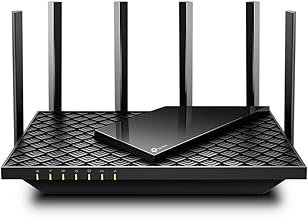
 TP-Link AX1800 WiFi 6 Router
- Wi-Fi 6(802.11ax) technology achieves faster speeds, greater capacity…
- Enjoy smoother and more stable streaming, gaming, downloading…
- Wi-Fi 6 technology communicates more data to more…
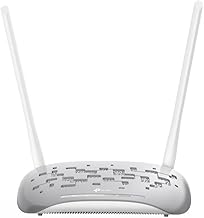
 TP-Link AC1200 WiFi Router Dual Band Wireless
- Dual-band Wi-Fi with 5 GHz speeds up to…
- Covers up to 1,000 sq
- Supports IGMP Proxy/Snooping, Bridge and Tag VLAN to…
 GL.iNet GL-MT6000 Flint 2 Wi-Fi 6 Gaming
- ***Please update the firmware upon initial setup of…
- 【High Speed Gaming Router】Dominate with uninterrupted performance with…
- 【Rapid OpenVPN & Wireguard speed】Wireguard VPN and OpenVPN…
| Product | Key specs | |
|---|---|---|
| TP-Link AX1800 WiFi 6 Router | Wi-Fi 6(802.11ax) technology achieves faster speeds, greater capacity… Enjoy smoother and more stable streaming, gaming, downloading… Wi-Fi 6 technology communicates more data to more… | Check price |
| TP-Link AC1200 WiFi Router Dual Band Wireless | Dual-band Wi-Fi with 5 GHz speeds up to… Covers up to 1,000 sq Supports IGMP Proxy/Snooping, Bridge and Tag VLAN to… | Check price |
| GL.iNet GL-MT6000 Flint 2 Wi-Fi 6 Gaming | ***Please update the firmware upon initial setup of… 【High Speed Gaming Router】Dominate with uninterrupted performance with… 【Rapid OpenVPN & Wireguard speed】Wireguard VPN and OpenVPN… | Check price |
 GL.iNet GL-BE6500 Flint 3e Wi-Fi 7 Router GL.iNet GL-BE6500 Flint 3e Wi-Fi 7 Router | 【Rapid OpenVPN & Wireguard Speed】Wireguard VPN and OpenVPN… 【Extensive Coverage】Experience seamless Wi-Fi connection throughout your home… 【Mass device connectivity】Experience enhanced online connectivity with our… | Check price |
 NETGEAR Nighthawk Dual-Band WiFi 7 Router NETGEAR Nighthawk Dual-Band WiFi 7 Router | FASTER, FARTHER, MORE RELIABLE WIFI: A dedicated dual-band… Pairs with your existing modem or gateway via… Download the free Nighthawk app on iOS or… | Check price |
 Tenda AC1200 Smart WiFi Router Tenda AC1200 Smart WiFi Router | 𝐀𝐂𝟏𝟐𝟎𝟎 𝐃𝐮𝐚𝐥-𝐁𝐚𝐧𝐝 𝐖𝐢𝐅𝐢 𝐑𝐨𝐮𝐭𝐞𝐫 𝐟𝐨𝐫 𝐇𝐨𝐦𝐞 𝐒𝐭𝐫𝐨𝐧𝐠 𝐖𝐢𝐅𝐢 𝐒𝐢𝐠𝐧𝐚𝐥 𝐂𝐨𝐯𝐞𝐫𝐚𝐠𝐞 𝐄𝐚𝐬𝐲 𝐒𝐞𝐭𝐮𝐩 𝐢𝐧 𝐦𝐢𝐧𝐮𝐭𝐞𝐬 𝐰𝐢𝐭𝐡 𝐀𝐏𝐏 | Check price |
 Cudy AC1200 Pocket-Sized Wi-Fi 5 Travel Router Cudy AC1200 Pocket-Sized Wi-Fi 5 Travel Router | Check price | |
 TP-Link Dual-Band BE3600 Wi-Fi 7 Router TP-Link Dual-Band BE3600 Wi-Fi 7 Router | 𝐅𝐮𝐭𝐮𝐫𝐞-𝐏𝐫𝐨𝐨𝐟 𝐘𝐨𝐮𝐫 𝐇𝐨𝐦𝐞 𝐖𝐢𝐭𝐡 𝐖𝐢-𝐅𝐢 𝟕: Powered by… 𝐁𝐄𝟑𝟔𝟎𝟎 𝐃𝐮𝐚𝐥-𝐁𝐚𝐧𝐝 𝐖𝐢-𝐅𝐢 𝟕 𝐑𝐨𝐮𝐭𝐞𝐫: Delivers up to… 𝐔𝐧𝐥𝐞𝐚𝐬𝐡 𝐌𝐮𝐥𝐭𝐢-𝐆𝐢𝐠 𝐒𝐩𝐞𝐞𝐝𝐬 𝐰𝐢𝐭𝐡 𝐃𝐮𝐚𝐥 𝟐.𝟓 𝐆𝐛𝐩𝐬 𝐏𝐨𝐫𝐭𝐬… | Check price |
As an Amazon Associate we earn from qualifying purchases at no extra cost to you.
This guide cuts through the marketing noise and covers the best routers available heading into 2026, with a focus on what matters for PC gaming: low latency, multi-gigabit ports for high-speed wired connections, Wi-Fi 6E and Wi-Fi 7 support for the newest wireless standards, and reliable firmware. Whether you need a budget-friendly upgrade, a travel-friendly option with built-in VPN support, or a full Wi-Fi 7 powerhouse for a multi-PC household, the picks below cover the spectrum.
🛒 Best Price Today on Amazon
Prime members get fast, free shipping on everything above, plus member-only deals. New members get a 30-day free trial — cancel anytime.
Watch: Best Router On The Market — Video Review
How to Choose a/an Router On The Market (2026)
- Wireless Standard: Wi-Fi 7 is the newest standard and offers the lowest latency for gaming, but Wi-Fi 6 remains excellent and more affordable. Choose Wi-Fi 7 if you have compatible hardware; otherwise Wi-Fi 6 delivers nearly identical real-world performance for most gamers.
- Wired Ports: For PC gaming, a wired Ethernet connection is non-negotiable. Look for routers with 2.5 Gbps ports if your motherboard supports it, especially if you download large game libraries or stream gameplay.
- CPU and RAM: A router with a strong processor and ample RAM handles many connected devices and heavy traffic without dropping packets. This matters in households with multiple gamers, smart home devices, and streaming happening simultaneously.
- Latency Features: Some routers include gaming-centric QoS (Quality of Service) settings that prioritize gaming traffic over background downloads. Look for this if you share your network with others who stream video or download large files while you play.
- Price-to-Performance: A higher price tag doesn’t always mean better gaming performance. Budget routers like the TP-Link Archer AX21 deliver surprisingly strong results for single-PC setups, while premium routers are only worth it for multi-gigabit internet or Wi-Fi 7-compatible devices.
The Best Router On The Market (2026)s Reviewed
TP-Link Archer AX21
The Archer AX21 is the best budget Wi-Fi 6 router for gamers who want reliable dual-band performance without spending over $100. It supports Easy Mesh for future expansion and includes gigabit Ethernet ports, making it a solid backbone for a single-PC wired setup.
GL.iNet Flint 2 (GL-MT6000)
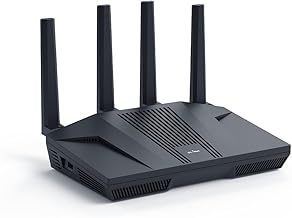
The Flint 2 is a standout for gamers who want dual 2.5 Gbps ports and pre-installed OpenWrt for advanced network customization. With Wi-Fi 6 speeds up to 6 Gbps and built-in OpenVPN and WireGuard support, it’s the ideal pick for privacy-conscious PC gamers.
GL.iNet Flint 3e (GL-BE6500)
The Flint 3e brings Wi-Fi 7 to the table with BE6500 speeds up to 6.5 Gbps, leveraging MLO and 4K-QAM for lower latency during competitive play. It’s a future-proof option for gamers with Wi-Fi 7 adapters or the newest Intel and AMD platforms.
NETGEAR Nighthawk RS140
The Nighthawk RS140 offers Wi-Fi 7 at BE5000 speeds with a 2.5 Gbps internet port and coverage for up to 2,250 square feet and 80 devices. It’s the best choice for large households where multiple gaming rigs and streaming setups compete for bandwidth.
Tenda AC6
The Tenda AC6 is the most affordable option here, offering AC1200 dual-band speeds and four Fast Ethernet ports for budget builds. While it lacks gigabit ports, it covers the basics for casual gamers on a tight budget who prioritize price over top-tier throughput.
Frequently Asked Questions
Is Wi-Fi 7 worth it for PC gaming in 2026?
Wi-Fi 7 reduces latency and improves signal reliability through Multi-Link Operation, but it’s only worth the premium if you own a Wi-Fi 7-compatible adapter or motherboard. For most gamers, a good Wi-Fi 6 router still delivers competitive-level performance.
Should I use Ethernet or Wi-Fi for my gaming PC?
Ethernet is always preferable for PC gaming because it eliminates wireless interference and delivers the lowest, most consistent latency. Use Wi-Fi only if your PC is far from the router and running a cable isn’t practical.
What is a 2.5 Gbps port and do I need one?
A 2.5 Gbps port allows wired speeds beyond the standard 1 Gbps limit, which matters if you have internet faster than 1 Gbps or transfer large files between networked PCs. If your plan is under 1 Gbps and you don’t do heavy local transfers, standard gigabit ports are sufficient.
Can a budget router handle competitive online gaming?
Yes, budget routers like the TP-Link Archer AX21 can handle competitive gaming just fine on a wired connection. The key factors are stable firmware and a clean 5 GHz band, both of which are present even in lower-priced units.
Final Thoughts
For most PC gamers in 2026, the GL.iNet Flint 2 hits the sweet spot of price, dual 2.5 Gbps ports, and OpenWrt flexibility. Those who want to invest in Wi-Fi 7 future-proofing should look at the GL.iNet Flint 3e or the NETGEAR Nighthawk RS140, both of which deliver next-gen wireless speeds and the lowest latency currently available.