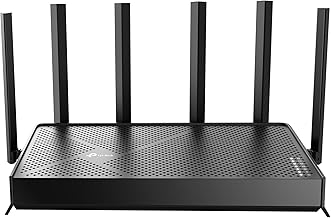
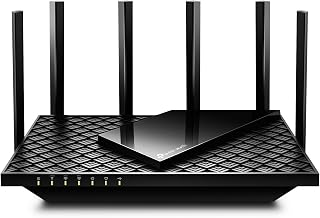
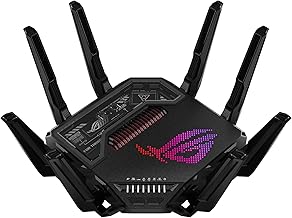
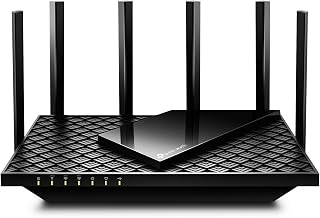
Our Top Picks
 TP-Link AXE5400 Tri-Band WiFi 6E RouterWiFi 6E, Tri-Band AXE540012.91 x 10.43 x 4.72 inches1.5 poundsCheck on Amazon



Choosing a TP-Link router is really a decision about where your home network struggles most, not about chasing the biggest number on the box. A household with dead zones in the bedrooms needs a different answer than a gamer whose console sits ten feet from the modem, and a family with dozens of smart devices needs different hardware than a two-person apartment. TP-Link covers all of those situations, which is exactly why the choice feels harder than it should.
This guide narrows the range to five routers that fit distinct situations: an affordable Wi-Fi 6 entry model, a stronger Wi-Fi 6 all-rounder, a tri-band Wi-Fi 6E model, a mesh system for larger homes, and a Wi-Fi 7 flagship. Each pick below comes from its Amazon listing title and listed specifications, so you can match the hardware to your home instead of guessing.
Quick Picks
As an Amazon Associate we earn from qualifying purchases
| Product | Best for | Key spec from title |
|---|---|---|
| TP-Link Archer AX21 | Replacing an ISP router on a modest budget | Dual-band Wi-Fi 6, AX1800 |
| TP-Link Archer AX55 | Gaming and 4K streaming in one room | Dual-band Wi-Fi 6, AX3000 |
| TP-Link Archer AXE75 | Wi-Fi 6E devices and the 6 GHz band | Tri-band Wi-Fi 6E, AXE5400 |
| TP-Link Deco X55 (3-Pack) | Whole-home coverage with no dead zones | AX3000 mesh, covers up to 6500 sq ft |
| TP-Link Archer BE230 | Future-proofing with Wi-Fi 7 gear | Dual-band Wi-Fi 7, BE3600 |
How to Choose
Match the Wi-Fi generation to your devices
Wi-Fi 6 handles most homes well, Wi-Fi 6E adds a 6 GHz band for newer laptops and phones, and Wi-Fi 7 brings multi-link operation that keeps latency steadier when several devices demand bandwidth at once. Look at the devices you actually own before paying for a newer generation. A home full of Wi-Fi 5 and Wi-Fi 6 phones gains little from a Wi-Fi 7 router today, while a household that just bought Wi-Fi 6E laptops can use the cleaner 6 GHz band immediately. Buy the generation your current devices can use, with one eye on what you will add next year.
Count your wired connections before you buy
Wireless speed gets all the attention, but the Ethernet ports on the back decide how tidy and how stable your setup feels. A gaming PC, a console, a TV box and a network drive already fill four ports, so a router with only a couple of gigabit LAN ports forces an extra switch into the setup. Multi-gig ports matter once your internet plan passes gigabit speed, because a single gigabit WAN port caps everything behind it. Sketch your wired devices on paper, add one spare port for whatever arrives next, and let that count narrow the shortlist.
Decide between one router and a mesh system
A single powerful router suits apartments and smaller homes where every room sits within a couple of walls of the living room. Mesh wins when the signal must cross floors, thick walls or a long hallway, because extra nodes shorten the distance each device must reach. Mesh also helps when the modem lives in a corner of the house far from where people actually sit. Walk your home and note where the signal drops today; if the weak spots cluster far from one point, mesh is the honest fix, while a single weak corner may only need a better-placed router.
Weigh security and software, not just speed
Every router in this guide ships with VPN support and TP-Link HomeShield, but the details differ in ways that matter day to day. Parental controls let you pause the internet for specific devices at bedtime, device lists show exactly what joined your network, and EasyMesh support lets you extend coverage later without replacing the main router. Check whether the model you like supports the VPN mode your remote work needs, and confirm the Tether app covers the controls you expect. Software you never open cannot protect a network you never check.
The 5 Best Options
TP-Link Archer AX21
The Archer AX21 is the sensible first step away from a rented ISP box, and it earns that role by covering the basics without wasted extras. Its dual-band Wi-Fi 6 radio keeps video calls steady while someone else streams in the next room, and the four antennas with beamforming push the signal toward devices instead of spraying it evenly in every direction. Setup runs through the Tether app in minutes, and EasyMesh support means a compatible extender can join later if one room still struggles.
Specs
- Dual-band Wi-Fi 6 with AX1800 combined throughput
- Up to 1200 Mbps on 5 GHz and 574 Mbps on 2.4 GHz
- Four high-gain antennas with beamforming
- Four gigabit LAN ports
- OFDMA and MU-MIMO for households with many devices
- EasyMesh support for adding extenders later
- Built-in VPN server with OpenVPN and PPTP modes
- Works with Alexa and the Tether app
Best for: Apartments and smaller homes replacing an ISP-supplied router.
Watch out for: AX1800 throughput can feel tight once several 4K streams and large downloads run at once.
ASIN: B08H8ZLKKK
TP-Link Archer AX55

Stepping up to the Archer AX55 buys headroom where the AX21 begins to feel crowded, especially in homes where gaming and streaming share the evening hours. The AX3000 radio doubles the 5 GHz ceiling compared with the entry model, so a console download hurts a video call less, and the USB 3.0 port adds a simple way to share a drive across the network. HomeShield brings network scanning and parental controls into the same app that handles setup, which keeps the extra features visible instead of buried in a web page.
Specs
- Dual-band Wi-Fi 6 with AX3000 combined throughput
- Up to 2402 Mbps on 5 GHz and 574 Mbps on 2.4 GHz
- Four gigabit LAN ports
- USB 3.0 port for shared storage
- HomeShield security with parental controls
- EasyMesh support for adding extenders later
- VPN client and server support
- OFDMA and MU-MIMO for busy networks
Best for: Gaming and 4K streaming in a single room or smaller home.
Watch out for: All four LAN ports are gigabit, so wired devices cannot exceed gigabit speed even on a faster plan.
ASIN: B09G5W9R6R
TP-Link Archer AXE75
Wi-Fi 6E exists for one reason: the 6 GHz band gives newer devices a wide, uncrowded lane that older neighbours cannot touch. The Archer AXE75 opens that lane with a tri-band AXE5400 radio, six antennas and a quad-core CPU that keeps up when dozens of devices connect at once. Its gigabit ports and USB 3.0 connection cover the wired side, while OneMesh support leaves room to extend coverage later. Households that already own Wi-Fi 6E laptops and phones will feel the difference on day one.
Specs
- Tri-band Wi-Fi 6E with AXE5400 combined throughput
- New 6 GHz band with 160 MHz channels
- Six high-performance antennas
- Quad-core CPU
- Gigabit Ethernet ports
- USB 3.0 port
- OneMesh support
- VPN support and WPA3 security
Best for: Homes with Wi-Fi 6E laptops and phones that want the uncrowded 6 GHz band.
Watch out for: Devices without Wi-Fi 6E cannot use the 6 GHz band, so older hardware gains nothing from it.
ASIN: B0B3SQK74L
TP-Link Deco X55 (3-Pack)
When one router cannot reach the far bedroom, adding power to that single box rarely fixes the geometry of the house. The Deco X55 takes the other approach, spreading three AX3000 mesh units through the home so every device talks to a nearby node instead of shouting across walls. Each unit carries three gigabit ports and supports Ethernet backhaul, so a wired link between nodes keeps the mesh itself from eating wireless airtime. The system replaces both a router and a range extender in one install.
Specs
- AX3000 mesh Wi-Fi 6 system, 3-pack
- Covers up to 6500 sq ft
- Up to 2402 Mbps on 5 GHz and 574 Mbps on 2.4 GHz
- Three gigabit ports per unit
- Supports Ethernet backhaul
- Connects over 150 devices
- AI-driven mesh for automatic node selection
- Replaces a wireless router and extender
Best for: Larger or multi-floor homes where a single router leaves dead zones.
Watch out for: Dual-band mesh shares wireless bandwidth between devices and node traffic unless Ethernet backhaul is wired in.
ASIN: B09PRB1MZM
TP-Link Archer BE230
The Archer BE230 is the pick for buyers who want their next router to stay relevant as Wi-Fi 7 devices spread through the house. Its BE3600 dual-band radio supports multi-link operation, which lets a compatible device use two bands at once for steadier latency during gaming and calls. Two 2.5G ports remove the gigabit ceiling that limits the older models here, so a faster internet plan reaches wired devices intact. Four antennas, a 2.0 GHz quad-core CPU and HomeShield round out a router built for the next several years.
Specs
- Dual-band Wi-Fi 7 with BE3600 combined throughput
- Two 2.5G ports plus three 1G ports
- USB 3.0 port
- 2.0 GHz quad-core CPU
- Four antennas
- Multi-link operation for steadier latency
- EasyMesh support
- HomeShield security and VPN support
Best for: Households with Wi-Fi 7 devices or a multi-gig internet plan.
Watch out for: Wi-Fi 7 features only switch on with Wi-Fi 7 devices, so older hardware runs at its own generation.
ASIN: B0DC99N2T8
Which One Fits Your Situation
Replacing an ISP router on a modest budget
Pick the Archer AX21 when the current goal is simply a better network than the box your provider supplied. Its AX1800 Wi-Fi 6 radio, four gigabit ports and EasyMesh support cover streaming, calls and smart devices in apartments and smaller homes. You get a real upgrade in coverage and control without paying for bands and ports your devices cannot use yet.
Gaming and streaming from one room
Pick the Archer AX55 when the router sits near the console and the TV, and evenings mean downloads, streams and calls competing at once. The AX3000 radio gives the 5 GHz band room to breathe, the USB 3.0 port adds shared storage, and HomeShield keeps the household controls in one app. Move to the Archer AXE75 instead if your laptop and phone already support Wi-Fi 6E.
Covering a large or multi-floor home
Pick the Deco X55 3-pack when dead zones, not raw speed, are the daily complaint. Three mesh units placed through the house shorten every device’s trip to the network, and Ethernet backhaul between units keeps the mesh fast when you can wire them. A single stronger router cannot fix a floor plan that puts the modem in the wrong corner.
Future-proofing for Wi-Fi 7
Pick the Archer BE230 when your next laptop, phone or console already supports Wi-Fi 7, or your internet plan runs past gigabit speed. Multi-link operation steadies latency for gaming and calls, and the two 2.5G ports let wired devices use the full plan. The Archer AXE75 remains the middle step if your newest devices top out at Wi-Fi 6E.
Common Mistakes
- Buying the fastest radio available while ignoring how many wired ports the household actually needs.
- Hiding the router inside a cabinet, behind a TV or on the floor, where furniture blocks the signal it was built to spread.
- Skipping firmware updates, which carry security fixes and stability improvements for the whole network.
- Choosing a mesh system for a small apartment, where one well-placed router would cover every room.
- Forgetting that most cable and DSL connections still need a separate modem in front of the router.
Frequently Asked Questions
Do TP-Link routers work with any internet provider?
Most TP-Link routers work with any provider that hands you an Ethernet connection from a modem or ONT box, including cable, fibre and DSL setups. Compatibility depends on the modem and the connection type rather than the router brand, so confirm your provider allows a customer-owned router and check whether it needs VLAN settings or a specific login method before ordering.
Do I still need a modem with a TP-Link router?
Yes, in most homes a modem or ONT box still sits between the wall connection and the router, translating the provider signal into Ethernet. The router then creates your Wi-Fi network and manages devices. Some providers combine modem and router in one rented unit, in which case the TP-Link router connects behind it or replaces it only if the provider allows it.
What is the difference between Archer and Deco routers?
Archer models are traditional single routers, with one box broadcasting Wi-Fi from a central spot, while Deco models are mesh systems with several units that share one network name across the home. Archer suits apartments and smaller homes, Deco suits larger or multi-floor homes with dead zones. Both lines share the Tether app, HomeShield security and EasyMesh or mesh expansion.
Is Wi-Fi 7 worth it if my devices are Wi-Fi 6?
Wi-Fi 7 routers serve Wi-Fi 6 devices well, but those devices cannot use multi-link operation or the Wi-Fi 7 features, so the extra capability sits idle until you upgrade hardware. Buy Wi-Fi 7 when your next phone, laptop or console already supports it, or when you plan to keep the router for many years. Otherwise a strong Wi-Fi 6 or Wi-Fi 6E model covers the same household for less.
FAQ
Do TP-Link routers work with any internet provider?
Do I still need a modem with a TP-Link router?
What is the difference between Archer and Deco routers?
Is Wi-Fi 7 worth it if my devices are Wi-Fi 6?
More from Amazon
Programs that pair well with the guide above. Offers and eligibility are set by Amazon and may change.
Free shipping on eligible items, Prime Video and more. Eligible new members can start with a free trial.
Start a Prime free trialAd-free music streaming. Eligible new subscribers can start with a free trial.
Try Music Unlimited freeA Prime membership for ages 18-24 with a trial period. Eligibility is set by Amazon.
See Prime for Young AdultsAudiobooks and podcasts to listen to on the go. Eligible new members can start with a free trial.
Try Audible freeAs an Amazon Associate we earn from qualifying purchases.