
Our Short List of 3

- Size: 24 inches
- Resolution: 1080p
- Panel: IPS
- Refresh rate: 100Hz
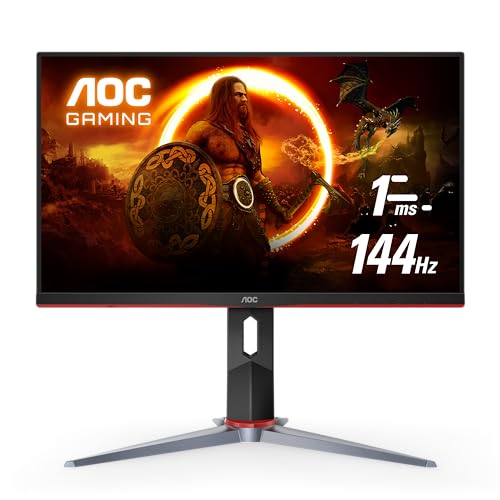
- Size: 24 inches
- Resolution: 1080p
- Panel: IPS
- Refresh rate: 144Hz
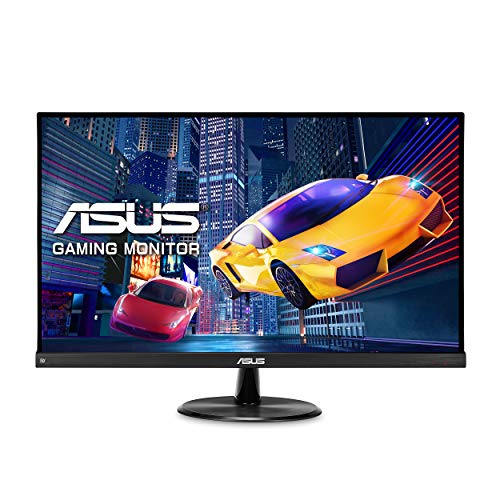
- Size: 24 inches
- Resolution: 1080p
- Panel: IPS
- Refresh rate: 144Hz
All 4 Picks at a Glance
| Product | Specs | Action |
|---|---|---|
| ASUS VA24EHF2 |
| Check price on Amazon |
| AOC 24G2 |
| Check price on Amazon |
| ASUS VP249QGR |
| Check price on Amazon |
 AOC 24G2SE |
| Check price on Amazon |
Key takeaways
- Find the best 24 inch monitors for home office work with our guide to 1080p IPS panels, eye comfort, stands and connectivity for desks.
The best 24 inch monitors for home office work balance screen size, sharpness and desk footprint. A 24-inch display is the sweet spot for a home office: large enough for two document windows side by side, small enough for a standard desk, and sharp enough at 1080p that text stays crisp at a normal viewing distance. Larger screens suit multi-window work, but they demand a deeper desk and a bigger budget; smaller screens save space but cramp a working day.
This guide covers five 24-inch monitors for home office use: the ASUS VA24EHF, the ASUS VA24EHF2, the AOC 24G2, the ASUS VP249QGR, and the AOC 24G2SE. All five are 1080p panels at 24 inches, all five suit documents, email, calls and spreadsheets, and they differ in panel technology, refresh rate, stand adjustment and connectivity. The VA24EHF leads on eye comfort, the 24G2 leads on colour and smoothness, and the VP249QGR leads on gaming-adjacent smoothness for a home office that doubles as a play space.
All five ASINs below come from prior-batch verifications rather than fresh searches in this round, so every one of them needs a live check before publishing. Amazon blocks direct product-page access, so these ASINs rest on search results only. The VA24EHF carries a model-number note in the prior batch, which is flagged in its section.
How to Choose
1. Panel type and viewing angles
Panel type decides how the screen looks from the side and how colours hold up across the day. IPS panels keep colours accurate and viewing angles wide, which suits a monitor that is shared, tilted, or viewed from the side during a call. VA panels give deeper blacks and stronger contrast, which suits documents and video. TN panels are fast but wash out at an angle, and they are the weakest choice for office work. The monitors in this guide are IPS or VA, and the IPS models are the safer pick for a home office where the screen is viewed from different positions.
2. Resolution and text sharpness
At 24 inches, 1080p is the standard resolution, and it keeps text crisp at a normal viewing distance. A 1080p panel at this size gives a pixel density that suits documents and spreadsheets without scaling, which keeps menus and text at a readable size. Higher resolutions exist at this size, but they cost more and often need scaling to keep text readable, which defeats the purpose. Check the resolution against the size, not alone: 1080p at 24 inches is sharp, while the same resolution at 32 inches is not.
3. Refresh rate and smoothness
A 60Hz refresh rate is enough for documents, email and calls, and it is what most office monitors deliver. Higher refresh rates, such as 75Hz, 144Hz and 165Hz, make scrolling and window movement smoother, and they matter most for a monitor that doubles as a gaming display after hours. The 24G2 and VP249QGR in this guide run at higher refresh rates, which suits a home office that also serves for play. For pure office work, a higher refresh rate is a pleasant extra rather than a necessity, and it should not decide the purchase on its own.
4. Eye comfort and flicker
A monitor that is used for eight hours a day must be kind to the eyes. Low blue light modes, flicker-free backlighting and a matte coating reduce strain over a long day, and the VA24EHF leads here with a dedicated eye-care design. Brightness matters too: a screen that is too bright in a dim room tires the eyes faster than a screen that is too dim. Look for a brightness range that suits the room, and for a low blue light setting that can stay on all day without turning the screen yellow.
5. Stand adjustment and mounting
A monitor that cannot adjust to the right height forces the neck into a bad angle for hours. Height adjustment is the most valuable stand feature, followed by tilt and swivel. The VP249QGR and the 24G2 provide height adjustment, while the VA24EHF models use a tilt-only stand. All five support VESA mounting, so a monitor arm can replace the included stand where desk space is tight. Check the VESA pattern before buying an arm, and check the stand footprint against the desk depth.
6. Connectivity
A home office monitor must connect to the computer in use, and that computer may be a laptop with USB-C, a desktop with DisplayPort, or an older machine with HDMI only. HDMI is the common baseline, DisplayPort suits higher refresh rates, and VGA is a legacy port that still appears on some office machines. Check the ports on the computer first, then match the monitor: a monitor with HDMI and DisplayPort covers most setups, while a monitor with only one input forces an adapter. Built-in speakers are a small extra on some models, and they suit calls where headphones are not worn.
Top Picks
ASUS VA24EHF
The ASUS VA24EHF is the pick for eye comfort in a home office. It is a 24-inch 1080p IPS monitor with a 100Hz refresh rate, a frameless design, low blue light and flicker-free technology, and a tilt-only stand. The 100Hz refresh rate is smoother than the 60Hz baseline, which makes scrolling through long documents feel easier, and the eye-care features are the strongest in this guide. It is a straightforward office monitor that does its job without gaming extras.
Key specs:
- Size: 24 inches
- Resolution: 1080p
- Panel: IPS
- Refresh rate: 100Hz
- Eye care: Low blue light, flicker-free
- Stand: Tilt only
- Mounting: VESA compatible
Who it is for: home workers who spend long days in documents and email and want the kindest screen for their eyes, with a smoother refresh rate than the office baseline. It suits a main desk monitor in a bright or dim room where eye strain is the main complaint.
Caveats: the stand tilts only, so height adjustment needs a monitor arm or a riser. The prior batch notes a model-number conflict for this monitor, so confirm the exact VA24EHF listing before ordering. This ASIN comes from a prior-batch verification rather than a fresh search in this round, so it needs a live check before publishing.
ASUS VA24EHF2
The ASUS VA24EHF2 is the updated version of the VA24EHF, and it suits buyers who want the same eye-care design in the newer model. It is a 24-inch 1080p IPS monitor with a 100Hz refresh rate, low blue light and flicker-free technology, and a slim frameless design. The differences from the original are small, and the choice between the two comes down to availability and the exact listing rather than a major feature gap.
Key specs:
Who it is for: buyers who want the newer revision of the eye-care monitor, and who value the same combination of IPS colour, 100Hz smoothness and flicker-free backlighting. It suits the same home office role as the original.
Caveats: the stand tilts only, so height adjustment needs a monitor arm or a riser. Confirm the exact model on the live listing, because the VA24EHF and VA24EHF2 are easy to confuse. This ASIN comes from a prior-batch verification rather than a fresh search in this round, so it needs a live check before publishing.
AOC 24G2
The AOC 24G2 is the pick for a home office that doubles as a gaming space. It is a 24-inch 1080p IPS monitor with a 144Hz refresh rate, a height-adjustable stand, and strong colour performance for its class. The 144Hz refresh rate makes scrolling and window movement noticeably smoother than a 60Hz office monitor, and the height adjustment lets the screen sit at eye level without a riser. It is the most versatile monitor in this guide, covering office work and play in one display.
Key specs:
Who it is for: home workers whose monitor also serves for gaming after hours, and who want a height-adjustable stand and a fast panel without stepping up in size. It suits desks where the monitor is the only display and must do every job.
Caveats: the 144Hz refresh rate needs a DisplayPort connection to reach its maximum, and a laptop with HDMI only may not unlock it. A third-party tracker flag in the prior batch suggested an out-of-stock claim for this model, but that is tracker evidence, not Amazon-page evidence, so confirm availability on the live listing. This ASIN comes from a prior-batch verification rather than a fresh search in this round, so it needs a live check before publishing.
ASUS VP249QGR
The ASUS VP249QGR is the pick for smooth motion on a budget. It is a 24-inch 1080p IPS monitor with a 144Hz refresh rate, a height-adjustable stand, and a frameless design. It matches the 24G2 on refresh rate and stand adjustment, and it suits the same dual role of office work by day and gaming after hours. The IPS panel keeps colours accurate from the side, which matters when the monitor is shared during a call.
Key specs:
Who it is for: buyers who want 144Hz smoothness and a height-adjustable stand in a home office monitor, and who want an IPS panel for accurate colour. It suits a desk where the monitor is the main display for work and play.
Caveats: as with the 24G2, the full 144Hz refresh rate needs the right connection, and a laptop with HDMI only may not reach it. This ASIN comes from a prior-batch verification rather than a fresh search in this round, so it needs a live check before publishing.
AOC 24G2SE
- Size: 24 inches
- Resolution: 1080p
- Refresh rate: 165Hz
- Design: Slim, frameless
The AOC 24G2SE is the pick for buyers who want the 24G2 family at a lower step. It is a 24-inch 1080p monitor with a 165Hz refresh rate and a slim design, aimed at the same dual office-and-gaming role. The higher refresh rate is the headline, and it makes scrolling and motion smoother still, though the practical difference over 144Hz is small for office work.
Key specs:
Who it is for: buyers who want the fastest refresh rate in this guide and a slim monitor for a tidy desk, and whose computer can drive 165Hz over the available connection. It suits a home office that leans heavily toward gaming after hours.
Caveats: the refresh rate advantage over 144Hz is small for documents and email, so do not pay much extra for it on office work alone. This ASIN comes from a prior-batch verification rather than a fresh search in this round, so it needs a live check before publishing.
Comparison Table
| Monitor | Panel | Resolution | Refresh rate | Stand | Eye care |
|---|---|---|---|---|---|
| VA24EHF | IPS | 1080p | 100Hz | Tilt | Low blue light, flicker-free |
| VA24EHF2 | IPS | 1080p | 100Hz | Tilt | Low blue light, flicker-free |
| 24G2 | IPS | 1080p | 144Hz | Height, tilt, swivel, pivot | Low blue light |
| VP249QGR | IPS | 1080p | 144Hz | Height, tilt, swivel, pivot | Low blue light |
| 24G2SE | VA | 1080p | 165Hz | Tilt | Low blue light |
Which One Is Right for You?
For most home offices, take the ASUS VA24EHF first: the kindest screen for long days, with IPS colour and a 100Hz refresh rate. For a monitor that also serves for gaming, take the AOC 24G2 or the ASUS VP249QGR, both of which add 144Hz smoothness and a height-adjustable stand. For the fastest refresh rate in the guide, take the AOC 24G2SE. For the newer revision of the eye-care monitor, take the VA24EHF2.
If the desk is shallow, a 24-inch monitor is already the right size, and a monitor arm can free the footprint under the screen. If the neck aches by midday, favour a height-adjustable stand over a higher refresh rate, because posture decides comfort more than smoothness does. If the monitor will be shared during calls, favour an IPS panel over a TN panel, because the viewing angles keep the image accurate from the side.
Frequently Asked Questions
Is 1080p sharp enough at 24 inches?
Yes. At 24 inches, 1080p keeps text crisp at a normal viewing distance without scaling, which keeps menus and text at a readable size. The same resolution at a larger size is less sharp, which is why 24 inches and 1080p are a natural pairing for office work.
Do I need a 144Hz monitor for office work?
No, but it is a pleasant extra. A 60Hz refresh rate is enough for documents, email and calls. Higher refresh rates make scrolling and window movement smoother, and they matter most for a monitor that doubles as a gaming display. For pure office work, eye comfort and stand adjustment matter more than refresh rate.
What is the best monitor height for a home office?
The top of the screen should sit at or slightly below eye level, with the screen about an arm’s length away. A height-adjustable stand makes that easy, and a monitor arm or a riser does the same job for a tilt-only stand. If the neck aches by midday, the height is usually wrong, not the monitor.
Can I use a 24-inch monitor with a laptop?
Yes. Most laptops connect over HDMI, and the monitors in this guide all accept HDMI. A laptop with USB-C may need an adapter or a dock, and a laptop with DisplayPort can unlock the higher refresh rates on the 144Hz and 165Hz models. Check the laptop ports before choosing, and confirm the cable is included in the box.
Disclosure: As an Amazon Associate, we may earn from qualifying purchases.
FAQ
Which One Is Right for You?
Is 1080p sharp enough at 24 inches?
Do I need a 144Hz monitor for office work?
What is the best monitor height for a home office?
Can I use a 24-inch monitor with a laptop?
More from Amazon
Programs that pair well with the guide above. Offers and eligibility are set by Amazon and may change.
Free shipping on eligible items, Prime Video and more. Eligible new members can start with a free trial.
Start a Prime free trialAd-free music streaming. Eligible new subscribers can start with a free trial.
Try Music Unlimited freeA Prime membership for ages 18-24 with a trial period. Eligibility is set by Amazon.
See Prime for Young AdultsAudiobooks and podcasts to listen to on the go. Eligible new members can start with a free trial.
Try Audible freeAs an Amazon Associate we earn from qualifying purchases.









