Our Short List of 3

- Best for: A crowded desk running many external drives and peripherals from one computer port
- Brand: SABRENT
- Model: HB-BU10
- Ports: 10 USB 3.0 ports
- Data transfer speed: up to 5Gbps
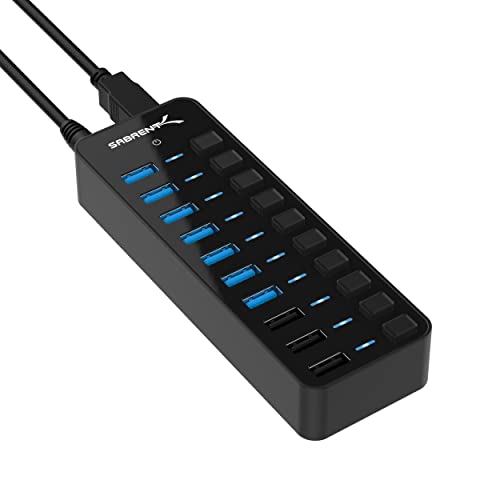
- Best for: Desks mixing several external drives with phones or controllers that need charging ports
- Brand: SABRENT
- Model: HB-B7C3
- Data ports: 7 USB 3.0 ports
- Charging ports: 3 smart charging ports

- Best for: A shared desk that needs powered drive ports, charging sockets, and one simple power button
- Brand: TP-Link
- Model: UH720
- Data ports: 7 USB 3.0 Standard A ports
- Charging ports: 2 smart charging ports, up to 5V/2.4A each
All 4 Picks at a Glance
| Product | Specs | Action |
|---|---|---|
| SABRENT 10-Port 60W USB 3.0 Hub (HB-BU10) |
| Check price on Amazon |
| SABRENT 10-Port USB 3.0 Hub (HB-B7C3) |
| Check price on Amazon |
| TP-Link Powered USB Hub 3.0 (UH720) |
| Check price on Amazon |
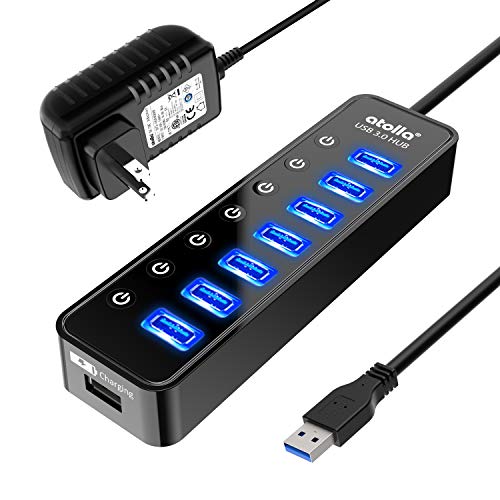 atolla 7-Port Powered USB Hub 3.0 (CH-207U3) |
| Check price on Amazon |
Key takeaways
- Compare powered USB hubs that run several external hard drives at once, with strong adapters, switched ports and fast data ports for a tidy desk setup.
Running several external hard drives from one computer port sounds simple until a portable drive clicks, disconnects mid-copy, or refuses to spin up at all. Those failures are usually a power problem, not a drive problem, so the real decision is which powered hub has an adapter strong enough to feed every drive you plan to leave connected at the same time.
This guide serves gamers rotating game-library drives, creators keeping backup and media drives online, and home users consolidating years of portable storage onto one desk. Every hub below is a desktop powered model chosen from the names and specifications on its Amazon page, with a bundled power adapter, multiple USB data ports, and enough stated output to run several drives together.
Quick Picks
As an Amazon Associate we earn from qualifying purchases
| Product | Best for | Key spec from title |
|---|---|---|
| SABRENT 10-Port 60W USB 3.0 Hub (HB-BU10) | Desks where every port carries a drive or device | 60W 12V/5A power adapter |
| SABRENT 10-Port USB 3.0 Hub (HB-B7C3) | Mixing data drives with charging cables | 3 smart charging ports |
| TP-Link Powered USB Hub 3.0 (UH720) | A simple powered hub with built-in protections | 12V/4A power adapter |
| atolla 7-Port Powered USB Hub 3.0 (CH-207U3) | Longer reach between computer and desk drives | 100cm USB hub cable |
How to Choose
Power Adapter Output for Spinning Drives
A portable hard drive draws its running power from the USB port, and a spinning drive needs a surge of current each time it starts. One drive on a laptop port is fine, but three or four starting together can overwhelm an unpowered hub. Compare the adapter rating in each listing before anything else. The two SABRENT models here include 60W 12V/5A adapters, the TP-Link UH720 includes a 12V/4A adapter, and the atolla includes a 5V/4A adapter with a stated combined limit for connected devices. A bigger adapter gives simultaneous spin-ups more headroom.
Port Count and USB Generation
Count data ports, not total ports, because several hubs in this class mix data sockets with charging-only sockets. The SABRENT HB-BU10 offers ten USB 3.0 data ports, while the HB-B7C3 splits its layout into seven data ports and three smart charging ports, and the TP-Link and atolla models each provide seven data ports plus charging sockets. All four hubs state USB 3.0 data transfer up to 5Gbps, which suits mechanical drives comfortably. If your collection includes fast external SSDs, remember that a 5Gbps hub link is shared by every drive transferring at once.
Individual Port Switches
Switches let you power one drive down without pulling cables or shutting the whole hub off, which is handy when a backup drive should stay mounted only during its scheduled copy. The two SABRENT hubs and the atolla give each port its own on/off switch with an LED showing its status, so a rarely used archive drive can sit dark while game drives stay live. The TP-Link UH720 takes the simpler route with a single power on/off button for the entire hub, which suits desks where everything starts and stops together.
Cable Length and Host Connection
A powered hub lives in two places at once: near a wall outlet for its adapter and near your drives on the desk, so cable lengths decide whether the layout works. The atolla listing states a 100cm USB hub cable and a 120cm power adapter cord, giving it the most placement freedom here. The TP-Link UH720 connects to the host through a USB 3.0 Micro B interface, while the SABRENT models ship with a USB 3.0 cable in the box. Check your computer’s free port type before ordering, especially on newer machines with few USB-A sockets.
The 4 Best Options
SABRENT 10-Port 60W USB 3.0 Hub (HB-BU10)
- Best for: A crowded desk running many external drives and peripherals from one computer port
- Brand: SABRENT
- Model: HB-BU10
- Ports: 10 USB 3.0 ports
- Data transfer speed: up to 5Gbps
A crowded desk running many external drives and peripherals from one computer port
All ten ports are USB-A, so USB-C-only laptops need an adapter for the host connection
Choose this hub when port count is the whole problem and nearly every socket will hold a drive, a dock, or another bus-powered device. All ten ports carry data, each one has an individual power switch and LED, and the included 60W adapter is the strongest supply in this group, so a row of portable drives can spin up together without leaning on the computer’s port. It fits a permanent desk better than a laptop bag, because the adapter needs a wall outlet and the long body needs a fixed home beside your drive stack.
SABRENT 10-Port USB 3.0 Hub (HB-B7C3)
- Best for: Desks mixing several external drives with phones or controllers that need charging ports
- Brand: SABRENT
- Model: HB-B7C3
- Data ports: 7 USB 3.0 ports
- Charging ports: 3 smart charging ports
Desks mixing several external drives with phones or controllers that need charging ports
Only seven of the ten ports transfer data, so count your drives before choosing it over the all-data model
This sibling model suits a desk where drives share space with phones, controllers, and other gear that only needs charging. Seven ports handle USB 3.0 data for your external drives, while three smart charging ports sit separately for devices that never transfer files. The same 60W 12V/5A adapter feeds the hub, and every port keeps an individual switch and LED, so you can silence a charging cable or park a backup drive independently. Pick it over the HB-BU10 when three of your ten sockets would otherwise be wasted on charging duty anyway.
TP-Link Powered USB Hub 3.0 (UH720)
- Best for: A shared desk that needs powered drive ports, charging sockets, and one simple power button
- Brand: TP-Link
- Model: UH720
- Data ports: 7 USB 3.0 Standard A ports
- Charging ports: 2 smart charging ports, up to 5V/2.4A each
A shared desk that needs powered drive ports, charging sockets, and one simple power button
The charging ports do not transfer data, and the data ports are not intended for charging devices
The UH720 is the straightforward option for buyers who want powered ports and sensible safeguards without managing ten switches. Seven USB 3.0 data ports handle external drives and everyday peripherals, two smart charging ports deliver up to 2.4A for phones and tablets, and the included 12V/4A adapter keeps the hub supplied independently of the computer. TP-Link lists protections against overheating, over-current, over-voltage, and short circuit, plus a single power button for the whole unit. It suits a family or office desk where the hub simply stays on and everything connected is used daily.
atolla 7-Port Powered USB Hub 3.0 (CH-207U3)
- Best for: Setups where the hub must sit well away from the computer, close to the drives themselves
- Brand: atolla
- Model: CH-207U3
- Data ports: 7 USB 3.0 data ports
- Charging port: 1 smart charging port, up to 2.4A
Setups where the hub must sit well away from the computer, close to the drives themselves
The 4A combined limit is the tightest power budget here, so avoid loading every port with a spinning drive at once
Reach for the atolla when your computer sits far from the drives it needs to feed. Its listing states a 100cm USB hub cable, the longest host reach described here, plus a 120cm cord on the 5V/4A power adapter, so the hub can sit with the drive stack instead of beside the tower. Seven USB 3.0 data ports each get an individual on/off switch, and a separate smart charging port handles a phone. The stated combined current limit for connected devices means it fits a moderate drive collection better than a wall of spinning disks.
Which One Fits Your Situation
You Keep a Whole Shelf of Game and Backup Drives
Pick the SABRENT HB-BU10. Ten data ports mean game-library drives, a backup drive, and a scratch drive can all stay connected, and the 60W adapter gives their combined spin-up demand the most headroom in this group. Individual switches let you park the backup drive between copies while the drives you play from stay mounted and ready.
Your Desk Mixes Drives With Charging Cables
Pick the SABRENT HB-B7C3 when your ten sockets would naturally split between storage and charging. Seven data ports cover a healthy drive collection, and the three smart charging ports keep controllers and phones off your data ports entirely. You give up three potential drive connections compared with the HB-BU10, so choose this layout only when that charging demand is real and daily.
You Want One Button and Built-In Protections
Pick the TP-Link UH720 for a family desk, a shared office, or any setup managed by people who will never touch a per-port switch. One button runs the whole hub, seven data ports cover typical drive counts, and the listed over-current, over-voltage, overheating, and short-circuit protections add peace of mind when the hub stays powered around the clock with drives attached.
Your Computer Sits Far From Your Drives
Pick the atolla CH-207U3 when cable reach decides the layout, such as a tower on the floor feeding drives on a shelf. The stated 100cm hub cable and 120cm adapter cord give it the placement freedom the others do not describe. Keep its combined current limit in mind and spread your hungriest spinning drives across fewer ports.
Common Mistakes
- Buying an unpowered pocket hub for several portable drives, then blaming the drives when they disconnect during large copies or refuse to spin up together.
- Counting charging-only sockets as drive ports, and discovering after setup that a hub with ten total ports only accepts seven data devices.
- Ignoring the adapter rating and combined current limits in the listing, even though those figures decide how many spinning drives can start at the same time.
- Parking the hub where its host cable barely reaches, so a small desk bump tugs the connector and drops every mounted drive at once.
- Leaving every drive switched on permanently when a backup drive only needs power during its copy window, adding heat and wear for no benefit.
Frequently Asked Questions
Can a powered USB hub really run several portable hard drives at once?
Yes, provided the adapter is strong enough for the combined draw. Each hub above includes its own power adapter, so the drives draw from the wall instead of sharing one computer port. Check the stated adapter rating and any combined current limit, and avoid starting many spinning drives on the smallest supply here.
Will my drives transfer at full speed through one of these hubs?
Each hub states USB 3.0 transfer up to 5Gbps on its data ports, which is comfortable headroom for mechanical external drives. That link is shared, though, so copying between two drives on the same hub splits the available bandwidth. A single drive working alone gets the cleanest path and the most consistent speeds.
Do I need the individual port switches, or is one power button enough?
Switches help when drives have different jobs: a backup drive can stay off between copies while game drives remain mounted. The SABRENT models and the atolla offer per-port switches with status LEDs. If everything on your desk starts and stops together, the single power button on the TP-Link UH720 is simpler and perfectly workable.
Can I plug one of these hubs into a USB-C-only laptop?
The hubs here use USB-A style connections, and the TP-Link connects to its host through a USB 3.0 Micro B interface. A USB-C-only laptop needs a suitable adapter or a different hub built for USB-C hosts. Check the port shapes on your machine against the listing photos and stated interfaces before ordering anything.
FAQ
Can a powered USB hub really run several portable hard drives at once?
Will my drives transfer at full speed through one of these hubs?
Do I need the individual port switches, or is one power button enough?
Can I plug one of these hubs into a USB-C-only laptop?
More from Amazon
Programs that pair well with the guide above. Offers and eligibility are set by Amazon and may change.
Free shipping on eligible items, Prime Video and more. Eligible new members can start with a free trial.
Start a Prime free trialAd-free music streaming. Eligible new subscribers can start with a free trial.
Try Music Unlimited freeA Prime membership for ages 18-24 with a trial period. Eligibility is set by Amazon.
See Prime for Young AdultsAudiobooks and podcasts to listen to on the go. Eligible new members can start with a free trial.
Try Audible freeAs an Amazon Associate we earn from qualifying purchases.