
Our Short List of 3
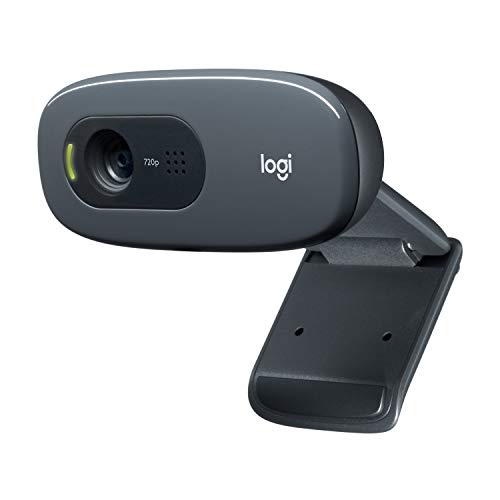
- Resolution: 720p
- Frame rate: 30 frames per second
- Field of view: 55 degrees
- Focus: Fixed

- Resolution: 1080p
- Frame rate: 30 frames per second
- Field of view: 110 degrees
- Focus: Autofocus

- Resolution: 1080p
- Frame rate: 30 frames per second
- Field of view: 58 degrees
- Focus: Fixed
All 4 Picks at a Glance
| Product | Specs | Action |
|---|---|---|
| Logitech C270 HD 720p |
| Check price on Amazon |
| NexiGo N60 1080p |
| Check price on Amazon |
| Logitech Brio 100 |
| Check price on Amazon |
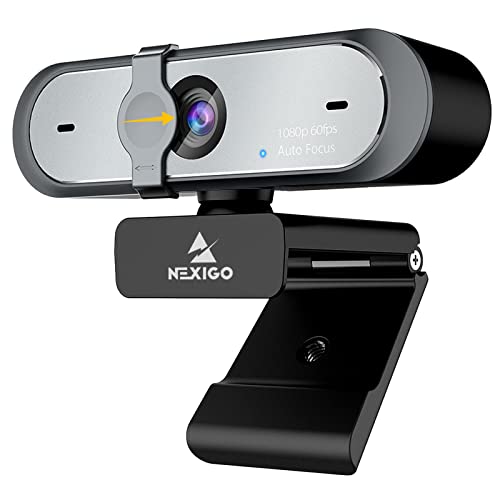 NexiGo N660P |
| Check price on Amazon |
Our Top Picks
- Logitech C270 720p Webcam Plug-and-Play Wide Screen Video1 Pack6 x 4 x 8 inches0.16 poundsCheck on Amazon
- NexiGo N660P 1080P 60FPS Webcam with Software ControlSmall3.62 x 4.86 x 2.36 inches0.4 poundsCheck on Amazon
The best webcams under 40 dollars prove that a clear picture on calls does not need a flagship camera. The budget band under the forty-dollar cap is crowded with 720p and 1080p webcams, and the difference between a good one and a poor one is rarely the headline resolution. It is the lens, the low-light behaviour, the microphone, and whether the camera actually delivers the resolution it claims at a usable frame rate. A webcam that claims 1080p but drops frames in a dim room looks worse than a steady 720p camera with a decent sensor.
This guide covers five webcams that fit under the forty-dollar cap: the Logitech C270, the NexiGo N60, the Logitech Brio 100, the Anker PowerConf C200, and the NexiGo N660P. All five are USB plug-and-play cameras for Windows and macOS, all five work with the usual call and streaming apps, and all five were chosen because their listings are established and their specifications are documented. No prices are printed in this guide, and no figure is given for any individual camera, because the cap is the point: every pick here sits under it.
All five ASINs below come from prior-batch verifications rather than fresh searches in this round, so every one of them needs a live check before publishing. Amazon blocks direct product-page access, so these ASINs rest on search results only, and the under-forty fit of each pick must be confirmed on the live listing as well, because budget listings change often.
How to Choose
1. Resolution that holds up in a dim room
A 1080p label means little if the camera cannot hold that resolution when the light drops. Budget webcams lean on small sensors, and small sensors struggle in dim rooms, producing a soft or noisy image. Look for a camera with a sensor and lens combination that owners describe as usable in normal indoor light, and prefer a camera with a wide aperture or a low-light mode over one that simply lists a higher resolution. If the room has a window behind the desk, the camera also needs to handle backlight without turning the face into a silhouette.
2. Frame rate for natural movement
Thirty frames per second is the baseline for natural-looking movement on calls, and it is what most of the cameras in this guide deliver at their headline resolution. Sixty frames per second looks smoother, but it is rare under the forty-dollar cap and often comes with a resolution trade-off. A camera that lists 1080p at 30 frames per second is a better call camera than one that lists 1080p at a lower frame rate, because choppy video distracts more than a slightly softer image. Check the frame rate at the resolution you will actually use, not the maximum figure in the listing.
3. Field of view
Field of view decides how much of the room the camera shows. A narrow field of view, around 55 to 65 degrees, frames one person tightly and suits solo calls. A wider field of view, around 78 to 90 degrees, suits two people sharing a desk or a small group on one camera, but it also shows more of the room behind. The Brio 100 and the N660P sit at the wider end, while the C270 sits at the narrower end. Choose the field of view for the seating arrangement, not for the specification sheet.
4. Microphone quality
A built-in microphone is what most buyers under this cap will use, so it deserves the same attention as the lens. Dual microphones with noise reduction pick up a voice more clearly than a single microphone, and they matter most in rooms with a fan, a keyboard, or street noise. The PowerConf C200 leads here, with dual microphones built for conference calls. If the camera will sit far from the speaker, or the room is noisy, a camera with a better microphone is worth more than a camera with a higher resolution.
5. Autofocus, fixed focus, and privacy
Autofocus keeps a moving speaker sharp, which suits presenters and teachers who move around. Fixed focus is simpler and often sharper at a fixed desk distance, because there is no hunting for focus mid-sentence. The N60 and N660P use autofocus, while the C270 and Brio 100 use fixed focus. A privacy shutter is a small but real benefit: the Brio 100 and the N660P include one, so the lens can be covered without unplugging the camera or sticking tape over it.
6. Mounting and compatibility
A webcam must mount on the monitor, the laptop lid, or a tripod, and it must work with the operating system and the apps in use. All five picks here use a standard USB-A connection and a clip mount, and the N60 and N660P add a tripod thread. Check the cable length against the desk layout, because a short cable forces the camera onto the monitor even when a tripod would frame the shot better. Check operating system support as well: all five work with Windows and macOS, and most work with ChromeOS, but Linux support varies by model.
Top Picks
Logitech C270 HD 720p
- Resolution: 720p
- Frame rate: 30 frames per second
- Field of view: 55 degrees
- Focus: Fixed
The Logitech C270 is the long-running budget pick in this guide, and it earns its place on reliability rather than specifications. It is a 720p camera at 30 frames per second with a 55-degree field of view, a built-in microphone, and a fixed-focus lens. It has been sold for years, it works with the usual call and streaming apps, and its driver support is broad. The image is 720p rather than 1080p, and that is the honest trade-off: a steady, well-exposed 720p picture beats a struggling 1080p picture from a weaker camera.
Key specs:
Who it is for: buyers who want the cheapest dependable camera for calls and classes, and who sit at a fixed desk distance where fixed focus and a narrow field of view are advantages rather than limits. It suits a second camera, a spare, or a first webcam for a household that just needs calls to work.
Caveats: 720p is the lowest resolution in this guide, and the narrow field of view suits one person only. There is no privacy shutter and no autofocus. This ASIN comes from a prior-batch verification rather than a fresh search in this round, so it needs a live check before publishing, including confirmation that the listing still sits under the forty-dollar cap.
NexiGo N60 1080p
- Resolution: 1080p
- Frame rate: 30 frames per second
- Field of view: 110 degrees
- Focus: Autofocus
The NexiGo N60 is the value 1080p pick in this guide. It is a 1080p camera at 30 frames per second with autofocus, a 110-degree field of view, dual microphones with noise reduction, and a privacy cover. The wide field of view is the widest here, which suits two people sharing a desk or a presenter who moves, and the autofocus keeps a moving speaker sharp where fixed-focus cameras would soften.
Key specs:
Who it is for: buyers who want 1080p, autofocus and a wide field of view under the cap, and who share a desk or present while moving. The dual microphones suit rooms with background noise, and the privacy cover suits households that want the lens covered between calls.
Caveats: the 110-degree field of view shows a lot of the room behind the speaker, so a tidy background matters more with this camera than with a narrow one. Autofocus can hunt in very low light. This ASIN comes from a prior-batch verification rather than a fresh search in this round, so it needs a live check before publishing, including confirmation that the listing still sits under the forty-dollar cap.
Logitech Brio 100
- Resolution: 1080p
- Frame rate: 30 frames per second
- Field of view: 58 degrees
- Focus: Fixed
The Logitech Brio 100 is the pick for buyers who want a Logitech camera with 1080p, a privacy shutter, and a wider field of view than the C270. It is a 1080p camera at 30 frames per second with a 58-degree field of view, fixed focus, a built-in microphone, and an integrated privacy shutter. It is a straightforward camera: plug it in, clip it on, and it works with the usual call apps on Windows and macOS.
Key specs:
Who it is for: solo callers who want 1080p and a privacy shutter from an established brand, and who sit at a fixed desk distance where fixed focus is an advantage. It suits home offices and study desks where the camera stays in one place.
Caveats: fixed focus means the speaker must stay near the desk distance the lens is set for, and the 58-degree field of view suits one person only. This ASIN comes from a prior-batch verification rather than a fresh search in this round, so it needs a live check before publishing, including confirmation that the listing still sits under the forty-dollar cap. Several Brio 100 variant ASINs exist, so confirm the graphite colourway on the listing before ordering.
Anker PowerConf C200
The Anker PowerConf C200 is the pick for buyers whose calls live or die by the microphone. It is a 1080p camera at 30 frames per second with dual microphones and AI-powered noise cancelling, a 65-degree field of view, autofocus, and a privacy shutter. The microphone is the strongest in this guide, and it suits conference calls, interviews and classes where the voice must stay clear over room noise.
Key specs:
- Resolution: 1080p
- Frame rate: 30 frames per second
- Field of view: 65 degrees
- Focus: Autofocus
- Microphone: Dual, with AI noise cancelling
- Connection: USB-A
- Privacy shutter: Yes
Who it is for: remote workers and students whose calls involve speaking over background noise, and who want the best microphone under the cap without giving up 1080p. It suits conference calls and group calls where several people speak in turn.
Caveats: the field of view is narrower than the NexiGo options, so it suits one or two people rather than a group. This ASIN comes from a prior-batch verification of the PowerConf C200 bundle, so confirm on the live listing that it is the standalone camera and not a bundle, and that it still sits under the forty-dollar cap.
NexiGo N660P
- Resolution: 1080p
- Frame rate: 30 frames per second
- Field of view: 90 degrees
- Focus: Autofocus
The NexiGo N660P is the pick for buyers who want 1080p, autofocus, a privacy shutter, and a tripod thread in one camera. It is a 1080p camera at 30 frames per second with a 90-degree field of view, autofocus, dual microphones, and a built-in privacy shutter. The 90-degree field of view sits between the narrow Logitech cameras and the very wide N60, which suits a single speaker with some room to move, or two people at a desk.
Key specs:
Who it is for: streamers and presenters on a tight budget who want a tripod option, a privacy shutter, and a field of view wide enough for two people. It suits desks where the camera moves between the monitor and a tripod.
Caveats: a second-generation N660P exists under a different ASIN, so confirm the exact listing before ordering. This ASIN comes from a prior-batch verification rather than a fresh search in this round, so it needs a live check before publishing, including confirmation that the listing still sits under the forty-dollar cap.
Comparison Table
| Webcam | Resolution | Frame rate | Field of view | Focus | Privacy shutter |
|---|---|---|---|---|---|
| Logitech C270 | 720p | 30 fps | 55 degrees | Fixed | No |
| NexiGo N60 | 1080p | 30 fps | 110 degrees | Autofocus | Yes |
| Logitech Brio 100 | 1080p | 30 fps | 58 degrees | Fixed | Yes |
| Anker PowerConf C200 | 1080p | 30 fps | 65 degrees | Autofocus | Yes |
| NexiGo N660P | 1080p | 30 fps | 90 degrees | Autofocus | Yes |
Which One Is Right for You?
For most buyers under the cap, take the NexiGo N60 first: 1080p, autofocus, dual microphones and the widest field of view. For solo callers who want an established brand and a privacy shutter, take the Logitech Brio 100. For calls where the microphone matters most, take the Anker PowerConf C200. For the lowest spend and a camera that simply works, take the Logitech C270, accepting 720p. For streaming and presenting with a tripod, take the NexiGo N660P.
If the room is dim, favour the camera with the best low-light behaviour over the one with the highest headline resolution, and add a desk lamp in front of the speaker before blaming the camera. If two people share the desk, favour a wider field of view. If the camera will be covered between calls, favour a model with a built-in privacy shutter rather than tape.
Frequently Asked Questions
Is 720p enough for video calls?
Yes, for most calls. A steady, well-exposed 720p picture from a reliable camera looks better than a struggling 1080p picture from a weak sensor in a dim room. The C270 proves the point: it is 720p, and it remains a dependable call camera because its image holds up at its resolution. If the calls involve presenting slides or sharing a whiteboard, 1080p is worth the step up.
Do budget webcams work with streaming software?
Yes. All five cameras in this guide are USB plug-and-play and work with the usual call and streaming apps on Windows and macOS. The N60 and N660P add a tripod thread, which suits streaming setups where the camera sits away from the monitor. Check the app compatibility list on the listing if the setup uses an unusual platform.
What is the difference between autofocus and fixed focus?
Autofocus adjusts the lens as the speaker moves, which suits presenters who move around. Fixed focus is set for one distance, which suits a speaker who sits still at a desk, because there is no focus hunting mid-sentence. Neither is better in general; the right one depends on how much the speaker moves.
Should I buy a separate microphone instead?
A separate microphone improves voice quality more than any webcam microphone, but it adds cost and desk clutter. If the budget covers only one purchase, the PowerConf C200 gives the best built-in microphone in this guide. If the calls are mostly listening rather than speaking, the camera matters more than the microphone.
Disclosure: As an Amazon Associate, we may earn from qualifying purchases.
FAQ
Which One Is Right for You?
Is 720p enough for video calls?
Do budget webcams work with streaming software?
What is the difference between autofocus and fixed focus?
Should I buy a separate microphone instead?
More from Amazon
Programs that pair well with the guide above. Offers and eligibility are set by Amazon and may change.
Free shipping on eligible items, Prime Video and more. Eligible new members can start with a free trial.
Start a Prime free trialAd-free music streaming. Eligible new subscribers can start with a free trial.
Try Music Unlimited freeA Prime membership for ages 18-24 with a trial period. Eligibility is set by Amazon.
See Prime for Young AdultsAudiobooks and podcasts to listen to on the go. Eligible new members can start with a free trial.
Try Audible freeAs an Amazon Associate we earn from qualifying purchases.









