Key takeaways
- Target 50-65% load at peak for the best efficiency and noise.
- Account for GPU transient spikes, which briefly exceed rated draw.
- Leave room for a future GPU upgrade if you plan to keep the PSU.
The power supply is the least glamorous part of a gaming PC and the one you least want to get wrong. Too little wattage and your system shuts down under load or refuses to boot; too much and you have wasted money and left efficiency on the table. Picking the right PSU wattage is a matter of adding up your components’ peak draw, adding sensible headroom, and choosing a quality unit with the right connectors. In 2026, with GPUs spiking to 350W+ and the 12V-2×6 connector standard, sizing your PSU correctly matters more than ever.
This guide teaches you to calculate your real power needs, understand efficiency ratings, plan for transient spikes, and confirm you have the right cables—especially the new PCIe 5.0 power connector. You will end up with a unit that runs cool, quiet, and reliably for a decade, with room to upgrade your GPU down the line. It is one of the few components worth buying slightly ahead of your needs.
Our top picks
 Computer PC Power Supply Tester
- [8-in-1 ATX Power Supply Tester] -- Support test…
- [Aluminum Alloy Enclosure] -- Light and Easy to…
- [1.8'' LCD Screen] -- Outputted Voltages shows on…
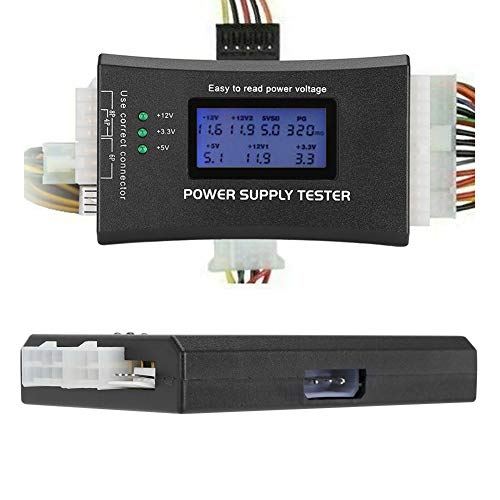 ATX Power Supply Tester
- LCD liquid crystal display, the output voltage is…
- It can also measure the output wire P4/P6/P8/SATA/IDE,…
- MINI and PRACTICAL: Now the number of power…
 Rack Mount Power Strip
- Reliable Power Distribution - Backed by a 3…
- Designed For Your Safety - This rack mount…
- Power Up Your Server - This PDU power…
| Product | Key specs | |
|---|---|---|
| Computer PC Power Supply Tester | [8-in-1 ATX Power Supply Tester] -- Support test… [Aluminum Alloy Enclosure] -- Light and Easy to… [1.8'' LCD Screen] -- Outputted Voltages shows on… | Check price |
| ATX Power Supply Tester | LCD liquid crystal display, the output voltage is… It can also measure the output wire P4/P6/P8/SATA/IDE,… MINI and PRACTICAL: Now the number of power… | Check price |
| Rack Mount Power Strip | Reliable Power Distribution - Backed by a 3… Designed For Your Safety - This rack mount… Power Up Your Server - This PDU power… | Check price |
 inShareplus 12V 33A 400W inShareplus 12V 33A 400W | Check price | |
 Upgraded 942332-001 L04618-800 400W Power Supply L04618-400 Upgraded 942332-001 L04618-800 400W Power Supply L04618-400 | Check price |
As an Amazon Associate we earn from qualifying purchases at no extra cost to you.
⚡ Save on Your Next PC — Amazon Prime
Prime members get fast free shipping on the systems above, plus early access to Prime Day & Black Friday PC deals. New members get a 30-day free trial.
Watch: How to Pick the Right PSU Wattage — Video Review
Add Up Your Component Power Draw
Start with the two components that dominate: the GPU and CPU. Check each part’s rated power (TDP or TGP)—a high-end GPU might draw 300-350W and a gaming CPU 100-170W under load. Add roughly 100W for the motherboard, RAM, drives, and fans combined. Add it all up and you have your system’s approximate peak draw. For a typical high-end 2026 build, that lands somewhere around 500-600W of actual consumption.
Add Headroom for Transients and Efficiency
Never run a PSU at its limit. Modern GPUs produce brief transient spikes that can momentarily exceed their rated draw by a large margin, and these microsecond surges can trip an undersized unit’s protection. Size your PSU so your peak system draw is around 50-65% of its rating—this also happens to be where most units run at peak efficiency and lowest noise. So a system drawing 550W is well served by an 850W supply, not a 600W one.
- Target 50-65% load at peak for the best efficiency and noise.
- Account for GPU transient spikes, which briefly exceed rated draw.
- Leave room for a future GPU upgrade if you plan to keep the PSU.
Understand 80 Plus Efficiency Ratings
The 80 Plus rating (Bronze, Gold, Platinum) tells you how much wall power actually reaches your components versus being lost as heat. Gold is the sweet spot for gaming builds—typically 87-90% efficient under load, meaning less wasted power, less heat, and quieter operation. A more efficient unit costs a little more upfront but runs cooler and often lasts longer. For most gamers, an 80 Plus Gold unit is the right balance of price and quality.
Confirm Connectors and Cables
Wattage is only half the story—the PSU must have the right cables. A modern high-end GPU needs either three or four 8-pin PCIe connectors or a single 12V-2×6 (12VHPWR) connector, and your PSU must supply that natively or via an included adapter. Buy an ATX 3.0 or ATX 3.1 unit if you have a current-generation GPU, since these are built to handle transient spikes and ship with the native 16-pin cable. Count your GPU’s power inputs and match them exactly.
Verify a Used or Suspect Unit
If you are reusing an older PSU or troubleshooting no-boot issues, a PSU tester like a compact ATX power supply tester quickly confirms whether the unit outputs correct voltages on each rail. It is a cheap diagnostic that rules the PSU in or out before you tear the rest of the system apart. A failing PSU can cause random shutdowns and instability that mimic other faults, so testing saves hours.
Tips
- Buy from a reputable brand—a cheap PSU is the one component that can damage everything else.
- Match your PSU standard (ATX 3.0/3.1) to a current GPU for the correct native power cable.
- Fully modular units make cable management far cleaner.
- When in doubt, size up one tier—the efficiency and headroom are worth it.
Frequently Asked Questions
How many watts do I actually need for gaming?
Add your GPU and CPU rated power, plus about 100W for everything else, to find your peak draw—then choose a PSU where that peak is 50-65% of its rating. A mid-range build often lands well on a 650-750W unit, while a high-end 2026 rig is best served by 850W or more for headroom and efficiency.
Is a higher-wattage PSU always better?
Not always—an oversized unit wastes money and can run slightly less efficiently at very light loads. The goal is a unit whose peak load sits in the 50-65% efficiency sweet spot, with room for transients and a future GPU. Buying one tier up from your calculated need is smart; buying three tiers up is just waste.
What is the 12VHPWR / 12V-2×6 connector?
It is the 16-pin PCIe 5.0 power connector that delivers up to 600W to modern high-end GPUs through a single cable. Current-generation cards use it, and an ATX 3.0 or 3.1 power supply ships with it natively. If your PSU predates it, you use an adapter, but a native ATX 3.x unit is cleaner and better suited to GPU transient spikes.
Does PSU efficiency rating matter for gaming?
Yes. An 80 Plus Gold unit converts around 87-90% of wall power to usable output, wasting less as heat, which means cooler and quieter operation. Higher efficiency also often correlates with better internal components and longevity. Gold is the practical sweet spot for gaming builds; Platinum and Titanium add efficiency at a premium.
Conclusion
Picking PSU wattage is simple arithmetic plus a margin of safety: sum your GPU, CPU, and system draw, then choose a quality 80 Plus Gold unit where that peak sits around 50-65% of the rating. Match the connectors to your GPU—especially the 12V-2×6 on current cards—and favor an ATX 3.x design. Get it right once and your power supply outlives several component upgrades without a second thought.