
Key takeaways
- Pro: Exceptional battery life on Snapdragon models, comfortably lasting a full day.
- Pro: Premium build with a bright, responsive touchscreen.
- Pro: Copilot+ AI features and Wi-Fi 7 keep it future-ready.
- Pro: Choice of 13.8 and 15-inch sizes to match your portability needs.
- Con: Arm-based Snapdragon models may hit occasional app compatibility issues.
- Con: Port selection is limited, so a hub is often necessary.
Microsoft’s Surface Laptop 7 represents the company’s most polished take yet on the Copilot+ PC concept, blending refined hardware with the efficiency of Snapdragon and Intel Lunar Lake processors. If you want a premium Windows ultraportable that emphasizes battery life, touchscreens, and AI features, this is one of the flagship options for 2026.
We examined the various Surface Laptop 7 configurations, from the 13.8-inch Snapdragon models to the 15-inch Intel Ultra 7 variant, to clarify which one fits your workflow and budget.
Our top picks
 Microsoft Surface Laptop 7 AI PC
- Boost productivity and creativity with the Microsoft Surface…
- Powered by Snapdragon X Plus processor with Qualcomm…
- Enjoy stunning visuals on the 13.8" 2K+ (2304…
 2024 Microsoft Surface Laptop 7th Edition
- Copilot+ PCs
- 15" PixelSense Flow display with 2496 x 1664…
- Snapdragon X Elite (12 core) processors The Snapdragon…
 Microsoft Surface Laptop 7
- Experience next-generation computing with the Microsoft Surface Laptop…
- Powered by Intel Core Ultra 7 268V processor…
- Enjoy stunning visuals on the 15" 2.5K (2490…
| Product | Key specs | |
|---|---|---|
| Microsoft Surface Laptop 7 AI PC | Boost productivity and creativity with the Microsoft Surface… Powered by Snapdragon X Plus processor with Qualcomm… Enjoy stunning visuals on the 13.8" 2K+ (2304… | Check price |
| 2024 Microsoft Surface Laptop 7th Edition | Copilot+ PCs 15" PixelSense Flow display with 2496 x 1664… Snapdragon X Elite (12 core) processors The Snapdragon… | Check price |
| Microsoft Surface Laptop 7 | Experience next-generation computing with the Microsoft Surface Laptop… Powered by Intel Core Ultra 7 268V processor… Enjoy stunning visuals on the 15" 2.5K (2490… | Check price |
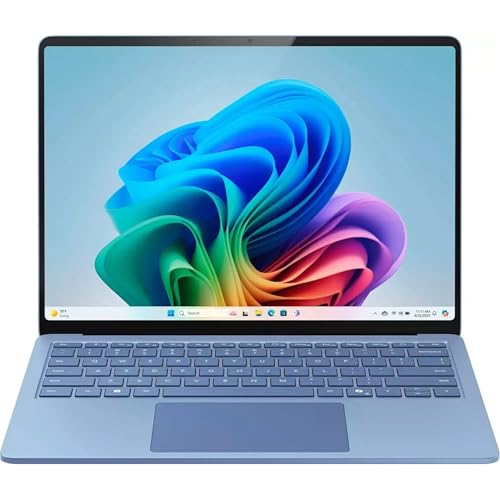 Microsoft Surface Laptop 7 Copilot+PC 13.8" Touchscreen Microsoft Surface Laptop 7 Copilot+PC 13.8" Touchscreen | This Certified Refurbished product is tested and certified… 13.8-inch (2304 x 1536) IPS Touchscreen LED Display Qualcomm Snapdragon X Plus Processor (Deca-Core, 1.0GHz, 42MB… | Check price |
 Microsoft Surface Laptop 7 Microsoft Surface Laptop 7 | Check price | |
 Microsoft Surface Laptop Microsoft Surface Laptop | Check price | |
 Microsoft Surface Laptop Microsoft Surface Laptop | Brilliant Display Power that lasts all day Work at the speed of your ideas | Check price |
 Microsoft Surface Laptop 7 15" Touchscreen Copilot+ Microsoft Surface Laptop 7 15" Touchscreen Copilot+ | With 16 GB LPDDR5X of memory, you can… The 15" 2496 x 1664 screen delivers an… 512 GB SSD offers ample capacity to store… | Check price |
As an Amazon Associate we earn from qualifying purchases at no extra cost to you.
🎮 Get More From Your Setup — Free
Prime Gaming gives you free PC games every month, in-game loot, and a free Twitch channel sub — plus fast free shipping on all the gear above. New members get a 30-day free trial.
Watch: Surface 7 Laptop: Review & Buyer’s Guide — Video Review
Design & Build
The Surface Laptop 7 continues Microsoft’s reputation for elegant, understated design. The aluminum chassis feels dense and premium, the 2K+ and 2.5K touchscreens are bright and responsive, and the keyboard is among the best in any ultraportable. Both the 13.8-inch and 15-inch sizes are thin and travel-friendly, with the smaller model favoring portability and the larger one offering more screen real estate for productivity.
Performance
Chip choice defines the experience. The Snapdragon X Plus models deliver outstanding efficiency with quoted battery life around 20 hours, making them ideal for all-day work away from an outlet. The Intel Ultra 7 268V configuration with 32GB of RAM leans toward broader app compatibility and stronger sustained performance, better suited to heavier multitasking. Across the lineup, fast SSDs, Wi-Fi 7, and Copilot+ AI acceleration keep the machine feeling quick and modern.
Pros & Cons
- Pro: Exceptional battery life on Snapdragon models, comfortably lasting a full day.
- Pro: Premium build with a bright, responsive touchscreen.
- Pro: Copilot+ AI features and Wi-Fi 7 keep it future-ready.
- Pro: Choice of 13.8 and 15-inch sizes to match your portability needs.
- Con: Arm-based Snapdragon models may hit occasional app compatibility issues.
- Con: Port selection is limited, so a hub is often necessary.
Alternatives to Consider
If compatibility with specialized Windows software matters most, the Intel Ultra 7 Surface Laptop 7 with 32GB of RAM is the safer, more powerful choice. Buyers focused on portability and endurance should compare the 13.8-inch Snapdragon X Plus against the 15-inch model, weighing screen size against carry weight. Renewed 15-inch Snapdragon X-Elite units are also worth considering for those wanting more screen at a lower price.
Frequently Asked Questions
How good is the Surface Laptop 7’s battery life?
Excellent on Snapdragon models, with quoted figures around 20 hours and real-world all-day use for typical productivity tasks. The Intel model is strong too, though slightly less enduring.
Will my Windows apps run on the Snapdragon version?
Most mainstream apps run natively or through emulation. If you depend on niche or older software, the Intel Ultra 7 configuration avoids potential compatibility hiccups.
Is the touchscreen useful on a laptop?
Yes, for scrolling, quick taps, and inking it adds convenience, and the Surface panels are responsive and bright. It’s a nice extra even if you primarily use the keyboard and trackpad.
Should I choose the 13.8 or 15-inch model?
Pick 13.8 inches for the lightest, most portable option and best battery life. Choose 15 inches if you want more screen space for multitasking and don’t mind the extra size.
Verdict
The 13.8-inch Snapdragon X Plus Surface Laptop 7 is our top pick for its blend of portability and all-day battery life, while the 15-inch Intel Ultra 7 model is the one to choose for maximum performance and compatibility.









