Key takeaways
- Compare the best projector mounts for gaming projectors, from low-profile ceiling brackets to wall arms and mini mounts, with fit and capacity checks.
A gaming projector only delivers its big-screen promise when it sits in exactly the right spot. Perch it on a coffee table and every bumped controller cable nudges the image off the screen; balance it on a stack of game cases and the fan vents end up half blocked. A proper mount fixes the projector at the correct height and throw distance, keeps it clear of foot traffic, and lets you align the picture once instead of fiddling before every session. Whether your room suits a ceiling bracket, a wall arm, or a compact mount for a mini projector, the five picks below cover the main ways gamers actually install these machines.
Disclosure: As an Amazon Associate, we earn from qualifying purchases made through links in this article, at no extra cost to you.
Quick Picks
| Product | Best for | ASIN |
|---|---|---|
| VIVO Universal Adjustable Ceiling Projector Mount (MOUNT-VP01W) | Low-profile ceiling installs | B01013QA86 |
| QualGear PRB-717-WHT Ceiling Mount | Wide tilt range and fine alignment | B00COF74G2 |
| QualGear QG-PM-002-WHT Ceiling Mount | High ceilings and tidy cabling | B0052YQE7C |
| Homcine Universal Projector Ceiling or Wall Mount | Ceiling or wall flexibility | B092CRRN2S |
| 2-Be-Best Mini Projector Wall Mount | Mini projectors on a wall | B09DQ6F62W |
How to Choose a Projector Mount for Gaming
Check the mounting hole pattern first. Universal mounts use adjustable arms that reach the threaded holes on the underside of your projector. Measure the distance between those holes diagonally and compare it with the mount’s stated range. A mount that cannot reach all the holes is useless, no matter how strong it is, and some large home theater models fall outside the common ranges entirely.
Match the listed capacity to your projector’s weight. Every mount here states a listed capacity in pounds. Weigh your projector or check its spec sheet, then leave yourself headroom rather than running right at the limit, especially on telescoping poles where a long extension adds leverage.
Ceiling, wall, or both. Ceiling mounts keep the projector fully out of the way and work best when the ceiling sits at a sensible height above the screen. Wall mounts suit rooms where ceiling work is impractical, such as rentals or rooms with fixtures in the way. A few brackets do both, which helps if you may rearrange the room later.
Drop length matters for image geometry. A flush mount holds the projector a few inches from the ceiling, while telescoping models can drop it two feet or more. The right drop puts the lens near the top edge of your screen so you need little or no keystone correction. That matters for gaming, because heavy digital keystone work softens the image and can add processing you do not want in fast-paced titles.
Adjustment range saves setup time. Tilt, pitch, roll, and rotation controls let you square the image with the screen without shimming the bracket. Roll adjustment is the one people forget, and it is the one that fixes a picture that sits slightly crooked.
Mind the surface you are fixing into. These mounts need a joist, stud, concrete, or brick to anchor into. Plain drywall alone will not hold a projector safely overhead, and several makers state this plainly in their listings. Plan the cable run at the same time, since a ceiling install usually means routing HDMI and power neatly to the mount.
The Picks in Detail
VIVO Universal Adjustable Ceiling Projector Mount (MOUNT-VP01W)

Specs
- All-steel construction with a listed capacity of 30 lbs
- Holds the projector 6 inches from the ceiling for a low profile
- Tilt +15° to −15°, swivel +15° to −15°, and 360° rotation
- Extending arms fit mounting holes from 2 to 12.5 inches apart
- Quick release hooks for attaching and removing the projector
- Item weight 2.2 lbs; model MOUNT-VP01W
The VIVO is the mount to shortlist when you want the projector tucked up tight to the ceiling and forgotten about. A six-inch drop keeps it clear of head height in most rooms and gives a clean, installed look that suits a permanent gaming setup. The steel build and 30 lb listed capacity cover the great majority of home gaming projectors, and the combination of tilt, swivel, and full rotation makes squaring the image a short job rather than an afternoon project.
Fit is the thing to verify before ordering. The arms cover hole spacings from 2 to 12.5 inches, and VIVO notes that the extension arms come off entirely for mini projectors. The listing also names specific incompatible models, including several Epson units and the LG HU915QE, so check your exact projector against that list. If yours clears it, this is a tidy, set-and-forget bracket.
Best for: A flush, low-profile ceiling install for a standard gaming projector in a dedicated room.
QualGear PRB-717-WHT Ceiling Mount

Specs
- Listed capacity of 30 lbs for small to medium projectors
- Tilt range of 0° to 90° for steep mounting angles
- Pitch −15° to +15° and roll −15° to +15°
- Full 360° rotation
- 6-inch arm length with a low mounting profile
- Metal enclosure; fits wood beams, concrete, and brick ceilings
QualGear pitches the PRB-717 at buyers who want alignment controls closer to pro-grade hardware. The headline figure is the tilt range: up to 90 degrees of tilt means the bracket can handle awkward placements where the projector has to aim well downward, and the separate pitch and roll adjustments let you level the image precisely once it hangs. For a gaming room, that roll control is genuinely useful, because even a slight roll shows up as a visibly slanted horizon in racing and flight games.
The mount sits close to the ceiling on a six-inch arm, so it suits rooms where headroom is limited and a long drop pole would intrude. It anchors into wood beams, concrete, or brick, and the white finish blends with most ceilings. If your screen position forces an unusual mounting angle, this is the most forgiving bracket in the group.
Best for: Rooms that need a wide tilt range and precise roll and pitch alignment from a close-to-ceiling mount.
QualGear QG-PM-002-WHT Ceiling Mount

Specs
- Cold-rolled steel construction
- Telescopic height adjustment from 16.9 to 25.6 inches
- 2-in-1 design installs flush or on the extension column
- Fits mounting holes up to 17.5 inches apart
- Pitch adjustment −15° to +15° with roll adjustment
- Built-in cable management and a quick connect/release plate
The second QualGear on this list solves a different problem: distance. If your gaming room has a high ceiling, a flush mount leaves the projector far above the screen’s top edge and forces heavy keystone correction. The QG-PM-002’s telescoping column drops the projector between 16.9 and 25.6 inches, and it can also install flush at under five inches when the ceiling is low, so one bracket covers both room types.
The wide arm reach, fitting holes up to 17.5 inches apart, makes it a candidate for larger projectors that narrower mounts cannot grab. Built-in cable management hides the HDMI and power runs inside the column for a cleaner finish, and the quick connect plate lets you take the projector down for cleaning without undoing the whole install. It needs a regular ceiling with beams or solid fixing, and the maker notes it does not suit vaulted ceilings or wall mounting.
Best for: High ceilings where the projector needs a long, tidy drop, or larger projectors with wide hole spacing.
Homcine Universal Projector Ceiling or Wall Mount
Specs
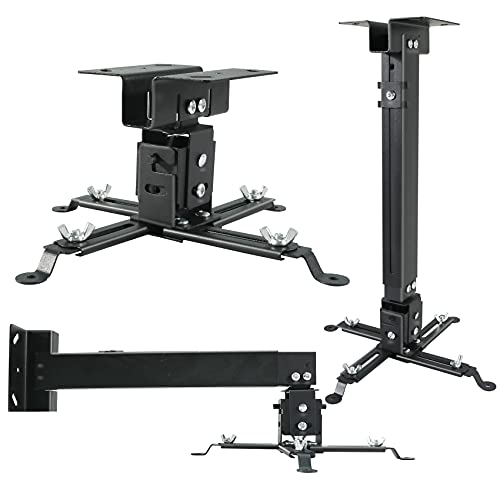
- Works as a ceiling mount or a wall mount
- Adjustable height from 16.9 to 25.6 inches
- Extendable arms for universal projector fit
- Low-profile quick release projector holder
- Suited to LCD and DLP projectors from major brands
- Black finish
Not every gaming room gives you a usable ceiling. Maybe the ceiling is sloped, maybe there is a fan exactly where the projector needs to go, or maybe you simply do not want to drill overhead. The Homcine bracket covers both routes in one box: bolt it to the ceiling on its extension, or fix it to a wall and let the arm hold the projector out into the room at the height you need.
The adjustable 16.9 to 25.6 inch reach gives you room to land the lens at screen height, and the extendable arms adapt to the hole patterns of common LCD and DLP models from brands such as Epson, Optoma, BenQ, and ViewSonic. The quick release holder is a practical touch for a shared room, since the projector can come down quickly when the space is needed for something else. Measure your hole spacing before ordering, as with any universal bracket.
Best for: Gamers who need the choice between a wall install and a ceiling install from a single bracket.
2-Be-Best Mini Projector Wall Mount

Specs
- Wall mount designed for mini projectors
- Arm length of 7.9 inches
- 360° rotation at the head
- Angle adjustable for aiming the image
- Fits popular mini projector brands including TMY, HAPPRUN, and AuKing
- Compact bracket for small rooms and bedrooms
Mini projectors are the casual end of gaming projection: a small LED unit, a blank wall, and a console or handheld docked underneath. They usually lack the multi-hole mounting patterns of full-size machines, so they need a different kind of bracket. This 2-Be-Best mount is a short wall arm built for exactly those compact units, holding the projector out from the wall with a head that rotates a full 360 degrees and adjusts its angle so you can aim the picture where you want it.
A wall arm keeps a mini projector off the bedside table or shelf it would otherwise wobble on, and it frees the surface for controllers and drinks. Because the arm is only 7.9 inches long, throw distance stays short, which suits the modest brightness of mini projectors in bedrooms and small dens. Confirm your unit’s weight and thread fitting against the listing before buying, since mini mounts are built for light machines only.
Best for: Mini projector owners who want a simple, compact wall arm for a bedroom or small gaming den.
FAQ
Will a universal projector mount fit my gaming projector?
Usually, yes, provided two numbers line up: the distance between your projector’s mounting holes must fall inside the mount’s stated arm range, and your projector’s weight must sit under the mount’s listed capacity. Measure the hole spacing diagonally before ordering, and check the maker’s incompatibility list, since a few large models are named exceptions on otherwise universal brackets.
Is a ceiling mount or a wall mount better for gaming?
Neither is automatically better; it depends on the room. A ceiling mount keeps the projector completely out of the play space and works well in a permanent setup. A wall mount is easier to install and reach, and it suits rooms with sloped ceilings, ceiling fans, or rental restrictions on overhead drilling. What matters most for gaming is placing the lens at the right height for your screen so you avoid heavy keystone correction.
How far below the ceiling should a projector hang?
Aim for the lens to sit roughly level with the top edge of your screen, adjusted for your projector’s lens offset. On a standard eight-foot ceiling with a typical screen, a short drop of around six inches often works. Taller ceilings call for a telescoping mount that can drop the projector 17 to 26 inches so the image lands square without tilting the unit sharply.
Can I mount a projector into drywall alone?
No. A projector mount must anchor into a ceiling joist, wall stud, concrete, or brick. Screws into plain drywall can pull out under the combined weight of the mount and projector, which is a safety problem overhead. Use a stud finder to locate solid fixing points, and if none exist where the projector needs to go, choose a wall position that hits a stud instead.
Conclusion
Mounting a gaming projector turns a fiddly tabletop arrangement into a permanent, aligned big-screen setup. Pick the VIVO MOUNT-VP01W for a clean low-profile ceiling install, the QualGear PRB-717-WHT when you need serious tilt and roll adjustment, or the QG-PM-002-WHT for a long drop from a high ceiling. The Homcine bracket keeps both wall and ceiling options open, and the 2-Be-Best arm gives mini projector owners a compact wall solution. Measure your hole spacing, weigh your projector, and anchor into solid structure, and any of these five will hold your picture steady session after session.
FAQ
Will a universal projector mount fit my gaming projector?
Is a ceiling mount or a wall mount better for gaming?
How far below the ceiling should a projector hang?
Can I mount a projector into drywall alone?
More from Amazon
Programs that pair well with the guide above. Offers and eligibility are set by Amazon and may change.
Free shipping on eligible items, Prime Video and more. Eligible new members can start with a free trial.
Start a Prime free trialAd-free music streaming. Eligible new subscribers can start with a free trial.
Try Music Unlimited freeA Prime membership for ages 18-24 with a trial period. Eligibility is set by Amazon.
See Prime for Young AdultsAudiobooks and podcasts to listen to on the go. Eligible new members can start with a free trial.
Try Audible freeAs an Amazon Associate we earn from qualifying purchases.