Our Top Picks
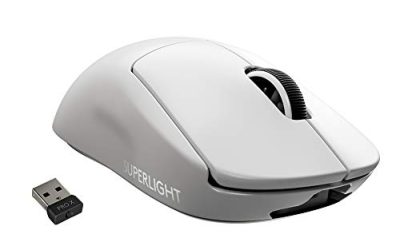
 Logitech G Pro X Superlight 2 Lightspeed WirelessClassic1.57 x 2.5 x 4.92 inches0.1 poundsCheck on Amazon
Pros & cons
- 95-hour battery life reduces how often you need to charge
- 60-gram weight suits fast, low-effort mouse movement
- HERO 2 sensor tracks up to 44,000 DPI with no smoothing
- POWERPLAY wireless charging pad is sold separately
- Premium features add a more complex setup than basic mice
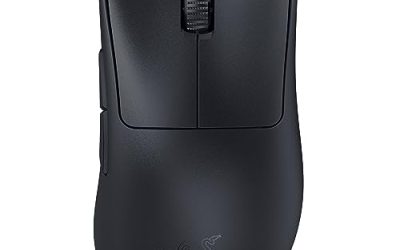
 Razer DeathAdder V3 Pro Wireless Gaming Mouse1000 Hz5.01 x 2.65 x 1.69 inches0.1 poundsCheck on Amazon
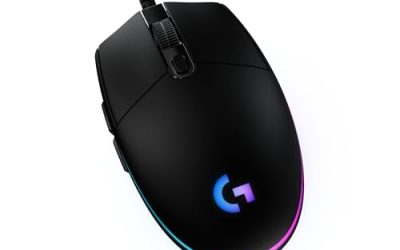
 Logitech G502 X Plus Wireless RGB Gaming MouseWireless7.1 x 4.6 x 2.7 inches0.84 poundsCheck on Amazon
Finding the best fps gaming mouse is one of the fastest ways to make aiming feel more natural in competitive shooters. A good first person shooter mouse does not aim for you, and it does not replace practice, map knowledge, or good crosshair placement. What it does is remove friction between your hand and the game. When the sensor tracks cleanly, the clicks respond at once, and the shape lets your wrist move without strain, you can focus on timing, positioning, and decision making.
First person shooters reward small, fast, and repeatable movements. A flick to a doorway, a micro adjustment to a head, a smooth track on a strafing target, and a quick reset after a spray all depend on control. The right mouse feels almost invisible. It moves where you expect it to move, stops where you expect it to stop, and stays comfortable through long sessions in Valorant, Counter-Strike 2, Apex Legends, Call of Duty, Overwatch 2, and Rainbow Six Siege. This guide explains what matters, compares four strong options, and helps you match a shape and weight to your grip and hand size.
Disclosure: As an Amazon Associate, we earn from qualifying purchases.
At a Glance
| Product | Key spec | Best for |
|---|---|---|
| Logitech G PRO X Superlight 2 | 60 g, HERO 2 sensor, 44,000 DPI, up to 8,000 Hz polling | All round competitive play |
| Razer DeathAdder V3 Pro | 63 g, Focus Pro 30K sensor, 30,000 DPI, ergonomic shape | Palm and claw grip, medium to large hands |
| Razer Viper V2 Pro | 58 g, Focus Pro 30K sensor, 30,000 DPI, symmetrical shape | Fingertip and claw grip, fast flicks |
| Logitech G502 X Plus | HERO 25K sensor, 25,600 DPI, 13 programmable buttons | Extra buttons and scroll control |
How to Choose
1. Sensor accuracy and tracking
The sensor is the heart of any mouse built for first person shooters. A modern flagship optical sensor should track at high speed without acceleration, smoothing, or angle snapping that changes your aim. Most competitive players use a DPI setting between 400 and 1600, combined with a low in game sensitivity, so clean tracking at the DPI you actually use matters more than a very high maximum DPI. What matters most is consistency. The cursor should move the same distance every time you move the mouse the same distance, on the surface you play on, at the speed you flick.
2. Polling rate and latency
Polling rate tells you how often the mouse reports its position to your computer. A 1,000 Hz polling rate reports once every millisecond. An 8,000 Hz polling rate reports eight times as often, which can make motion feel smoother on a high refresh rate monitor. For many players, 1,000 Hz is already fast enough, and the difference is subtle. It becomes more noticeable at 240 Hz and above. Modern wireless gaming mice use a dedicated 2.4 GHz connection with a USB receiver, and the best of them feel as responsive as a wired mouse.
3. Weight and balance
Weight changes how a mouse feels during fast flicks, long tracking, and repeated lifts. Lighter mice, often between 50 g and 65 g, tend to feel quicker to start and stop, and they can reduce wrist fatigue during long sessions. Heavier mice, often above 90 g, can feel more planted and stable, which some players prefer for smooth tracking and for holding a steady angle. Balance matters as much as total weight. A mouse that is front heavy or back heavy can feel awkward even if the total weight looks right on paper. A centred balance point helps the mouse feel predictable when you lift it and set it down again.
4. Shape, size, and grip style
Shape is the most personal part of choosing a mouse for first person shooters. No sensor can fix a shape that does not fit your hand. The three common grip styles are palm, claw, and fingertip. Palm grip players rest the whole hand on the mouse and need a longer, taller shell with support under the palm. Claw grip players arch the fingers and rest the palm lightly on the back, and they often prefer a medium length shell with a defined hump. Fingertip grip players hold the mouse with the fingertips only, and they often prefer a shorter, lighter shell that is easy to lift and move. Symmetrical mice work well for both left and right handed players and for fingertip and claw grips.
5. Clicks and switches
In a first person shooter, the main click is your most used input. It should feel crisp, with a short travel distance, a clear tactile response, and no unwanted double click. Optical switches use light to register a click, which can reduce debounce delay and avoid the double click faults that can appear in older mechanical switches. Hybrid switches combine optical sensing with a mechanical feel, aiming for a fast response with a familiar click. Side buttons matter for utility, reload, melee, and push to talk, but they should not get in the way. Two well placed side buttons are enough for most shooter players.
6. DPI, sensitivity, and software
DPI, or dots per inch, sets how far the cursor moves for a given physical movement. A higher DPI means more cursor movement for the same hand movement. Competitive shooter players often pair a DPI of 400, 800, or 1600 with a low in game sensitivity, which gives fine control for small adjustments. The exact number matters less than finding a setting that lets you turn 180 degrees comfortably without running out of pad space, while still making small head level adjustments without overshooting. Good software lets you set DPI steps, polling rate, lift off distance, button assignments, and lighting, and save those settings to the mouse memory so they travel with you.
7. Battery life and charging
Wireless mice for first person shooters need a battery that lasts through long practice sessions and ranked play. A battery life of 70 hours or more at a standard polling rate is a good baseline, and many modern mice last 90 hours or more. Higher polling rates use more power, so a mouse set to 8,000 Hz will run for fewer hours than the same mouse set to 1,000 Hz. Check whether the stated battery life applies to the polling rate you plan to use. Charging should be simple. USB-C charging is now standard. Some mice support wireless charging on a compatible pad, which can keep the battery topped up between sessions without a cable.
Top Picks
Logitech G PRO X Superlight 2
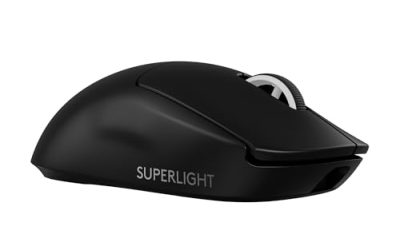
The Logitech G PRO X Superlight 2 is a strong all round choice for competitive first person shooters. It weighs 60 g, which puts it in the light category without feeling hollow or fragile. The symmetrical shape suits claw and fingertip grips well, and it also works for palm grip players with small to medium hands who prefer a lower profile shell. The shell has a smooth, matte finish that stays grippy during long sessions.
Key specs include the HERO 2 optical sensor with up to 44,000 DPI, tracking at up to 888 inches per second, LIGHTSPEED wireless connectivity, and a polling rate of up to 8,000 Hz with a compatible receiver. The mouse uses LIGHTFORCE hybrid optical mechanical switches, has five programmable buttons and on board memory, and battery life rated at up to 95 hours at 1,000 Hz polling. Charging is over USB-C, and it also supports POWERPLAY wireless charging with a compatible charging pad, sold separately.
Best for: players who want a light, neutral, tournament style mouse that works across Valorant, Counter-Strike 2, and Apex Legends without a strong ergonomic bias.
Considerations: the symmetrical shape has no dedicated thumb rest, so palm players with large hands may want a taller ergonomic shell. The 8,000 Hz polling mode needs a compatible receiver and uses more battery than the standard 1,000 Hz mode.
Razer DeathAdder V3 Pro
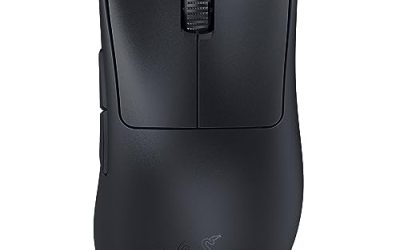
The Razer DeathAdder V3 Pro is an ergonomic wireless mouse built for players who rest their palm on the mouse and want a shape that supports the hand through long sessions. It weighs 63 g, which is light for an ergonomic mouse, and the right handed shell has a gentle curve, a flared thumb area, and a raised back that fills the palm. That shape helps medium to large hands stay relaxed during low sensitivity aim, where the arm does most of the work.
Key specs include the Razer Focus Pro 30K optical sensor with up to 30,000 DPI, tracking at up to 750 inches per second, HyperSpeed wireless connectivity, and a polling rate of up to 1,000 Hz in the standard configuration, with an optional HyperPolling receiver for up to 8,000 Hz polling. The main buttons use Razer Gen-3 optical switches for a fast, clean actuation with no debounce delay. It has five programmable controls, on board memory, and a battery life of up to 90 hours. Charging is over USB-C, and the mouse includes a Speedflex cable for wired play.
Best for: palm and claw grip players with medium to large hands who want an ergonomic shape, a light body, and a sensor that tracks cleanly at low sensitivity.
Considerations: the right handed shape does not suit left handed players, and the narrow waist can feel slim for very large hands. The HyperPolling receiver for the highest polling rate is a separate accessory.
Razer Viper V2 Pro

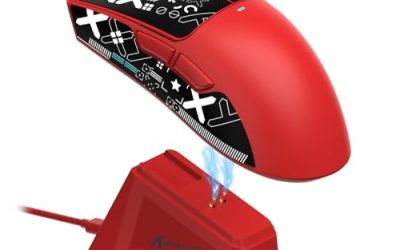
The Razer Viper V2 Pro is a symmetrical wireless mouse aimed at fast, precise aim with a light body and a simple layout. It weighs 58 g, making it one of the lightest mice in this guide, and the low profile shell suits fingertip and claw grips well. The shape is clean, with no thumb rest and no side flare, so your hand can find a natural position without being pushed into a fixed grip. That neutrality also makes it a good choice for players who switch between grip styles during a match.
Key specs include the Razer Focus Pro 30K optical sensor with up to 30,000 DPI, tracking at up to 750 inches per second, HyperSpeed wireless connectivity, and a polling rate of up to 1,000 Hz in the standard configuration, with an optional HyperPolling receiver for up to 8,000 Hz polling. The main buttons use Razer Gen-3 optical switches for a crisp click with minimal delay. It has five programmable buttons, on mouse DPI controls, on board memory, and a battery life of up to 90 hours. Charging is over USB-C, and the package includes a USB-C Speedflex cable and a wireless dongle extender.
Best for: fingertip and claw grip players who want a very light symmetrical mouse for fast flicks, quick resets, and precise micro adjustments in fast paced shooters.
Considerations: the light body and low hump give less palm support than an ergonomic mouse, so palm players may prefer the DeathAdder V3 Pro. The side buttons sit close to the shell, so players with large hands should check the button position before choosing this shape.
Logitech G502 X Plus
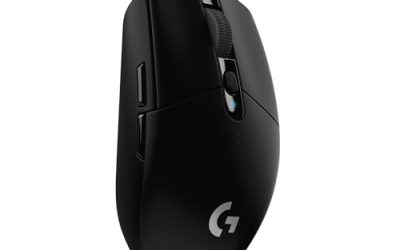
The Logitech G502 X Plus is a feature rich wireless mouse for shooter players who want more buttons, more scroll control, and a shape with a thumb rest. It is heavier than the other mice in this guide, and that weight gives it a planted, stable feel that suits tracking, holding angles, and smooth recoil control. The right handed ergonomic shell has a thumb rest, a wide body, and a textured grip area that helps the hand stay in place during long sessions.
Key specs include the HERO 25K optical sensor with up to 25,600 DPI, LIGHTSPEED wireless connectivity, and a polling rate of up to 1,000 Hz. The main buttons use LIGHTFORCE hybrid optical mechanical switches, with a crisp click and a short travel distance. It has 13 programmable buttons, including side buttons, a DPI shift button, and a dual mode scroll wheel that switches between a stepped ratchet mode and a free spin mode. Battery life is rated at up to 130 hours with lighting turned off, and charging is over USB-C. It supports LIGHTSYNC RGB lighting and POWERPLAY wireless charging with a compatible charging pad, sold separately.
Best for: players who bind abilities, grenades, ping, melee, or push to talk to the mouse, and who want a stable, ergonomic shape with a scroll wheel that can switch modes for different games.
Considerations: the weight and the wide body make it less suited to fingertip grip players and to players who prefer a very light mouse for fast flicks. The extra buttons take time to learn, so set up a simple layout first and add bindings only when you need them.
Which One Fits
Start with your grip and your hand size, then narrow the list by weight and button needs. If you use a claw or fingertip grip and you want the lightest possible mouse, the Razer Viper V2 Pro and the Logitech G PRO X Superlight 2 are the natural starting points. Both are symmetrical, light, and built around a flagship sensor with a fast wireless link. The Viper V2 Pro is slightly lighter and has a lower profile, while the Superlight 2 has a slightly taller shell and a more neutral balance that works well for low sensitivity arm aim. If you use a palm grip, or a claw grip with medium to large hands, look at the Razer DeathAdder V3 Pro first. Its ergonomic curve supports the palm, and its weight stays low for an ergonomic mouse. If you want extra controls, choose the Logitech G502 X Plus. Its 13 programmable buttons, dual mode scroll wheel, and thumb rest suit players who play hero shooters, battle royale games, or tactical shooters where utility, ping, and communication bindings help.
FAQ
What DPI should I use for first person shooters?
Most competitive players use 400, 800, or 1600 DPI with a low in game sensitivity. A common starting point is 800 DPI with an in game sensitivity that lets you turn 180 degrees with a comfortable arm movement across your pad. From there, adjust in small steps until small head level adjustments feel precise and large turns feel natural.
Is wireless good enough for competitive FPS games?
Yes, for modern wireless gaming mice with a dedicated 2.4 GHz receiver. The best wireless mice in this guide have a stable link, a polling rate of 1,000 Hz or higher, and a wired mode over USB-C for charging and for play while charging. Keep the receiver close to the mouse, away from metal objects and USB hubs that can cause interference, and keep the firmware updated through the mouse software.
How light should an FPS mouse be?
Many competitive players prefer a mouse between 50 g and 70 g, because a lighter mouse is quicker to start, stop, and lift. That range suits flicks, fast resets, and long sessions with low sensitivity. Some players still prefer a heavier mouse above 90 g for stability and for smooth tracking. Weight is personal, so compare the weight and balance of a mouse with the one you use now.
Does a higher polling rate improve aim?
A higher polling rate can make motion feel smoother, especially on a high refresh rate monitor at 240 Hz or above. At 1,000 Hz, the mouse reports its position every millisecond, which is already fast for most players. At 8,000 Hz, it reports eight times as often. The difference is subtle, and higher polling uses more battery.
Should I choose a symmetrical or ergonomic mouse?
Choose a symmetrical mouse if you use a fingertip or claw grip, if you are left handed, or if you want a neutral shape that does not force your hand into one position. Choose an ergonomic mouse if you use a palm grip, if you have medium to large hands, or if you want a thumb rest and palm support for long sessions. Both shapes can work well for first person shooters, so fit and comfort should decide the choice.
Bottom Line
The best fps gaming mouse for you is the one that fits your hand, tracks cleanly at your sensitivity, and stays comfortable through long competitive sessions. The Logitech G PRO X Superlight 2 is the strongest all round pick for claw and fingertip players who want a light, neutral mouse. The Razer DeathAdder V3 Pro is the best ergonomic pick for palm and claw players with medium to large hands. The Razer Viper V2 Pro is the lightest symmetrical pick for fast flicks and precise micro adjustments. The Logitech G502 X Plus is the best pick for players who want extra buttons, scroll control, and a stable ergonomic shape.
FAQ
What DPI should I use for first person shooters?
Is wireless good enough for competitive FPS games?
How light should an FPS mouse be?
Does a higher polling rate improve aim?
Should I choose a symmetrical or ergonomic mouse?
More from Amazon
Programs that pair well with the guide above. Offers and eligibility are set by Amazon and may change.
Free shipping on eligible items, Prime Video and more. Eligible new members can start with a free trial.
Start a Prime free trialAd-free music streaming. Eligible new subscribers can start with a free trial.
Try Music Unlimited freeA Prime membership for ages 18-24 with a trial period. Eligibility is set by Amazon.
See Prime for Young AdultsAudiobooks and podcasts to listen to on the go. Eligible new members can start with a free trial.
Try Audible freeAs an Amazon Associate we earn from qualifying purchases.