Our Top Picks
 Logitech G Pro X Superlight 2 Lightspeed WirelessClassic1.57 x 2.5 x 4.92 inches0.1 poundsCheck on Amazon
Pros & cons
- 95-hour battery life reduces how often you need to charge
- 60-gram weight suits fast, low-effort mouse movement
- HERO 2 sensor tracks up to 44,000 DPI with no smoothing
- POWERPLAY wireless charging pad is sold separately
- Premium features add a more complex setup than basic mice
 Razer DeathAdder V3 Pro Wireless Gaming Mouse1000 Hz5.01 x 2.65 x 1.69 inches0.1 poundsCheck on Amazon
Pros & cons
- 11 programmable buttons add extensive control customization
- Adjustable weights let you fine-tune balance and feel
- LIGHTSYNC RGB syncs lighting with other Logitech gear
- Wired connection limits cable-free desk setups
- Heavier than typical lightweight esports mice at 0.27 pounds

Tracking is the smooth, continuous movement that keeps a crosshair glued to a moving target while it strafes, jumps, and changes direction. Flick shots get the highlights, but tracking wins the long fights and close-range duels where a single missed moment lets an opponent escape. True tracking quality comes from a clean optical sensor, a fast and stable connection, a weight that lets the hand move freely, feet that glide without catching, and a shape that stays comfortable through hours of play.
Disclosure: As an Amazon Associate, we earn from qualifying purchases.
At a Glance
| Product | Key Spec | Best For |
|---|---|---|
| Logitech G PRO X Superlight 2 | HERO 2 sensor, up to 44,000 DPI, 60 grams | Competitive players who want a light, symmetrical wireless mouse |
| Razer DeathAdder V3 Pro | Focus Pro 30K sensor, up to 30,000 DPI, 63 grams | Palm grip players who want an ergonomic shape and steady tracking |
| Razer Viper V2 Pro | Focus Pro 30K sensor, up to 30,000 DPI, 58 grams | Claw and fingertip players who want an ultra-light symmetrical mouse |
| Logitech G502 HERO | HERO 25K sensor, up to 25,600 DPI, 121 grams | Players who want many buttons and adjustable weight in a wired mouse |
How to Choose
1. Sensor Quality and Accuracy
The sensor is the heart of tracking. Modern flagship optical sensors track with no smoothing, filtering, or acceleration across their usable range, so the cursor moves exactly as far as the hand moves, at any speed. Look for a sensor that holds accuracy at very slow speeds, where fine adjustments happen, and at very high speeds, where fast flicks happen. If a sensor adds acceleration, the cursor travels farther on a fast swipe than on a slow swipe of the same length, and that unpredictability is the enemy of consistent tracking.
2. DPI Range and Native Steps
DPI sets how far the cursor moves for each inch the mouse travels. Most tracking-focused players settle between 400 and 1,600 DPI, paired with a low in-game sensitivity, because that gives fine control without demanding huge arm movements. What matters more than the ceiling is whether the sensor stays accurate at the chosen setting. Check that the mouse software allows precise DPI steps and stores the setting on the mouse itself, so the feel stays the same on any computer.
3. Polling Rate
Polling rate is how often the mouse reports its position to the computer, measured in hertz. A 1,000 Hz polling rate sends an update every millisecond, which is smooth enough for most players and has been the competitive standard for years. Newer wireless mice can reach 8,000 Hz, which can make motion feel even smoother on fast displays. For tracking, a stable polling rate matters more than a peak number. A mouse that holds a steady 1,000 Hz without drops will feel better than one that spikes and dips.
4. Weight and Balance
A lighter mouse, in the range of 58 to 65 grams, is easier to start, stop, and change direction, which helps when a target suddenly reverses course. It also puts less strain on the wrist and forearm during long sessions. A heavier mouse can feel more planted and deliberate, which some players prefer for slow, controlled tracking. Balance matters as much as total weight. A front-heavy or tail-heavy mouse will pull the hand off line during diagonal movement, while a well-balanced mouse moves the same in every direction.
5. Glide and Feet
The feet on the underside of the mouse, usually made from PTFE, decide how smoothly the mouse slides and how easily it starts moving from a standstill. Large, well-placed feet with rounded edges glide more evenly than small feet and resist catching on the edge of a pad. The pad is half of this equation. A control pad with a textured surface adds friction and helps with stopping power, while a speed pad with a smoother surface lets the mouse fly. Keep the feet clean and replace them when they wear down.
6. Shape, Size, and Grip
No sensor can fix a shape that does not fit the hand. Palm grip players rest the whole hand on the mouse and usually prefer a larger, taller, ergonomic shape. Claw grip players arch the fingers and prefer a medium, slightly narrower body. Fingertip grip players hold the mouse with only the fingertips and usually prefer a smaller, lighter, symmetrical shape. A mouse that is too long forces the fingers to stretch, while one that is too short leaves the palm unsupported. Comfort is not a luxury here; it is a tracking input.
7. Connection and Latency
Modern wireless gaming mice use a dedicated 2.4 GHz receiver that delivers latency close to a wired connection. That is the connection to use for competitive play, rather than Bluetooth, which is convenient for general use but slower and less consistent. For a wired mouse, the cable matters too. A stiff, heavy cable drags on the pad and adds resistance to every movement. Battery life is the other wireless consideration: a mouse that lasts many hours per charge, and that can keep playing while charging over a cable, will not interrupt a session at the wrong moment.
8. Switches and Click Consistency
Tracking is not only about movement; it is also about firing at the right instant while the crosshair is on target. Switches that feel crisp and consistent, with a clear actuation point, help the player time shots while tracking. Optical switches, used in several of the mice below, use light rather than metal contact to register a click, which can reduce debounce delay and avoid the double-click faults that sometimes affect mechanical switches over time.
Top Picks
The four mice below cover the main shapes and styles that tracking-focused players choose between. All four are gaming mice with flagship-level optical sensors, and each one leans toward a different grip, weight, or feature set.
Logitech G PRO X Superlight 2
Logitech G PRO X Superlight 2 on Amazon
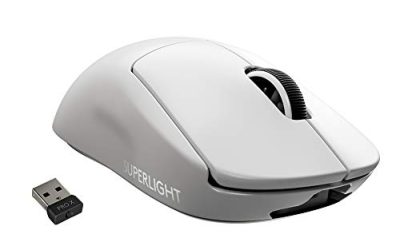
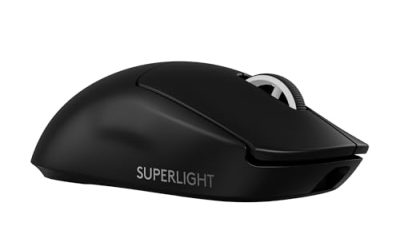
The Superlight 2 is the benchmark light wireless mouse for competitive play. Its HERO 2 sensor reaches up to 44,000 DPI and tracks at speeds up to 888 inches per second, with no smoothing or acceleration in its normal operating range. The polling rate reaches up to 8,000 Hz over its wireless connection, which makes cursor movement feel exceptionally smooth on fast displays. At 60 grams, the mouse is light enough to change direction quickly, and its symmetrical shape suits claw and fingertip grips, as well as palm grip players with medium hands. Battery life runs up to 95 hours, and the mouse charges over USB-C.
- Sensor: HERO 2 optical, up to 44,000 DPI
- Polling rate: Up to 8,000 Hz wireless
- Weight: 60 grams
- Connection: LIGHTSPEED wireless, USB-C charging
- Buttons: 5 programmable buttons
- Battery life: Up to 95 hours
Best for: Competitive players who want a light, symmetrical wireless mouse with a top-tier sensor and a very high polling rate for the smoothest possible tracking.
Considerations: The minimal design means fewer side buttons than larger mice, and the symmetrical shape will not suit every palm grip player. The smooth shell can feel slippery to players with dry hands, so grip tape is a common addition.
Razer DeathAdder V3 Pro
Razer DeathAdder V3 Pro on Amazon
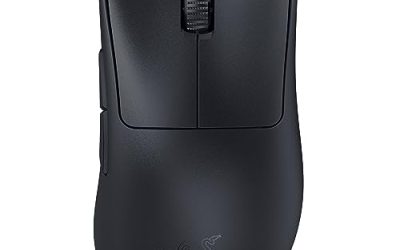
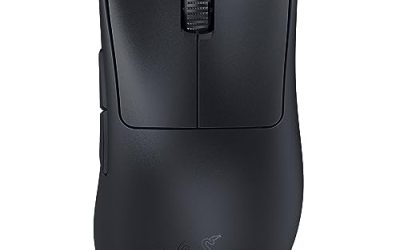
The DeathAdder V3 Pro is the ergonomic option on this list, built around the idea that a comfortable hand tracks better than a tense one. Its right-handed shape is tall in the middle, flared where the thumb rests, and shaped to support the palm through long sessions. The Focus Pro 30K optical sensor reaches up to 30,000 DPI and tracks accurately on a wide range of surfaces, including glass. At 63 grams, it is light for an ergonomic mouse, and its HyperSpeed wireless connection keeps latency low at a 1,000 Hz polling rate in its standard configuration. Gen-3 optical switches give a crisp click, and the battery lasts up to 90 hours.
- Sensor: Focus Pro 30K optical, up to 30,000 DPI
- Polling rate: 1,000 Hz wireless in standard configuration
- Weight: 63 grams
- Connection: HyperSpeed wireless, USB-C charging
- Buttons: 5 programmable buttons
- Battery life: Up to 90 hours
Best for: Palm grip players who want an ergonomic shape, steady tracking, and long-session comfort in a light wireless mouse.
Considerations: The right-handed shape is not suitable for left-handed players. The standard configuration polls at 1,000 Hz, so players who want an 8,000 Hz wireless connection need a separate HyperPolling dongle.
Razer Viper V2 Pro

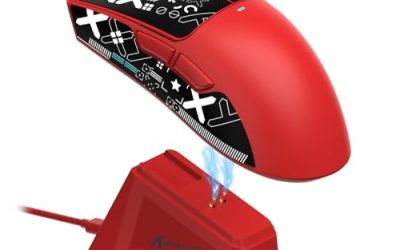
The Viper V2 Pro is the lightest mouse in this guide, and its symmetrical shape makes it a natural choice for claw and fingertip players who prize fast, free movement. At 58 grams, it starts and stops with very little effort, which helps when tracking a target that changes direction in the middle of a strafe. The Focus Pro 30K optical sensor reaches up to 30,000 DPI and tracks cleanly on many surfaces, including glass. Gen-3 optical switches deliver a fast, consistent click, and the HyperSpeed wireless connection runs at a 1,000 Hz polling rate with low latency. Battery life runs up to 90 hours.
- Sensor: Focus Pro 30K optical, up to 30,000 DPI
- Polling rate: 1,000 Hz wireless
- Weight: 58 grams
- Connection: HyperSpeed wireless, USB-C charging
- Buttons: 5 programmable buttons, plus on-mouse DPI controls
- Battery life: Up to 90 hours
Best for: Claw and fingertip players who want an ultra-light symmetrical mouse that changes direction fast and stays out of the way of the hand.
Considerations: The low, flat profile will not suit players who want a tall palm-filling shape, and the light weight can feel less stable to players used to a heavier mouse. Players with large hands may find the compact body a little short for a full palm grip.
Logitech G502 HERO

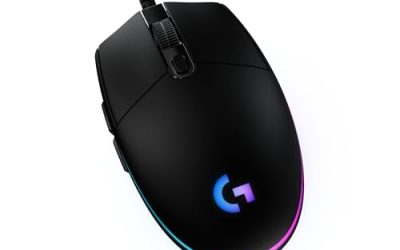
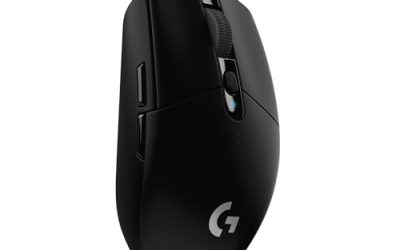
The G502 HERO is the wired classic on this list, and it takes a different approach from the light wireless mice above. Instead of chasing the lowest possible weight, it gives the player control over weight and buttons. Its HERO 25K sensor reaches up to 25,600 DPI with no smoothing, filtering, or acceleration. Five removable 3.6-gram weights sit in the base, so the mouse can be tuned from 121 grams up to 139 grams. Eleven programmable buttons, including a dual-mode hyper-fast scroll wheel with tilt, cover abilities, weapons, and macros. Onboard memory stores up to five profiles directly on the mouse, and the wired connection means there is no battery to charge.
- Sensor: HERO 25K optical, up to 25,600 DPI
- Polling rate: 1,000 Hz wired
- Weight: 121 grams, plus five 3.6-gram tuning weights
- Connection: Wired
- Buttons: 11 programmable buttons, dual-mode scroll wheel with tilt
- Memory: Onboard memory for up to 5 profiles
Best for: Players who want many buttons, adjustable weight, and a wired connection with no battery concerns, and who like a substantial, right-handed shape.
Considerations: At 121 grams before weights are added, this is by far the heaviest mouse in this guide, and it will not suit players who want a feather-light feel. The right-handed shape does not work for left-handed players, and the cable needs a clear path across the desk to avoid drag.
Which One Fits
For fast-paced shooters where targets strafe and jump constantly, the lightest mice usually win. The Razer Viper V2 Pro, at 58 grams, and the Logitech G PRO X Superlight 2, at 60 grams, both make it easy to reverse direction mid-track and to hold a smooth line through a long strafe. Between the two, the Viper V2 Pro suits claw and fingertip grips, while the Superlight 2 suits a wider range of grips and adds a higher polling rate for players with fast displays.
For players who rest the whole palm on the mouse and play for hours, shape comes first. The Razer DeathAdder V3 Pro is the clear pick here, with its tall ergonomic curve, thumb rest, and light 63-gram body. It keeps the wrist in a neutral position and lets the hand stay relaxed, which matters more over a long session than a small difference in sensor numbers.
For players who want control and customization above all else, the Logitech G502 HERO stands apart. Its eleven buttons, adjustable weights, and onboard profiles make it the most flexible mouse in this guide, and its wired connection removes battery management entirely. It is the best fit for players who play a mix of shooters and other genres, or who simply prefer a heavier, more planted mouse.
Low-sensitivity players who move the mouse across a large pad with the whole arm will feel the benefit of a light mouse most, because every gram matters over a long swipe. High-sensitivity players who aim mostly with the wrist may be comfortable with a heavier mouse, since the movements are shorter and the extra mass adds stability. Give any new mouse at least a week of regular play before judging it, and keep the sensitivity the same for the first few days while the hand learns the new hardware.
FAQ
What DPI is best for tracking?
There is no single DPI that works for everyone, because DPI and in-game sensitivity work together to set the effective sensitivity. A common starting point is 800 DPI with a low in-game sensitivity, which gives fine control for tracking while keeping arm movement manageable. Some players prefer 400 DPI for even finer control, while others use 1,600 DPI with a lower in-game setting. Pick a combination that lets the player track smoothly without running out of pad, then keep it fixed while muscle memory builds.
Does a higher polling rate improve tracking?
A higher polling rate can improve tracking, but the gain is subtle. Moving from 125 Hz to 1,000 Hz is a large and noticeable step, because the cursor updates far more often. Moving from 1,000 Hz to 8,000 Hz is a smaller step that shows up mainly as smoother motion on fast displays. For most players, a stable 1,000 Hz connection is enough for excellent tracking, and stability matters more than the peak figure.
Is a wireless mouse good enough for tracking?
Yes. Modern wireless gaming mice using a dedicated 2.4 GHz receiver have latency that is close to a wired connection, and many competitive players use them in serious play. Use the included receiver rather than Bluetooth for gaming, keep the receiver close to the mouse, and keep the battery charged. A wireless mouse also removes cable drag entirely, which is a real advantage for tracking.
How much does mouse weight matter for tracking?
Weight matters a lot, especially for low-sensitivity players who move the mouse with the arm. A lighter mouse is easier to start, stop, and reverse, which helps when a target changes direction suddenly, and it reduces fatigue over long sessions. A heavier mouse can feel more stable and deliberate. The difference between 58 grams and 63 grams is small, while the difference between 60 grams and 121 grams is large and easy to feel.
Should I choose an ergonomic or a symmetrical mouse for tracking?
The choice depends on grip style. Ergonomic mice, with a shape made for the right hand, support the palm and keep the wrist relaxed, which helps palm grip players track smoothly for hours. Symmetrical mice work for more grip styles and for both hands, and they tend to be lighter and lower, which suits claw and fingertip players. The better shape is the one that fits the hand, lets the fingers rest naturally on the main buttons, and stays comfortable through a full session.
Bottom Line
The best gaming mouse for tracking is the one that pairs a clean, accurate sensor with a shape and weight that let the hand move freely and consistently. For most competitive players, the Logitech G PRO X Superlight 2 is the strongest all-around pick, with its HERO 2 sensor, high polling rate, and 60-gram symmetrical body. Palm grip players who want ergonomic comfort should look first at the Razer DeathAdder V3 Pro, while claw and fingertip players who want the lightest possible mouse should look at the Razer Viper V2 Pro. Players who want many buttons, adjustable weight, and a wired connection will find the Logitech G502 HERO hard to beat.
Whichever mouse is chosen, the fundamentals stay the same. Pick a comfortable DPI and sensitivity, keep them fixed while muscle memory builds, use a clean pad and fresh feet, and give the new hardware a full week of play before judging it. Tracking improves with practice, but the right mouse removes the friction, the fatigue, and the unpredictability that hold aim back.
FAQ
What DPI is best for tracking?
Does a higher polling rate improve tracking?
Is a wireless mouse good enough for tracking?
How much does mouse weight matter for tracking?
Should I choose an ergonomic or a symmetrical mouse for tracking?
More from Amazon
Programs that pair well with the guide above. Offers and eligibility are set by Amazon and may change.
Free shipping on eligible items, Prime Video and more. Eligible new members can start with a free trial.
Start a Prime free trialAd-free music streaming. Eligible new subscribers can start with a free trial.
Try Music Unlimited freeA Prime membership for ages 18-24 with a trial period. Eligibility is set by Amazon.
See Prime for Young AdultsAudiobooks and podcasts to listen to on the go. Eligible new members can start with a free trial.
Try Audible freeAs an Amazon Associate we earn from qualifying purchases.