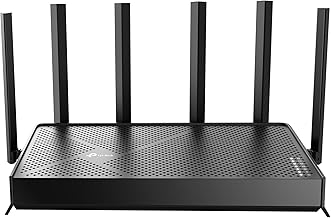
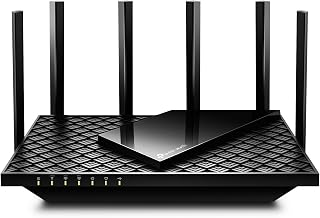
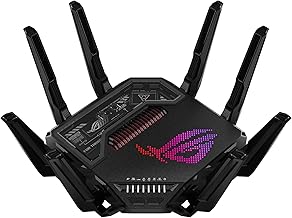
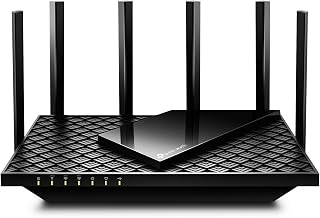
Our Top Picks
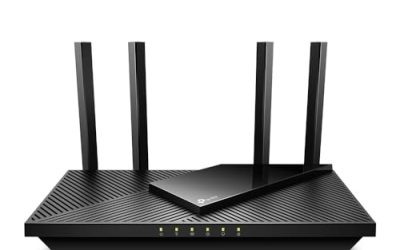
 NETGEAR Nighthawk Pro Gaming 6-Stream WiFi 6 RouterExtra Large11.61 x 7.87 x 2.51 inches1.32 poundsCheck on Amazon


Choosing a Nighthawk router is a decision about where lag lives in your setup, not a contest over the biggest number on the box. A tri-band radio with a huge combined speed figure still leaves your console waiting when every phone, TV and laptop in the house shares the same airtime, while a gaming dashboard cannot rescue a weak signal reaching a back bedroom. The real question is which bottleneck bites first in your home: crowded wireless, a slow wired link, or a router that cannot tell game traffic apart from a background download.
This guide covers five Nighthawk routers picked from Amazon listing titles and specifications, from a flagship WiFi 7 model to a straightforward WiFi 6 workhorse. Competitive players get a router with server controls, large households get coverage and device capacity, and anyone moving to WiFi 7 gets an entry point that does not demand a full network rebuild.
Quick Picks
As an Amazon Associate we earn from qualifying purchases
| Product | Best for | Key spec from title |
|---|---|---|
| NETGEAR Nighthawk RS700S | Flagship WiFi 7 for large homes | Tri-band BE19000, 10 Gig port |
| NETGEAR Nighthawk RS140 | WiFi 7 entry for mid-size homes | Dual-band BE5000, 2.5 Gig port |
| NETGEAR Nighthawk RAXE300 | 6 GHz band for WiFi 6E devices | Tri-band AXE7800, 8 streams |
| NETGEAR Nighthawk XR1000 | Competitive play with server controls | DumaOS 3.0, AX5400 |
| NETGEAR Nighthawk RAX50 | Straightforward WiFi 6 upgrade | AX5400, 2,500 sq. ft. coverage |
How to Choose
Match the WiFi generation to the devices you own
WiFi 7 routers such as the RS700S and RS140 add Multi-Link Operation and wider channels, yet those gains only appear on WiFi 7 phones, laptops and consoles. A home full of WiFi 6 gear sees a smaller jump, since the router still talks to each device in the language that device understands. WiFi 6E sits between the two: the RAXE300 opens the 6 GHz band for newer laptops and headsets, giving them a quieter channel away from crowded 2.4 and 5 GHz airwaves. Check the wireless standard printed on your newest devices before choosing a generation, because a flagship radio cannot speed up hardware that predates it.
Look at the wired ports before the wireless numbers
Wireless speed figures describe the radio, while your wired ports decide what actually reaches a PC or console. A gigabit WAN port caps the connection at one gigabit even when the internet plan delivers more, so a multi-gig plan needs a 2.5 Gig or 10 Gig internet port like the ones on the RS140 and RS700S. Count the LAN ports too: a desk with a gaming PC, a console and a streaming box fills four ports fast, and a single spare port decides whether a new device needs a switch. USB ports matter for shared storage and printer sharing, so scan the rear panel in the listing images before ordering.
Decide whether gaming software earns its keep
Every router in this guide moves packets, while only the XR1000 adds a gaming operating system that steers them. DumaOS lets a player filter game servers by location, watch ping on a heatmap and reserve bandwidth for the console when someone else starts a large download. Those controls help most in competitive shooters where a distant server or a sudden upload causes visible stutter. Households that mainly stream and browse gain little from server filters, and a strong WiFi 7 radio may serve them better. Weigh how often lag ruins a session against how often the network simply needs more coverage.
Size coverage and device capacity honestly
Manufacturers measure coverage in open space, while walls, floors and metal shelving shrink it in a real house. A router rated for 3,500 square feet still struggles when it sits behind a TV cabinet in a far corner, so plan for a central, elevated spot with clear air around the antennas. Device counts deserve the same honesty: phones, watches, TVs, speakers and smart plugs add up quickly, and a router rated for 25 devices can feel crowded in a connected home. Pick a model whose coverage and device figures leave headroom above your current household, not one that matches it exactly.
The 5 Best Options
NETGEAR Nighthawk RS700S

The RS700S sits at the top of the Nighthawk line for homes that already run multi-gig internet and WiFi 7 devices. Its tri-band WiFi 7 radio reaches a combined BE19000 class, and the 10 Gig internet port lets a fast fiber plan through without a wired bottleneck. Coverage reaches 3,500 square feet with room for 200 devices, so a large household with consoles, phones, laptops and smart home gear stays on one network. Setup runs through the Nighthawk app, and NETGEAR Armor covers the first year.
Specs
- Tri-band WiFi 7 with BE19000 wireless speed up to 19 Gbps
- 10 Gig internet port plus Gigabit Ethernet ports
- Covers up to 3,500 sq. ft. for up to 200 devices
- NETGEAR Armor security included for 1 year
- Nighthawk app for setup and network management
Best for: Large homes with multi-gig internet and WiFi 7 devices.
Watch out for: The 10 Gig port only helps with a multi-gig plan and a matching wired device, and Armor needs a subscription after the first year.
NETGEAR Nighthawk RS140
The RS140 brings WiFi 7 into reach for a mid-size home that does not need a third band. Its dual-band BE5000 radio reaches 5 Gbps combined, with 700 Mbps on 2.4 GHz and 4,300 Mbps on 5 GHz, and the 2.5 Gig internet port suits fiber and cable plans above one gigabit. Coverage of 2,250 square feet and support for 80 devices fit an apartment or a family house with several streamers. The compact tower hides its antennas inside the case, so it fits on a shelf where a winged router would look out of place.
Specs
- Dual-band WiFi 7 with BE5000 wireless speed up to 5.0 Gbps
- 2.5 Gig internet port and three Gigabit Ethernet LAN ports
- Covers up to 2,250 sq. ft. for up to 80 devices
- Multi-Link Operation for WiFi 7 devices
- Nighthawk app for setup, guest networks and device pausing
Best for: Apartments and mid-size homes moving to WiFi 7 on a multi-gig plan.
Watch out for: No 6 GHz band, so WiFi 7 devices cannot use the third band, and only one port runs at multi-gig speed.
NETGEAR Nighthawk RAXE300
The RAXE300 is the pick for households whose newest laptops and phones already use the 6 GHz band. Its tri-band WiFi 6E radio reaches AXE7800, spreading traffic across 2.4, 5 and 6 GHz so a video call no longer fights a game download for the same channel. Eight streams and coverage for 2,500 square feet keep a busy family network steady, and 40 connected devices leave room for smart home gear. It costs less than a flagship WiFi 7 router while still giving modern devices a clean, uncongested band.
Specs
- Tri-band WiFi 6E with AXE7800 wireless speed up to 7.8 Gbps
- New 6 GHz band for WiFi 6E devices
- 8 streams covering up to 2,500 sq. ft. for 40 devices
- Gigabit Ethernet ports for wired consoles and PCs
- NETGEAR Armor security features
Best for: Homes with WiFi 6E laptops and phones that need a quiet 6 GHz channel.
Watch out for: Devices without WiFi 6E cannot use the 6 GHz band, and a Renewed version circulates under a separate code, so check the listing condition.
NETGEAR Nighthawk XR1000
The XR1000 is the only router here built around gaming software rather than raw radio speed. DumaOS 3.0 puts server selection in the player’s hands: a geo-filter keeps matches on nearby servers, a ping heatmap shows where delay comes from, and bandwidth controls reserve room for the console when the rest of the house streams. Underneath sits an AX5400 WiFi 6 radio with a triple-core 1.5 GHz processor, four Gigabit LAN ports and a USB 3.0 port. Competitive players who blame lost fights on distant servers get more from this router than from a faster radio alone.
Specs
- AX5400 WiFi 6 with 6 streams, up to 5.4 Gbps
- DumaOS 3.0 with geo-filter, ping heatmap and QoS bandwidth allocation
- Triple-core 1.5 GHz processor
- 4 x 1G Ethernet LAN ports and 1 x USB 3.0 port
- 4 detachable antennas
Best for: Competitive players who want control over game servers and ping.
Watch out for: No multi-gig port, so a plan above one gigabit hits a wired ceiling, and NETGEAR Armor needs a subscription after the included trial.
NETGEAR Nighthawk RAX50

The RAX50 is the straightforward upgrade for a home leaving an ISP gateway or an older WiFi 5 router behind. Its AX5400 WiFi 6 radio uses six streams to reach 5.4 Gbps, covering 2,500 square feet for 25 devices, which suits a family house with a console, a couple of TVs and a stack of phones. Setup takes a few minutes in the Nighthawk app, and NETGEAR Armor adds a layer of network security. It skips the newer bands and multi-gig ports, trading future-proofing for a simpler box that does the everyday job well.
Specs
- AX5400 WiFi 6 with 6 streams, up to 5.4 Gbps
- Covers up to 2,500 sq. ft. for up to 25 devices
- Dual-band 2.4 GHz and 5 GHz
- Nighthawk app for setup and network management
- NETGEAR Armor security features
Best for: Homes replacing an ISP router or an old WiFi 5 box on a gigabit plan.
Watch out for: Gigabit-only ports cap multi-gig plans, and there is no 6 GHz band for newer devices.
Which One Fits Your Situation
You play ranked matches and blame the server
Pick the XR1000. Its geo-filter steers matchmaking toward nearby servers, and the ping heatmap shows whether delay comes from the server or your own network. Bandwidth controls keep a housemate’s download from spiking your ping mid-round. The AX5400 radio is fast enough for competitive play, and the wired LAN ports give a PC or console a stable link.
You run a large home on multi-gig internet
Pick the RS700S. The 10 Gig internet port takes a full multi-gig plan, the tri-band WiFi 7 radio serves 200 devices, and coverage reaches 3,500 square feet. It suits a household where several people game, stream and work from home at the same time, and where the router must keep up with a fast fiber line.
You want WiFi 7 in a mid-size home
Pick the RS140. Its BE5000 radio and 2.5 Gig port cover a mid-size home on a fast plan without paying for a third band the household may never use. Coverage of 2,250 square feet and support for 80 devices fit an apartment or a family house, and the compact tower fits on a shelf without dominating the room.
You are replacing an old router on a standard plan
Pick the RAX50. Its AX5400 WiFi 6 radio covers 2,500 square feet and handles a gigabit plan with room to spare, while the Nighthawk app makes setup quick for anyone who has never configured a router. It is the sensible choice when the old box drops connections, not when the household needs WiFi 7 or multi-gig ports.
Common Mistakes
- Buying a BE19000 router for a plan and devices that cannot use its top bands.
- Forgetting to check the WAN port speed before ordering for a multi-gig plan.
- Hiding the router inside a cabinet or behind a television, where the signal has to fight through furniture.
- Judging a router by its combined speed figure alone, without counting LAN ports or checking coverage.
- Assuming NETGEAR Armor stays included forever, when it needs a subscription after the included period.
Frequently Asked Questions
Do Nighthawk routers need a modem?
Yes. Every Nighthawk router in this guide is a router only, with no modem built in. Connect it by Ethernet cable to a modem or to a gateway set in bridge mode, then let the Nighthawk handle WiFi, device management and security. Homes with a combined modem-router unit should check the gateway settings before adding a second router.
Is WiFi 7 worth it over WiFi 6E?
WiFi 7 earns its keep when your phones, laptops and consoles already support it, since Multi-Link Operation and wider channels cut congestion on busy networks. A household still running WiFi 6 gear gains less, and the RAXE300 covers the 6 GHz band for less money. Upgrade to WiFi 7 when new devices arrive, not before.
Does DumaOS actually lower ping?
DumaOS lowers ping when the problem is server distance or a crowded home network. Its geo-filter favors nearby game servers, and its bandwidth controls stop other devices from hogging the connection mid-match. It cannot fix a slow internet plan or routing problems beyond your provider, so treat it as control over your side of the connection.
Can one Nighthawk cover a large multi-floor home?
A single router can cover a large home when it sits central and elevated, with its antennas clear of shelves and metal. Thick floors and concrete walls still cut the signal, so a router rated for 3,500 square feet may struggle across two floors. In that case, place the router on the middle floor or add a compatible extender to reach the far rooms.
FAQ
Do Nighthawk routers need a modem?
Is WiFi 7 worth it over WiFi 6E?
Does DumaOS actually lower ping?
Can one Nighthawk cover a large multi-floor home?
More from Amazon
Programs that pair well with the guide above. Offers and eligibility are set by Amazon and may change.
Free shipping on eligible items, Prime Video and more. Eligible new members can start with a free trial.
Start a Prime free trialAd-free music streaming. Eligible new subscribers can start with a free trial.
Try Music Unlimited freeA Prime membership for ages 18-24 with a trial period. Eligibility is set by Amazon.
See Prime for Young AdultsAudiobooks and podcasts to listen to on the go. Eligible new members can start with a free trial.
Try Audible freeAs an Amazon Associate we earn from qualifying purchases.