Key takeaways
- Looking for the best 240 Hz monitors? Compare five native 240 Hz picks for competitive play, 1440p gaming, curved immersion and two-computer desks.
For most buyers the LG 27GR83Q-B is the safest pick: a 27-inch 1440p IPS panel with a true 240 Hz refresh rate, HDMI 2.1, and colour that works for gaming and everyday use. Competitive players who want the clearest motion should look at the BenQ ZOWIE XL2546X, while the Samsung Odyssey G7 is the curved VA option for contrast and HDR600. Remember that a 240 Hz monitor only shows its speed when the graphics card can push 240 frames per second, and at 1440p that takes a much stronger GPU than at 1080p.
This guide is for three kinds of buyers: competitive players chasing frames at 1080p, players who want 1440p sharpness with speed, and people running two computers from one desk. Every monitor below was chosen from its Amazon listing title and specifications, and each one runs at a native 240 Hz refresh rate.
Quick Picks
As an Amazon Associate we earn from qualifying purchases
| Product | Best for | Key spec from title |
|---|---|---|
| LG 27GR83Q-B | Best all-round 1440p gaming | 27-inch QHD IPS, 240 Hz, HDMI 2.1 |
| BenQ ZOWIE XL2546X | Competitive esports play | 24.5-inch FHD Fast TN, 240 Hz, DyAc 2 |
| Samsung Odyssey G7 27-inch | Curved contrast and HDR | 27-inch QHD VA, 240 Hz, 1000R, HDR600 |
| ASUS TUF VG279QM | Budget entry to 240 Hz | 27-inch FHD Fast IPS, 240 Hz native |
| Gigabyte M27Q X | Two-computer desk with KVM | 27-inch QHD IPS, 240 Hz, KVM and USB-C |
How to Choose
Pick the resolution your GPU can actually feed
A 240 Hz monitor is only as fast as the frames your graphics card renders, so resolution is the first decision, not an afterthought. At 1080p, a mid-range card can hold high frame rates in competitive shooters, which is why the two 1080p monitors in this guide suit players who value frames above all else. At 1440p, the same card renders far more pixels per frame, so holding 240 frames per second takes a much stronger graphics card. If your card struggles to hold 144 frames per second at 1440p, a 1440p 240 Hz panel will spend most of its life showing fewer frames than it can display. Match the monitor to the frame rates your hardware reaches.
Match the panel type to how you play
Panel type decides what a 240 Hz monitor is good at beyond raw speed, and each type in this guide makes a different trade. IPS panels, found in the LG, ASUS and Gigabyte models, give the best all-round colour and wide viewing angles, so they suit players who also browse, watch films or work at the same desk. The BenQ uses a Fast TN panel, which has the sharpest motion for competitive play but narrower viewing angles and weaker colour. The Samsung uses a VA panel, which delivers the deepest contrast of the five and a curved shape, though VA panels can smear in dark scenes. Pick the panel for your main use, not for the refresh rate alone.
Check the ports before you buy
The port you use decides whether you get 240 Hz, and this is where buyers get caught out. DisplayPort 1.4 is the safe route to full 240 Hz at 1440p on every monitor in this guide. HDMI 2.0 caps 1440p at 144 Hz, so on the Samsung, Gigabyte and ASUS models the full refresh rate needs DisplayPort. Only the LG has HDMI 2.1, which carries 1440p at 240 Hz and makes it the only monitor here that takes 1440p at 120 Hz from a console over HDMI. Consoles cap at 120 Hz, so a 240 Hz monitor gives a console buyer no extra refresh headroom. Count your ports and check their versions before ordering.
Read motion figures the way makers measure them
Response-time numbers look comparable, but every maker measures them differently, so ranking monitors by those figures is a mistake. GtG and MPRT are different measurements, and a 0.5 ms MPRT figure is not the same kind of number as a 1 ms GtG figure, even on similar listings. Backlight strobing sharpens motion: the BenQ has DyAc 2 and the ASUS has ELMB SYNC, but strobing reduces brightness, and on the BenQ variable refresh rate cannot run at the same time as DyAc 2. DisplayHDR 400 is an entry-level badge with no local dimming, so it does not make a monitor a good HDR display. Judge motion by panel type and strobing, not by a single figure.
The 5 Best Options
LG 27GR83Q-B

The LG 27GR83Q-B is the best all-round pick in this guide because it pairs a sharp 1440p IPS panel with the most flexible connectivity of the five. Its 27-inch QHD display runs at a native 240 Hz with a 1 ms GtG response time, and its 95 percent DCI-P3 coverage keeps colours lively for gaming and everyday use. Two HDMI 2.1 ports make it the only monitor here that carries 1440p at 240 Hz over HDMI, and it also takes 1440p at 120 Hz from a console. Adaptive sync covers both NVIDIA G-SYNC Compatible and AMD FreeSync Premium, and the stand adjusts for tilt, height and pivot.
Specs
- 27-inch QHD IPS panel, 2560 x 1440, 240 Hz native, 1 ms GtG
- DisplayHDR 400, 95 percent DCI-P3, 1000:1 contrast
- 2 x HDMI 2.1, 1 x DisplayPort 1.4, USB downstream ports
- NVIDIA G-SYNC Compatible and AMD FreeSync Premium
- 4-pole headphone out with DTS Headphone:X
- Tilt, height and pivot stand, VESA mountable
Best for: Players who want one sharp 1440p monitor for gaming, films and everyday work.
Watch out for: The indexed Amazon listing is about 350 days old, so live-check availability before buying; DisplayHDR 400 has no local dimming, so do not expect strong HDR.
BenQ ZOWIE XL2546X

The BenQ ZOWIE XL2546X is the monitor for competitive players who care about motion clarity above everything else. Its 24.5-inch Full HD Fast TN panel runs at a native 240 Hz with a 0.5 ms response time, and DyAc 2 backlight strobing sharpens fast movement in first-person shooters. Black eQualizer lifts detail in dark scenes without washing out bright areas, Color Vibrance lets players tune the look per game, and the included shielding hood and S Switch keep the setup focused. The stand uses an industrial-grade bearing design for height and tilt adjustment, and the whole package is built around tournament play rather than everyday versatility.
Specs
- 24.5-inch Full HD Fast TN panel, 1920 x 1080, 240 Hz native, 0.5 ms
- DyAc 2 backlight strobing, Black eQualizer, Color Vibrance
- S Switch controller, XL Setting to Share, shielding hood
- 2 x HDMI 2.0, 1 x DisplayPort 1.4, headphone jack
- Height and tilt adjustable stand, 6.1 kg with stand
Best for: Competitive first-person shooter players who want the clearest motion in the pool.
Watch out for: There is no HDR support on this monitor at all; variable refresh rate only works with DyAc 2 turned off, and the ZOWIE Europe page shows a Discontinued label that applies regionally, so live-check the US listing.
Samsung Odyssey G7 27-inch
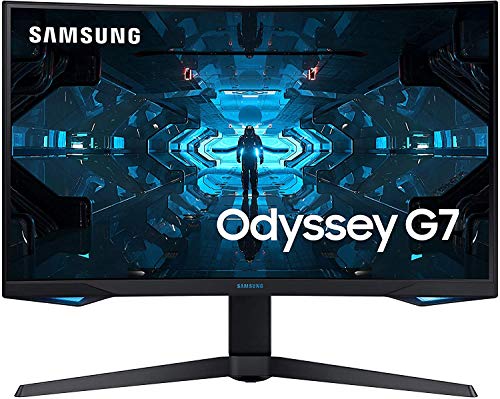
The Samsung Odyssey G7 is the curved option for buyers who want contrast and immersion rather than flat-panel neutrality. Its 27-inch QHD VA QLED panel runs at a native 240 Hz with a 1 ms GtG response time, and the 1000R curve wraps the screen around the player for single-player games and films. HDR600 support and 600 nits of peak brightness put it a step above the DisplayHDR 400 models in this guide, while 2500:1 contrast gives dark scenes real depth. Adaptive sync covers NVIDIA G-SYNC Compatible and AMD FreeSync Premium Pro, and the stand adjusts for height, pivot, swivel and tilt.
Specs
- 27-inch QHD VA QLED panel, 2560 x 1440, 240 Hz native, 1 ms GtG
- 1000R curved, HDR600, 600 nits peak brightness, 2500:1 contrast
- 1.07 billion colours, 178-degree viewing angles
- 2 x DisplayPort 1.4, 1 x HDMI 2.0, 2 x USB 3.0, audio out
- NVIDIA G-SYNC Compatible and AMD FreeSync Premium Pro
- Height, pivot, swivel and tilt stand, VESA 100 x 100 mm
Best for: Players who want a curved, high-contrast screen for immersive single-player games and films.
Watch out for: Stock signals conflict, with a November 2026 listing screenshot showing it live while a recent mirror shows the Amazon offer sold out, so live-check first; the single HDMI port is 2.0, which caps 1440p at 144 Hz, so use DisplayPort for full 240 Hz, and VA panels can smear in dark scenes.
ASUS TUF Gaming VG279QM

The ASUS TUF Gaming VG279QM is the cheapest way into true 240 Hz in this pool, and it suits players whose graphics card is built for 1080p frame rates. Its 27-inch Full HD Fast IPS panel runs at a native 240 Hz with a 1 ms GtG response time, and ELMB SYNC sharpens motion by syncing backlight strobing with variable refresh rate. DisplayHDR 400 adds basic HDR support, while G-SYNC Compatible and FreeSync Premium cover adaptive sync on both major graphics card brands. The stand adjusts for height, tilt, swivel and pivot, so the monitor fits a desk setup without extra hardware.
Specs
- 27-inch Full HD Fast IPS panel, 1920 x 1080, 240 Hz native, 280 Hz overclock mode
- 1 ms GtG, DisplayHDR 400, ELMB SYNC
- NVIDIA G-SYNC Compatible and AMD FreeSync Premium
- 2 x HDMI 2.0, 1 x DisplayPort 1.2, 3.5 mm audio out
- Height, tilt, swivel and pivot stand
Best for: Budget buyers who want real 240 Hz at 1080p without paying for 1440p.
Watch out for: The 280 Hz figure is an overclock mode only, since the native refresh rate is 240 Hz; there is no November 2026 Amazon signal for this listing, so live-check availability, and a 27-inch 1080p panel is about 81 pixels per inch, so text looks softer than on the 1440p models.
Gigabyte M27Q X

The Gigabyte M27Q X is the pick for a desk shared by two computers, because its KVM switch and USB-C port do work the others cannot. Its 27-inch QHD SS IPS panel runs at native 240 Hz with a 1 ms GtG response time, and its 92 percent DCI-P3 coverage and 10-bit colour keep it usable for mixed work and gaming. The KVM switch has a dedicated button for swapping keyboard, mouse and display between machines, while USB-C carries DisplayPort Alt Mode with 18 W Power Delivery. Picture-in-Picture and Picture-by-Picture modes, plus OSD Sidekick software, round out a feature set for people juggling a gaming PC and a work laptop.
Specs
- 27-inch QHD SS IPS panel, 2560 x 1440, 240 Hz native, 1 ms GtG
- DisplayHDR 400, 92 percent DCI-P3, 10-bit colour, 350 nits typical brightness
- AMD FreeSync Premium Pro, regular RGB subpixel layout
- 1 x DisplayPort 1.4, 2 x HDMI 2.0, USB-C with DisplayPort Alt Mode and 18 W Power Delivery
- KVM switch, Picture-in-Picture, Picture-by-Picture, OSD Sidekick software
- Height adjustable stand, 130 mm height range
Best for: People running a gaming PC and a laptop from one desk who need KVM and USB-C.
Watch out for: This is the weakest listing in the pool, last tracked 7 months ago with the last Amazon offer in February 2025, so live-check before buying; it is not officially NVIDIA G-SYNC Compatible, although G-Sync worked in independent testing, and its response time is 1 ms GtG only.
Which One Fits Your Situation
You play competitive shooters most nights
Pick the BenQ ZOWIE XL2546X if fast motion and target tracking matter more than resolution. Its 24.5-inch 1080p TN panel, DyAc 2 strobing and 0.5 ms response time are built for first-person shooters, and the shielding hood and S Switch suit focused setups. If the BenQ stretches the budget, the ASUS VG279QM gives the same native 240 Hz at 1080p on a Fast IPS panel with ELMB SYNC, trading some sharpness for better colour and viewing angles.
You want one monitor for gaming and everyday work
Pick the LG 27GR83Q-B, because its 1440p IPS panel is sharp enough for documents and browsing while its native 240 Hz keeps games smooth. HDMI 2.1 is a real advantage here, since it carries full 240 Hz and also handles a console at 1440p and 120 Hz. The Gigabyte M27Q X is the alternative if a second computer shares the desk, since its KVM switch and USB-C port add flexibility the LG does not offer.
You run two computers from one desk
Pick the Gigabyte M27Q X for its dedicated KVM button, which swaps keyboard, mouse and display between a gaming PC and a laptop without replugging cables. Its USB-C port with DisplayPort Alt Mode and 18 W Power Delivery connects a laptop with a single cable, and Picture-by-Picture mode shows both machines side by side. Live-check the listing first, since it has the weakest availability signal in this guide.
You want a curved screen for single-player games and films
Pick the Samsung Odyssey G7, because its 1000R curve and VA panel deliver the deepest contrast of the five monitors, and HDR600 with 600 nits of peak brightness suits cinematic games and films better than the DisplayHDR 400 models. Use DisplayPort to reach the full 240 Hz at 1440p, since the single HDMI 2.0 port caps at 144 Hz. Accept that VA panels can smear in dark scenes and that the curve is a love-it-or-hate-it shape.
Common Mistakes
- Buying a 240 Hz monitor without a graphics card that can push 240 frames per second in the games you actually play.
- Using HDMI 2.0 and expecting 240 Hz at 1440p, when that port caps 1440p at 144 Hz on the Samsung, Gigabyte and ASUS models.
- Ranking monitors by response-time numbers, even though GtG and MPRT are different measurements that cannot be compared directly.
- Treating DisplayHDR 400 as a sign of good HDR, when it is an entry-level badge with no local dimming.
- Expecting a 240 Hz monitor to help on console, when both PlayStation 5 and Xbox Series X cap at 120 Hz, or assuming every 240 Hz monitor is OLED: none of the five picks here is OLED, and the OLED candidates were left out on stock and freshness grounds, not on image quality.
Frequently Asked Questions
Do I need a powerful graphics card for a 240 Hz monitor?
Yes, because the monitor only shows 240 frames per second if the graphics card renders them. At 1440p that takes a much stronger card than at 1080p, and in demanding games a mid-range card will sit well below 240 frames per second. Check the frame rates your card already reaches in your favourite games before choosing between a 1080p and a 1440p 240 Hz monitor.
Can I get 240 Hz over HDMI?
It depends on the port version. HDMI 2.1, which only the LG has in this pool, carries 1440p at 240 Hz, while HDMI 2.0 caps 1440p at 144 Hz. DisplayPort 1.4 is the reliable route to full 240 Hz on the other four monitors. Check the port version on both the monitor and the graphics card, since the cable alone cannot fix a bandwidth limit.
Is a 240 Hz monitor good for work or photo editing?
The 1440p IPS models work well for mixed use: the LG covers 95 percent DCI-P3 and the Gigabyte covers 92 percent DCI-P3 with 10-bit colour, and both have sharp text at 1440p. The BenQ TN panel is a poor choice for colour-critical work because of its narrow viewing angles and weaker colour. For serious photo editing, a dedicated colour-accurate monitor with hardware calibration remains the better tool.
Does 240 Hz help on a PlayStation 5 or Xbox Series X?
No extra headroom, since both consoles cap at 120 Hz, so a 240 Hz monitor runs at 120 Hz on console. The LG is still the best console pick in this pool because its HDMI 2.1 ports carry 1440p at 120 Hz with variable refresh rate. If you only play on console, a 120 Hz or 144 Hz monitor with HDMI 2.1 may be the better spend.
FAQ
Do I need a powerful graphics card for a 240 Hz monitor?
Can I get 240 Hz over HDMI?
Is a 240 Hz monitor good for work or photo editing?
Does 240 Hz help on a PlayStation 5 or Xbox Series X?
More from Amazon
Programs that pair well with the guide above. Offers and eligibility are set by Amazon and may change.
Free shipping on eligible items, Prime Video and more. Eligible new members can start with a free trial.
Start a Prime free trialAd-free music streaming. Eligible new subscribers can start with a free trial.
Try Music Unlimited freeA Prime membership for ages 18-24 with a trial period. Eligibility is set by Amazon.
See Prime for Young AdultsAudiobooks and podcasts to listen to on the go. Eligible new members can start with a free trial.
Try Audible freeAs an Amazon Associate we earn from qualifying purchases.