Key takeaways
- Best cinema projectors: five home cinema models compared by resolution, brightness, contrast and lens control, so you can pick the right one for movie nights.
A dedicated cinema projector turns a dark room into a private movie hall, with an image far larger than any flat panel of the same footprint. The five models in this guide all sit in the home cinema class: each one is built for movie viewing first, with a 4K image, a contrast figure aimed at dark-room viewing, and lens controls that let you place the image where it belongs. They span two light-source families, lamp and laser, and two design schools, the classic ceiling-mount box and the compact gimbal unit that sits on a shelf. What follows compares them on the points that matter for movie nights: resolution, brightness, contrast, lens control, HDR support, and sound. No single model leads on every point, so the right pick depends on your room, your screen size, and how much setup work you want to do.
What to look for
Resolution. Native resolution is the count of physical pixels on the imaging chip. Several models in this guide use pixel-shifting: a 1080p chip flashes two slightly offset images in quick succession so the eye reads a 4K image. The result is visibly sharper than plain 1080p, though a native 4K chip still holds an edge on fine detail. All five models in this guide reach a 4K image by pixel-shifting rather than a native 4K chip, so treat the 4K label as a shared baseline and judge them on the other points below.
Light source. Lamp models use a replaceable bulb that dims over time; the 3800 lamp runs 3,500 hours on high and 5,000 hours in Eco, per the maker spec sheet. Laser models hold their brightness far longer, Epson states a 20,000-hour laser life for the LS11000, and need no bulb changes. Triple-laser designs, the Valerion and the Hisense, use separate red, green, and blue lasers for a wider color gamut, which shows up most clearly in saturated scenes like sunsets and neon-lit streets.
Brightness. Makers measure brightness in different ways, ISO lumens, ANSI lumens, or a plain lumen figure with no standard named, so the figures in this guide are not directly comparable across brands. Treat each figure as a rough guide to that maker’s own claim. What matters more is the room: a dark room with curtains lets even a modest figure fill a 120-inch screen, while a bright living room washes out any projector, however strong its figure looks on paper.
Contrast. Contrast figures come from the maker and describe the gap between the brightest white and the darkest black the unit can show. Lamp models with an auto iris, the 3800 and the 5050UB, close the iris on dark scenes for deeper blacks. The figures in this guide run from 15,000:1 on the Valerion to 1,200,000:1 on the LS11000, but since each maker measures differently, use them to compare within a brand, not across brands. A dark room does more for black levels than any figure on a spec sheet.
Lens control. A zoom lens and lens shift let you place the projector off-center without moving the image. Motorized focus, zoom, and shift, on the LS11000 and the 5050UB, let you adjust from the remote; manual controls, on the 3800, need a hand on the unit. The Valerion uses an optical zoom, and the Hisense adds a gimbal base that tilts the whole unit to aim at a wall or a ceiling. Check the throw range for your screen size before mounting anything, since a short-throw and a long-throw unit need very different distances.
HDR and sound. HDR10 is common to all five; HDR10+ and Dolby Vision appear on the laser models. Built-in sound varies: the 3800 has a pair of 10 W speakers, the Hisense has JBL sound, and the two Epson flagships name no built-in speaker, so plan on external sound for those. A soundbar or a set of speakers is the usual companion for a cinema room, and every model here carries an audio output for one.
Epson Home Cinema LS11000 4K PRO-UHD Laser Projector

The LS11000 is the flagship of this guide, and it leads on the points a dedicated cinema room cares about most. Its laser light source carries a 20,000-hour life stated by Epson, so there is no bulb to change and no slow dimming to plan around. The 4K PRO-UHD image comes from pixel-shifting across three LCD chips, which keeps color brightness equal to white brightness and removes the rainbow effect some viewers see on single-chip designs. The listing names 2,500 lumens of color and white brightness, full 10-bit HDR with HDR10+ and HLG, and a dynamic contrast figure of 1,200,000:1. HDMI 2.1 takes 4K at 120 Hz, which keeps the unit useful for console play as well as movies. Focus, zoom, and shift are all motorized, with lens memory that recalls positions for different aspect ratios, so a scope screen and a flat screen can share one mount. The listing names no built-in speaker, so plan on external sound. This is the pick for a dedicated dark room where the projector stays mounted and the image size stays fixed. Confirm the exact model V11HA27020 on the live listing before buying, since Epson sells several look-alike laser models in this line.
Valerion VisionMaster Pro2 Triple Laser 4K Projector

The VisionMaster Pro2 is the triple-laser challenger in this guide, and it packs the most built-in features of the five. Three separate lasers, red, green, and blue, feed a 4K pixel-shifted image with a headline figure of 3,000 ISO lumens and a contrast figure of 15,000:1. The listing names IMAX Enhanced, HDR10+, and Dolby Vision, plus Google TV built in, so streaming apps run on the unit itself with no stick to plug in. Optical zoom runs 0.9x to 1.5x, and the image stretches to a 300-inch diagonal on a large enough wall. For play, the listing names a 4 ms input lag and 1080p at 240 Hz, which puts it in the same conversation as gaming projectors even though this guide judges it on movie viewing. The 4K image is pixel-shifted rather than native, per Notebookcheck, which is the same approach the Epson models use. Two points to weigh: the contrast figure is the lowest in this guide, so very dark scenes lean on the room being fully dark, and the triple-laser design is the newest of the five, with fewer years of owner history behind it. It suits a living room that doubles as a cinema room, where built-in apps and a bright image matter more than a motorized lens.
Hisense C2 Ultra Triple Laser 4K Projector

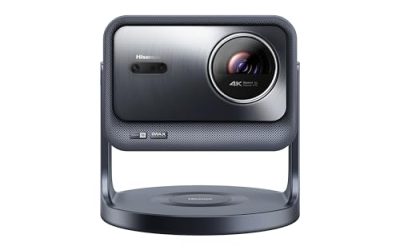
The C2 Ultra is the compact pick, a gimbal-based unit that sits on a table or a shelf instead of hanging from a ceiling. Its triple-laser engine puts out a 4K UHD image with a headline figure of 3,000 lumens, and the listing names Dolby Vision, IMAX Enhanced, and sound by JBL, so the built-in audio is a step above the usual projector speaker. Optical zoom and the gimbal base let you tilt the unit to aim at a wall or a ceiling, and the image spans 65 to 300 inches. Netflix is included on the built-in platform, and the unit carries a Designed for Xbox badge. The listing calls it a portable projector, but it is marketed for cinema use with IMAX Enhanced and Dolby Vision, so it fits this guide’s cinema rule. Weigh two things: the compact body means a smaller lens and less placement range than a ceiling-mount box, and the listing excerpts checked name no contrast figure, so the table below leaves that cell blank rather than borrowing a figure from a sibling model. It suits a renter or a household that wants cinema nights without drilling a mount into the ceiling.
Epson Home Cinema 3800 4K PRO-UHD 3-Chip Projector

The 3800 is the long-running lamp pick of this guide, and it remains the most balanced of the lamp models. Its three-chip 3LCD engine shows full color in every frame, so there is no rainbow effect, and the listing names 3,000 lumens of both color and white brightness with a contrast figure of 100,000:1. The 4K PRO-UHD image is pixel-shifted from a 1080p native chip, with full 10-bit HDR, HDR10, and HLG. A pair of 10 W speakers sits inside the chassis, which is more than the Epson flagships carry. Lens shift runs a wide manual range, vertical plus or minus 60 percent and horizontal plus or minus 24 percent, with a 1.62x manual zoom, so placement is forgiving even without a motor. The lamp is a 250 W UHE bulb rated 3,500 hours on high and 5,000 hours in Eco, per the maker spec sheet, so budget for a replacement bulb over the life of the unit. Two flags: Epson’s own store shows the model out of stock, and Amazon stock runs through a third-party seller, so confirm the listing before buying; and the unit has no built-in apps, so a streaming stick is needed. It suits a first cinema room where a bright, flexible lamp projector beats a costlier laser unit.
Epson Home Cinema 5050UB 4K PRO-UHD 3-Chip Projector
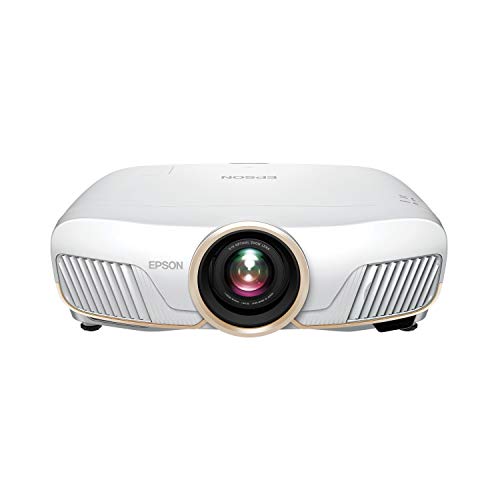
The 5050UB is the upper-mid lamp pick, aimed at a dedicated room where black levels matter most. Its three-chip 3LCD engine puts out a 4K PRO-UHD image with 2,600 lumens of color and white brightness and a dynamic contrast figure of 1,000,000:1, the second-highest in this guide. The listing names full 10-bit HDR and the full DCI-P3 gamut in Digital Cinema Mode, which is the mode to use for movie nights. Focus, zoom, and shift are motorized, like the LS11000, so the unit can sit on a high shelf and still be adjusted from the remote. The listing names no built-in speaker, so plan on external sound. One honest flag: this pick carries the weakest stock evidence in the guide. A direct Amazon crawl 252 days old showed no buying option, while roundups checked November 24, 2026 still link the listing as live, so confirm the live listing first and be ready to fall back to the 3800 if the link shows no buying option. It suits a dark room where deep blacks and a wide color gamut outrank built-in apps and a laser light source.
Comparison table
| Projector | Resolution | Brightness | Contrast | Light source | Lens control |
|---|---|---|---|---|---|
| Epson LS11000 | 4K PRO-UHD, pixel-shift | 2,500 lumens | 1,200,000:1 dynamic | Laser | Motorized focus, zoom, shift |
| Valerion VisionMaster Pro2 | 4K, pixel-shift | 3,000 ISO lumens | 15,000:1 | Triple laser | Optical zoom 0.9x-1.5x |
| Hisense C2 Ultra | 4K UHD | 3,000 lumens | Not stated | Triple laser | Optical zoom, gimbal |
| Epson Home Cinema 3800 | 4K PRO-UHD, pixel-shift | 3,000 lumens | 100,000:1 | Lamp | Manual zoom, shift |
| Epson Home Cinema 5050UB | 4K PRO-UHD, pixel-shift | 2,600 lumens | 1,000,000:1 dynamic | Lamp | Motorized focus, zoom, shift |
Brightness figures come from each maker and use different measurements, so they are not directly comparable across brands. Contrast figures are maker figures as well. The Hisense contrast cell is left blank because the listing excerpts checked name no contrast figure.
Can I use a plain wall instead of a screen?
Yes, for a first setup. A smooth matte wall in white or light grey gives a watchable image, and many households begin that way. A dedicated screen still earns its place: it is flatter and more even than any wall, it holds its gain across the whole surface, and an ambient-light-rejecting screen keeps the image readable when a lamp stays on. If you buy a screen, match its size to the throw range of your projector before mounting anything, since a screen that is too large for the room forces the projector too close to the wall.
Can a cinema projector work in a bright living room?
It can, but with limits. A brighter figure helps, and the triple-laser models in this guide hold up better with lamps on than the lamp models do. Even so, no projector beats a flat panel in daylight, and direct sun on the wall washes out any image. Curtains, an ambient-light-rejecting screen, and evening viewing do more for the image than any brightness figure. If the room stays bright through the day, treat the projector as an evening cinema setup and keep a television for daytime viewing.
How far back should the projector sit?
It depends on the throw range and the zoom of the model you pick. The Valerion zooms from 0.9x to 1.5x, the 3800 zooms 1.62x, and the motorized models shift the lens as well, so each one covers a range of distances for a given screen size. Measure the room first, then check the throw range for your screen size in the listing or the maker manual. Lens shift gives room to mount off-center, but it cannot fix a projector that sits too close for the screen size. A ceiling mount needs a power point nearby, and a shelf mount needs a clear line to the wall with nothing in the light path.
How to choose
Begin with the room. A dedicated dark room with a fixed screen points to the LS11000 or the 5050UB, with the laser model for a fit-and-forget setup and the lamp model for deeper blacks on a tighter scope. A living room that doubles as a cinema room points to the Valerion Pro2 or the Hisense C2 Ultra, with built-in apps and a bright image mattering more than a motorized lens. A first cinema room on a lamp budget points to the 3800, which pairs a bright 3LCD image with forgiving placement. In every case, confirm the live listing before buying, check the throw range against your room, and plan on external sound unless the model you pick carries speakers you trust. The image is only half the cinema; the room, the screen, and the sound carry the rest.
Disclosure: As an Amazon Associate, we may earn a commission from qualifying purchases made through links in this article, at no additional cost to you.
FAQ
Can I use a plain wall instead of a screen?
Can a cinema projector work in a bright living room?
How far back should the projector sit?
More from Amazon
Programs that pair well with the guide above. Offers and eligibility are set by Amazon and may change.
Free shipping on eligible items, Prime Video and more. Eligible new members can start with a free trial.
Start a Prime free trialAd-free music streaming. Eligible new subscribers can start with a free trial.
Try Music Unlimited freeA Prime membership for ages 18-24 with a trial period. Eligibility is set by Amazon.
See Prime for Young AdultsAudiobooks and podcasts to listen to on the go. Eligible new members can start with a free trial.
Try Audible freeAs an Amazon Associate we earn from qualifying purchases.