Key takeaways
- Presenting design work to clients? These projectors pair the color accuracy, resolution and lit-room brightness that graphic, product and architecture reviews demand.
The real decision when a designer buys a projector is not screen size. It is whether the brand color a client approved on a calibrated monitor still looks like that same color when it lands on a meeting-room wall, under office lighting, in front of people who are about to sign off on it. A projector that washes out reds or crushes shadow detail turns every review into an argument about the display instead of the design.
This guide is for graphic and brand designers presenting identity work, architects and interior designers walking clients through renderings, and product teams reviewing prototypes and packaging in shared rooms. Every model below was picked from the specifications on its Amazon product page, with priority given to color brightness, resolution and the brightness headroom a lit room demands.
Quick Picks
As an Amazon Associate we earn from qualifying purchases.
| Product | Best for | Key spec from title |
|---|---|---|
| Epson Pro EX11000 | Client presentations in bright meeting rooms | 4,600 lumens of color and white brightness |
| ViewSonic LS740HD | Large review spaces and fixed installations | 5,000 ANSI lumens laser light source |
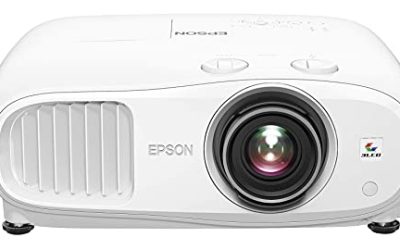
| Epson Home Cinema 2350 | Color-critical studio critique sessions | 4K PRO-UHD with 3-chip 3LCD color |
How to Choose
Judge color brightness, not just white brightness
A single headline lumen number usually describes white output, and design work rarely fails on white. It fails on saturated brand colors, skin tones in lifestyle photography and the mid-tone gradients inside a rendering. Look for a separate color brightness figure, or a color gamut claim in the listing, and treat the two numbers as a pair. Three-chip designs rate color and white brightness equally, which is why they dominate this list. If a listing only quotes one brightness figure and says nothing about color, assume saturated colors will look weaker than the headline number suggests.
Match resolution to the finest detail you present
A logo lockup survives almost any projector, but CAD linework, architectural plans and dense UI screens do not. At a 100-inch image, standard 1080p turns thin lines and small annotation text into guesswork for anyone sitting past the second row. If your reviews involve drawings, spreadsheets of dimensions or interface mockups with body copy, step up to a 4K-enhanced model or keep the image size modest. Designers who mostly show photography, video and large-format brand boards can stay at 1080p and put the difference toward brightness instead.
Buy brightness for the room you actually present in
Client meeting rooms have windows, glass walls and ceiling lights nobody will switch off for you. In that environment, output in the 4,000 to 5,000 lumen range keeps colors from looking grey and tired at presentation sizes. A dimmable studio or critique room is a different purchase: there, a 2,800 lumen model with stronger color processing will show subtler gradations than a brighter business unit running in its most aggressive mode. Be honest about which room hosts your important reviews, because the right answer changes completely between the two.
Plan placement before you fall for a spec sheet
Keystone correction rescues a crooked image by throwing away resolution and softening edges, which is exactly what fine design detail cannot afford. Prefer a projector whose throw distance fits your room from a shelf or ceiling mount, square to the screen, and use lens shift where a listing offers it. Check the port list as well: dual HDMI keeps a laptop and a workstation connected during reviews, and wireless screen mirroring saves the cable shuffle when three designers present in a row.
The 3 Best Options
Epson Pro EX11000
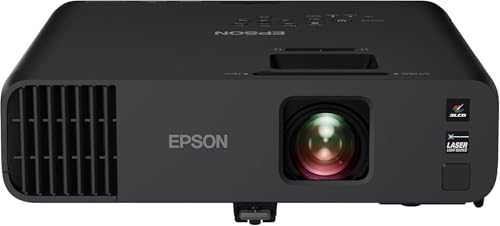
Design reviews usually happen in rooms nobody blacked out, and this is the model built for that reality. Its 3-chip 3LCD engine delivers equal color and white brightness, so a saturated brand palette holds up under ceiling lights instead of fading toward grey. The laser light source removes lamp changes from a busy studio’s calendar, and Miracast mirroring lets a visiting client or a second designer share the wall without passing cables around the table. The built-in speaker is loud enough for a review room, so walkthrough videos with narration need no extra hardware.
Specs
- Display technology: 3-chip 3LCD
- Resolution: Full HD 1080p (1920 x 1080)
- Brightness: 4,600 lumens of color brightness and 4,600 lumens of white brightness
- Light source: laser, rated up to 20,000 hours
- Wireless: Miracast screen mirroring
- Ports: 2 HDMI, USB power for streaming devices
- Speaker: built-in 16W
Best for: Studios and agencies presenting to clients in bright, windowed meeting rooms.
Watch out for: Native resolution stops at 1080p, so very fine CAD linework softens at large image sizes.
ASIN: B0C35ZF3WR
ViewSonic LS740HD

Some design work gets reviewed at architectural scale: full-height elevations, exhibition graphics and retail concepts that only make sense when a roomful of people can stand back from them. The LS740HD brings the highest brightness in this guide and a laser engine rated for long service, which suits a fixed installation that runs daily critique sessions. Its zoom range, four-corner adjustment and 360-degree projection support awkward mounting positions in converted studio spaces, although straight-on placement still gives the sharpest result for detailed drawings.
Specs
- Display technology: DLP with laser phosphor light source
- Resolution: Full HD 1080p (1920 x 1080)
- Brightness: 5,000 ANSI lumens
- Light source life: up to 30,000 hours
- Zoom: 1.3x optical zoom
- Throw ratio: 1.1 to 1.5
- Image correction: horizontal and vertical keystone, 4-corner adjustment
- Projection: 360-degree orientation support
Best for: Large studios, showrooms and training spaces running big images in rooms with ambient light.
Watch out for: It is an installation-class unit rather than something to carry between rooms, and it has no wireless mirroring in the listing.
ASIN: B0CDG3JKQP
Epson Home Cinema 2350

When the review moves into a controlled studio space and the conversation turns to subtle color decisions, this is the sharper tool. The 4K PRO-UHD processing keeps interface mockups, typography and rendered textures legible, while the 3-chip 3LCD design holds color brightness equal to white brightness for honest saturated tones. HDR10 and HLG support helps product films and motion work show the contrast range the team graded for. It gives up raw output compared with the business models above, so it rewards a room where someone can dim the lights.
Specs
- Display technology: 3-chip 3LCD
- Resolution: 4K PRO-UHD (pixel-shifted 3840 x 2160)
- Brightness: 2,800 lumens of color and white brightness
- HDR: HDR10 and HLG support
- Smart features: Android TV built in
- Speaker: built-in 10W
- Audio: Bluetooth output
Best for: Design studios holding color-critical critique sessions in rooms with controllable light.
Watch out for: At 2,800 lumens it loses contrast quickly in a bright room, and 4K PRO-UHD is pixel-shifted rather than native 4K.
ASIN: B0BDR8THMJ
Which One Fits Your Situation
You present to clients in a bright boardroom
Choose the Epson Pro EX11000. Client rooms rarely go dark, and its equal color and white brightness keeps brand colors believable with the lights on. Miracast also means a client can mirror a phone or laptop to the wall in seconds, which keeps the meeting moving instead of stalling on cables and adapters.
You run internal critiques where color calls get made
Choose the Epson Home Cinema 2350. In a dimmable studio its 4K PRO-UHD detail and even color brightness show the differences between two nearly identical brand reds, and HDR support keeps motion work honest. This is the pick when the people in the room are judging the work, not just viewing it.
You review large-format work with a whole team
Choose the ViewSonic LS740HD. Exhibition graphics, retail concepts and architectural elevations need image size plus brightness, and its 5,000 ANSI lumens and long-life laser suit a permanently mounted unit in a big room. The zoom and corner adjustment help fit the image to walls that were never designed as screens.
Your studio moves the projector between rooms
Choose the Epson Pro EX11000 and a rolling cart. It is the most forgiving option here when placement changes daily: high brightness tolerates whatever lighting each room has, the laser source starts instantly with no warm-up ritual, and wireless mirroring removes one more cable from the setup routine before every single session.
Common Mistakes
- Buying on white brightness alone, then discovering that saturated brand colors look washed out because color brightness was never specified.
- Relying on keystone correction for a permanently crooked setup, which discards resolution and softens the fine lines design reviews exist to examine.
- Projecting onto a colored or textured wall and blaming the projector when whites shift and renderings lose their neutrality.
- Choosing a dim, cinema-tuned model for a glass-walled meeting room where nobody will turn the lights off during a client presentation.
- Skipping a test with your own files: a deck of charts proves nothing about how your renderings, type and photography will hold up.
Frequently Asked Questions
Can a projector replace a calibrated monitor for final color sign-off?
No, and it should not try to. Treat the projector as the shared discussion surface where clients and teams react to scale, layout and overall color direction. Keep final color approval on the calibrated monitor the artwork was produced on, and say so in the meeting so nobody signs off a shade based on a wall, a bulb and a viewing angle.
How many lumens does a design presentation actually need?
For a typical meeting room with windows or ceiling lights, look in the 4,000 to 5,000 lumen range at presentation sizes around 100 inches. In a studio where you control the lighting, a model near 2,800 lumens with equal color and white brightness will usually show subtler, more accurate color than a brighter unit pushed hard. Image size matters as much as the number itself.
Is 1080p enough for presenting design work?
For photography, brand boards, video and large headlines, yes, provided viewers are not crowding a very large image. For CAD drawings, architectural plans, dense dashboards or interface screens with small text, the extra resolution of a 4K-enhanced model keeps lines and annotations readable from the back of the room. Match the projector to the finest detail your team regularly puts on the wall.
What should I check before mounting a projector in a studio?
Measure the throw distance from the intended mount to the screen and compare it with the listing’s throw ratio at your target image size. Confirm the mount position lets the lens sit square to the wall so you avoid keystone correction, and check that power and HDMI runs reach the spot. A fixed installation repays an hour of measuring every single day it is used.
FAQ
Can a projector replace a calibrated monitor for final color sign-off?
How many lumens does a design presentation actually need?
Is 1080p enough for presenting design work?
What should I check before mounting a projector in a studio?
More from Amazon
Programs that pair well with the guide above. Offers and eligibility are set by Amazon and may change.
Free shipping on eligible items, Prime Video and more. Eligible new members can start with a free trial.
Start a Prime free trialAd-free music streaming. Eligible new subscribers can start with a free trial.
Try Music Unlimited freeA Prime membership for ages 18-24 with a trial period. Eligibility is set by Amazon.
See Prime for Young AdultsAudiobooks and podcasts to listen to on the go. Eligible new members can start with a free trial.
Try Audible freeAs an Amazon Associate we earn from qualifying purchases.