Key takeaways
- Find a desk wide and steady enough for two or three screens, with room left for a keyboard, a tower, and cables that stay out of the way. See three wide picks.
A desk for multiple monitors is not the same purchase as a desk for one screen and a laptop. Two or three displays change the geometry of the whole setup, because each screen needs width, depth, and a stable edge for a monitor arm or a heavy stand. A narrow top forces screens toward the corners and crowds the keyboard. The right desk gives every screen a settled place and leaves space for a tower, speakers, or a notebook.
Gamers with a second screen for chat, maps, or streaming tools need width and a frame that does not wobble when they lean in. Home workers with two documents open side by side need depth and a clear cable path. Creators with a timeline on one screen and a preview on another need room for both without crowding the tools in front. The three desks below were chosen from Amazon listings for wide surfaces, stated load capacity, and cable and storage details.
Quick Picks
As an Amazon Associate we earn from qualifying purchases
| Product | Best for | Key spec from title |
|---|---|---|
| FEZIBO 63-Inch L-Shaped Standing Desk with Drawers | Corner setups with two or three screens and sit-stand use | 63-inch L-shaped surface, triple motors, supports up to 330 lbs |
| SHW 55-Inch Commercial-Grade Office Computer Desk | A straightforward wide desk for two monitors in a smaller room | 55-inch surface with two desktop grommets for cables |
| Tribesigns 63-Inch Modern Computer Desk | A deep fixed desk for two large monitors plus a tower | 63 x 31.5-inch surface on a steel frame rated up to 900 lbs |
How to Choose
Measure width for the screens you actually own
Start with the combined width of your monitors, including their bezels and stands, then add room for the keyboard in front of them and a little breathing space at each end. Two 27-inch screens side by side need far more than a 48-inch top once stands, speakers, and a lamp are in the picture, and a third screen or a laptop beside them pushes the requirement higher still. A 55-inch desk suits many two-screen setups, while a 63-inch desk gives a dual ultrawide layout or a three-screen row room to sit without screens hanging past the edge. Measure the wall as well, because a desk that fits on paper can still block a door swing or crowd a chair.
Check depth before you check width
Depth decides how far your eyes sit from the screens, and that distance matters more with every extra monitor. A 24-inch-deep top can work for two standard screens on slim stands, yet larger displays and monitor arms need more room behind the keyboard so the screens do not feel too close. A 31.5-inch-deep surface lets you push monitors back, keep a keyboard at a relaxed distance, and still have space for a notebook or a controller in front of the screens. If you use a clamp mount, confirm that the edge is thick enough and clear enough for the clamp to grip without hitting a drawer, a crossbar, or a modesty panel.
Judge stability by frame and load rating, not by looks
Multiple monitors add weight in one place, and a monitor arm concentrates that weight at a single clamp point, so a light frame will show movement every time you type or adjust a screen. Look for a steel frame, extra support bars, and a stated load capacity that comfortably covers your screens, tower, and accessories together. A desk rated for a heavy load is not only about avoiding sag; it also stays steadier when you lean on it, plug in a cable, or swivel a screen toward a second viewer. Fixed desks gain stability from a simple rigid frame, while adjustable desks need a motor system and frame design that hold level across the full height range.
Plan cables, storage, and the tower before you buy
A multi-monitor desk collects power bricks, display cables, and a keyboard cable, and without a plan they end up draped across the back edge or tangled under the top. Grommets in the desktop, a tray beneath the surface, or a drawer for small accessories can keep that clutter controlled, yet each option changes how the desk is used day to day. Decide where the tower will live, because a large case on the desktop eats screen width, while a case on the floor needs a cable path and clearance to breathe. Drawers and shelves help with storage, but they also reduce legroom and can limit where a monitor clamp can sit, so weigh that trade before choosing built-in storage.
The 3 Best Options
FEZIBO 63-Inch L-Shaped Standing Desk with Drawers
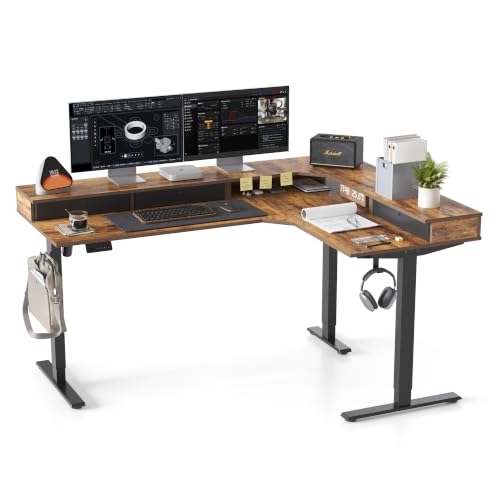
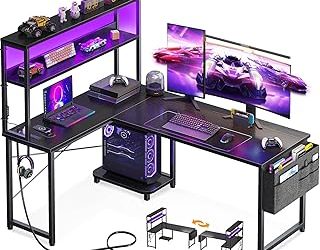
This FEZIBO desk turns a corner into a genuine multi-screen workstation, with a 63-inch L-shaped surface that lets two monitors sit along the main run while a third screen, a laptop, or a stream deck takes the return. Three motors lift the top through its height range, and the frame is built to carry a heavy load, so the desk suits a setup with large displays, a tower, and the usual collection of peripherals. Drawers in the desktop keep small accessories close without taking surface space, and lockable casters make it easier to move the desk for cleaning or rewiring before locking it back into place.
Specs
- 63-inch L-shaped work surface
- Triple electric motors
- Height range from 27 inches to 48 inches, with 3 preset buttons
- Industrial-grade steel frame supports up to 330 lbs
- 3 desktop drawers
- Lockable casters rotate 360 degrees
- Maximum lifting speed of 35mm/s, with no-load noise of 50db or less
Best for: Corner rooms and sit-stand users who run two or three screens plus a laptop.
Watch out for: The L shape needs a real corner and clear floor space on both sides, and the desk arrives in more than one package.
SHW 55-Inch Commercial-Grade Office Computer Desk
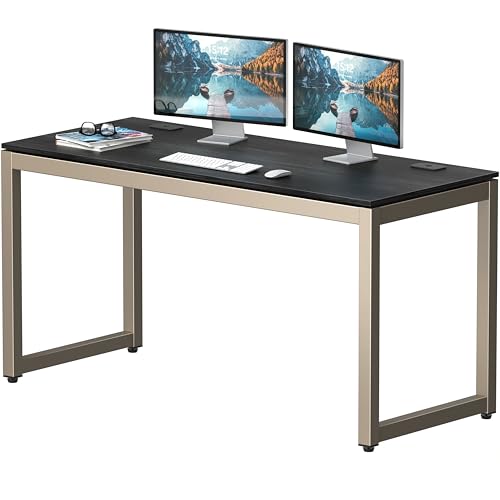
This SHW desk is the plain, practical choice for a two-monitor setup that does not need height adjustment or a corner layout. Its 55-inch top is wide enough for two standard screens side by side with a keyboard in front, and the 24-inch depth keeps the footprint modest enough for a bedroom, a small office, or a shared room. Two grommets in the desktop give monitor and peripheral cables a direct route below the surface, while adjustable glides help the desk sit level on an uneven floor. The steel frame and fiberboard top keep the design simple, and the long warranty period gives the fixed-height format a clear, low-fuss appeal.
Specs
- 55-inch wide desktop, 24 inches deep
- Powder-coated steel frame
- Environmentally friendly fiberboard top
- Two desktop grommets to organize cables
- Adjustable glides stabilize the desk on uneven floors
- 10-year limited warranty
Best for: Two-monitor work or gaming in a smaller room where a simple fixed desk is enough.
Watch out for: The fixed height and 24-inch depth suit standard screens better than very large displays on deep stands, and there are no drawers or shelves.
Tribesigns 63-Inch Modern Computer Desk

This Tribesigns desk gives a multi-monitor setup a deep, uninterrupted surface, with a 63-inch length and a 31.5-inch depth that leave room to push screens back and still keep a keyboard, mouse, and notebook in comfortable reach. The steel frame uses extra support bars and triangular junction bracing, and the listing rates the structure for a very heavy load, so a pair of large monitors, a tower, and a printer can share the top without the frame feeling strained. Open legroom underneath keeps the seating position relaxed, and the wide top also works as a shared workstation or a small conference surface when only one screen is in use.
Specs
- 63 x 31.5-inch desktop, 29.13 inches high
- Powder-coated steel frame with two extra support bars and triangular junction bracing
- Rated for up to 900 lbs
- 1.97-inch steel legs
- Desktop ships in three pieces
- Assembled weight of 57.2 lbs
- 18-month warranty
Best for: Two large monitors, or a monitor plus a tower and printer, on a deep fixed desk.
Watch out for: The desktop arrives in three pieces, so seams are visible across the surface, and the height is fixed with no sit-stand adjustment.
Which One Fits Your Situation
You work in a corner and want to stand sometimes
Choose the FEZIBO L-shaped standing desk. Its corner layout separates the main screens from a laptop or secondary display, the height adjustment lets you change posture through the day, and the drawers keep the accessories for a busy setup close at hand. Measure both walls first, because the return needs the same clear space as the main run.
You have a small room and two standard monitors
Choose the SHW 55-inch desk. It fits two screens without dominating the room, the grommets keep cables tidy, and the fixed frame is simple to assemble and live with every day. It is the right scale when the priority is a clean two-screen workspace rather than a large command centre for work and gaming.
You run two large monitors and a tower on the desk
Choose the Tribesigns 63-inch desk. The extra depth moves large screens to a comfortable viewing distance, the wide top leaves space for a tower and a printer, and the heavy load rating suits a setup where several weighty items share one surface. Allow help for moving it, because the assembled desk is heavy to shift alone.
You want the widest surface for future expansion
Choose either 63-inch desk over the 55-inch model. A third screen, an ultrawide, or a second computer will need the extra width sooner than most buyers expect, and buying the wider top now avoids replacing the whole desk when the setup grows. Pick the FEZIBO if the extra screen will sit around a corner, and the Tribesigns if it will sit in a straight row.
Common Mistakes
- Buying a desk by screen count alone, without adding the width of stands, bezels, speakers, and a keyboard.
- Choosing a 24-inch-deep top for large monitors, then finding the screens sit too close for comfortable viewing.
- Clamping a monitor arm to an edge that is blocked by a drawer, a crossbar, or a thin desktop section.
- Putting the tower on the desktop without checking how much screen width it removes from the layout.
- Ignoring cable routes until after assembly, when grommets and trays are harder to reach and use well.
Frequently Asked Questions
How wide should a desk be for two monitors?
A 55-inch desk fits two monitors with a keyboard in front, if the stands are slim and speakers stay modest. A 63-inch desk is a safer choice for two large monitors, two monitors plus a laptop, or a setup with a tower on the desktop. Measure the combined width of your screens and stands, then add space for the keyboard and margin at each end before deciding.
How wide should a desk be for three monitors?
Three monitors need a 63-inch desk at minimum in most layouts, and an L-shaped desk can help by placing the third screen on the return instead of squeezing all three into one straight row. Check the width of each screen with its bezel and stand, because three 27-inch displays take up far more room than three smaller panels. Leave room for the keyboard to sit centred under the main screen.
Is a standing desk better for a multi-monitor setup?
A standing desk helps when you want to change posture during long sessions, and a wide electric model can carry several screens without forcing you to rebuild the layout. A fixed desk is steadier and simpler when you always sit in the same position and want maximum rigidity for heavy monitors. Choose based on how often you would actually change height, rather than on the feature alone.
Where should the tower go in a multi-monitor setup?
A tower on the floor frees the full desktop width for screens, yet it needs a clear cable path and enough airflow around the case. A tower on the desk keeps ports within easy reach and shortens cable runs, but it removes a large section of usable surface. Decide the tower position before choosing desk width, because that single choice changes how many screens fit comfortably.
FAQ
How wide should a desk be for two monitors?
How wide should a desk be for three monitors?
Is a standing desk better for a multi-monitor setup?
Where should the tower go in a multi-monitor setup?
More from Amazon
Programs that pair well with the guide above. Offers and eligibility are set by Amazon and may change.
Free shipping on eligible items, Prime Video and more. Eligible new members can start with a free trial.
Start a Prime free trialAd-free music streaming. Eligible new subscribers can start with a free trial.
Try Music Unlimited freeA Prime membership for ages 18-24 with a trial period. Eligibility is set by Amazon.
See Prime for Young AdultsAudiobooks and podcasts to listen to on the go. Eligible new members can start with a free trial.
Try Audible freeAs an Amazon Associate we earn from qualifying purchases.