Key takeaways
- Connect a laptop, Steam Deck or ROG Ally to a high-refresh monitor with these USB-C to DisplayPort cables, including DP 1.4 and DP 2.1 picks.
Most gaming laptops, mini PCs and handhelds now lean on USB-C for video output, while the monitors gamers actually want — 1440p at 240Hz, 4K at 144Hz and beyond — still shine brightest over a native DisplayPort input. A USB-C to DisplayPort cable is the cleanest bridge between the two: one slim run, no hub, no dongle chain.


The catch is that these cables are not all equal. A cable built around the older DisplayPort 1.2 signal tops out far below a DisplayPort 1.4 cable with HBR3 and DSC, and nearly all of them carry the signal in one direction only. Pick the wrong one and a 4K 240Hz panel quietly drops to a much lower mode. The five cables below cover the main buying paths: a strong all-round DP 1.4 cable, a future-facing DP 2.1 option, a VESA certified pick, a two-pack for dual-monitor desks, and a simpler cable that still feeds a 1440p 165Hz screen. Every pick assumes your USB-C port carries DisplayPort Alt Mode or Thunderbolt video.
Disclosure: As an Amazon Associate, we earn from qualifying purchases made through links in this article, at no extra cost to you.
Quick Picks
Our Short List of 3
- Best for: A single do-everything cable for a gaming laptop and a 4K 144Hz or 1440p 240Hz monitor.
- DisplayPort 1.4 signal with HBR3
- Up to 8K at 60Hz, 4K at 240Hz and 2K at 360Hz
- Listed bandwidth: 32.4Gbps
- Length: 6.6 ft, with shorter and longer variants in the same line
- Best for: A tested, certified link for a fixed desk with a high-refresh 4K monitor.
- VESA certified DisplayPort 1.4 cable
- Up to 8K at 60Hz, 4K at 144Hz and 2K at 240Hz
- Listed bandwidth: 32.4Gbps with HBR3
- Supports DSC, HDR and HDCP 2.2/1.4
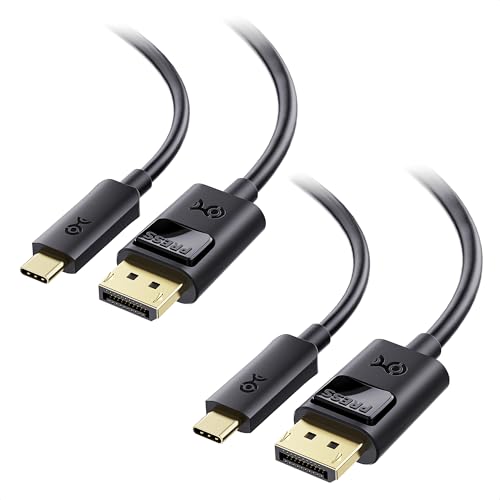
- Best for: Two-screen laptop desks, or one screen plus a travel spare.
- Two 6 ft cables in the box (model 201036-BLK-1.8mx2)
- DisplayPort 1.4: up to 8K at 60Hz or 4K at 240Hz with HBR3 and DSC
- Locking DisplayPort connector
- Unidirectional: USB-C or Thunderbolt source to DisplayPort monitor
All 4 Picks at a Glance
| Product | Specs | Action |
|---|---|---|
| UGREEN USB C to DisplayPort 1.4 Cable (6.6 ft) |
| Check price on Amazon |
| Maxonar USB C to DisplayPort Cable, VESA Certified (6.6 ft) |
| Check price on Amazon |
| Cable Matters 2-Pack USB C to DisplayPort 1.4 Cable (6 ft) |
| Check price on Amazon |
 LENTION USB C to DisplayPort Cable (6 ft) |
| Check price on Amazon |
How to Choose a USB-C to DisplayPort Cable
Check the port before the cable. Not every USB-C port carries video. The port on your laptop or handheld must support DisplayPort Alt Mode, or be a Thunderbolt 3, 4 or 5 port, or a USB4 port with video output. The Steam Deck, ROG Ally and Legion Go all send video over USB-C, but plenty of thin laptops have one video-capable port and one charge-only port. Look for a DisplayPort or Thunderbolt symbol beside the port, or check the spec sheet for your exact model.
Match the DisplayPort version to your monitor. A DP 1.2-era link handles 4K at 60Hz and 1440p at high refresh, which is plenty for many desks. A DP 1.4 cable with HBR3 raises the listed bandwidth to 32.4Gbps and, with DSC (Display Stream Compression) active at both ends, reaches 4K at 240Hz and 8K at 60Hz. DP 2.1 with UHBR modes lifts the ceiling again for the newest panels. Buy for the monitor you own today and the one you plan next.
Respect the direction. Almost every USB-C to DisplayPort cable is unidirectional: USB-C source at one end, DisplayPort display at the other, and no signal at all if you flip it. If you ever need to feed a USB-C portable monitor from a desktop graphics card, you need a bi-directional model like the Cable Matters DP 2.1 pick below.
Keep the run short and direct. Six feet is the sweet spot for a desk. Longer runs and hub pass-throughs make the highest modes less reliable, so plug the cable straight from port to monitor whenever you chase 4K 144Hz or above. A locking DisplayPort connector also helps on wall-mounted screens, since it resists slow pull-outs when the panel tilts.
Adaptive sync rides along. G-Sync and FreeSync both travel over a DisplayPort Alt Mode link, so a proper DP 1.4 cable preserves variable refresh on supported monitors. If your screen falls back to a fixed refresh, the cable or the port generation is the first suspect.
The Picks in Detail
UGREEN USB C to DisplayPort 1.4 Cable (6.6 ft)
- Best for: A single do-everything cable for a gaming laptop and a 4K 144Hz or 1440p 240Hz monitor.
- DisplayPort 1.4 signal with HBR3
- Up to 8K at 60Hz, 4K at 240Hz and 2K at 360Hz
- Listed bandwidth: 32.4Gbps
- Length: 6.6 ft, with shorter and longer variants in the same line
A single do-everything cable for a gaming laptop and a 4K 144Hz or 1440p 240Hz monitor.
This is the cable to buy when you want one lead that handles nearly any current gaming monitor. The DP 1.4 link with HBR3 covers 4K at 144Hz without compression and reaches 4K at 240Hz or 8K at 60Hz when DSC is available at both ends, so a high-end laptop and a flagship panel can actually use the modes printed on their boxes. UGREEN also lists MST support, which lets a single port feed a daisy chain of compatible monitors — handy for a laptop desk that doubles as a work setup.
Compatibility is broad: the listing names gaming laptops, the Steam Deck and current phones and tablets with video output, and the cable needs no driver or software. The 6.6 ft length gives a little extra slack for a monitor on an arm. It is unidirectional, so it cannot run a USB-C portable display from a desktop card.
Cable Matters Bi-Directional USB-C to DisplayPort 2.1 Cable (6 ft)
Specs
- DisplayPort 2.1 signal with DP40 (UHBR10) mode
- Up to 8K at 120Hz and 4K at 480Hz
- Listed bandwidth: 40Gbps
- Bi-directional: also carries a DisplayPort source to a USB-C display
- Length: 6 ft (1.8 m)
- Video signal only; no power delivery
- Model 201346-BLK-6
This is the headroom pick. DP 2.1 with UHBR10 pushes the listed bandwidth to 40Gbps, opening modes like 4K at 480Hz and 8K at 120Hz that DP 1.4 cannot reach even with compression. Very few monitors and GPUs exploit that ceiling today, but if you buy panels on a long cycle, this is the cable that stays relevant when the next screen arrives.
The rare trick here is direction. Unlike the other picks, this cable works both ways, so the same lead can connect a USB-C laptop to a DP monitor today and a desktop graphics card to a USB-C portable monitor tomorrow. Note that it carries video only — there is no power delivery, so a portable display still needs its own power feed. For everyone else it behaves like a premium USB-C to DP cable with the widest mode support in this roundup.
Best for: Future-facing setups and anyone who needs one cable to run in both directions.
Maxonar USB C to DisplayPort Cable, VESA Certified (6.6 ft)
- Best for: A tested, certified link for a fixed desk with a high-refresh 4K monitor.
- VESA certified DisplayPort 1.4 cable
- Up to 8K at 60Hz, 4K at 144Hz and 2K at 240Hz
- Listed bandwidth: 32.4Gbps with HBR3
- Supports DSC, HDR and HDCP 2.2/1.4
A tested, certified link for a fixed desk with a high-refresh 4K monitor.
Certification is the headline here. VESA certification means the cable has been tested against the DisplayPort spec rather than simply built to resemble it, which matters at the modes where marginal cables flicker, drop sync or fall back to lower refresh figures. For a permanent desk install behind a 4K 144Hz panel, that tested margin is worth having.
On paper the mode support matches the UGREEN pick: 8K at 60Hz, 4K at 144Hz, 2K at 240Hz, with DSC and HDR in the mix and HDCP support for protected video. Backward compatibility with older DP inputs makes it a safe hand-me-down to a secondary display later. Like most cables in this class it is unidirectional.
Cable Matters 2-Pack USB C to DisplayPort 1.4 Cable (6 ft)
- Best for: Two-screen laptop desks, or one screen plus a travel spare.
- Two 6 ft cables in the box (model 201036-BLK-1.8mx2)
- DisplayPort 1.4: up to 8K at 60Hz or 4K at 240Hz with HBR3 and DSC
- Locking DisplayPort connector
- Unidirectional: USB-C or Thunderbolt source to DisplayPort monitor
Two-screen laptop desks, or one screen plus a travel spare.
Dual-monitor laptop setups eat cables. A laptop with two Thunderbolt ports can drive two DisplayPort monitors directly, and this two-pack covers both runs with matched DP 1.4 cables, each able to push 8K at 60Hz or 4K at 240Hz when the source offers HBR3 with DSC. The same logic works for a single-monitor gamer: one cable lives at the desk, the spare lives in the travel bag.
The underlying cable is Cable Matters’ long-running 201036 line, with a locking DisplayPort plug that clicks into the monitor and resists working loose when you swivel the screen. The pair is unidirectional and aimed at DP monitors only, so USB-C portable displays are out. For a dock-free laptop desk with two proper gaming panels, it is the tidy way to wire both screens at full speed.
LENTION USB C to DisplayPort Cable (6 ft)
- Best for: 1440p 165Hz monitors and Thunderbolt 3 laptops that cannot use DP 1.4 modes.
- Up to 4K at 60Hz and 2K at 165Hz
- Length: 6 ft (2 m)
- Unidirectional: USB-C source to DisplayPort display
- Suits Thunderbolt 3 and USB-C ports with DisplayPort Alt Mode
1440p 165Hz monitors and Thunderbolt 3 laptops that cannot use DP 1.4 modes.
Not every setup needs DP 1.4 headroom. If your panel is a 1440p 165Hz esports monitor — still the sweet spot for fast-paced play — this simpler LENTION cable feeds it fully, and it handles a 4K screen at 60Hz for slower games and desktop work. It is a sensible match for Thunderbolt 3 era laptops whose ports cap out below DP 1.4 modes anyway.
The trade is clear: there is no path here to 4K at 144Hz or beyond, so it is the wrong pick for a flagship panel or a planned upgrade. Within its lane, though, it does the job with a standard 6 ft reach and broad compatibility across MacBook, Surface, XPS and similar machines with video-capable USB-C ports. Buy it for the monitor on your desk today, and let the DP 1.4 and 2.1 picks above handle anything faster.
FAQ
Does every USB-C port work with these cables?
No. The port must support DisplayPort Alt Mode, or be a Thunderbolt 3, 4 or 5 port, or a USB4 port with video output. A charge-and-data port carries no picture at all. Check for a DisplayPort or Thunderbolt symbol next to the port, or look up your exact laptop or handheld model before ordering.
Can a USB-C to DisplayPort cable run a 4K monitor at 240Hz?
Yes, with the right chain. You need a DP 1.4 cable with HBR3, DSC supported by both the source and the monitor, and a GPU that can output the mode — or a DP 2.1 cable and matching hardware. If any link in that chain tops out lower, the screen negotiates the lower mode instead.
Can I run one of these cables in reverse, from my graphics card to a USB-C monitor?
Only the Cable Matters DP 2.1 pick, which is bi-directional. The other four are unidirectional and pass a signal only from a USB-C source to a DisplayPort display. Plugging them in the other way gives you a black screen, not a damaged one.
Why is my refresh figure lower than the cable’s maximum?
The weakest link sets the mode. A Thunderbolt 3 port, an older monitor input, a hub in the middle or DSC being off can each pull the ceiling down. Connect the cable directly, confirm the monitor input is set to its newest DisplayPort version in its on-screen menu, and check that your port carries the mode you expect.
Conclusion
For most gamers, the UGREEN DP 1.4 cable is the one to buy: it covers 4K 144Hz today and 4K 240Hz with DSC, at a practical 6.6 ft length. Step up to the Cable Matters DP 2.1 cable if you want maximum headroom or two-way flexibility, choose the Maxonar when VESA certification matters for a permanent install, take the Cable Matters two-pack for a dual-monitor laptop desk, and let the LENTION serve a 1440p 165Hz setup. Whichever you pick, confirm the port first — Alt Mode support is the one requirement no cable can work around.
More from Amazon
Programs that pair well with the guide above. Offers and eligibility are set by Amazon and may change.
Free shipping on eligible items, Prime Video and more. Eligible new members can start with a free trial.
Start a Prime free trialAd-free music streaming. Eligible new subscribers can start with a free trial.
Try Music Unlimited freeA Prime membership for ages 18-24 with a trial period. Eligibility is set by Amazon.
See Prime for Young AdultsAudiobooks and podcasts to listen to on the go. Eligible new members can start with a free trial.
Try Audible freeAs an Amazon Associate we earn from qualifying purchases.