Key takeaways
- The 5 best keyboards for accountants, chosen for full-size number pads, quiet keys, and all-day comfort during long hours of spreadsheet and data entry work.
An accountant’s keyboard is not a fashion choice. It is the tool that turns a day of invoices, reconciliations, and spreadsheets into finished work, and the wrong one shows up as mistyped figures, sore wrists, and a number pad that fights your muscle memory. The real decision is not which keyboard looks best on a desk, but which one lets you enter numbers quickly, quietly, and accurately for eight hours without thinking about the keys at all.


This guide is for accountants, bookkeepers, and finance staff who spend most of the day in spreadsheets and accounting software and need a full-size board with a real number pad. Every keyboard here was chosen from the name and specifications printed on its Amazon product page, with layout, key feel, connectivity, and battery life weighed against a full day of number entry.
Quick Picks
As an Amazon Associate we earn from qualifying purchases.
| Product | Best for | Key spec from title |
|---|---|---|
| Logitech MX Keys S | All-day spreadsheet work with quiet backlit keys | Low profile, quiet typing, Bluetooth, USB-C rechargeable |
| Logitech K120 | A dependable wired board for a fixed office desk | Full size, wired USB, plug-and-play, Windows |
| Logitech MK540 Advanced | Replacing a keyboard and mouse together in one purchase | Full-size combo, 2.4 GHz Unifying receiver, 3-year battery life |
| Logitech K580 | Switching between a desktop, laptop, and tablet | Slim multi-device, Bluetooth/receiver, 24 month battery |
| Keychron K10 | A mechanical board with a solid frame for heavy daily typing | 104-key, hot-swappable, Gateron G Pro Brown switch, RGB backlight |
How to Choose
Start with the number pad
A keyboard for accounting lives or dies on its number pad. Look for a full-size layout with a dedicated 10-key pad, a clearly marked Num Lock, and a large Enter key and plus key placed where your right hand expects them. Accountants who enter figures by touch should check that the zero key is wide and the pad is not squeezed against the arrow keys, because a cramped pad forces your hand into an awkward angle and produces transposed digits. If you regularly work with decimal figures, confirm the pad includes a decimal key in the bottom row rather than a second zero.
Key feel decides your error rate
The feel of each keystroke matters more than it seems when you type thousands of figures a day. Quiet scissor or membrane keys suit shared offices because they keep keystrokes soft, while tactile mechanical switches give a clearer bump that confirms each press and helps touch typists catch mistakes. Try to match the key travel to your habits: shallow laptop-style keys are fast but can feel vague during long sessions, while deeper keys give more feedback at the cost of finger fatigue. Whatever you choose, the keys should register reliably on light presses, since missed digits are worse than slow ones.
Wired or wireless, and how many devices
A wired keyboard never needs charging and never drops a connection in the middle of a reconciliation, which makes it the safe pick for a fixed desk. Wireless boards earn their place when your desk is shared, your laptop moves between rooms, or you work across a desktop and a tablet. If you juggle devices, look for a board that pairs with two or three of them and switches with a dedicated key, so you are not re-pairing Bluetooth every time you change screens. Check the battery arrangement too: rechargeable boards need a cable nearby, while replaceable batteries last months but need spares in a drawer.
Comfort over a full working day
Comfort features decide whether a keyboard still feels good at the end of month-end close. Adjustable tilt legs let you set the typing angle instead of accepting the factory slope, and a palm rest supports your wrists during long stretches of entry. Low-profile boards reduce the reach from desk to key and suit people who type with relaxed wrists, while a slightly raised board suits those who learned on traditional desktop keyboards. Backlighting is worth having if you work early mornings or late evenings, but it should be adjustable so the glow does not distract you during normal daylight hours.
The 5 Best Options
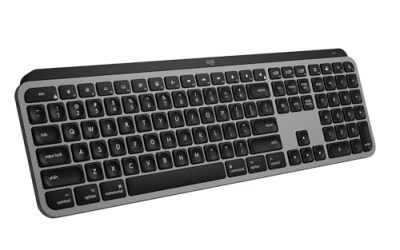
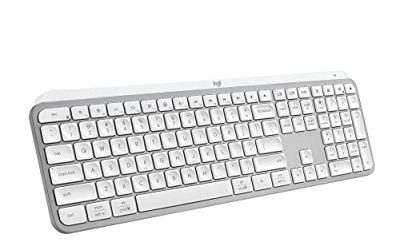
Logitech MX Keys S Wireless Keyboard, Pale Grey
The MX Keys S is the strongest all-round pick for an accountant who types all day and wants the quietest possible keystroke. Its low-profile keys have a short, fluid travel that suits fast number entry, and the backlighting adjusts to the room so late-evening closes stay readable without a desk lamp. It connects over Bluetooth or a receiver, pairs with up to three devices, and recharges over USB-C, which keeps the desk free of battery swaps. The full-size layout keeps the number pad exactly where a spreadsheet user expects it.
Specs
- Low profile, fluid precise quiet typing
- Programmable keys
- Backlighting
- Bluetooth
- USB-C rechargeable
- For Windows PC, Linux, Chrome, Mac
- Color: Pale Grey
Best for: Accountants who type for eight hours a day and want quiet, backlit keys on a full-size wireless board.
Watch out for: The low-profile key feel is very different from a traditional deep keyboard, so typists used to tall keys may need a week to adjust. Full customization of the programmable keys needs Logitech software installed.
Logitech K120 Full Size Wired Keyboard USB Plug-and-Play Windows – Black
The K120 is the plain, dependable choice for a desk that never moves. It plugs in over USB and starts working immediately, with no batteries, no pairing, and no software to install, which makes it easy to deploy across a whole accounts department. The low-profile keys are whisper-quiet by design, and the spill-resistant construction forgives the occasional knocked-over coffee during a busy close. Its standard full-size layout puts the number pad, function row, and navigation keys in familiar places, so anyone can sit down and start entering figures.
Specs
- Full size wired keyboard
- USB plug-and-play
- Whisper-quiet low-profile keys
- Spill-resistant design
- 104 deep-profile keys
- For Windows-based PCs
- Color: Black
Best for: A fixed office desk where a simple wired keyboard with a full number pad is all that is needed.
Watch out for: There is no backlighting, so it is a poor match for dim rooms or late-night work. The glossy keycaps show fingerprints quickly, and the wired connection limits where the board can sit on the desk.
Logitech MK540 Advanced Wireless Keyboard and Mouse Combo

The MK540 is the practical pick when the whole workstation needs replacing rather than just the keyboard. The full-size board comes with a palm rest, adjustable tilt legs, a spill-resistant design, and a dedicated calculator hotkey, which is a small detail that saves real time during reconciliations. Its reduced-noise keys keep shared offices calm, and the included ambidextrous mouse means one receiver covers both devices. A single Unifying receiver handles the pair, so only one USB port is used and setup takes seconds.
Specs
- Full-size wireless keyboard and mouse combo
- 2.4 GHz Unifying USB receiver
- Multimedia hotkeys, including calculator and battery check
- 3-year battery life
- Palm rest, spill-resistant design, adjustable tilt legs
- 10-key number pad
- For Windows, PC, Laptop
Best for: Setting up or refreshing a complete accounting workstation with one keyboard-and-mouse purchase.
Watch out for: The board is built around Windows, so Mac-specific key labels are absent. There is no backlighting, and the keyboard runs on replaceable batteries, so keeping spares on hand matters.
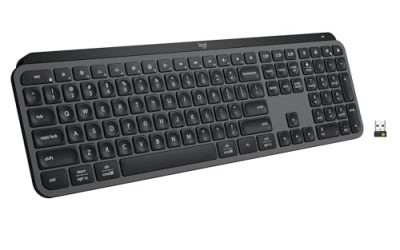
Logitech K580 Slim Multi-Device Wireless Keyboard, Graphite
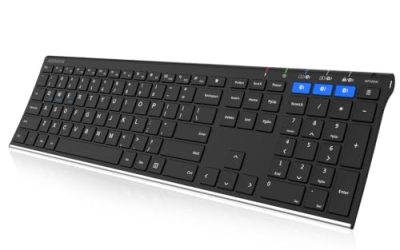
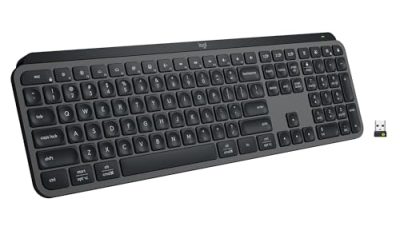
The K580 suits accountants whose work moves between a desktop, a laptop, and a tablet during the day. Its slim frame still carries a full 104-key layout with a numeric keypad, and the Easy Switch keys move typing between paired devices without re-pairing. The scissor-switch keys are whisper-quiet and laptop-like, which keeps long entry sessions comfortable, and the built-in cradle holds a phone or tablet upright so reference figures stay visible. Battery life is rated at 24 months, so charging is rarely a thought.
Specs
- Slim multi-device wireless keyboard
- Bluetooth and 2.4 GHz receiver
- Easy Switch between devices
- 24 month battery life
- 104 keys with full numeric keypad
- Scissor-switch keys, whisper-quiet typing
- Built-in cradle for device
- Color: Graphite
Best for: Accountants who switch between a desktop, laptop, and tablet and want one quiet board for all three.
Watch out for: The compact spacing can feel tight for people with large hands, and there is no backlighting for dark rooms. The board runs on replaceable AAA batteries rather than recharging over a cable.
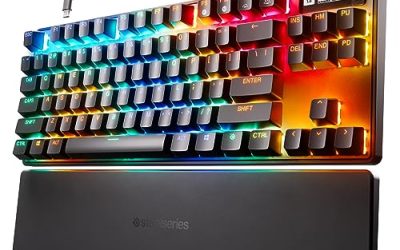
Keychron K10 Full Size Layout 104-Key Wireless Mechanical Keyboard, Hot-Swappable RGB Backlight with Gateron G Pro Brown Switch Aluminum Bluetooth/Wired Gaming Keyboard for Mac Windows

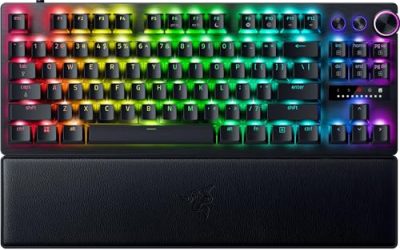
The K10 is the mechanical option for accountants who like a clear tactile bump under each key and a board that feels built to last. Its Gateron G Pro Brown switches give a soft tactile response without the sharp click of louder switches, and the hot-swappable sockets let the switches be changed later without soldering. The aluminum frame keeps the board planted during fast number entry, and it connects over Bluetooth or a wired connection, with a layout that works on both Mac and Windows. The RGB backlight can be toned down or switched off for office use.
Specs
- Full size layout, 104 keys
- Hot-swappable RGB backlight
- Gateron G Pro Brown switch
- Aluminum frame
- Bluetooth and wired connection
- For Mac and Windows
Best for: Accountants who prefer a tactile mechanical feel and want a heavy, durable board for years of daily entry.
Watch out for: Mechanical switches are louder than membrane or scissor boards, so the K10 can disturb a quiet shared office. The aluminum frame makes it heavier to move, and the RGB lighting needs to be turned off or dimmed in formal workplaces.
Which One Fits Your Situation
You enter numbers all day at one fixed desk
Pick the Logitech K120 if the desk never changes, because a wired board removes batteries and pairing from the equation entirely. If the mouse is also worn out, the MK540 covers both devices with one receiver and adds a palm rest and calculator hotkey. Both keep the full number pad in its standard place, which is what matters most for uninterrupted entry.
You work late closes in dim rooms
Pick the Logitech MX Keys S, because its backlighting adjusts to the room and its quiet keys will not carry across a dark, empty office. The low-profile keys stay comfortable through long evenings, and the rechargeable battery avoids hunting for spares at midnight. This is the only board in this list with backlighting built in.
You switch between a desktop, laptop, and tablet
Pick the Logitech K580, because its Easy Switch keys move typing between three paired devices with one press, and the built-in cradle keeps a tablet visible while you enter figures from it. The slim frame also travels well between a home office and a workplace desk, and the 24-month battery life means it is usually ready when you are.
You want a mechanical feel and a board that lasts for years
Pick the Keychron K10, because its tactile Brown switches confirm every keystroke and its hot-swappable sockets let the switches be replaced without buying a new board. The aluminum frame stays planted during fast entry, and the board works wired or wireless on both Mac and Windows, so it survives a change of computer.
Common Mistakes
- Buying a compact or tenkeyless board and discovering too late that spreadsheet work without a number pad is slow and error-prone.
- Choosing a loud clicky mechanical keyboard for a shared office, where the noise distracts colleagues during close week.
- Ignoring the layout of the number pad, then finding the Enter or plus key sits in an unfamiliar spot that breaks touch-typing habits.
- Picking a wireless board without checking whether it uses rechargeable or replaceable batteries, and being caught without a cable or spares mid-task.
- Treating backlighting as a gimmick, then struggling to read keys during early-morning or late-evening work in a dim room.
Frequently Asked Questions
Do accountants need a mechanical keyboard?
No, a mechanical keyboard is a preference rather than a requirement. Many accountants do their best work on quiet membrane or scissor-switch boards, because the softer keys disturb nobody and cause less finger fatigue over a long day. Mechanical boards suit people who like a clear tactile bump and a heavier frame, but they are louder, so choose one only if typing feel matters more to you than silence.
Is a wireless keyboard reliable enough for data entry?
Yes, a modern wireless keyboard with a 2.4 GHz receiver or stable Bluetooth connection is reliable for data entry, and dropped keystrokes are rare in normal office conditions. Keep the receiver close to the board, keep spare batteries nearby, and prefer a board with a wired fallback if your work cannot tolerate any interruption. A wired board remains the safest choice for a desk that never moves.
What layout feature matters most for accounting work?
A full-size layout with a dedicated 10-key number pad matters most, ahead of switch type or wireless features. The pad should have a wide zero key, a clearly marked Num Lock, and a large Enter key positioned where your right hand expects it. Everything else, from backlighting to multi-device pairing, is secondary to a number pad that matches your touch-typing habits.
Do I need backlighting on an accounting keyboard?
Backlighting is useful if you regularly work early mornings, late evenings, or in a dimly lit room, because it keeps the legends readable without a desk lamp. If you work standard hours in a bright office, it adds little and a non-backlit board will serve just as well. When you do choose backlighting, make sure its brightness is adjustable so it does not distract you during normal daylight work.
FAQ
Do accountants need a mechanical keyboard?
Is a wireless keyboard reliable enough for data entry?
What layout feature matters most for accounting work?
Do I need backlighting on an accounting keyboard?
More from Amazon
Programs that pair well with the guide above. Offers and eligibility are set by Amazon and may change.
Free shipping on eligible items, Prime Video and more. Eligible new members can start with a free trial.
Start a Prime free trialAd-free music streaming. Eligible new subscribers can start with a free trial.
Try Music Unlimited freeA Prime membership for ages 18-24 with a trial period. Eligibility is set by Amazon.
See Prime for Young AdultsAudiobooks and podcasts to listen to on the go. Eligible new members can start with a free trial.
Try Audible freeAs an Amazon Associate we earn from qualifying purchases.