Our Short List of 3

- Best for: Right-handed players who want a light, comfortable mouse for long ranked sessions.
- Brand: Logitech G
- Weight: 60g
- Sensor: HERO 2, up to 44,000 DPI
- Tracking: up to 888 IPS, 88g acceleration

- Best for: Palm-grip players who want a fuller ergonomic shape with smooth tracking.
- Brand: Razer
- Weight: 63g
- Sensor: Focus Pro 30K optical sensor
- Switches: Optical Switches Gen-3

- Best for: Claw and fingertip players who want a light symmetrical mouse for fast flicks.
- Brand: Razer
- Weight: 58g
- Sensor: Focus Pro 30K optical sensor
- Switches: Optical Mouse Switches Gen-3, 90-million-click lifecycle, 0.2ms actuation
All 4 Picks at a Glance
| Product | Specs | Action |
|---|---|---|
| Logitech G PRO X Superlight 2 DEX |
| Check price on Amazon |
| Razer DeathAdder V3 Pro |
| Check price on Amazon |
| Razer Viper V2 Pro |
| Check price on Amazon |
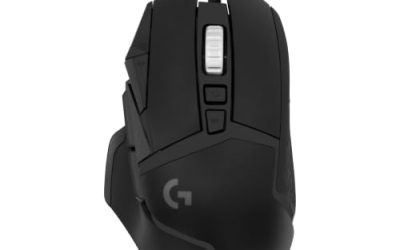
 Logitech G502 X Plus |
| Check price on Amazon |
Key takeaways
- Find the best gaming mouse for Apex Legends, from ultralight esports shapes to button-rich designs built for fast tracking, looting, and close fights.
Apex Legends asks a mouse to do three different jobs: track a legend who is sliding, jumping, and changing direction, flick to a new target when a third party arrives, and then loot, heal, and reposition without fumbling. A mouse that feels fine in a slow game can fall behind here, because the gap between a clean beam and a missed spray often comes down to how steadily the sensor follows fast movement and how quickly the shape lets you reset your aim. That is the real decision in this guide, and it matters more than any single headline number.
This guide is for ranked players pushing for higher lobbies, casual squads who want steadier aim in close fights, and anyone whose current mouse feels too heavy, too small, or too short on buttons for the way they play. The five mice below were chosen from their Amazon product listings, comparing sensor, weight, shape, buttons, and battery life so each pick fits a different grip and playstyle.
Quick Picks
As an Amazon Associate we earn from qualifying purchases
| Product | Best for | Key spec from title |
|---|---|---|
| Logitech G PRO X Superlight 2 DEX | Right-handed players who want a light ergonomic shape | 60g, HERO 2 sensor up to 44K DPI |
| Razer DeathAdder V3 Pro | Palm-grip players who want a fuller ergonomic shape | 63g, Focus Pro 30K optical sensor |
| Razer Viper V2 Pro | Claw and fingertip players who want a light symmetrical shape | 58g, Focus Pro 30K optical sensor |
| Logitech G502 X Plus | Players who want extra buttons for pings, heals, and abilities | HERO 25K sensor, 13 programmable buttons |
| Razer Viper V3 Pro | Players who want the lightest mouse with the fastest polling | 54g, 35K DPI optical sensor, 8K polling |
How to Choose
Match the shape to your grip
Apex Legends rewards a mouse that stays comfortable through long sessions, so shape comes before sensor numbers. Palm-grip players usually do better with a taller, fuller shell that fills the hand, while claw and fingertip players tend to prefer a lower, narrower shape they can lift and reset quickly. If your hand cramps after a few matches, the shape is wrong, even when the sensor is excellent. Compare length and height against the mouse you already own, and remember that a symmetrical shape suits both hands, while an ergonomic shape is built for one hand only.
Weigh the mouse, not just the sensor
Weight changes how fast you can flick between targets and how tired your wrist feels by the third match. Ultralight mice around 54 to 63 grams make quick direction changes easier, which suits aggressive players who push fights and track sliding legends. Heavier mice around 100 grams can feel steadier for players who hold angles and take slower, deliberate shots. Neither weight is better on its own, so think about whether you flick constantly or hold still more often, and pick the weight that matches that habit.
Set polling rate and DPI for tracking
Polling rate decides how often the mouse reports its position to the computer, and a higher rate gives smoother tracking when a target moves fast. Mice in this guide offer polling up to 8,000 Hz, which helps when you are beaming a legend at close range. DPI sets sensitivity, and most Apex Legends players do better with a moderate DPI paired with a lower in-game sensitivity, because that combination keeps small aim adjustments steady. Pick a mouse that lets you change DPI on the mouse itself, so you can switch settings without opening software mid-match.
Count the buttons you will actually press
Apex Legends uses more than aim: pinging enemies, calling for loot, healing, using a tactical ability, and swapping weapons all happen while you are moving. A mouse with two side buttons covers the basics, while a mouse with more buttons lets you bind a heal or a ping where your thumb already rests. More buttons only help when you can reach each one without shifting your grip, so check the button layout against your hand size. Extra buttons that sit under the wrong finger will slow you down instead of helping.
The 5 Best Options
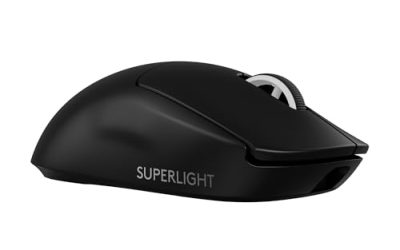
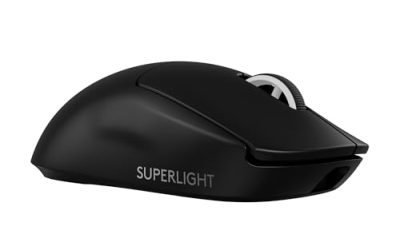
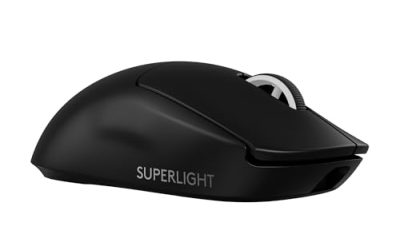
Logitech G PRO X Superlight 2 DEX
- Best for: Right-handed players who want a light, comfortable mouse for long ranked sessions.
- Brand: Logitech G
- Weight: 60g
- Sensor: HERO 2, up to 44,000 DPI
- Tracking: up to 888 IPS, 88g acceleration
Right-handed players who want a light, comfortable mouse for long ranked sessions.
The ergonomic shape is built for the right hand only, so check your handedness before buying.
The Superlight 2 DEX suits right-handed players who want a light mouse with a shape that supports the whole hand during long Apex Legends sessions. Its ergonomic shell fills the palm without adding bulk, and the 60-gram weight keeps flicks quick when a fight turns into a scramble. The HERO 2 sensor tracks fast slides and jumps cleanly, and the high polling rate keeps the cursor smooth during close-range beams. This is the pick for players who hold the mouse for hours and want comfort without giving up speed.
Razer DeathAdder V3 Pro
- Best for: Palm-grip players who want a fuller ergonomic shape with smooth tracking.
- Brand: Razer
- Weight: 63g
- Sensor: Focus Pro 30K optical sensor
- Switches: Optical Switches Gen-3
Palm-grip players who want a fuller ergonomic shape with smooth tracking.
The shape is ergonomic and right-handed, so claw players with small hands should check the size first.
The DeathAdder V3 Pro suits palm-grip players who want a fuller shape that supports the hand through long fights and loot runs. At 63 grams it stays light enough for fast flicks, while the sculpted shell keeps the hand relaxed when you are holding an angle or tracking a legend across open ground. The Focus Pro 30K sensor follows quick movement reliably, and the included HyperPolling dongle lifts the polling rate for smoother tracking. This is the pick for players who found symmetrical mice too flat and want a shape that fills the hand.
Razer Viper V2 Pro
- Best for: Claw and fingertip players who want a light symmetrical mouse for fast flicks.
- Brand: Razer
- Weight: 58g
- Sensor: Focus Pro 30K optical sensor
- Switches: Optical Mouse Switches Gen-3, 90-million-click lifecycle, 0.2ms actuation
Claw and fingertip players who want a light symmetrical mouse for fast flicks.
The symmetrical shape has fewer side buttons than button-rich mice, so check the button count against your bindings.
The Viper V2 Pro suits claw and fingertip players who want a light symmetrical mouse they can lift and reset in a fraction of a second. At 58 grams it moves fast, which helps when a legend slides past you and you need to snap to a new target. The Focus Pro 30K sensor tracks cleanly on a wide range of surfaces, and the on-mouse DPI controls let you switch sensitivity without opening software. This is the pick for aggressive players who push fights, reposition constantly, and want nothing extra getting in the way.
Logitech G502 X Plus
- Best for: Players who want many programmable buttons for pings, heals, and abilities.
- Brand: Logitech G
- Sensor: HERO 25K, 100 to 25,600 DPI
- Switches: LIGHTFORCE hybrid optical-mechanical switches
- Buttons: 13 programmable buttons
Players who want many programmable buttons for pings, heals, and abilities.
At 106 grams it is much heavier than the ultralight mice here, so fast flick players should weigh that trade-off.
The G502 X Plus suits players who want a mouse that carries more of the game on its buttons, from pings and heals to tactical abilities and weapon swaps. Its 13 programmable buttons put common actions under the thumb, so you can call out an enemy or start a heal without taking a finger off the trigger. The HERO 25K sensor tracks precisely, and the dual-mode scroll wheel switches between a notched feel and free spin for fast loot scrolling. This is the pick for players who like a fuller, feature-rich mouse and use every button they are given.
Razer Viper V3 Pro
The Viper V3 Pro suits players who want the lightest mouse in this guide with the fastest polling, built for pure tracking speed. At 54 grams it feels almost weightless in the hand, which helps when you are flicking between two legends or tracking a target that keeps changing direction. The 35K DPI sensor and 8,000 Hz polling keep the cursor smooth during the fastest fights, and the symmetrical shape works for claw and fingertip grips. This is the pick for competitive players who care most about raw aim and want the quickest response the list offers.
Specs
- Brand: Razer
- Weight: 54g
- Sensor: 35K DPI optical sensor
- Switches: Gen3 Optical Switches
- Buttons: 8 programmable buttons
- Polling: up to 8,000 Hz
- Battery life: up to 95 hours
- Wireless: HyperSpeed Wireless
- Shape: symmetrical
- Model number: RZ01-05120100-R3U1
Best for: Competitive players who want the lightest mouse with the fastest polling for pure aim.
Watch out for: The very light weight can feel too loose at first for players coming from a heavier mouse, so give it a few matches to adjust.
ASIN: B0CW25XR5R
Which One Fits Your Situation
You flick and track at high sensitivity
Pick the Razer Viper V3 Pro or the Logitech G PRO X Superlight 2 DEX. Both are ultralight and pair a strong sensor with high polling, which keeps tracking smooth when a legend slides or jumps. The Viper V3 Pro is the lighter and suits claw and fingertip grips, while the Superlight 2 DEX suits right-handed players who want an ergonomic shape. Either one handles the fastest fights without feeling sluggish.
You palm grip and want a fuller shape
Pick the Razer DeathAdder V3 Pro. Its sculpted ergonomic shell fills the palm and stays comfortable through long sessions, while its 63-gram weight keeps it light enough for quick flicks. The Focus Pro 30K sensor tracks steadily, and the included HyperPolling dongle raises the polling rate for smoother aim. This is the right pick when symmetrical mice feel too flat and your hand needs more support.
You want buttons for pings, heals, and abilities
Pick the Logitech G502 X Plus. Its 13 programmable buttons let you bind a ping, a heal, a tactical ability, and a weapon swap where your thumb already rests, so you spend less time reaching for the keyboard mid-fight. The HERO 25K sensor keeps aim precise, and the dual-mode scroll wheel makes fast loot scrolling easy. Choose this one when your playstyle depends on using abilities and callouts quickly.
You want the lightest symmetrical shape for claw or fingertip grip
Pick the Razer Viper V2 Pro. At 58 grams it lifts and resets quickly, which suits players who reposition constantly and snap between targets. The Focus Pro 30K sensor and Gen-3 switches give fast, reliable clicks, and the on-mouse DPI controls let you change sensitivity without opening software. Choose this one when you want a simple, fast mouse with no extra weight.
Common Mistakes
- Choosing a mouse by DPI alone, when shape and weight affect aim far more in fast fights.
- Picking an ergonomic right-handed mouse without checking handedness, then finding the shape fights your hand.
- Setting sensitivity so high that small aim corrections become wild, instead of pairing moderate DPI with lower in-game sensitivity.
- Binding too many actions to buttons you cannot reach without shifting your grip mid-fight.
- Ignoring battery life on a wireless mouse and running out of charge during a ranked session.
Frequently Asked Questions
What DPI should I use for Apex Legends?
Most players do better with a moderate DPI, such as 800 or 1600, paired with a lower in-game sensitivity. That combination keeps small aim adjustments steady while still letting you turn quickly. Start with one of those settings, play several matches, and adjust until tracking feels natural. Avoid changing DPI every match, since your muscle memory needs time to settle.
Is a wireless mouse fast enough for Apex Legends?
Yes, the wireless mice in this guide use low-latency wireless connections built for competitive play, and several offer polling up to 8,000 Hz. The difference from a wired mouse is not something most players will notice in a match. Keep the receiver close to the mouse, keep the battery charged, and the connection will hold up through fast fights.
How many buttons do I need for Apex Legends?
Two side buttons cover the basics, such as a ping and a heal, and most players are fine with that. More buttons help when you want a tactical ability, a weapon swap, or a second ping within thumb reach. Only add buttons you can press without shifting your grip, since a button you cannot reach is extra weight and bulk.
Does mouse weight really change my aim?
Weight changes how you can start, stop, and reverse the mouse, which matters when targets slide and jump. Lighter mice make flicks and direction changes easier, while heavier mice can feel steadier for slow, deliberate aim. The best weight depends on your grip and playstyle, so try the lightest option first if you flick often, and a heavier shape if you hold angles.
FAQ
What DPI should I use for Apex Legends?
Is a wireless mouse fast enough for Apex Legends?
How many buttons do I need for Apex Legends?
Does mouse weight really change my aim?
More from Amazon
Programs that pair well with the guide above. Offers and eligibility are set by Amazon and may change.
Free shipping on eligible items, Prime Video and more. Eligible new members can start with a free trial.
Start a Prime free trialAd-free music streaming. Eligible new subscribers can start with a free trial.
Try Music Unlimited freeA Prime membership for ages 18-24 with a trial period. Eligibility is set by Amazon.
See Prime for Young AdultsAudiobooks and podcasts to listen to on the go. Eligible new members can start with a free trial.
Try Audible freeAs an Amazon Associate we earn from qualifying purchases.