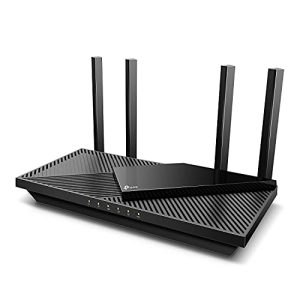
Our Short List of 3

- Best for: A first Wi-Fi 6 upgrade in a busy small home.
- Standard: Wi-Fi 6 (802.11ax), dual-band
- Speed class: AX1800 — 1,201 Mbps on 5 GHz, 574 Mbps on 2.4 GHz
- Wired ports: 1 gigabit WAN port, 4 gigabit LAN ports
- Antennas: 4 high-gain antennas with beamforming

- Best for: Everyday use where built-in security without a subscription matters.
- Standard: Wi-Fi 6 (802.11ax), dual-band
- Speed class: AX1800 — 1,201 Mbps on 5 GHz, 574 Mbps on 2.4 GHz
- Wired ports: 1 gigabit WAN port, 4 gigabit LAN ports
- Antennas: 4 external antennas

- Best for: A small flat moving from an old router to Wi-Fi 6.
- Standard: Wi-Fi 6 (802.11ax), dual-band
- Speed class: AX1500 — 1,201 Mbps on 5 GHz, 300 Mbps on 2.4 GHz
- Wired ports: 4 gigabit LAN ports
- Features: OFDMA, MU-MIMO, beamforming, parental controls, Alexa support
All 4 Picks at a Glance
| Product | Specs | Action |
|---|---|---|
| TP-Link Archer AX21 |
| Check price on Amazon |
| ASUS RT-AX1800S |
| Check price on Amazon |
| TP-Link Archer AX10 |
| Check price on Amazon |
 TP-Link Archer A54 |
| Check price on Amazon |
Our Top Picks
- ASUS RT-AX1800S Dual Band WiFi 6 Extendable RouterRouter9.06 x 5.28 x 2.2 inches0.82 poundsCheck on Amazon
- TP-Link AC1200 WiFi Router Dual Band Wireless Internet5.7 x 9.1 x 1.5 inches5.7 x 9.1 x 1.5 inches1.45 poundsCheck on Amazon
Choosing an affordable wireless router is a decision about which corners to cut, not about whether a lower-cost router can work at all. Every model in this guide makes a different trade: one keeps gigabit wired ports and drops the newest radio band, another keeps modern Wi-Fi 6 and settles for a slower speed class, and a third strips the wired side down to the basics so the wireless side stays simple. The right pick depends on how your household connects — how many devices share the network, whether anything plugs in with a cable, and how far the signal must travel.
This guide is for renters replacing an ISP-supplied box, families setting up a first home network, and anyone whose old router drops video calls whenever someone else starts a stream. It covers four standalone wireless routers sold on Amazon US, from an AX1800 Wi-Fi 6 upgrade to a basic AC1200 model for light use, each chosen from the name and specifications on its Amazon product page.
Quick Picks
As an Amazon Associate we earn from qualifying purchases.
| Product | Best for | Key spec |
|---|---|---|
| TP-Link Archer AX21 | A first Wi-Fi 6 upgrade for a busy small home | AX1800 dual-band Wi-Fi 6 |
| ASUS RT-AX1800S | Everyday use with built-in security and no subscription extras | AX1800 dual-band Wi-Fi 6 |
| TP-Link Archer AX10 | The simplest step into Wi-Fi 6 for a small flat | AX1500 dual-band Wi-Fi 6 |
| TP-Link Archer A54 | Basic dual-band Wi-Fi for light use in a small home | AC1200 dual-band Wi-Fi 5 |
How to Choose
Start with the Wi-Fi generation, not the headline speed
A speed class such as AX1800 or AC1200 adds both bands together, and no single device ever uses that combined figure, so look past the headline number. Wi-Fi 6 routers handle crowded networks better than Wi-Fi 5 models because OFDMA and MU-MIMO serve several devices at once instead of queuing them, which steadies video calls while a household streams and works. Among the routers here, the AX1800 and AX1500 models are Wi-Fi 6, while the AC1200 model is Wi-Fi 5. Check the band split against the devices you own, since recent phones and laptops gain the most from Wi-Fi 6.
Check the wired ports before you buy
Wireless speed gets all the attention, yet the Ethernet ports decide whether a wired console, desktop or TV gets the full connection. Three routers in this guide carry gigabit LAN ports, which pass a fast plan to a cable without bottlenecking it, while the AC1200 model uses 10/100 Mbps Fast Ethernet ports that cap every wired device at 100 Mbps. That limit is easy to miss because the listing still calls the router dual-band and the wireless side looks fine on paper. Count what you plan to plug in: a console, a desktop and a streaming box already fill three ports, and too few usable LAN ports force an extra switch.
Match coverage to the shape of the home
A router in a hallway cupboard performs nothing like the same router on an open shelf, so placement and antennas matter as much as the spec sheet. Four external antennas with beamforming, as on every pick here, focus the signal toward devices rather than spraying it evenly, which matters in long homes. The 5 GHz band carries the fastest traffic but fades sooner through walls, while 2.4 GHz reaches further at lower speed, so distant devices drift onto the slower band. For a dead corner, look for a mesh path first: EasyMesh on the TP-Link models and AiMesh on the ASUS model let a compatible extender join the same network later.
Weigh the software you will actually use
Two routers with identical radios can feel very different after a month, because the app and security tools decide how often you touch the settings. Parental controls, a guest network and a phone app for setup are the features most households use weekly, and all four picks offer them in some form, while VPN support and network-wide security separate the Wi-Fi 6 models from the basic AC1200 pick. Built-in security without a subscription matters: the ASUS model includes AiProtection Classic, and the TP-Link Wi-Fi 6 models include HomeShield tools, so protection does not depend on renewing anything. Check whether the features you want need an account or an app you will keep.
The 4 Best Options
TP-Link Archer AX21
- Best for: A first Wi-Fi 6 upgrade in a busy small home.
- Standard: Wi-Fi 6 (802.11ax), dual-band
- Speed class: AX1800 — 1,201 Mbps on 5 GHz, 574 Mbps on 2.4 GHz
- Wired ports: 1 gigabit WAN port, 4 gigabit LAN ports
- Antennas: 4 high-gain antennas with beamforming
A first Wi-Fi 6 upgrade in a busy small home.
No 6 GHz band, so newer Wi-Fi 6E devices fall back to the 5 GHz band.
For a household moving off an ISP-supplied box, the Archer AX21 covers the most ground with the fewest compromises. Its AX1800 Wi-Fi 6 radio splits into 1,201 Mbps on 5 GHz and 574 Mbps on 2.4 GHz, which suits streaming, calls and smart-home devices sharing one network, and OFDMA with MU-MIMO keeps that mix steadier than an older Wi-Fi 5 router would. Four gigabit LAN ports take care of a console, a desktop and a TV without a switch, and the Tether app plus Alexa support make setup straightforward. EasyMesh support leaves a path to wider coverage later.
Watch out for: No 6 GHz band, so newer Wi-Fi 6E devices fall back to the 5 GHz band.
ASUS RT-AX1800S
- Best for: Everyday use where built-in security without a subscription matters.
- Standard: Wi-Fi 6 (802.11ax), dual-band
- Speed class: AX1800 — 1,201 Mbps on 5 GHz, 574 Mbps on 2.4 GHz
- Wired ports: 1 gigabit WAN port, 4 gigabit LAN ports
- Antennas: 4 external antennas
Everyday use where built-in security without a subscription matters.
No USB port for shared storage, and no 6 GHz band for Wi-Fi 6E devices.
Households that want security handled by the router itself, without signing up for anything extra, will find the RT-AX1800S the most complete pick here. It matches the Archer AX21 on the headline figures — dual-band AX1800 Wi-Fi 6 with 1,201 Mbps on 5 GHz and 574 Mbps on 2.4 GHz, plus a gigabit WAN port and four gigabit LAN ports — then adds AiProtection Classic security and an Instant Guard VPN, both included without a subscription. Four external antennas and AiMesh support cover the practical side: solid room-to-room coverage now, and the option to add a compatible ASUS node later.
Watch out for: No USB port for shared storage, and no 6 GHz band for Wi-Fi 6E devices.
TP-Link Archer AX10
- Best for: A small flat moving from an old router to Wi-Fi 6.
- Standard: Wi-Fi 6 (802.11ax), dual-band
- Speed class: AX1500 — 1,201 Mbps on 5 GHz, 300 Mbps on 2.4 GHz
- Wired ports: 4 gigabit LAN ports
- Features: OFDMA, MU-MIMO, beamforming, parental controls, Alexa support
A small flat moving from an old router to Wi-Fi 6.
The 2.4 GHz band tops out at 300 Mbps, so older devices and smart-home gear share a slower lane.
When the goal is simply to step into Wi-Fi 6 without paying for speed the household will not use, the Archer AX10 is the most direct route. Its AX1500 radio delivers 1,201 Mbps on 5 GHz, the same fast-band figure as the AX1800 models here, and gives up ground only on the 2.4 GHz band, where it offers 300 Mbps for smart plugs, cameras and other low-demand devices. Four gigabit LAN ports are included despite the entry positioning, so a wired console or desktop is not penalised, and OFDMA with MU-MIMO plus beamforming covers the Wi-Fi 6 essentials.
Watch out for: The 2.4 GHz band tops out at 300 Mbps, so older devices and smart-home gear share a slower lane.
TP-Link Archer A54
- Best for: Light use in a small home where most devices connect over Wi-Fi.
- Standard: Wi-Fi 5 (802.11ac), dual-band
- Speed class: AC1200 — 867 Mbps on 5 GHz, 300 Mbps on 2.4 GHz
- Wired ports: 4 x 10/100 Mbps Fast Ethernet ports
- Antennas: 4 external antennas
Light use in a small home where most devices connect over Wi-Fi.
The wired ports cap at 100 Mbps, so a wired console or PC cannot use a faster plan.
Light users should not pay for radio capacity they will never touch, and the Archer A54 is built exactly for that case. Its AC1200 Wi-Fi 5 radio pairs 867 Mbps on 5 GHz with 300 Mbps on 2.4 GHz, which is enough for browsing, streaming and video calls in a small home, and four external antennas keep the signal steady across a flat. WPA3 security, EasyMesh compatibility, a guest network and access point mode are all included, so the basics are covered despite the entry positioning. This is the router to choose when most devices connect over Wi-Fi and the household wants the simplest possible box.
Watch out for: The wired ports cap at 100 Mbps, so a wired console or PC cannot use a faster plan.
Which One Fits Your Situation
A small flat replacing an ISP router
Start with the Archer AX10 if the phones and laptops support Wi-Fi 6, since it brings the current generation and gigabit LAN ports to a small space. Pick the Archer A54 instead when the household only browses, streams and takes video calls, because its AC1200 radio covers that load with the simplest setup here. Either way, place the router on an open shelf near the centre of the flat, not inside a cabinet.
A family home with children and guests
Choose the ASUS RT-AX1800S when parental controls and network security are the priority, since AiProtection Classic and the ASUS Router app cover both without a subscription. The Archer AX21 is the alternative when the household also wires in a console or desktop, because its HomeShield tools and four gigabit LAN ports handle that mix well. Set up a separate guest network, so visitors get internet without reaching shared drives or smart-home devices.
A household that still wires in a console or PC
Rule out the Archer A54: its 10/100 Mbps ports cap wired devices, which wastes a fast plan on the devices that need it most. Between the remaining three, the Archer AX21 and ASUS RT-AX1800S both offer a gigabit WAN port and four gigabit LAN ports, so the choice comes down to software — HomeShield and Alexa on the TP-Link side, AiProtection Classic and Instant Guard VPN on the ASUS side.
A renter who may move or extend coverage later
Renters should favour a router that can grow rather than one that must be replaced; both Wi-Fi 6 leaders here offer that path. The Archer AX21 supports EasyMesh, so a compatible TP-Link extender can join the same network later, while the ASUS RT-AX1800S supports AiMesh with ASUS nodes. The Archer A54 also carries EasyMesh, a reasonable fallback for a renter whose next home is only slightly bigger.
Common Mistakes
- Judging a router by its combined speed class alone, when the band split and the Wi-Fi generation say more about real use.
- Buying a router with 10/100 Mbps ports for a household that wires in a console or PC, then wondering why wired speed never rises.
- Hiding the router in a cabinet, behind a TV or in a far corner, and blaming the model for dead zones that placement caused.
- Assuming a router includes a modem: these four are routers only, so a separate modem or fibre terminal is still needed.
- Choosing Wi-Fi 5 to save money while the household already owns Wi-Fi 6 phones and laptops that would benefit from the newer generation.
Frequently Asked Questions
Is an affordable router enough for streaming and video calls?
Yes, for most households. Streaming and video calls need steadiness more than a headline speed figure, and every router here handles that load. The Wi-Fi 6 models cope better when several people stream, call and browse at once, because OFDMA and MU-MIMO share the radio better. If calls freeze, check placement and each device’s band before blaming the router.
Do I need Wi-Fi 6, or is Wi-Fi 5 still fine?
Wi-Fi 5 suits light use in a small home, which is why the Archer A54 is here. Wi-Fi 6 is the better choice with newer phones and laptops, many smart-home devices, or several people online at once, since it manages crowded airwaves better. If the replacement must last years, Wi-Fi 6 is the safer direction.
Will an affordable router work with my internet provider?
Yes, if the connection arrives through a separate modem or fibre terminal, because these routers plug into that box through their WAN port. Check whether your provider’s box also acts as a router, since two routers can create a second network that confuses smart-home gear. Use the provider box in bridge mode, or run the new router as an access point.
Can I extend coverage later without replacing the router?
Yes, for three of the four picks. The Archer AX21 and Archer A54 support EasyMesh, and the ASUS RT-AX1800S supports AiMesh, so a compatible extender or node can join later. The Archer AX10 has no mesh path listed, so it suits homes one router covers. Confirm an extender matches the router’s mesh system, since EasyMesh and AiMesh do not mix.
FAQ
Is an affordable router enough for streaming and video calls?
Do I need Wi-Fi 6, or is Wi-Fi 5 still fine?
Will an affordable router work with my internet provider?
Can I extend coverage later without replacing the router?
More from Amazon
Programs that pair well with the guide above. Offers and eligibility are set by Amazon and may change.
Free shipping on eligible items, Prime Video and more. Eligible new members can start with a free trial.
Start a Prime free trialAd-free music streaming. Eligible new subscribers can start with a free trial.
Try Music Unlimited freeA Prime membership for ages 18-24 with a trial period. Eligibility is set by Amazon.
See Prime for Young AdultsAudiobooks and podcasts to listen to on the go. Eligible new members can start with a free trial.
Try Audible freeAs an Amazon Associate we earn from qualifying purchases.