Our Short List of 3

- Best for: fast shooter players who want the shortest reach and a crisp clicky press.
- 60 percent compact gaming keyboard layout
- Clicking optical switches
- Doubleshot PBT keycaps
- Removable USB-C cable

- Best for: players who want to tune how deep each key press goes for different games.
- Compact 60 percent form factor
- Adjustable actuation HyperMagnetic switches
- RGB lighting
- PBT keycaps

- Best for: players who travel or switch between desk and couch and want wireless freedom.
- 60 percent ultra-compact TKL mechanical keyboard
- GX Optical Tactile switches
- LIGHTSPEED wireless, Bluetooth, and USB connections
- LIGHTSYNC RGB lighting
All 5 Picks at a Glance
| Product | Specs | Action |
|---|---|---|
| Razer Huntsman Mini |
| Check price on Amazon |
| SteelSeries Apex Pro Mini |
| Check price on Amazon |
| Logitech G PRO X 60 |
| Check price on Amazon |
 HyperX Alloy Origins 60 |
| Check price on Amazon |
 Corsair K65 RGB MINI |
| Check price on Amazon |
Our Top Picks
A full-size keyboard spreads the keys you use most across a wide frame, and for smaller hands that distance turns into constant reaching. The WASD cluster sits far from the modifiers, the function row feels like a stretch, and the number pad pushes the mouse arm outward into an awkward angle. A compact board fixes the geometry instead of asking your fingers to adapt: the core keys sit closer together, the mouse moves nearer, and your wrists stay in a neutral line through long sessions.
This guide is for players with shorter fingers, younger gamers, and anyone whose hands tire on a standard layout, as well as laptop players who want a board that travels well. Every pick below is a compact gaming keyboard with a 60 percent layout, and each specification comes from its Amazon listing title or specification table, so you can match the switches, connection, and keycaps to the exact model before you buy.
Quick Picks
As an Amazon Associate we earn from qualifying purchases
| Product | Best for | Key spec from title |
|---|---|---|
| Razer Huntsman Mini | Fast shooters on a tight desk | Clicking optical switches, doubleshot PBT keycaps |
| SteelSeries Apex Pro Mini | Tuning actuation per game | Adjustable actuation, compact 60 percent form factor |
| Logitech G PRO X 60 | Wireless play and travel | LIGHTSPEED wireless, GX Optical Tactile switches |
| HyperX Alloy Origins 60 | A solid board that stays planted | Full aircraft-grade aluminum body, HyperX Red switches |
| Corsair K65 RGB MINI | Cherry MX feel in a small frame | Cherry MX Red switches, per-key RGB backlighting |
How to Choose
Pick the Layout That Shortens Every Reach
A 60 percent board drops the number pad, the function row, and the navigation cluster, which pulls the keys you actually press into a much tighter block. That shorter span is the whole point for small hands: WASD, Shift, Space, and the number keys sit within easy finger travel instead of spread across a wide slab. The trade is that arrows, function keys, and media controls move to a Fn layer, so check how the board labels those second functions. Side-printed legends make the layer easy to learn, while unmarked keys force you to memorize combinations. A 65 percent board keeps dedicated arrows if you use them constantly, but it gives back some of the width you just saved.
Match the Switch to Your Fingers
Switches decide how much force each press needs and how the board sounds, and both matter more when your fingers are short. Linear switches glide straight down with no bump, which suits fast repeated presses in shooters, while tactile switches add a small bump that confirms each press without a loud click. Clicky switches give the strongest feedback but carry the most noise, so they fit a private room better than a shared one. Optical switches actuate with light instead of metal contact, and several boards in this guide use them for faster, more consistent presses. Lighter actuation also means less finger fatigue across a long evening of play.
Choose Wired, Wireless, or Both
A wired board never needs charging and keeps its connection simple, which is why many competitive players still prefer a detachable USB-C cable. Wireless boards free the desk and travel better, and modern 2.4 GHz wireless now answers fast enough for serious play, with Bluetooth as a second option for a laptop or tablet. The catch is battery: a wireless board needs charging, and a dead battery mid-match is a real annoyance. Boards that offer all three connections give you the most flexibility, since you can play wired at your desk and switch to wireless on the couch. Check whether the board ships with a carrying case if you plan to move it often.
Check Keycaps, Build, and the Fn Layer
Keycaps take the most wear, so their material shapes how the board feels after months of use. Double-shot PBT keycaps resist shine and keep their legends crisp far longer than thin ABS caps, and they give each press a deeper, more solid feel. The case matters too: a full aluminum body stays planted during intense flicks, while a plastic shell is lighter to carry but can flex under hard typing. Look for onboard memory if you play on more than one computer, since it carries your lighting and macros with the board. Read the Fn layer before you buy, because a compact board lives or dies by how quickly you can reach its hidden keys.
The 5 Best Options
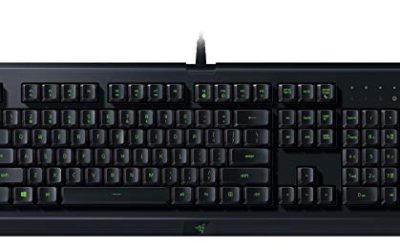
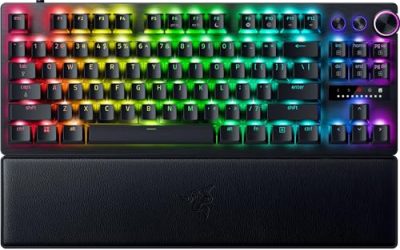
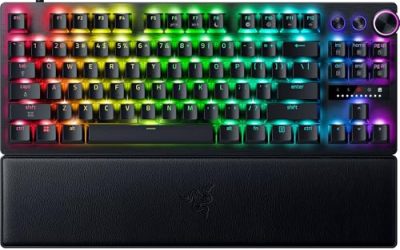
Razer Huntsman Mini
- Best for: fast shooter players who want the shortest reach and a crisp clicky press.
- 60 percent compact gaming keyboard layout
- Clicking optical switches
- Doubleshot PBT keycaps
- Removable USB-C cable
fast shooter players who want the shortest reach and a crisp clicky press.
there are no dedicated arrow keys, so every arrow press goes through the Fn layer; confirm it is still sold before buying.
The Huntsman Mini suits the player who wants the smallest possible footprint without giving up a proper mechanical feel. Its 60 percent layout pulls every key within close reach, and the clicking optical switches fire with a sharp, tactile snap that makes each press easy to confirm in a firefight. Doubleshot PBT keycaps keep the legends readable after heavy use, and the removable USB-C cable means the board packs flat into a bag for LAN nights. Chroma RGB lighting runs through Razer Synapse, and onboard memory carries your settings between machines.
Watch out for: there are no dedicated arrow keys, so every arrow press goes through the Fn layer; confirm it is still sold before buying.
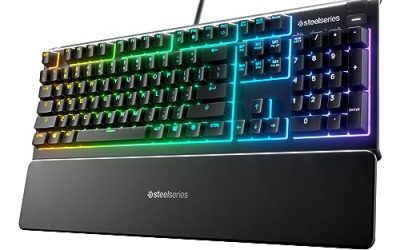
SteelSeries Apex Pro Mini
- Best for: players who want to tune how deep each key press goes for different games.
- Compact 60 percent form factor
- Adjustable actuation HyperMagnetic switches
- RGB lighting
- PBT keycaps
players who want to tune how deep each key press goes for different games.
adjustable actuation takes time to set up per game, and the wired-only connection means no wireless option; confirm it is still sold before buying.
The Apex Pro Mini is the pick for players who change games often and want one board that adapts with them. Its adjustable actuation lets you set a hair-trigger press for shooters and a deeper press for typing, all on the same switches, so you stop choosing between speed and accuracy. The compact 60 percent frame keeps the keys close for smaller hands, PBT keycaps hold up to daily wear, and RGB lighting runs through SteelSeries software. A USB-C connection keeps the setup simple, and the board stays small enough to slide into a backpack between sessions.
Watch out for: adjustable actuation takes time to set up per game, and the wired-only connection means no wireless option; confirm it is still sold before buying.
Logitech G PRO X 60
- Best for: players who travel or switch between desk and couch and want wireless freedom.
- 60 percent ultra-compact TKL mechanical keyboard
- GX Optical Tactile switches
- LIGHTSPEED wireless, Bluetooth, and USB connections
- LIGHTSYNC RGB lighting
players who travel or switch between desk and couch and want wireless freedom.
wireless play needs charging, and the Fn layer carries arrows and function keys; confirm it is still sold before buying.
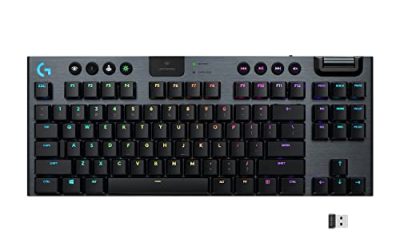
The G PRO X 60 is the travel pick in this group, and it is the only board here that cuts the cable entirely. LIGHTSPEED wireless, Bluetooth, and USB give you three ways to connect, so the same board works at your desk, on a laptop, and on the couch without swapping hardware. GX Optical Tactile switches give each press a clear bump with fast actuation, and KEYCONTROL lets you remap every key across five layers to recover the commands a 60 percent layout hides. A volume roller and media controls sit within thumb reach, and the included carrying case protects the board on the move.
Watch out for: wireless play needs charging, and the Fn layer carries arrows and function keys; confirm it is still sold before buying.
HyperX Alloy Origins 60
- Best for: players who want a heavy, rigid board that never slides during intense play.
- Petite 60 percent form factor
- Linear HyperX Red switches
- Full aircraft-grade aluminum body
- Double shot PBT keycaps with side-printed secondary functions
players who want a heavy, rigid board that never slides during intense play.
the aluminum body adds weight if you carry the board daily, and the wired-only design needs a cable; confirm it is still sold before buying.
The Alloy Origins 60 is the board to pick when you want a compact keyboard that feels like it will never move. Its full aircraft-grade aluminum body gives the board real weight, so it stays planted during fast mouse flicks and hard typing, and the petite 60 percent layout frees up desk space for sweeping mouse movements. HyperX Red linear switches glide smoothly with no bump, which suits rapid repeated presses, and the double-shot PBT keycaps carry side-printed secondary functions so the Fn layer stays visible. NGENUITY software handles macros, lighting, and Game Mode, while three onboard profiles remember your setup.
Watch out for: the aluminum body adds weight if you carry the board daily, and the wired-only design needs a cable; confirm it is still sold before buying.
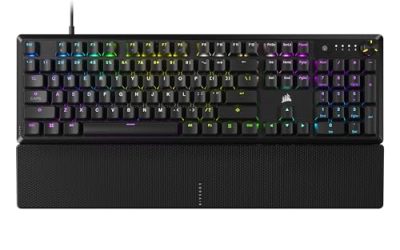
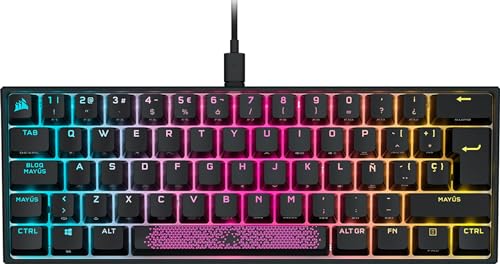
Corsair K65 RGB MINI
- Best for: players who want genuine Cherry MX Red switches in a compact board.
- 60 percent mechanical gaming keyboard
- Cherry MX Red linear mechanical keyswitches
- Customizable per-key RGB backlighting
- Detachable USB Type-C cable
players who want genuine Cherry MX Red switches in a compact board.
the 60 percent layout hides arrows and function keys behind the Fn layer, and iCUE setup takes a few minutes; confirm it is still sold before buying.
The K65 RGB MINI brings classic Cherry MX switches into a small frame, which makes it the natural pick if you already know and like the Cherry feel. Cherry MX Red linear switches press smoothly with no tactile bump, and per-key RGB backlighting lets you color-code abilities, movement keys, and macros at a glance. PBT double-shot keycaps resist wear far better than standard caps, and the detachable USB Type-C cable makes the board easy to pack away. AXON hyper-processing technology drives fast input response, and iCUE software handles lighting, macros, and remapping across your setup.
Watch out for: the 60 percent layout hides arrows and function keys behind the Fn layer, and iCUE setup takes a few minutes; confirm it is still sold before buying.
Which One Fits Your Situation
You Want the Shortest Reach for Fast Shooters
Pick the Razer Huntsman Mini. Its clicking optical switches fire quickly and confirm every press, while the tight 60 percent frame puts WASD, Shift, and Space within easy travel for short fingers. The removable cable and onboard memory also make it easy to carry to a friend’s setup without reconfiguring anything.
You Play Several Genres and Want One Board That Adapts
Pick the SteelSeries Apex Pro Mini. Adjustable actuation lets you run a light, fast press for shooters and a deeper press for strategy or typing, so one board covers games that ask for opposite things. The compact frame keeps every key close, and the wired USB-C connection keeps the setup simple.
You Travel or Play Away From Your Desk
Pick the Logitech G PRO X 60. LIGHTSPEED wireless, Bluetooth, and USB mean it connects to almost anything, and the carrying case protects it in a bag. KEYCONTROL and the five layers recover the hidden commands, while the volume roller keeps media control at your thumb without reaching for the mouse.
You Want a Heavy Board That Never Slides
Pick the HyperX Alloy Origins 60. The full aluminum body plants the board firmly on the desk, and the side-printed Fn legends keep the hidden keys visible instead of memorized. If you prefer Cherry MX switches over HyperX Red, the Corsair K65 RGB MINI gives you the same compact idea with a different switch feel.
Common Mistakes
- Buying a full-size board out of habit, then stretching for keys your fingers can barely reach during long sessions.
- Choosing clicky switches for a shared room, where the noise bothers everyone else late at night.
- Ignoring the Fn layer and discovering too late that your arrows and function keys need two-key combinations.
- Assuming a wireless board never needs attention, then running out of charge in the middle of a match.
- Picking thin ABS keycaps that go shiny and slippery within months instead of durable double-shot PBT.
Frequently Asked Questions
Is a 60 percent keyboard hard to learn?
It takes a few days, not weeks. The letters, numbers, and modifiers sit exactly where your fingers expect them, so normal typing feels familiar at once. Only arrows, function keys, and media controls move to the Fn layer, and side-printed legends make those combinations easy to find. Most players stop thinking about the layer within a week of daily use.
Do compact keyboards work for large hands too?
They can, but the benefit shrinks. Large hands gain desk space and mouse room from a 60 percent board, yet the tight key spacing can feel cramped for wide fingers. The boards in this guide are chosen for shorter reach, so players with large hands should compare the board width against their current keyboard and check the Fn layout before deciding.
Which board here uses Cherry MX switches?
The Corsair K65 RGB MINI uses Cherry MX Red linear switches, which press smoothly with no tactile bump. If you want a tactile bump instead, the Logitech G PRO X 60 uses GX Optical Tactile switches, while the SteelSeries Apex Pro Mini lets you adjust actuation depth per key. Each switch family feels different, so the right choice depends on whether you prefer smooth, bumpy, or clicky presses.
Should I pick wired or wireless for competitive play?
Either works if the board is built for gaming. Wired boards never need charging and keep the connection simple, while LIGHTSPEED wireless on the Logitech G PRO X 60 answers fast enough for competitive matches. The practical difference is habit: wired suits a fixed desk setup, wireless suits travel and couch play, and boards with all three connections cover both.
FAQ
Is a 60 percent keyboard hard to learn?
Do compact keyboards work for large hands too?
Which board here uses Cherry MX switches?
Should I pick wired or wireless for competitive play?
More from Amazon
Programs that pair well with the guide above. Offers and eligibility are set by Amazon and may change.
Free shipping on eligible items, Prime Video and more. Eligible new members can start with a free trial.
Start a Prime free trialAd-free music streaming. Eligible new subscribers can start with a free trial.
Try Music Unlimited freeA Prime membership for ages 18-24 with a trial period. Eligibility is set by Amazon.
See Prime for Young AdultsAudiobooks and podcasts to listen to on the go. Eligible new members can start with a free trial.
Try Audible freeAs an Amazon Associate we earn from qualifying purchases.