Our Short List of 3

- Best for: A medium conference room with the lights on and an IT-managed install.
- Native resolution 1080p (1920 x 1080)
- 4000 lumens brightness
- 16,000:1 contrast ratio
- DLP display technology

- Best for: A small meeting room or classroom that needs a bright widescreen image.
- Native resolution WXGA (1280 x 800)
- 4000 lumens brightness
- HDMI input
- 2x VGA in, VGA output, composite video, audio in and out

- Best for: Shared rooms where 1080p text sharpness matters for documents and spreadsheets.
- Native resolution 1080p (1920 x 1080)
- 4000 lumens brightness
- 1.1x optical zoom
- USB and HDMI inputs
All 5 Picks at a Glance
| Product | Specs | Action |
|---|---|---|
| BenQ MH733 1080P Business Projector |
| Check price on Amazon |
| ViewSonic PA503W WXGA Projector |
| Check price on Amazon |
| ViewSonic PA503HD 1080p Projector |
| Check price on Amazon |
 ViewSonic LS740HD 1080p Laser Projector |
| Check price on Amazon |
 Epson EX3280 3LCD XGA Projector |
| Check price on Amazon |
Key takeaways
- Compare the best business digital projectors for bright meeting rooms, with 1080p and WXGA picks, laser and lamp models, and setup guidance.
Choosing a business projector comes down to one question: will everyone in the room read the slide without asking for dimmed lights or a closer seat? Brightness, resolution, and throw distance decide that answer, and a model built for home movies can fail in a meeting room even when it looks fine in a dark living room. The five projectors below are digital models whose Amazon listings describe them for business presentations, classrooms, and meeting rooms, so each is judged on what matters at work: legible text, steady brightness with the lights on, and connections that match the laptops people bring.
This guide suits office managers fitting out a meeting room, team leads presenting in borrowed rooms, and small business owners who need one projector for a whole office. Every pick comes from the name and specifications on its Amazon listing, with brightness, resolution, and connectivity taken from that listing, not a manufacturer brochure. Where a listing leaves a detail unclear, the Watch out for line says so.
Quick Picks
As an Amazon Associate we earn from qualifying purchases
| Product | Best for | Key spec from title |
|---|---|---|
| BenQ MH733 1080P Business Projector | A medium conference room with the lights on | 4000 lumens |
| ViewSonic PA503W WXGA Projector | A small meeting room or classroom | 4000 lumens |
| ViewSonic PA503HD 1080p Projector | Sharp 1080p text in a shared room | 4000 lumens |
| ViewSonic LS740HD 1080p Laser Projector | A large room or fixed ceiling install | 5000 lumens |
| Epson EX3280 3LCD XGA Projector | Carrying between home office and meeting room | 3600 lumens |
How to Choose
Match brightness to the room, not the brochure
Brightness decides whether text stays readable when the lights stay on, which is how most meeting rooms actually work. A small room with blinds drawn can work with a modest output, while a large room with windows and a wide screen needs far more light on the wall. Compare the lumen figure across listings at the same screen size, because the same projector looks dimmer as the image grows. Color brightness matters as much as white brightness for charts and photos, so check that the listing states both figures when it makes the claim. If your room has strong daylight, put brightness first and treat every other feature as secondary.
Pick resolution by what you show
Resolution decides how sharp small text looks, and spreadsheets punish low resolution faster than video does. XGA at 1024 by 768 suits basic slides and large fonts, and its 4 by 3 shape matches older presentation templates. WXGA at 1280 by 800 adds widescreen room for modern slide decks and side by side windows, which fits most office laptops. Full HD at 1920 by 1080 keeps dense spreadsheets, small fonts, and detailed diagrams legible from the back row. Choose the lowest resolution that keeps your smallest regular text readable, and step up when your work mixes fine print with video.
Measure throw distance before you buy
Throw distance decides where the projector must sit to fill your screen, and it is the detail buyers most often guess wrong. A standard throw model needs several feet of space between lens and wall, so a short room can force an image smaller than the screen. Optical zoom gives you room to adjust without moving furniture, while digital keystone fixes a tilted image at some cost to sharpness. Check the throw ratio and the zoom range on the listing, then measure your room and screen before ordering. Ceiling mounting changes the answer again, so confirm the mount, the cable run, and the remote control reach.
Check ports and control options
Connections decide whether the projector works with the laptops your colleagues actually carry. Two HDMI inputs cover a laptop and a streaming stick at once, while a VGA input still matters for older office machines and legacy adapters. USB ports can power a streaming stick or read files directly, and a LAN port lets IT staff manage a ceiling mounted unit over the network. Wireless casting sounds convenient, yet many business models need a separate dongle or an app to do it, so confirm the exact method on the listing. A built-in speaker helps in a small room, but a large room still needs separate audio.
The 5 Best Options
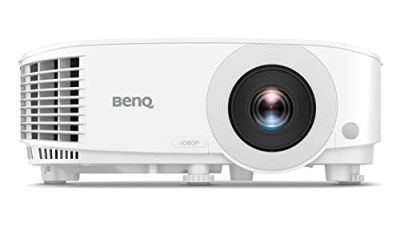
BenQ MH733 1080P Business Projector
- Best for: A medium conference room with the lights on and an IT-managed install.
- Native resolution 1080p (1920 x 1080)
- 4000 lumens brightness
- 16,000:1 contrast ratio
- DLP display technology
A medium conference room with the lights on and an IT-managed install.
Listing data shows the model name BENQMH733REFB, so confirm the offer is a new unit before buying. Confirm it is still sold before buying.
The MH733 is the sharpest pick in this group, pairing full HD resolution with 4000 lumens of brightness for rooms where the lights stay on. Its network control and LAN connection suit an office where IT staff manage the projector remotely, and the USB reader supports presentations without a laptop in the room. A glass lens and auto keystone keep setup quick when the unit moves between rooms, while the lamp saving mode stretches lamp life for heavy weekly use. This is the projector to choose when your slides mix dense text, charts, and video in a medium conference room.
Watch out for: Listing data shows the model name BENQMH733REFB, so confirm the offer is a new unit before buying. Confirm it is still sold before buying.
ViewSonic PA503W WXGA Projector
- Best for: A small meeting room or classroom that needs a bright widescreen image.
- Native resolution WXGA (1280 x 800)
- 4000 lumens brightness
- HDMI input
- 2x VGA in, VGA output, composite video, audio in and out
A small meeting room or classroom that needs a bright widescreen image.
The Amazon title states 4000 lumens while manufacturer material states 3800 lumens, so confirm the brightness figure on the listing before buying. Confirm it is still sold before buying.
The PA503W is the straightforward value pick for small rooms, offering widescreen WXGA resolution and a bright image without the extras that push other models higher. Its HDMI and VGA inputs cover new laptops and older office machines alike, and vertical keystone straightens the picture when the projector sits on a table below the screen. Ceiling mounting is supported, so the same unit can move from a desk to a permanent install as the room changes. Text stays legible at typical meeting room distances, and the simple control layout means anyone in the office can start a presentation.
Watch out for: The Amazon title states 4000 lumens while manufacturer material states 3800 lumens, so confirm the brightness figure on the listing before buying. Confirm it is still sold before buying.
ViewSonic PA503HD 1080p Projector
- Best for: Shared rooms where 1080p text sharpness matters for documents and spreadsheets.
- Native resolution 1080p (1920 x 1080)
- 4000 lumens brightness
- 1.1x optical zoom
- USB and HDMI inputs
Shared rooms where 1080p text sharpness matters for documents and spreadsheets.
The listing carries the series name PX704HD alongside the model name PA503HD, so confirm the exact model on the listing before buying. Confirm it is still sold before buying.
The PA503HD takes the same practical approach as the PA503W and adds full HD resolution, which shows in small fonts and dense spreadsheets. Its 4000 lumens keep the image visible with the lights on, and the 1.1x optical zoom gives you room to fit the screen without shifting furniture. USB and HDMI inputs cover laptops and streaming sticks, and the listing describes projection up to 300 inches for large rooms. This is the pick when your work involves detailed documents and you want the extra sharpness without moving to a laser model.
Watch out for: The listing carries the series name PX704HD alongside the model name PA503HD, so confirm the exact model on the listing before buying. Confirm it is still sold before buying.
ViewSonic LS740HD 1080p Laser Projector
- Best for: A large room, auditorium, or fixed ceiling install used every day.
- Native resolution 1080p (1920 x 1080)
- 5000 lumens brightness
- Laser light source
- 1.3x optical zoom
A large room, auditorium, or fixed ceiling install used every day.
The Amazon title states 5000 lumens while manufacturer material states 5500 lumens, so confirm the brightness figure on the listing before buying. Confirm it is still sold before buying.
The LS740HD is the only laser model in this group, and that changes the ownership picture: no lamp swaps, steady brightness over a long service life, and instant readiness in a room that gets used every day. Its 5000 lumens and 1080p resolution suit large rooms, auditoriums, and lecture spaces where the screen is wide and the lights stay on. Horizontal and vertical keystone plus four corner adjustment help when the projector cannot sit square to the screen, and 360 degree projection supports unusual installs. Dual HDMI inputs, RS232 control, and a built-in 15W speaker round out a unit built for fixed installation.
Watch out for: The Amazon title states 5000 lumens while manufacturer material states 5500 lumens, so confirm the brightness figure on the listing before buying. Confirm it is still sold before buying.
Epson EX3280 3LCD XGA Projector
- Best for: Presenters who carry one projector between a home office and meeting rooms.
- Native resolution XGA (1024 x 768)
- 3600 lumens color brightness and 3600 lumens white brightness
- 3LCD, 3-chip technology
- 15,000:1 contrast ratio
Presenters who carry one projector between a home office and meeting rooms.
The listing shows a Renewed style beside the standard model and a second ASIN circulates for this model, so confirm you are buying the new EX3280 under the ASIN in this guide. Confirm it is still sold before buying.
The EX3280 uses Epson 3LCD technology, which gives color brightness equal to white brightness, so charts and photos keep their color in a lit room. Its XGA resolution suits basic slides and large text, and the 3600 lumens output covers small to medium rooms without dimming the lights. HDMI and VGA inputs handle modern and older laptops, and the built-in speaker covers audio in a small room without extra gear. At just over five pounds with a slim profile, it travels easily between a home office and a meeting room, which makes it the most portable full-size pick here.
Watch out for: The listing shows a Renewed style beside the standard model and a second ASIN circulates for this model, so confirm you are buying the new EX3280 under the ASIN in this guide. Confirm it is still sold before buying.
Which One Fits Your Situation
A small meeting room with the lights on
Pick the ViewSonic PA503W when the room seats a handful of people and the work is standard slides and documents. Its widescreen WXGA image and bright output cover a small wall without fuss, and the VGA input keeps older laptops in play. Move up to the PA503HD when the same room handles dense spreadsheets, because the 1080p panel keeps small fonts readable from the back chairs.
A large conference room or auditorium
Pick the ViewSonic LS740HD when the screen is wide, the audience is large, and the projector stays mounted. The laser light source holds brightness over long service, and the keystone and corner controls handle installs where the unit cannot sit square to the screen. The BenQ MH733 is the fallback when you want network control and a lamp model instead.
One projector shared across several rooms
Pick the Epson EX3280 when the projector travels between rooms or between home and office. Its slim build and light weight make carrying simple, and the 3LCD image stays colorful with the lights on. Choose the BenQ MH733 instead when the shared rooms are larger and the work needs full HD text.
Spreadsheets and documents all day
Pick the BenQ MH733 or the ViewSonic PA503HD when your day is mostly spreadsheets, contracts, and diagrams. Full HD resolution keeps rows and small print legible, and both models stay bright enough for note taking with the lights on. The XGA Epson suits this work only when the text stays large and the sheets stay simple.
Common Mistakes
- Buying on lumens alone without checking native resolution, so bright text still looks blurry.
- Skipping the throw distance measurement and ending up with an image smaller than the screen.
- Assuming wireless casting is built in when the listing requires a separate dongle or app.
- Forgetting that older office laptops may still need a VGA input or an adapter.
- Ordering without checking the exact model name and ASIN on the listing, since similar models share a page.
Frequently Asked Questions
How bright should a business projector be for a lit meeting room?
A small lit room usually works with around 3000 lumens or more, while a larger room with windows and a wide screen needs 4000 lumens or more to keep text readable. Screen size matters as much as the room, because the same output spreads thinner across a bigger image. Check the lumen figure on the listing, then match it to your room and screen before deciding.
Is XGA resolution enough for spreadsheets?
XGA at 1024 by 768 handles basic slides and large text, but dense spreadsheets with small fonts look cramped and hard to read from the back of the room. WXGA adds widescreen room for modern layouts, and full HD keeps fine print legible at distance. Choose XGA only when your text stays large, and step up to 1080p for detailed documents.
Can I present wirelessly from my laptop?
Some business projectors support wireless presenting, yet the method varies: one model may need a USB dongle, another may need a companion app, and a third may offer nothing wireless at all. Read the connectivity section of the listing before assuming anything. An HDMI cable remains the most reliable connection when wireless setup fails before a meeting.
Should I choose a lamp projector or a laser projector?
A laser projector keeps its brightness steady over a long service life and needs no lamp swaps, which suits rooms used every day. A lamp projector costs less up front and works well for occasional use, though the lamp will need replacing after thousands of hours. Match the choice to how often the room is used, not to the technology label alone.
FAQ
How bright should a business projector be for a lit meeting room?
Is XGA resolution enough for spreadsheets?
Can I present wirelessly from my laptop?
Should I choose a lamp projector or a laser projector?
More from Amazon
Programs that pair well with the guide above. Offers and eligibility are set by Amazon and may change.
Free shipping on eligible items, Prime Video and more. Eligible new members can start with a free trial.
Start a Prime free trialAd-free music streaming. Eligible new subscribers can start with a free trial.
Try Music Unlimited freeA Prime membership for ages 18-24 with a trial period. Eligibility is set by Amazon.
See Prime for Young AdultsAudiobooks and podcasts to listen to on the go. Eligible new members can start with a free trial.
Try Audible freeAs an Amazon Associate we earn from qualifying purchases.