
Our Short List of 3

- DOCSIS 3.1 cable modem, Wi-Fi 6 router, four Gigabit Ethernet ports, two telephone ports for cable phone service, coaxial cable input, single setup interface for modem and router.
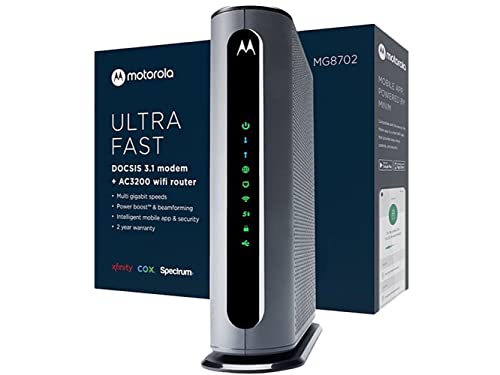
- DOCSIS 3.1 cable modem, Wi-Fi 6 router with beamforming, four Gigabit Ethernet ports, coaxial cable input, web-based setup interface.

- DOCSIS 3.1 cable modem, Wi-Fi 5 router with quality-of-service controls, four Gigabit Ethernet ports, coaxial cable input, Nighthawk app for device management.
All 5 Picks at a Glance
| Product | Specs | Action |
|---|---|---|
| 1. ARRIS SURFboard G36 — Best Overall Coax Cable Router |
| Check price on Amazon |
| 2. Motorola MG8702 — Best Fast Coax Cable Router |
| Check price on Amazon |
| 3. NETGEAR Nighthawk C7800 — Best Coax Cable Router for Gaming |
| Check price on Amazon |
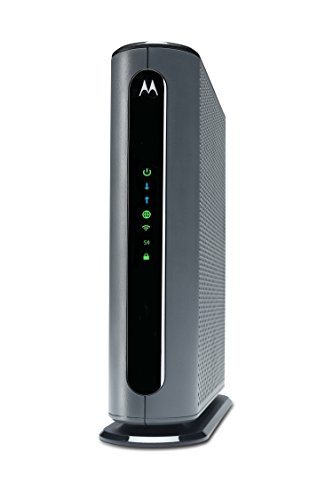 4. Motorola MG7700 — Best Mid-Range Coax Cable Router |
| Check price on Amazon |
 5. NETGEAR Nighthawk C7000 — Best Budget Coax Cable Router |
| Check price on Amazon |
Key takeaways
- The best coax cable routers — modem-router combos that connect straight to a cable line — compare DOCSIS speeds, Wi-Fi and ports.
The best coax cable routers connect straight to the cable line and replace two boxes with one. A coax cable router is a modem-router combination: the modem half talks to the cable network through the coaxial cable in the wall, and the router half creates the Wi-Fi network for the home. One device, one power cable, and one setup screen instead of a separate modem and router that need to agree with each other.
That single-box design is the main reason to buy one. There is no compatibility question between modem and router, no extra Ethernet cable between the two, and no second device to reboot when the connection drops. The trade-off is flexibility: when the Wi-Fi standard moves on, a combination unit cannot have its router half upgraded without replacing the modem half too. For a household that wants a simple, tidy setup and a cable internet plan, that trade-off is usually worth it.
Every pick in this guide is a cable modem-router combination with a coaxial input, built for cable internet plans. The guide explains the DOCSIS versions that decide how fast the modem half can go, the Wi-Fi standards that decide how fast the router half can go, and which combinations suit which internet plans. A note on naming: manufacturers call these devices cable modem routers, gateway routers, or modem-router combos, and all three names describe the same kind of device.
How to Choose
1. DOCSIS version
DOCSIS is the standard the modem half uses to talk to the cable network, and the version decides the maximum speed. DOCSIS 3.0 supports fast plans and remains adequate for many households, while DOCSIS 3.1 supports gigabit plans and is the right choice for fast internet. DOCSIS 3.1 also handles congested networks better, since it uses the available spectrum more efficiently. Match the DOCSIS version to the internet plan: a gigabit plan needs a DOCSIS 3.1 modem, while a slower plan works well on DOCSIS 3.0.
2. Internet plan speed
Buy a modem-router combination rated for the plan, not for a plan that may arrive one day. A combination rated for gigabit speeds works on a slower plan, but the extra capacity is unused, while a combination rated below the plan speed becomes the bottleneck for the whole household. Check the plan speed on the internet bill, then choose a combination whose modem half meets or exceeds it. If a faster plan is planned within the year, stepping up to DOCSIS 3.1 now avoids buying twice.
3. Wi-Fi standard
The router half of the combination carries its own Wi-Fi standard. Wi-Fi 5 is the baseline in this guide and handles streaming, video calls, and gaming well. Wi-Fi 6 adds capacity for households with many devices, keeping speeds steadier when dozens of phones, laptops, and smart devices share the network. In a household with more than twenty wireless devices, Wi-Fi 6 is worth having; in a smaller household, Wi-Fi 5 is enough.
4. Provider compatibility
Not every cable modem-router combination works with every cable provider. Providers publish a list of approved devices for their network, and a combination that is not on the list may not activate at all. Before buying, check the combination against the provider’s approved device list using the exact model number, and confirm whether the provider charges a rental fee for its own equipment that disappears when a owned device is used. Compatibility is the first check, not an afterthought.
5. Wired ports
Count the devices that need a wired connection: a desktop PC, a console, a smart TV, and a network drive can fill four ports quickly. Most combinations in this guide have four Gigabit Ethernet ports, which covers a typical household. If the household has more wired devices, add a separate Gigabit switch rather than choosing a combination by port count alone. Also check for a USB port, which some combinations use for a shared drive or a printer.
6. Coverage and placement
A combination unit usually sits where the coaxial cable enters the home, which is not always the centre of the house. If that spot is in a corner or a basement, Wi-Fi may struggle to reach the far rooms. In that case, plan for a wired access point or a mesh node in the far part of the house rather than expecting the combination unit to cover everything alone. A combination with strong antennas and beamforming helps, but placement matters more than any antenna specification.
7. Voice support
Some households still use a landline phone service delivered over the cable line. Combinations with a telephone port support that service, while combinations without one do not. If the household uses cable phone service, the telephone port is a requirement, not a nice extra. If the household has no landline, the port adds nothing and can be ignored.
Top Picks
1. ARRIS SURFboard G36 — Best Overall Coax Cable Router
- DOCSIS 3.1 cable modem, Wi-Fi 6 router, four Gigabit Ethernet ports, two telephone ports for cable phone service, coaxial cable input, single setup interface for modem and router.
The ARRIS SURFboard G36 is the most capable coax cable router in this guide, and the pick for households on a fast cable plan. It pairs a DOCSIS 3.1 modem with a Wi-Fi 6 router, which covers gigabit internet plans and a household full of wireless devices in one box. The DOCSIS 3.1 modem handles the fastest cable plans, while the Wi-Fi 6 router keeps speeds steadier when many devices share the network.
The G36 includes four Gigabit Ethernet ports for wired devices and two telephone ports for households that use cable phone service. Setup is through a single interface for both the modem and the router, which is simpler than configuring two separate devices. The combination is also on the approved device lists of the major cable providers, though the exact model should still be checked against the provider’s list before buying.
Who it is for: households on a gigabit cable plan, homes with many wireless devices, and anyone who wants one box to replace a separate modem and router.
Caveats: a DOCSIS 3.1 combination is more than a slower plan needs, so households on a basic plan can save by choosing a DOCSIS 3.0 pick below. Confirm the G36 model on the listing and check it against the provider’s approved device list before buying.
2. Motorola MG8702 — Best Fast Coax Cable Router
- DOCSIS 3.1 cable modem, Wi-Fi 6 router with beamforming, four Gigabit Ethernet ports, coaxial cable input, web-based setup interface.
The Motorola MG8702 is a DOCSIS 3.1 modem-router combination with Wi-Fi 6, built for households that want fast speeds and a tidy setup. It handles gigabit cable plans through its DOCSIS 3.1 modem and serves a busy wireless household through its Wi-Fi 6 router, with beamforming that focuses the signal toward connected devices rather than spreading it evenly in all directions.
The MG8702 includes four Gigabit Ethernet ports and a straightforward setup process through a single app-free web interface. Motorola’s modem-router combinations have a long reputation for reliability on cable networks, and the MG8702 continues that line with a design that runs cool and stays stable. It is also widely listed as compatible with the major cable providers, though the exact model should be checked against the provider’s list.
Who it is for: households on a fast cable plan that want a reliable, no-fuss combination unit, and homes where the router sits centrally enough to cover the whole house.
Caveats: there is no telephone port, so households that use cable phone service need a different model. Confirm the MG8702 model on the listing, since Motorola sells several modem-router combinations with similar names, and do not confuse it with the renewed listing under a different identifier.
3. NETGEAR Nighthawk C7800 — Best Coax Cable Router for Gaming
- DOCSIS 3.1 cable modem, Wi-Fi 5 router with quality-of-service controls, four Gigabit Ethernet ports, coaxial cable input, Nighthawk app for device management.
NETGEAR Nighthawk C7800 on Amazon
The NETGEAR Nighthawk C7800 is a DOCSIS 3.1 modem-router combination from the Nighthawk gaming line, and the pick for households where gaming shares the network with streaming and work. It pairs a DOCSIS 3.1 modem with a Wi-Fi 5 router, and its strength is not raw specification but the way it manages traffic: quality-of-service controls let gaming traffic take priority over background downloads, which keeps latency steadier during a match.
The C7800 includes four Gigabit Ethernet ports for wired consoles and PCs, and its antennas are designed for wide coverage across a house. The Nighthawk app provides parental controls, device management, and a clear view of which devices use the most bandwidth. For a household where a gaming session competes with a video stream in the next room, that traffic management is the feature that matters.
Who it is for: gaming households on a fast cable plan, and homes where gaming traffic needs priority over background downloads.
Caveats: the router half is Wi-Fi 5 rather than Wi-Fi 6, so very large device households may prefer a Wi-Fi 6 pick. One third-party listing tracker showed an out-of-stock signal for this model at one point, which is tracker evidence only and not an opened listing page, but a live check of availability is still sensible. Confirm the C7800-200NAS model on the listing.
4. Motorola MG7700 — Best Mid-Range Coax Cable Router
- DOCSIS 3.0 cable modem, Wi-Fi 5 router, four Gigabit Ethernet ports, coaxial cable input, compact desktop design.
The Motorola MG7700 is the mid-range pick in this guide, a DOCSIS 3.0 modem-router combination with Wi-Fi 5 that suits households on a moderate cable plan. It handles plans up to the fast end of DOCSIS 3.0 comfortably, serves a typical household of phones, laptops, and streaming devices, and costs less than the DOCSIS 3.1 combinations above.
The MG7700 includes four Gigabit Ethernet ports and a compact design that fits on a shelf near the cable outlet. Its setup is straightforward, and its reliability on cable networks is well established. For a household on a plan below gigabit speeds, the MG7700 delivers everything the connection can use without paying for modem capacity that will sit idle.
Who it is for: households on a moderate cable plan that want a reliable combination unit without paying for gigabit modem capacity.
Caveats: DOCSIS 3.0 cannot use a gigabit plan fully, so households planning a gigabit upgrade within the year should choose a DOCSIS 3.1 pick instead. Confirm the MG7700 model on the listing and do not confuse it with the renewed listing under a different identifier.
5. NETGEAR Nighthawk C7000 — Best Budget Coax Cable Router
- DOCSIS 3.0 cable modem, Wi-Fi 5 router, four Gigabit Ethernet ports, two USB ports, coaxial cable input, Nighthawk app for device management.
NETGEAR Nighthawk C7000 on Amazon
The NETGEAR Nighthawk C7000 is the budget pick in this guide, a DOCSIS 3.0 modem-router combination with Wi-Fi 5 that has been a staple of cable households for years. It handles moderate cable plans, serves a typical household, and includes the Nighthawk app for device management and parental controls. Its long presence on the market means its behaviour on cable networks is well understood.
The C7000 includes four Gigabit Ethernet ports and two USB ports for a shared drive or printer. Its Wi-Fi 5 router covers a typical home, and its setup through the Nighthawk app is straightforward. For a household on a basic or moderate plan that wants a single box and a low outlay, it remains a sensible choice.
Who it is for: households on a basic or moderate cable plan, and anyone replacing a rented provider device with an owned combination unit.
Caveats: DOCSIS 3.0 and Wi-Fi 5 are older standards, so this pick suits current moderate plans rather than future gigabit upgrades. Confirm the new C7000-100NAS model on the listing and do not use a renewed listing under a different identifier.
Comparison Table
| Router | DOCSIS | Wi-Fi | Ethernet Ports | Phone Port | Best For |
|---|---|---|---|---|---|
| ARRIS SURFboard G36 | 3.1 | Wi-Fi 6 | 4 Gigabit | Yes, 2 ports | Gigabit plans, many devices |
| Motorola MG8702 | 3.1 | Wi-Fi 6 | 4 Gigabit | No | Fast plans, reliable setup |
| NETGEAR Nighthawk C7800 | 3.1 | Wi-Fi 5 | 4 Gigabit | No | Gaming traffic priority |
| Motorola MG7700 | 3.0 | Wi-Fi 5 | 4 Gigabit | No | Moderate plans, mid-range |
| NETGEAR Nighthawk C7000 | 3.0 | Wi-Fi 5 | 4 Gigabit | No | Basic plans, budget |
Which One Is Right for You?
Start with the internet plan. A gigabit plan needs a DOCSIS 3.1 combination, which points to the ARRIS G36, the Motorola MG8702, or the NETGEAR C7800. A moderate plan works well on DOCSIS 3.0, which points to the Motorola MG7700 or the NETGEAR C7000. Buying a DOCSIS 3.1 combination for a basic plan wastes capacity, while buying a DOCSIS 3.0 combination for a gigabit plan wastes the plan.
Then check the provider list. Every pick in this guide is widely listed as compatible with the major cable providers, but the exact model must be checked against the provider’s approved device list before buying. A combination that is not on the list may not activate, and that check takes two minutes.
For most households on a fast plan, the ARRIS G36 is the default answer: DOCSIS 3.1, Wi-Fi 6, and a phone port in one box. Households that want the most reliable setup should look at the Motorola MG8702, gaming households at the NETGEAR C7800, and households on a moderate plan at the MG7700 or the C7000.
Frequently Asked Questions
What is a coax cable router?
A coax cable router is a modem-router combination with a coaxial cable input. The modem half connects to the cable internet service through the coaxial cable in the wall, and the router half creates the Wi-Fi network. One device replaces a separate modem and a separate router.
Do I need a DOCSIS 3.1 modem for a gigabit plan?
Yes. DOCSIS 3.0 cannot carry a gigabit plan at full speed, so a gigabit plan needs a DOCSIS 3.1 modem. A slower plan works well on DOCSIS 3.0, and a DOCSIS 3.1 modem works on a slower plan too, so the choice depends on the plan today and the plan expected within the year.
Will a coax cable router work with my cable provider?
Most combinations work with the major cable providers, but compatibility must be checked against the provider’s approved device list using the exact model number. A device that is not on the list may not activate. Check the list before buying, and confirm the exact model on the listing.
Can I use my own coax cable router instead of renting one?
Yes, in most cases. Cable providers allow customers to use their own approved modem-router combination instead of renting the provider’s equipment. The provider’s approved device list shows which models are accepted, and the provider’s activation process connects the owned device to the account. Check the list and the activation steps with the provider before buying.
Disclosure: As an Amazon Associate, we may earn from qualifying purchases.
FAQ
Which One Is Right for You?
What is a coax cable router?
Do I need a DOCSIS 3.1 modem for a gigabit plan?
Will a coax cable router work with my cable provider?
Can I use my own coax cable router instead of renting one?
More from Amazon
Programs that pair well with the guide above. Offers and eligibility are set by Amazon and may change.
Free shipping on eligible items, Prime Video and more. Eligible new members can start with a free trial.
Start a Prime free trialAd-free music streaming. Eligible new subscribers can start with a free trial.
Try Music Unlimited freeA Prime membership for ages 18-24 with a trial period. Eligibility is set by Amazon.
See Prime for Young AdultsAudiobooks and podcasts to listen to on the go. Eligible new members can start with a free trial.
Try Audible freeAs an Amazon Associate we earn from qualifying purchases.









